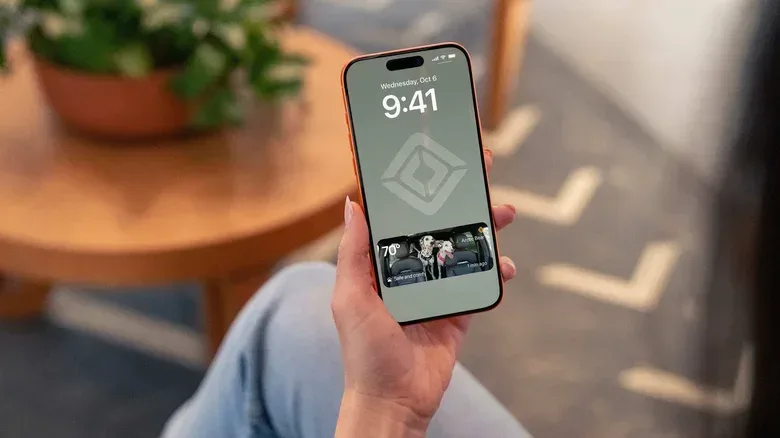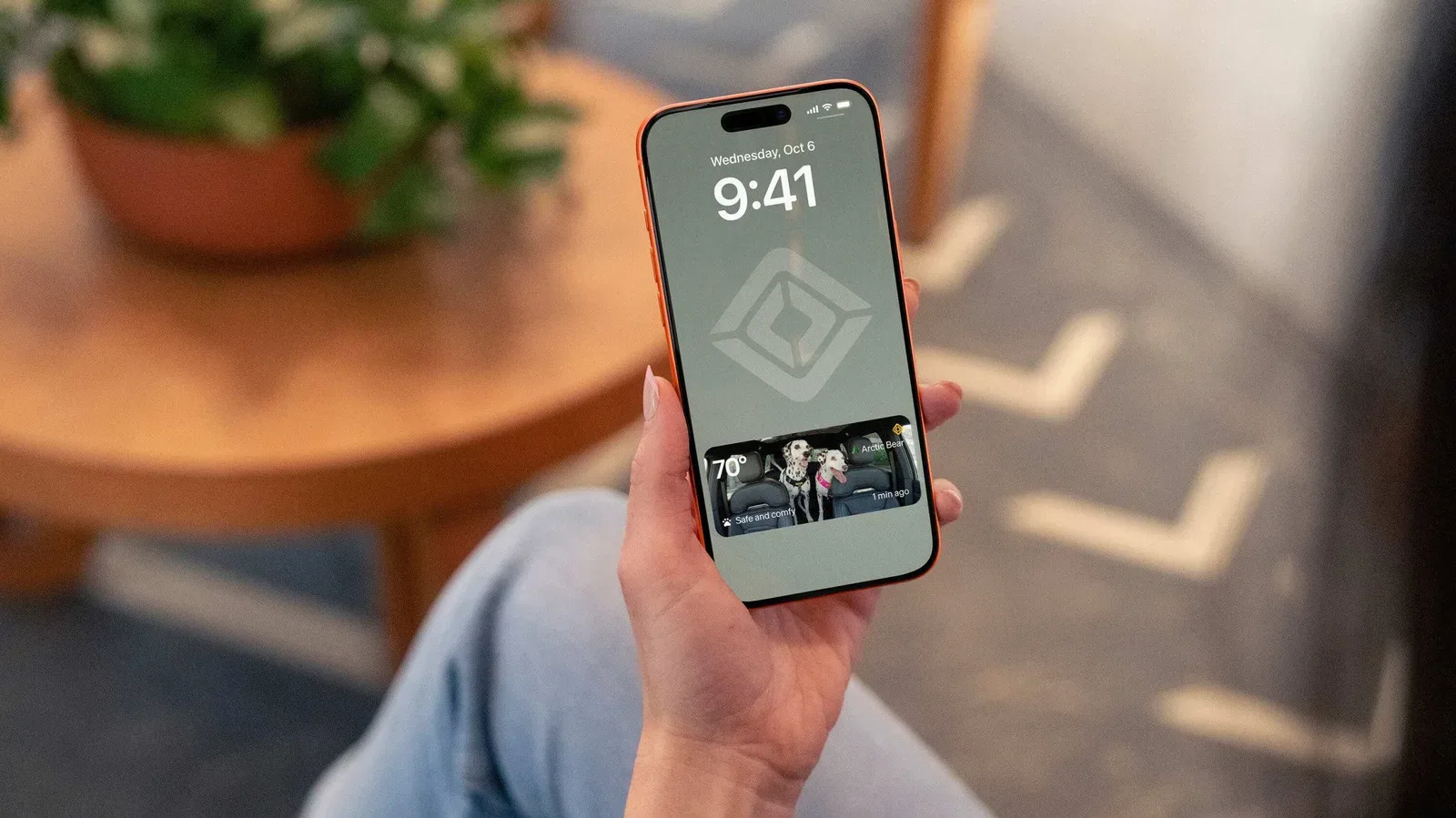
Rivian is adding a notably practical pet-focused feature to its R2 software: owners will be able to check the vehicle’s interior through a Pet Cam view that can appear directly on a phone’s lock screen. The capability arrives with software version 2026.36 and uses the R2’s high-definition interior camera to send either a live view or periodically refreshed images through the Rivian app.
That means an owner who has stepped away from the vehicle can choose between watching a continuous stream and getting a quick, glanceable update. The latter is the more unusual element here. A lock-screen snapshot removes a few small steps from opening an app and navigating to a camera feed, which is exactly the sort of friction that matters when someone simply wants to check whether a pet is settled rather than conduct a full remote monitoring session.
The Pet Cam can be stopped from the vehicle’s main display. Rivian is also broadening the remote controls around Pet Mode, its existing setting for maintaining animal-friendly climate conditions while the owner is away. Pet Mode will be enabled from the Rivian app, rather than only before exiting the vehicle, and the app will show a confirmation prompt when an owner switches the setting on or off. Those revised Pet Mode controls are planned for all Rivian models, while the lock-screen Pet Cam feature is specified for the R2.
What Rivian’s Pet Cam actually adds
In this context, a live stream is a continuing camera view of the cabin delivered through the companion app. The app will also offer a regularly updated still image on its dashboard and, for R2 drivers, on the phone lock screen. Those are distinct ways to use the same interior camera: a livestream is for prolonged viewing, while a refreshed snapshot is designed for a fast status check.
That distinction is important because the announced feature is not described as an automated wellbeing system. It is a remote viewing tool. It can show the cabin, but the supplied details do not describe pet detection, behaviour alerts, health monitoring, automatic emergency action, recording retention, or notification rules. Owners should therefore understand Pet Cam for what it is: an additional way to see inside the R2 remotely, not a replacement for sound judgement about when and where an animal should be left in a vehicle.
The lock-screen option gives the feature a more immediate feel without requiring the phone to be unlocked every time. It is also a sensible fit for a quick confirmation: Is the pet visible? Does the cabin appear calm? Is it time to return? The full livestream remains available when a short still image cannot answer the question.
Remote Pet Mode is the bigger operational change
Pet Mode is already Rivian’s climate-control feature intended for use when an animal remains in the vehicle and the owner is not onboard. The coming change is that it can be activated in the Rivian app if the driver realizes it was not turned on before leaving.
That remote option addresses a simple real-world mistake: forgetting a setting during the rush to get out of the car. It also makes Pet Mode a more flexible part of the app’s remote-controls toolkit rather than a cabin-only setting that must be handled before departure.
Related coverage includes Rivian R2 Adds Pet Cam Lock Screen Viewing and App-Based Pet Mode.
However, the new capability is paired with an intentionally cautious interface decision. Toggling Pet Mode remotely will require confirmation, whether it is being enabled or disabled. Confirmation prompts are common in software, but their value depends on the consequence of an accidental tap. Here, an unintended change to a pet-related climate setting could be consequential, so asking the user to confirm helps make a potentially risky command more deliberate.
Rivian says the app-based Pet Mode controls and confirmations will be available across all of its models. That broader rollout matters for current owners outside the R2 range: while the lock-screen camera view is tied to R2 vehicles and their interior camera setup, the Pet Mode improvements are not being limited the same way.
A connected-car feature built around small checks
Connected vehicles often frame remote access around big actions: locking doors, locating a car, initiating climate settings or checking charging. Pet Cam’s pitch is quieter. It turns the phone into a window into the cabin, with options that range from a persistent feed to an occasional snapshot.
The update also links two different pieces of vehicle technology without claiming they are the same thing. The camera offers visual information; Pet Mode handles climate conditions. An owner can use the camera to look inside, and can use the app to enable Pet Mode if it was overlooked. The provided information does not say that viewing the Pet Cam automatically enables Pet Mode, that either feature controls the other, or that the camera is used to evaluate whether climate settings are adequate. Those remain separate functions.
For users, that separation is useful to keep in mind. A clear camera image may provide reassurance, but it does not itself change the vehicle’s environmental settings. Conversely, turning on Pet Mode is a climate-control action, not proof that a pet is comfortable or visible on camera. The new app controls give owners more options, but responsibility still rests with the person making the decision to leave an animal in the vehicle.
R2 also gains Rivian Assistant
The same update brings Rivian Assistant to R2 vehicles. The AI voice assistant is already available on R1 models and is intended for basic in-car tasks related to navigation, entertainment and climate.
“AI voice assistant” here means software that accepts spoken commands and carries out supported vehicle functions or requests. Rivian has not detailed a wider set of R2-specific assistant features in the available information, so the clearest expectation is straightforward voice control across those three named areas rather than a radically new in-car experience.
Navigation, entertainment and climate are practical categories for voice operation because they are recurring controls drivers may want to adjust without manually working through the main display. The assistant’s arrival also makes the R2’s software offering more consistent with the R1 models where the feature is already available. Readers interested in how AI is increasingly being pushed into dedicated hardware can also see a look at Microsoft’s Surface RTX Spark developer box, though Rivian’s assistant serves a distinctly vehicle-focused purpose.
What R2 owners should expect
- Pet Cam: R2 owners can view the interior camera in the Rivian app as either a full livestream or a regularly refreshed snapshot.
- Lock-screen checks: The snapshot can be placed on a phone’s lock screen for a quicker look at the cabin.
- Stopping the camera: Pet Cam can be turned off by tapping the R2’s main display.
- Remote Pet Mode: Rivian will let owners enable Pet Mode from the app if they did not activate it before leaving the vehicle.
- Extra safeguard: App changes to Pet Mode will ask for confirmation before switching the setting on or off.
- Model scope: The Pet Mode app controls are planned for all Rivian models; the Pet Cam lock-screen feature is described for R2 vehicles.
- Voice control: R2 is receiving Rivian Assistant for simple navigation, entertainment and climate tasks.
With the 2026.36 update, Rivian’s headline addition is less about spectacle than convenience: a remote cabin check that can sit where people already glance all day, on the phone lock screen. Combined with remotely accessible Pet Mode and a confirmation step intended to prevent accidental changes, it is a software update aimed squarely at making a brief trip away from the vehicle a little easier to manage for owners traveling with animals.