DLSS is one of those graphics-menu acronyms that can make a demanding PC game suddenly seem much less demanding—provided it is used in the right way. Short for Deep Learning Super Sampling, NVIDIA’s proprietary technology lets a game render at a lower internal resolution and then reconstruct that image for the monitor’s chosen output resolution with a machine-learning model.
The immediate benefit is straightforward: rendering fewer pixels reduces the work a GPU must do. That headroom can be spent on a higher frame rate, more demanding graphics settings, or a balance of both. The less immediate part is the trade-off. Reconstruction is not the same as rendering every pixel natively. DLSS uses information from the image, including motion vectors, depth and brightness data, to make an informed reconstruction, but image fidelity can still change depending on the selected mode, the game’s implementation and the scene on screen.
For players navigating modern PC gaming, the useful question is therefore not simply whether DLSS is “good.” It is which DLSS feature solves the actual problem: insufficient rendered frames, shimmering image edges, noisy ray-traced effects, or a desire for a more extravagant visual treatment at a performance cost.
DLSS begins with a lower internal resolution
When DLSS Super Resolution is enabled, the game first produces an image below the target output resolution. The algorithm then upscales and reconstructs that result to the resolution set for the display. In most cases, the target should match the monitor’s native resolution: 1440p on a 1440p panel, for example, or 4K on a 4K panel.
This distinction matters because a game can show a 4K output while its GPU is not natively rendering a full 4K image. The internal starting resolution varies by preset. The lower it goes, the more performance potential there is—and the more difficult the reconstruction job becomes.
Motion vectors are particularly important to this process. In simple terms, they describe where objects are moving from one frame to the next. Alongside depth and brightness information, they give the model more context than a basic image-resize operation would have. That extra context is why modern temporal upscaling can preserve considerably more detail than merely stretching a lower-resolution screenshot.
It is still a compromise. Fine detail, fast movement, transparencies and difficult edges can reveal the limits of reconstruction. A preset that looks excellent during a slower interior sequence may look less convincing around foliage, particle effects, rapid camera movement or intricate UI-adjacent geometry. DLSS should be treated as a configurable graphics setting, not an automatic replacement for native rendering in every situation.
The four main DLSS modes, with practical starting points
The named DLSS modes determine the internal render resolution relative to the final output. They are not separate visual styles; they establish how much source image data the model has available before it reconstructs the output.
- Quality renders at 66.7 percent of the target output resolution. At 4K, that starts from 1440p. At 1440p, it starts from 960p. It offers the strongest image quality among the standard performance-oriented presets, with a more moderate frame-rate improvement.
- Balanced renders at 58 percent of output resolution. That equates to roughly 1253p for a 4K output and about 835p for 1440p output. It is intended as the middle ground between preserved detail and greater performance.
- Performance renders at 50 percent of output resolution. A 1440p target uses a 720p internal resolution, while 4K output begins from 1080p. It can provide a larger performance lift, but asks more of the reconstruction model.
- Ultra Performance renders at 33.3 percent of output resolution. It is meant for 8K displays. At 1440p or 4K, the starting image is so low that blur is an expected risk.
A sensible way to set them
On a 1440p monitor, Quality is the sensible first choice in most supported games. It keeps the internal resolution relatively high while still easing GPU load. If the result does not reach the desired performance level, try Balanced. Moving further down can help, but the image-quality compromise becomes more obvious.
At 4K, Balanced is a reasonable starting point. Since even its reduced internal image begins above 1080p, the model has substantially more source detail than it does when reconstructing a 1440p image from a very low starting point. If more frames are needed, Performance becomes the next option to test.
That wording—test—is important. “Best” depends on the game, display and goal. Someone trying to keep demanding settings enabled may favor Quality. Someone with a high-refresh-rate monitor may value the higher frame rate available through Balanced or Performance. A player using Ultra Performance on a 4K display because the label sounds most powerful is more likely to get a noticeably soft image than a victory.
DLSS is a family name, not one toggle
DLSS branding now covers several connected technologies. They can be used together, but they do different jobs. Confusing them leads to misleading expectations, especially around the difference between more traditionally rendered frames and more frames displayed through interpolation.
Super Resolution: the core upscaler
The original DLSS arrived in 2019 alongside NVIDIA’s RTX 20-series GPUs. Early support was limited; Battlefield V and Metro Exodus were among the initial games because NVIDIA had to train the algorithm for each individual title. DLSS 2, released in 2020, removed that game-specific training requirement. NVIDIA said that more than 1,000 games and apps supported DLSS by the beginning of 2025.
DLSS 4 brought a major model change in early 2025, adopting a transformer-based machine-learning architecture. A transformer is a machine-learning architecture designed to interpret relationships within data; here, its relevance is the image reconstruction process. NVIDIA’s newer model is intended to improve image quality, reduce ghosting and make the image more stable.
Ghosting describes lingering visual trails or incorrect remnants around moving objects. Image stability refers to how consistently fine details hold together from frame to frame instead of shimmering or changing distracting ways. These are especially meaningful quality measures for an upscaler because games are moving images, not isolated stills.
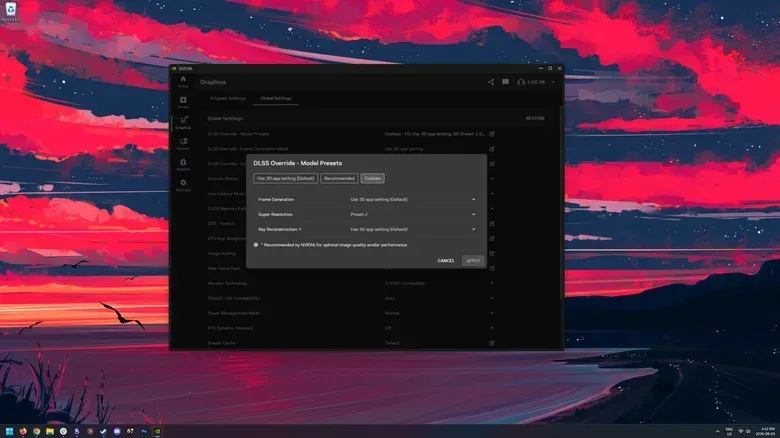
Newer is not automatically faster on every card. DLSS 4 can carry greater overhead on older RTX GPUs, potentially reducing performance relative to older DLSS models. NVIDIA therefore provides separate DLSS presets that allow users to select earlier models. Those presets are distinct from Quality, Balanced, Performance and Ultra Performance: one choice concerns the model, while the other controls the rendering scale.
DLAA: choose cleaner edges, not extra speed
Deep Learning Anti-Aliasing, or DLAA, uses the same broad AI-focused toolbox for a different priority. Rather than render below the target resolution and then upscale, DLAA works from native output to reduce shimmer and flicker. Its goal is image quality and stability, not a frame-rate increase.
Anti-aliasing is the general name for techniques that reduce jagged or unstable edges in a rasterized image. DLAA can be understood as an alternative to temporal anti-aliasing, often abbreviated as TAA. The practical expectation should be clear: DLAA is for players with performance to spare who want a steadier native-resolution image. It is the wrong choice for a game that already needs a performance rescue.
Not every title exposes a DLAA option of its own, although the NVIDIA app can add DLAA in games that do not natively support it.
Frame Generation: a higher displayed frame rate, with conditions
Frame Generation, introduced with DLSS 3, is available on RTX 40-series GPUs and newer. It creates one interpolated frame from every two traditionally rendered frames, increasing the game’s overall displayed frame rate.
An interpolated frame is a generated in-between image rather than a frame rendered through the ordinary game pipeline. That makes the technique useful, but it also means a bigger FPS number alone does not tell the complete performance story. The technology is best suited to a game that is already rendering a consistent 60 FPS or more and to a high-refresh-rate monitor that can benefit from those additional displayed frames.
In other words, frame generation works best as an enhancement on top of a solid baseline, not as a cure for an unstable low frame rate. If traditionally rendered performance is already inconsistent, generating additional frames does not erase the underlying instability.
DLSS 4 expanded the concept with multi frame generation for RTX 50-series GPUs. It can generate and interpolate more frames from one conventionally rendered frame. With DLSS 4.5, released in March, the stated ceiling is six generated frames for each rendered frame. That is a striking multiplier, but the baseline principle remains: generated output is most useful when the game’s normally rendered performance is already in good shape.
Ray Reconstruction: tackling ray-tracing noise
Ray reconstruction, introduced in DLSS 3.5, is a denoising algorithm for ray-traced effects. Ray tracing models light rays to produce lighting-related effects, while path tracing is a more comprehensive lighting approach. These techniques can introduce visible artifacts because their effects are constructed from sampled light data.
Ray reconstruction samples the scene’s light rays and generates higher-quality pixels between those samples. Although it can provide performance gains, its primary role is visual coherence: reducing artifacting and making ray-traced or path-traced scenes look cleaner. This is a different task from Super Resolution’s lower-resolution reconstruction and from Frame Generation’s creation of intervening frames.
DLSS 5 is not an upscaler—and it can lower performance
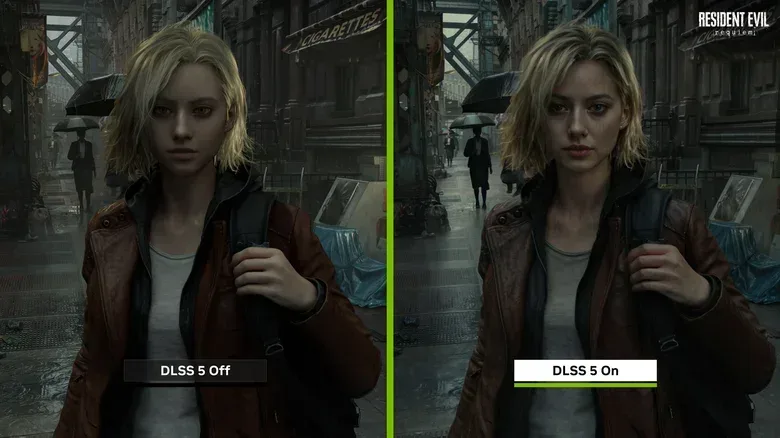
DLSS 5 represents a more dramatic departure from the technologies above. Instead of focusing on image upscaling, it interprets a game’s color and motion vectors to apply photorealistic lighting and material treatment anchored to the underlying 3D content and intended to remain consistent across frames.
The simplest description is an AI visual filter layered onto games, though the aim is more ambitious than a flat screen-space filter. Early demonstrations have produced an uncanny result in some instances, particularly around character presentation. Used more carefully, the technology can add more realistic-looking shadows and textures.
The key practical difference is that DLSS 5 is not a frame-rate feature. It adds overhead and lowers performance rather than improving it. Players should not enable it expecting the familiar DLSS proposition of a higher FPS count. The question is whether its additional visual treatment is worth the extra GPU cost.
As of October 2026, DLSS 5 is officially available in one game, NBA 2K27. Whether developers will adopt it widely remains uncertain, though modders have already added the technology to a variety of games. For now, it is best viewed as an early and separate branch of NVIDIA’s DLSS work, rather than the default next step for anyone turning on an upscaling setting.
A quick decision guide before changing the graphics menu
- Set output resolution to the monitor’s native resolution. This establishes the correct target for DLSS reconstruction.
- Use DLSS Quality first at 1440p. Move to Balanced only if the performance improvement is not enough.
- Start with Balanced at 4K. Try Performance when more frames matter more than the reduction in source detail.
- Use DLAA when image cleanliness is the goal and performance is already sufficient. Do not expect it to raise FPS.
- Use Frame Generation only with a stable 60 FPS-or-higher rendered baseline and a high-refresh-rate display. It is an enhancement, not a substitute for a healthy base frame rate.
- Consider Ray Reconstruction in games using ray or path tracing. Its central benefit is cleaner, more coherent lighting effects.
- Treat DLSS 5 separately. It is a performance cost for a new visual treatment, not an upscaling shortcut.