PCSX2 has received a substantial stable update that puts equal attention on the unglamorous essentials and the flashy stuff. There are interface changes, new shortcut options, cover downloads and improvements to the achievements presentation. There is also a useful capture upgrade for Windows, expanded device support, and macOS EyeToy camera functionality. But the headline-grabbing part is the work beneath the menus: a long run of rendering and performance changes aimed at making PlayStation 2 games behave more accurately and efficiently on contemporary hardware.
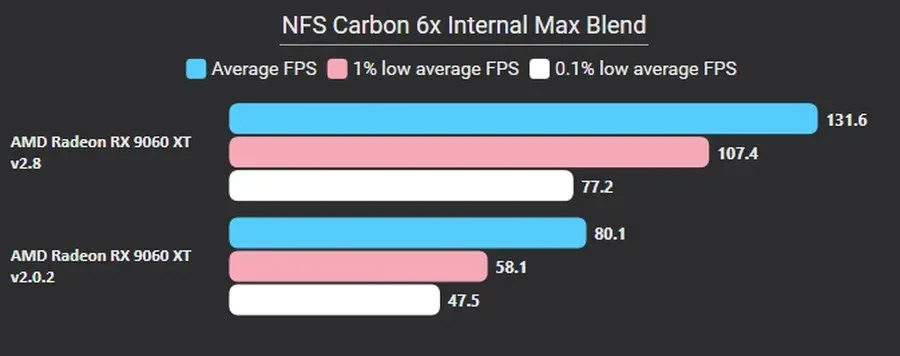
The project highlighted Need for Speed: Carbon, the EA Black Box racer, as an example of the performance progress made since PCSX2 version 2.0.2. The comparison signals a notably improved result for that game, though performance in any emulator can still depend on a user’s processor, graphics card, operating system, settings and the particular title in question. It is nevertheless a welcome reminder that mature emulators do not simply reach a finish line. Seemingly tiny corrections to timing, texture handling or render-pass behavior can eventually add up to a major practical difference.
For a console as technically idiosyncratic as the PlayStation 2, that ongoing work matters. The machine’s Graphics Synthesiser is a notoriously unusual piece of hardware, and games often relied on its peculiarities rather than a single, cleanly standardized rendering path. PCSX2’s new rendering work includes a system developed by contributor TJ to represent texture depth more accurately, tackling one of those areas where getting a scene to look broadly correct is not always the same as reproducing the behavior a game expects.
A deeper rendering pass for a famously complicated console
The technical change list is substantial. It includes depth feedback loops and more accurate AFAIL behavior, support for hardware AA1 lines and triangles, and support for Rasterizer Order View, or ROV. Those terms may not sound like the sort of update that inspires someone to reorganize their game library at midnight, but they are exactly the kind of low-level changes that can resolve difficult visual edge cases.
Other graphics-side revisions include shader-based anisotropic filtering, updates to depth-target lookup behavior, target-detection and format fixes, and adjustments to depth copying during Texture Cache moves. PCSX2 has also improved its handling of destination alpha testing and CRTC merging. Together, these changes address the many small decisions involved in translating PS2-era rendering techniques to modern PC graphics APIs without losing effects, introducing glitches, or throwing unnecessary work at the GPU.
Performance is part of that same story. The update merges adjacent triangle strips in the draw list, optimizes framebuffer switching and continues to improve framebuffer copies. It also avoids ending render passes when enhanced barriers are in use. This is less a list of one magic speed switch than a set of engineering refinements, each intended to reduce waste or improve correctness in the route between a PS2 game and a modern display.
Direct3D 12 is now the default graphics option for Nvidia and AMD hardware, while Direct3D 11 is designated as Legacy. PCSX2 also uses the Enhanced Barriers API. That shift makes sense in the context of the project’s broader focus: modern APIs and features can offer better ways to manage the complicated stream of graphical tasks demanded by emulation. It does not mean every configuration will produce identical outcomes, but it establishes a clearer default direction for supported Windows graphics hardware.
Video capture loses an extra setup step on Windows
One of the more immediately useful changes is the inclusion of FFmpeg with the Windows version of PCSX2. FFmpeg is an open-source collection of multimedia libraries and tools, and it is used here by the emulator’s built-in video-capture feature. Previously, Windows users needed to obtain FFmpeg separately before using that feature. With the new build, the required component arrives as part of the package.
The bundled selection is deliberately slimmer than a full FFmpeg installation. Rather than carrying every available codec, the Windows build includes a chosen set of widely used codecs meant to cover modern, efficient recording choices without padding the install with a large group of seldom-used options. It is a practical quality-of-life improvement: fewer separate downloads, fewer paths to configure, and a clearer route from an old PS2 moment to a saved clip.
That is particularly handy for people preserving their own gameplay footage, comparing versions of a game, or simply documenting a spectacular crash in a racing game before it disappears into the void. Capture tools are rarely the reason people first install an emulator, but reducing friction around them makes the whole application feel more complete.
EyeToy and unusual hardware get more attention
macOS users gain EyeToy camera support in this release. The EyeToy was one of the PlayStation 2’s most distinctive accessories, a camera peripheral associated with games and applications that turned a player’s movement into part of the input. Supporting such hardware is not merely a novelty checkbox. It broadens the range of PS2 software and experiences the emulator can accommodate, especially for players exploring the system beyond its conventional controller-led catalogue.
The update also adds support for Train Mascon, Master Controller and Olympus Storage Devices. The list is an entertainingly specific slice of PlayStation 2 history, and it underlines the fact that console libraries were not built only around standard gamepads. Specialty devices can be essential to particular games, genres or regional releases. Better peripheral coverage helps an emulator serve the full, sometimes gloriously strange, outline of the platform rather than only its biggest hits.
For players who still use original equipment alongside modern display setups, our guide on mapping the connection before buying a retro console HDMI adapter is also worth keeping in mind. Emulation and original-hardware play solve different problems, but both benefit from knowing exactly which devices, video paths and accessories are involved before committing to a setup.
A tidier front end for a large game library
Not every upgrade happens inside the renderer. PCSX2’s FullscreenUI/ImGui on-screen display now offers customization options, giving users more control over the information that appears while they play. The achievements menu has received various visual improvements as well. These may sound secondary beside difficult graphics emulation fixes, but frequent users spend plenty of time looking at these screens. Clearer presentation and adaptable overlays have real value.
Game-library management receives attention through cover-download support and a revamped status bar. Cover art can make a large list easier to scan, especially for a collection full of similarly named sequels, regional variations or disc images with less-than-helpful file names. The shortcut creator now offers icon selection and previews, making desktop or launcher shortcuts feel less improvised.
There are also multiple new “Open XXX Folder” actions attached to Game List entries. In plain terms, this should make it quicker to jump from a listed game to relevant folders without manually digging through the file system. A new -datapath launch argument provides another organizational tool, allowing users to specify a data path when launching the emulator. Such options are most likely to appeal to those maintaining portable installs, separate configurations, or carefully divided libraries.
What this update means in practice
PCSX2’s release is not a promise that every PlayStation 2 game has suddenly become effortless on every computer. The PS2 has a massive and varied library, and emulation remains a moving target where one fix can be especially meaningful for a specific game or hardware arrangement. The project’s own emphasis on technical rendering work makes that clear: accurate depth, alpha behavior, framebuffer operations and draw ordering are complicated precisely because games can depend on them in different ways.
What the update does offer is a stronger foundation across several fronts at once. A game such as Need for Speed: Carbon can demonstrate the potential of the performance work. Windows users get simpler video capture through bundled FFmpeg. macOS gains EyeToy support. Specialist controllers and storage devices receive new support. And ordinary day-to-day use gets smoother through better menus, shortcut tools, cover art, status information and folder access.
The stable release is available for Windows, macOS and Linux. For users already on PCSX2, the update is notable not because it rests on one marquee feature, but because it combines compatibility-minded technical work with the convenience improvements that make a long-running retro library easier to return to. The PS2 may be a fixed piece of early-2000s hardware, yet the software built to understand it continues to get smarter.