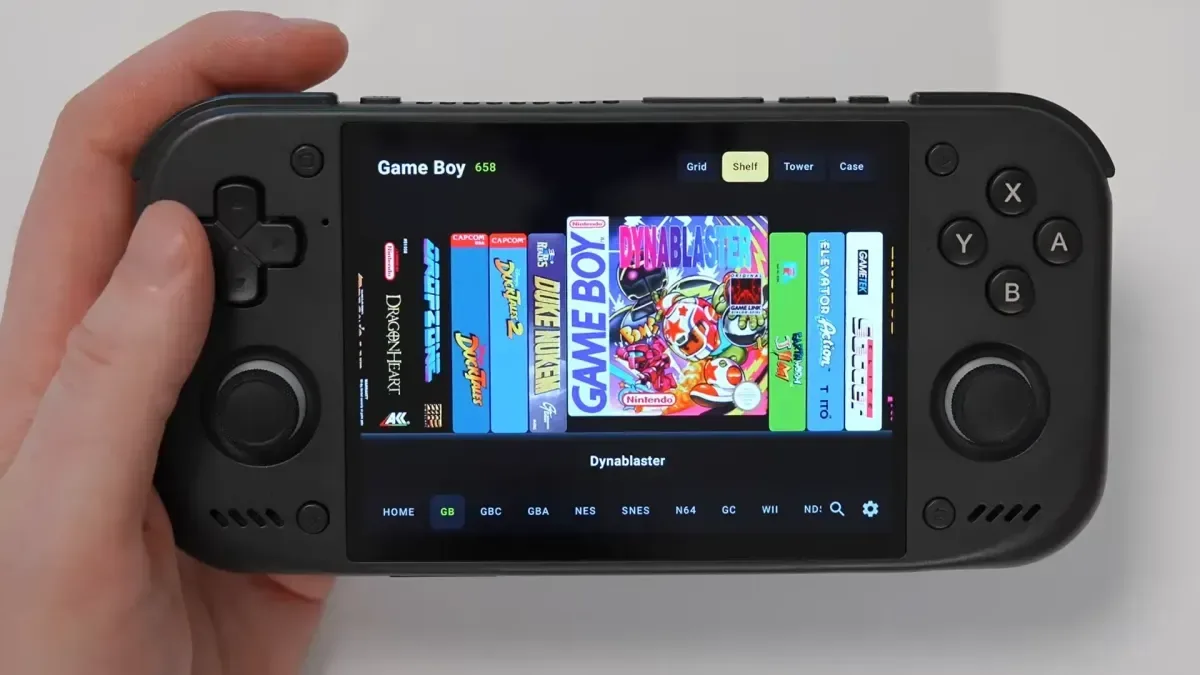
Digital game libraries are convenient right up until they become a long, joyless list of filenames. Somewhere between “Racing_Game_Final_v2” and “Racing_Game_Final_v2_ReallyFinal,” the romance of collecting tends to evaporate. Jump, a newly revealed Android frontend from retro-gaming creator Ryan Retro, is designed to put some of that feeling back.
Rather than treating a ROM collection as a spreadsheet that happens to launch games, Jump approaches it more like a display cabinet. The Android app organizes emulator libraries around box art as well as cartridge and disc imagery, giving users room to arrange a collection in a manner that feels closer to browsing physical media. That emphasis is especially notable at a time when retro players are looking for better ways to make enormous digital libraries manageable without making them anonymous.
It is not an emulator itself. Jump is a frontend: the layer that helps users sort, browse, search, and select games before handing off to compatible emulators. The distinction matters. A frontend can dramatically change how a collection feels to use, even though it does not determine the emulation performance or game compatibility underneath. For people using legally obtained ROM dumps and configured emulator apps on Android hardware, the library screen is often where every session begins. Jump is trying to make that moment feel less like opening a file manager.
A frontend built around the visual side of collecting
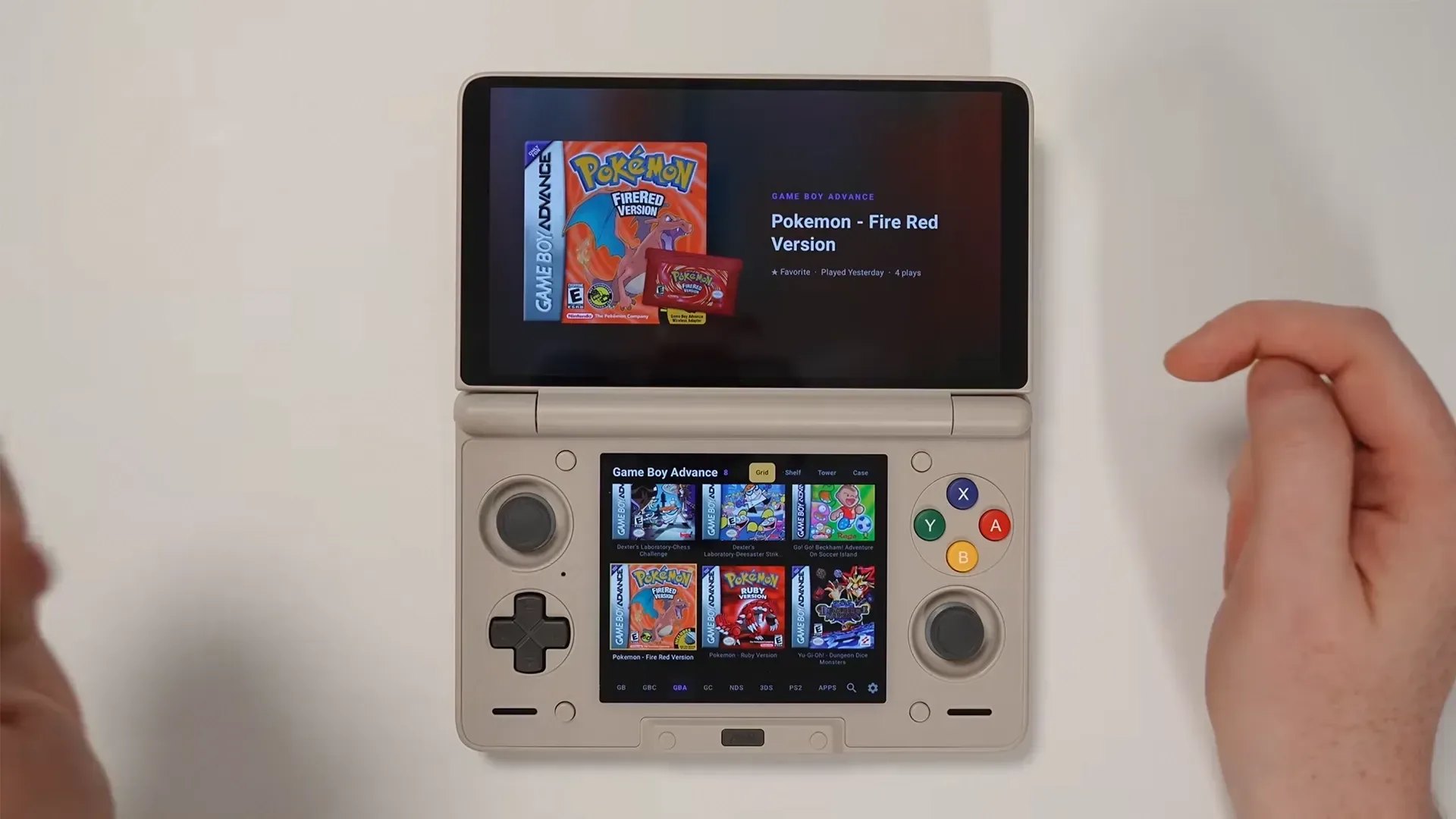
Jump’s central idea is simple: make games recognizable at a glance. Users can manipulate a collection’s visual layout by resizing, repositioning, and adjusting how titles appear. The goal is not merely to create a prettier menu, but to let a library resemble the way its owner thinks about it. A player who knows a game by its cover can browse covers. Somebody who remembers a cartridge color or disc label has another visual clue to work with.
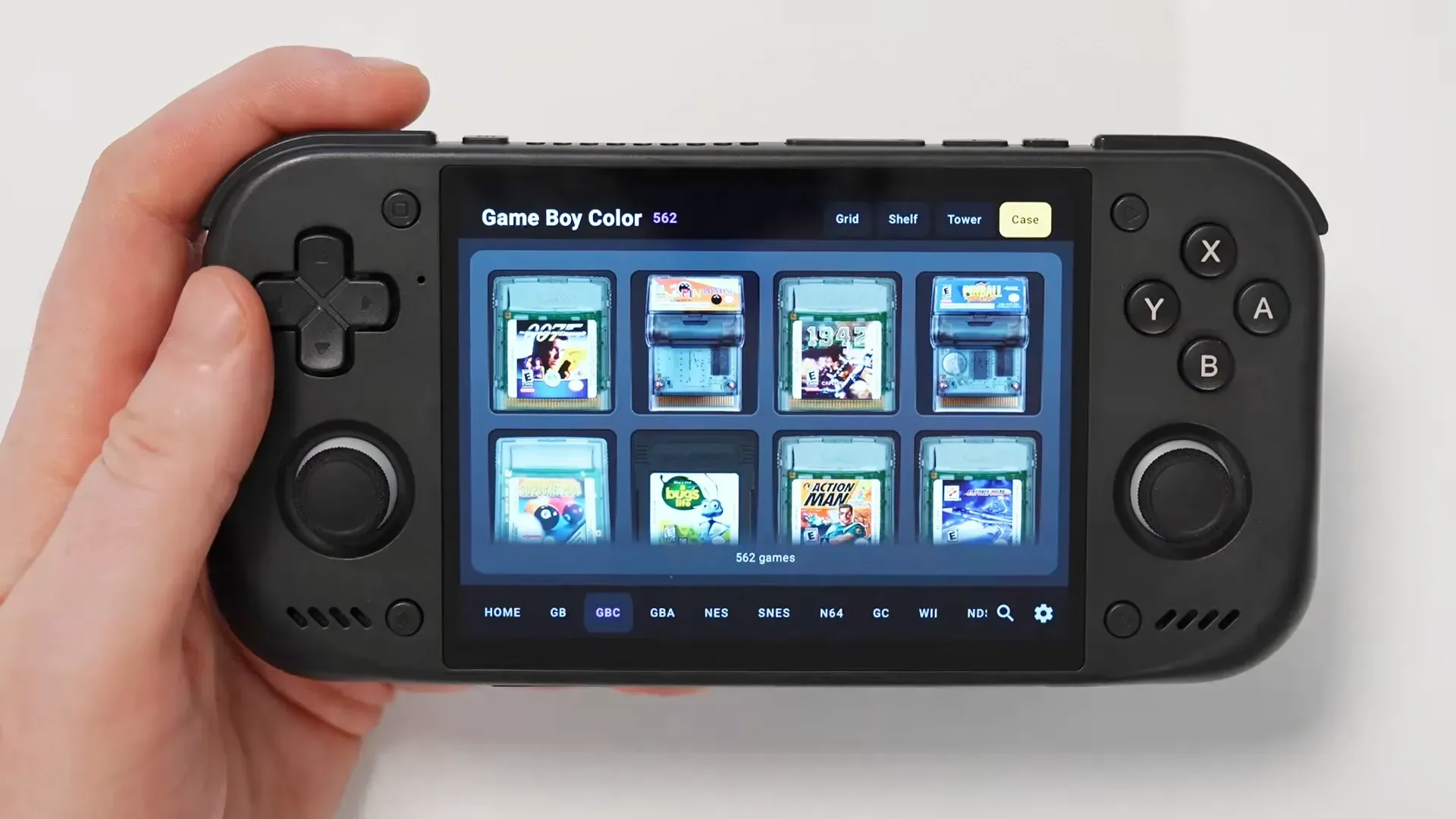
Its most playful option appears to be Case view. Cartridge-based games can be shown as though they are resting in a foam-lined storage case, while disc-based titles can appear in transparent sleeves. It is the kind of deliberately tactile visual treatment that has little to do with raw efficiency and quite a lot to do with why people enjoy old games in the first place. The machine may be modern, but the little ritual of looking through a collection can still have personality.
That collector-minded approach fits neatly alongside the physical organization advice in How to Store Retro Games: A Collection You Can Find and Play. Jump does not replace shelves, cases, labels, or sensible storage for actual cartridges and discs. It does, however, offer a comparable philosophy for the digital half of a hobby: a collection is more useful when it is easy to understand, navigate, and return to.
Four ways to browse, plus a little woodgrain nostalgia
Jump includes four principal presentation styles: Grid, Shelf, Tower, and Case. Each offers a different answer to the same question: when a library has hundreds or thousands of entries, what is the least boring way to look through it?
- Grid provides the familiar cover-wall approach, suited to scanning lots of games at once.
- Shelf leans into the appearance of a displayed physical collection.
- Tower supplies another vertical browsing option for users who prefer a different visual density.
- Case foregrounds cartridge and disc presentation, including the foam-case and sleeve-like styling.
Light and dark themes are available across these modes, and the Shelf presentation can use a wooden-shelf look for an extra dose of living-room nostalgia. Woodgrain is not a performance feature, naturally, but retro interfaces have never been only about performance. The visual language of old media—plastic clamshells, printed spines, cardboard boxes, acrylic cases—carries memory with it. A frontend that acknowledges that is speaking to a real part of the hobby rather than pretending every game is just a title in a database.
Importantly, the selected presentation is retained when users search their libraries with a keyboard. That means searching does not apparently kick the collection into a stripped-down utility view. It is a small design choice, but it supports Jump’s broader pitch: organization and atmosphere do not have to be enemies.
Integrated artwork scraping may be the standout feature
The most consequential part of Jump may be its built-in artwork service. Ryan Retro has created a scraping system for box art and cartridge or disc art, so users do not need to connect a separate third-party service just to make their library look complete. The app includes a “download it for me” function intended to locate suitable images, download them, and update the collection automatically.
For a frontend centered on visual browsing, that could be an enormous quality-of-life improvement. Artwork setup is often the point at which a fun project turns into an evening of directory management. Users may need accounts, API details, external scrapers, careful platform matching, and enough patience to resolve games that were released with different regional covers or confusingly similar names. An all-in-one option cannot eliminate every complication, but it can remove several early hurdles.
There is one practical catch: ROM filenames should match the game title accurately for the smoothest results. That is sensible given how automated matching works. A clearly named file gives any art lookup service a stronger chance of identifying the intended game; a filename crammed with abbreviations, dump labels, misspellings, or unrelated notes can produce poor matches or no match at all.
That makes basic library housekeeping worthwhile before expecting automation to do miracles. Consistent naming is not glamorous, but it is the digital equivalent of putting the right game back in the right case. As with physical collecting, the time spent organizing once can save a lot of needless rummaging later.
Multiple folders make sense for Android handheld owners
Jump also supports assigning multiple folders to a single console. That is a useful feature for Android-based retro handhelds, where a user’s collection may be split between internal storage and a microSD card, or otherwise separated across more than one location. Instead of treating each location as an isolated library, the frontend can bring them together under the relevant platform.
That flexibility is particularly relevant in a handheld market full of devices with different storage approaches. Internal capacity may be limited, removable storage may hold the bulk of a collection, and users may move files around as their setup evolves. A library tool that accommodates that reality is more appealing than one that assumes every game lives inside one immaculate folder tree created by a person who definitely has never run out of storage halfway through a transfer.
The frontend is intended to work across a range of Android retro handhelds, including dual-screen devices such as the AYN Thor. Dual-screen support is worth calling out because these machines invite more specialized setups, especially for systems that originally depended on two displays. Jump’s role remains focused on managing and launching a collection, but compatibility with that category of hardware broadens its potential audience beyond a single conventional handheld format.
Why another frontend is not necessarily too many frontends
There is a healthy crop of library and launcher projects aimed at retro players, including recent efforts such as Socket and DigitBitPlay, both of which also put physical-media aesthetics near the center of their design. That overlap is less a sign that every developer had the same idea at once than proof that users want a better alternative to sterile lists and generic thumbnails.
Different frontends can prioritize different needs: metadata depth, theme flexibility, controller-first navigation, platform coverage, artwork management, or a particular style of hardware support. Jump’s identity appears to be the combination of its physical-collection presentation, its configurable views, Android focus, multi-folder handling, and integrated image retrieval.
For collectors, the appeal is easy to understand. The habits that apply to tangible games apply digitally, too. You want to know what you own, distinguish versions quickly, find a title without friction, and enjoy seeing the collection rather than merely maintaining it. Even the familiar urge to rearrange everything for no reason at all is represented here—only without lifting a stack of jewel cases and discovering that one of them has somehow become three loose manuals and a receipt from 2004.
Access, updates, and what prospective users should know
Jump is available through Ryan Retro’s Patreon rather than as an unrestricted public download. Access costs $3, and that payment includes the app along with ongoing updates rather than requiring users to pay again for later releases. For a small independent project, that model gives development a direct support path while setting a relatively low entry point for interested Android users.
Prospective users should still view Jump as an evolving frontend rather than assume it answers every emulation need on its own. They will need their own compatible Android hardware, emulator setup, and properly organized game files. Accurate filenames will be particularly important when using the integrated artwork download feature. And, as always, players should make sure their game files and emulation use comply with applicable law and the rights attached to the games they own.
For the right user, though, Jump’s promise is charmingly direct. It wants the library browser to become part of the hobby again: a place where familiar art, cartridge shapes, disc sleeves, shelves, and a little organization make choosing a game feel like choosing a game—not like searching an archive. Anyone who has ever spent longer admiring a row of old boxes than actually deciding what to play will understand the assignment.
It may also offer a useful companion mindset to mapping the connection before buying a retro console HDMI adapter: good retro setups are not just about one component. Display, controls, storage, emulators, hardware, and the library interface all shape whether a game gets played or quietly vanishes into a folder forever. Jump is aiming to ensure the last part of that chain is a lot more inviting.