Protecting expensive gear is usually a sensible instinct. Phones get dropped, rubbed against keys, shoved into bags, and generally asked to survive a daily life that resembles a low-budget stunt show. So it is entirely reasonable to look at a MacBook, look at its large glossy display, and think: “This needs a screen protector immediately.”
For a MacBook, though, the usual phone-protection logic can lead in the wrong direction. The laptop’s display and keyboard are engineered to sit with a very small amount of room between them when the lid is shut. Adding material to either surface can upset that fit. An adhesive screen protector can also create a separate risk when it is removed: damage to the display’s anti-reflective coating.
That does not mean every accessory is forbidden or that privacy concerns are unimportant. It means MacBook owners should treat the closed-lid clearance as a real design constraint, rather than assuming an accessory marketed as protection is automatically harmless. Thinness, attachment method, ventilation, and whether an accessory stays in place while the computer is closed all matter.
Why a laptop screen is not a giant phone screen
A phone is frequently exposed while being carried, and it is regularly handled one-handed. A MacBook is normally folded shut for transport, with the display inside the chassis rather than facing the outside world. It is also generally used on a desk, table, or lap instead of being held over pavement.
Those differences do not make a laptop indestructible. They do explain why a screen protector’s trade-offs are less attractive here. A protector adds another layer between the display and the viewer. That layer can scatter light, making the picture seem less clear or less vivid. On a large panel, installation also presents a practical challenge: avoiding dust, alignment errors, and air bubbles across the entire screen is much harder than on a smaller device.
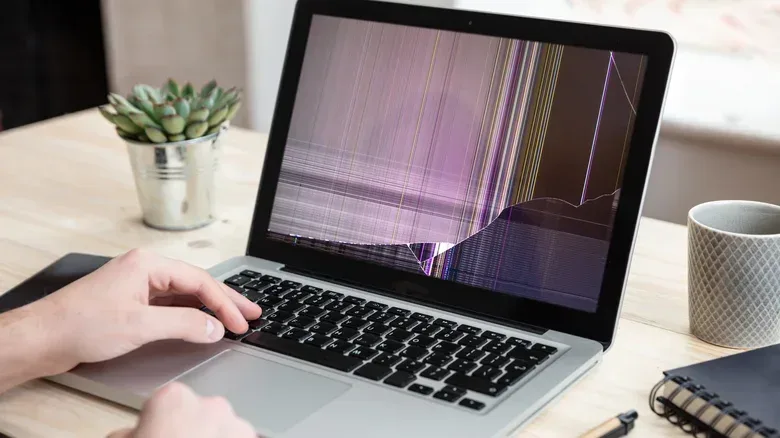
More importantly, the display is not simply a flat pane waiting for extra armor. Its outer surface includes an anti-reflective coating, a layer designed to reduce reflections. It is easy to overlook when functioning normally because that is precisely its job. But if that layer becomes damaged, the result can be visible cracking or peeling that significantly affects the appearance of the screen.
Adhesive is the central problem
The concern with a conventional screen protector is not merely that it might look imperfect on day one. Adhesive is intended to hold the protector in place, which means it must eventually be peeled away when the protector is replaced. That removal can harm the anti-reflective coating underneath, leaving the display with damage that the protector was supposed to prevent.
This is a useful distinction for buyers comparing products. “Scratch-resistant” describes what a protector may withstand, but it does not answer whether it is appropriate for the surface to which it is attached. A protective layer that creates a removal hazard is not a straightforward upgrade.
Related coverage includes Why a MacBook Screen Protector Can Create More Problems Than It Solves.
The visual compromise deserves consideration as well. Depending on the material and finish, an added film can reduce apparent display clarity by scattering light. This is especially awkward on a laptop display that someone may use for games, photos, videos, design work, or simply reading for hours at a time. Avoiding a hypothetical scratch is less compelling if the solution makes every ordinary session look a little worse.
The small gap is doing a big job
MacBooks close with a very narrow clearance between the display and the keyboard. That tight fit is the key practical issue behind warnings about thick screen protectors, keyboard covers, and webcam covers.
A thick glass protector may take up enough space to bridge part of the gap. Once the display and base cannot close as designed, closing the lid introduces unwanted pressure. If the laptop is shut forcefully, that force can be transferred into the screen rather than being accommodated by the intended clearance. In other words, the accessory does not have to be visibly enormous to matter; a very slim laptop has very little spare room to donate to add-ons.
This is why it is a mistake to evaluate an accessory only while the MacBook is open. A cover can look tidy, sit flat, and seem completely benign during use. The more important test is what happens when the lid closes. If it prevents a full close or alters the fit, it has become part of the pressure system inside the laptop.
For anyone weighing a laptop against a desktop setup, portability is a major part of the appeal—and it is worth protecting without changing how the portable machine shuts. Our look at the Mac mini versus MacBook trade-off also underscores the point that a notebook’s integrated design brings conveniences as well as constraints.
Privacy is a legitimate need, but attachment method matters
Privacy screen filters can be appealing for people who use a MacBook in public spaces and want to make the display harder for nearby strangers to read. That need does not disappear simply because adhesive protectors are a poor fit for the laptop.
A more cautious option is a thin magnetic privacy filter, such as Kensington’s UltraThin Magnetic Privacy Screen Filter, which is sold through Apple’s official store. Because it attaches magnetically rather than with adhesive, it avoids the adhesive-removal risk to the anti-reflective coating. Its thin construction is also intended to avoid the force and clearance issue associated with a thicker layer.
That is not a license to treat every privacy filter as interchangeable. The meaningful characteristics are still the same: how it attaches, how thick it is, and whether it compromises the closed-lid fit. Buyers should resist the tempting product-page logic that labels such as “ultra-thin” or “protective” settle the question on their own. The physical relationship between display, keyboard, and lid matters more than the marketing badge.
Keyboard covers can turn into screen markers
The same tight-tolerance principle applies to silicone or similar keyboard covers. They may keep dust and debris away from the keys while the computer is open, but leaving one on when the lid is closed removes some of the microscopic space designed to separate keyboard and screen.
Over time, that can leave permanent marks on the display. The practical compromise is simple: if a keyboard cover is genuinely useful for a particular workspace or task, remove it before closing the MacBook. That preserves its temporary benefit without asking the screen and keys to occupy the same space.
This is a slightly less glamorous maintenance habit than buying a permanently installed accessory, but it matches the device’s design. It also avoids a common mistake in device care: confusing “kept clean” with “kept safe.” An accessory can help with one problem while creating another.
Webcam covers have a size limit for a reason
Webcam covers are another product that sounds uncomplicated. They offer a physical barrier over the camera, but they can interfere with the same narrow clearance when the lid is shut. A cover can therefore pose a risk to the screen if it is too thick.
There is a second consideration: the ambient light sensor. This component helps the MacBook respond to surrounding light. A webcam cover can interfere with that useful feature. Anyone who uses a cover should keep it no thicker than an average sheet of printer paper, reducing the chance that it disrupts the laptop’s fit or causes a display problem.
The lesson is not that privacy-conscious users must give up on physical measures. Rather, the measure has to respect the hardware around it. A camera cover that cannot coexist with the lid’s clearance is a particularly unfortunate kind of protection: it shields one small area while potentially endangering a much larger, more expensive one.
Hardshell cases deserve a ventilation and weight check
The lid area is not the only place where a “protective” add-on can create trouble. Hardshell cases can add external protection, yet a heavy case may wear on the MacBook’s hinge. Depending on its construction, it may also hold heat against the computer.
For owners who want a hardshell case, the safer direction is a very lightweight design with vent cutouts. The case should not keep the laptop from closing fully. As with screen, keyboard, and webcam accessories, anything that disrupts the intended closed position carries a risk because the screen and base were designed around tight tolerances.
Vent cutouts matter because they avoid turning a case into an unnecessary heat trap. Weight matters because the hinge has to support whatever is attached to the lid. Neither criterion requires a complex checklist; it is simply a reminder that the case becomes part of the laptop’s physical structure once installed.
A practical MacBook accessory checklist
Before attaching anything to a MacBook’s display, keyboard, webcam area, or shell, use a short reality check:
- Will it add thickness inside the closed laptop? If yes, it can affect the narrow display-to-keyboard clearance.
- Does it use adhesive on the display? Adhesive removal can damage the anti-reflective coating.
- Can it remain in place while the lid is shut? A keyboard cover is best removed before closing; webcam covers must be exceptionally thin.
- Does it make the laptop fail to close completely? Do not use it in that configuration.
- For a case, is it lightweight and ventilated? Look for vent cutouts and avoid designs that add hinge strain or trap heat.
- Is privacy the actual goal? A thin magnetic privacy filter is a more suitable direction than an adhesive screen protector.
The broad takeaway is refreshingly unglamorous: leave the MacBook display bare unless there is a specific need that a suitably thin, non-adhesive solution can meet. The machine already protects its screen by folding it inward. Adding a thick layer or a sticky one can undermine the precision fit that makes that arrangement work.