Apple Music’s Lossless setting sounds like a clean upgrade: more of the music, fewer compromises, perhaps a tiny audiophile cape fluttering behind every chorus. But cellular data is the hidden miniboss. A streaming-quality choice that seems harmless in Settings can turn a few regular commutes, gym sessions, or workdays into a surprisingly large chunk of a monthly allowance.
There is no single, guaranteed answer to how much data Apple Music Lossless will use. The total can vary by recording, available stream, network conditions, and the equipment at the other end of the connection. Still, Apple’s published estimates provide a useful map before anyone accidentally sends their data plan to the respawn screen.
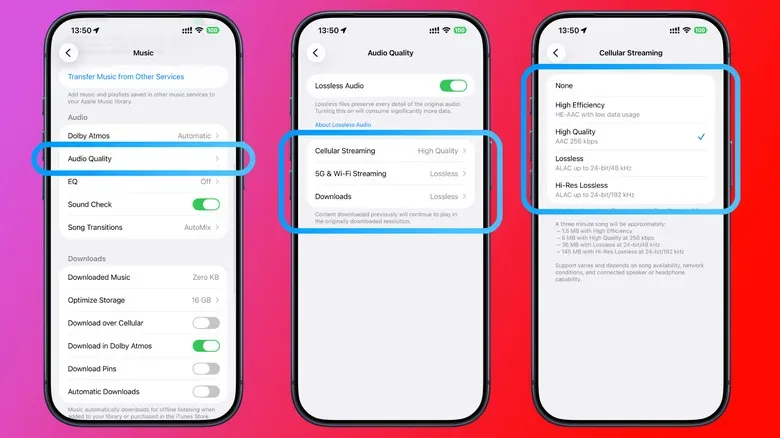
For a three-minute song, the estimates are roughly 6MB at High Quality, 36MB at standard Lossless, and up to 145MB at Hi-Res Lossless. Put another way, moving from High Quality to Lossless is not a minor increase. Hi-Res Lossless is an even steeper leap, intended for situations where the listener has both the supporting setup and a reason to chase the additional specification.
The Apple Music data math, without needing a calculator-shaped side quest
Using those three-minute track estimates, an hour of uninterrupted listening works out to approximately 120MB for High Quality, 720MB for Lossless, and as much as 2.9GB for Hi-Res Lossless. These should be treated as planning figures, not an exact meter for every album or playlist. But the scale of the gap is clear.
- High Quality: about 120MB per hour
- Lossless: about 720MB per hour
- Hi-Res Lossless: up to about 2.9GB per hour
The monthly picture is where the setting becomes a practical concern. Someone streaming for one hour a day across a 30-day month could use around 21.6GB with the standard Lossless estimate. At the upper Hi-Res Lossless estimate, that same daily routine could approach 87GB in a month. That is a huge difference from ordinary High Quality playback, and it can matter greatly on a capped or shared mobile plan.
Apple Music introduced Lossless in 2021, with High Quality represented by 256kbps AAC in these estimates. Standard Lossless and Hi-Res Lossless use Apple Lossless Audio Codec, usually called ALAC. Unlike lossy AAC, ALAC is designed to preserve the source audio data while reducing its size. It is still compression, but it does not discard the information in the way a lossy format does.
That distinction helps explain why the data total is not locked to a perfectly fixed rate. Different recordings can compress differently. A dense, busy production may not behave exactly like a sparse acoustic recording, and the stream delivered can also depend on what is available for a particular song and on the listening setup. The sensible move is to regard the estimates as a budget forecast rather than a promise that every 60 minutes will cost the precise same number of megabytes.
Standard Lossless and Hi-Res Lossless are not the same quest difficulty
Apple’s standard Lossless tier reaches 24-bit/48kHz. Hi-Res Lossless extends up to 24-bit/192kHz. The bigger numbers make Hi-Res tempting, especially to anyone whose settings menu is an irresistible loot chest, but the higher tier comes with a substantially higher potential data cost.
It also has an extra hardware consideration. An iPhone needs an external digital-to-analog converter, or DAC, to play sample rates above 48kHz. So enabling Hi-Res Lossless without the required signal chain can be a little like equipping legendary armor on a character who never leaves the tutorial village: technically impressive, but not necessarily doing anything useful in the moment.
Standard Lossless can make more practical sense for listeners using compatible wired equipment and Wi-Fi, while Hi-Res Lossless is best viewed as a deliberate choice for people with the appropriate DAC and a setup where data usage is not the limiting factor. Neither setting needs to become a permanent, everywhere-on lifestyle choice.
Bluetooth is the plot twist many listeners miss
A common assumption is that selecting Lossless automatically means a lossless experience through every pair of wireless headphones. It does not. Bluetooth connections are not lossless, so a Lossless stream sent from an iPhone to typical Bluetooth headphones is downgraded along the way.
This is not an argument that Bluetooth headphones are bad. Convenience is a mighty stat, and wireless headphones remain enormously useful for walking, commuting, exercising, and generally avoiding the cable snag that turns a door handle into a surprise attack. It does mean the cellular-data trade-off deserves a reality check. If the last leg of the audio path is Bluetooth, spending the data required by Lossless may not produce the full lossless result at the listener’s ears.
AirPods Max 2 support lossless audio over USB-C, but not wirelessly. That detail reinforces the broader rule: audio quality is a chain, not merely one toggle in an app. The source stream, the connection type, the headphones or speakers, and—in the Hi-Res case—the DAC all affect what can actually be reproduced.
Apple has said the difference between AAC and lossless audio can be virtually indistinguishable. Individual listeners may still value Lossless, especially with suitable wired hardware and quiet conditions. But it is a useful perspective check for cellular listening, where a technical maximum can become costly while road noise, a crowded train, or Bluetooth transmission limits what can be perceived.
Use separate quality settings instead of choosing one setting for every situation
The best way to reduce data use is not necessarily to banish Lossless entirely. Apple Music on iPhone lets users assign different audio-quality choices for cellular streaming, Wi-Fi streaming, and downloads. Open Settings > Apps > Music > Audio Quality to find the relevant options.
A practical setup is to leave cellular streaming on High Quality while enabling Lossless for Wi-Fi. That preserves a relatively sensible mobile-data footprint while allowing the higher-quality setting at home, at work, or anywhere else with Wi-Fi and equipment capable of benefiting from it. It is less a surrender than a build tailored for different levels.
- Open Settings on an iPhone.
- Choose Apps, then Music.
- Select Audio Quality.
- Review cellular streaming, Wi-Fi streaming, and download settings independently.
- Keep cellular on High Quality if conserving data is the priority, then reserve Lossless for Wi-Fi or selected downloads.
That separation is especially useful because the places people want music most often—cars, public transit, walks, errands, and travel—are exactly the places where mobile data may be doing the work. A setting optimized for a quiet, wired, Wi-Fi session is not automatically the right selection for every everyday listening scenario.
Downloads trade storage space for predictable mobile data use
Downloading favorite albums and playlists over Wi-Fi is the other major strategy. Lossless downloads consume more local storage than High Quality downloads, but playback from an already downloaded file does not use cellular data. For listeners with room on their device but a limited monthly plan, that can be an excellent trade.
It is particularly helpful for driving. A USB CarPlay connection supports lossless playback, giving wired audio a clearer route than ordinary Bluetooth. Of course, cabin acoustics, vehicle speakers, and road noise may still make the theoretical advantage difficult to fully appreciate. The point is not that every drive becomes a mastering-studio listening session; it is that a downloaded library prevents the phone from continuously dipping into cellular data while the car is moving.
Storage and connectivity decisions often sit next to broader Apple-device ownership questions. Readers sorting through that ecosystem may also want to see how AppleCare One Family is structured for a household of devices. In the music case, though, the core choice remains straightforward: use Wi-Fi downloads for the tracks you play repeatedly, and let cellular streaming stay leaner when a cap matters.
A sensible Apple Music quality loadout
For most people, High Quality on cellular is the low-drama option. It uses roughly one-sixth of the standard Lossless estimate per hour and a fraction of Hi-Res Lossless at its upper estimate. It is also the setting that avoids paying for quality that may be reduced by a Bluetooth connection anyway.
Lossless on Wi-Fi is a strong middle ground for listeners using compatible wired gear, speakers, or USB-C audio. Hi-Res Lossless is best saved for the comparatively narrow cases where the external DAC, hardware, connection, and listening environment all line up. Downloads fill the gap for frequent travelers, commuters, and drivers who want reliable playback without a data bill ambush.
The important thing is intentionality. Lossless is not inherently wasteful, and High Quality is not a defeat screen. Apple Music gives listeners separate levers for cellular, Wi-Fi, and downloads, so the sensible choice can change with the connection and the gear. Check the settings before pressing play, and the music—not the data counter—gets to be the main event.