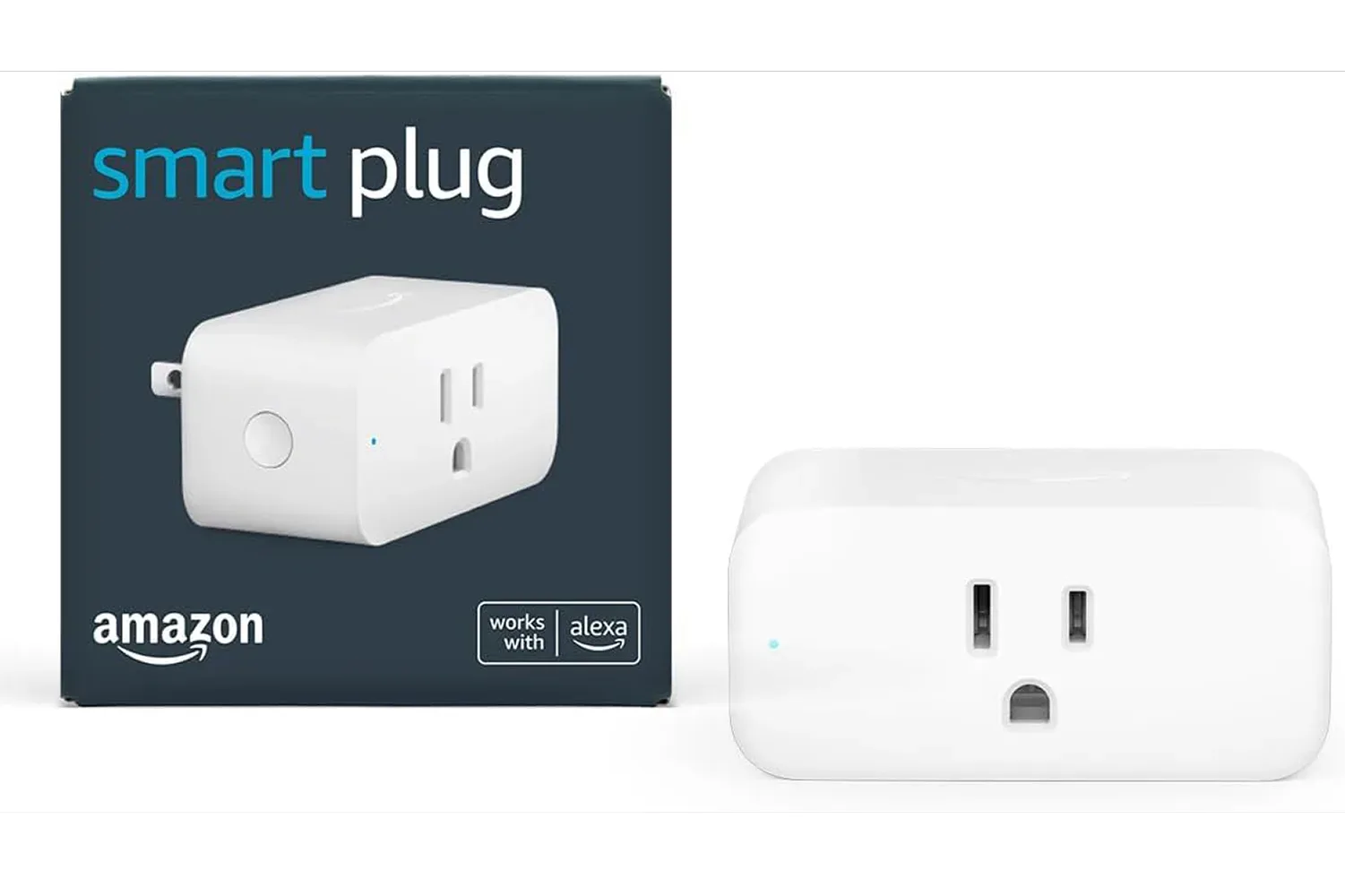
Amazon’s Smart Plug is listed at $15, a reduction from its stated $25 regular price. A two-pack is listed at $30. The appeal is straightforward: rather than replacing a working lamp, fan, or coffee machine with a connected model, a smart plug can put basic on/off control between that appliance and the wall outlet.
That makes this a modest but potentially useful entry point for people interested in Alexa-based home automation. The plug is designed to work with the Alexa app and voice assistant, while its compact form factor is intended to leave the second socket in a standard outlet accessible. It also has a physical on/off switch, so the app and voice controls are not the only way to operate whatever is connected to it.
The important qualifier is in the name: a smart plug makes the power supply smart, not the appliance itself. It can tell a compatible device to receive power or stop receiving power. That distinction determines whether a particular lamp, fan, coffee machine, or other household device is a sensible candidate for automation.
What the $15 Smart Plug actually changes
At its simplest, the Amazon Smart Plug acts as a remotely controllable outlet. Plug it into the wall, connect an ordinary household device to it, and the user can switch that device on or off through Alexa. The same control can be performed in the Alexa app after setup.
For a lamp with a conventional power switch left in the on position, that is a clean use case. The smart plug can restore power at a chosen time in the evening and remove it later at night. A fan that resumes operating when power returns can work similarly. The value is not a new lighting fixture or fan; it is the ability to apply a regular schedule and optional voice control to an existing one.
The product can also be used in Alexa routines. A routine is an automation that carries out an action after a defined trigger or condition. The supplied examples include turning lights off at bedtime and switching on a coffee machine when an alarm goes off. Timers provide a more direct form of scheduling, such as arranging for a light to turn on at a chosen evening hour.
These are intentionally small automations, but small is often the point. A single plug can handle one repetitive task without requiring a household to rebuild every room around connected appliances. For shoppers who want to experiment with an Alexa setup, the lower price also reduces the cost of discovering whether routines are genuinely useful in their own daily schedule.
Setup: the Alexa app is the control center
The reported setup process begins with the plug connected to an outlet. In the Alexa app, open Devices, choose the + option, and add a compatible device. Once the plug is recognized, it can be controlled in the app or through Alexa voice commands.
That process matters because the plug is not a stand-alone timer in the traditional sense. Its connected features are organized through the Alexa ecosystem. The app is where a user adds the device and establishes scheduled behavior; Alexa provides the voice-control layer.
After setup, sensible first routines are uncomplicated ones that are easy to verify:
- A bedside or living-room light that turns off at a regular time.
- A lamp that comes on before the household arrives home in the evening.
- A fan that is switched off after a set period.
- A coffee machine schedule, but only where the machine is already prepared and resumes safely when power is supplied.
Starting with a lamp is particularly practical. A light makes its state obvious immediately, which helps establish whether the schedule is set up correctly. It also avoids the uncertainty of appliances that rely on electronic buttons, menus, or a manual reset after losing power.
Compatibility is about appliance behavior, not just the plug
The product is described as compatible with household devices including lamps, fans, and coffee makers. Still, prospective users should consider what happens when the connected appliance loses power and receives it again. A basic lamp with a physical switch is generally intuitive: leave its own switch on, and the smart plug governs the electricity. A device that must be awakened by pressing a button after every power interruption is less likely to deliver the desired hands-free experience.
This is the practical meaning behind “making an outlet smart.” The plug cannot operate controls that exist inside the appliance. It cannot fill a coffee maker, change a fan’s settings, or overcome a device’s need for manual input. It can only provide or remove power. Before buying several plugs, it is worth identifying devices with persistent physical settings—the kind that continue in the same state after the wall power is restored.
It is also wise to treat automation as convenience rather than a substitute for ordinary household judgment. A scheduled action can be useful because it is predictable, but the connected device still needs to be appropriate for unattended operation. The best candidates are the appliances whose normal operation is already simple and whose expected behavior after a power cycle is clear to the owner.
Outages and Alexa+ context
The plug is described as reconnecting to Alexa after power or Wi-Fi service returns, without requiring the owner to go through the original setup again. That is a meaningful detail for a connected outlet: automated control depends on both electricity and network access, so recovering normally after an interruption is preferable to having to re-add the plug every time service fails.
It does not mean routines can operate during an outage. If the home has no power, the plugged-in appliance cannot run; if the network connection is unavailable, the Alexa-linked control experience is affected until connectivity comes back. The reported benefit is recovery afterward, not immunity to the interruption itself.
Prime members are also described as having access to Alexa+, presented as a more context-aware version of the standard Alexa experience that supports more natural conversation. That service context is separate from the basic proposition of the Smart Plug. The fundamental plug functions described here—app control, voice commands, timers, and routines—are the core reasons to consider the hardware. Alexa+ may matter more to households already invested in conversational assistant features than to someone seeking a simple scheduled lamp.
Is the deal meaningful?
At $15 versus a stated $25 regular price, the single-plug listing represents a 40% reduction. The two-pack is listed at $30, which works out to the same $15 per plug, so it does not present an additional per-unit reduction based on the figures provided. Prime members can receive free shipping on eligible orders, potentially affecting the overall cost.
The deal is most compelling for a specific use case rather than an abstract ambition to own smart-home gear. One plug is enough to automate an existing lamp or another straightforward device and decide whether Alexa routines fit into a household’s habits. Multiple plugs make more sense where there are several clear, independent jobs: perhaps lights in separate rooms or a fan on a recurring schedule.
For another budget-minded piece of home tech, the site has also covered the JBL Go 4 portable Bluetooth speaker listing. The two products serve different jobs, but both illustrate a useful shopping principle: focus on the feature that addresses an actual everyday need, rather than treating a sale price alone as a reason to add another device.
Who should consider it—and who should pause
The Amazon Smart Plug is a credible fit for Alexa users who want basic automation without replacing functional household equipment. Its strengths are the straightforward app workflow, Alexa voice control, scheduling options, and physical switch. The $15 listing lowers the barrier for someone who wants to automate one predictable device first.
It is less attractive for appliances that do not automatically resume their prior state after power is restored, or for shoppers expecting a plug to provide advanced controls that the original product does not possess. Before purchasing, check the appliance’s own controls and think through the real action the schedule will perform. If it is simply “turn this lamp on at 6 p.m.” or “turn this fan off at bedtime,” the concept is clear. If the intended task needs button presses, changing modes, preparation, or supervision, an outlet-level control may not be enough.
As with any time-limited retail listing, the $15 price and availability can change. But the underlying case remains uncomplicated: for the right device, a compact smart plug can add voice controls and routines while preserving the appliance already in the room.
Shop the products
Check current price, model and availability at the retailer.