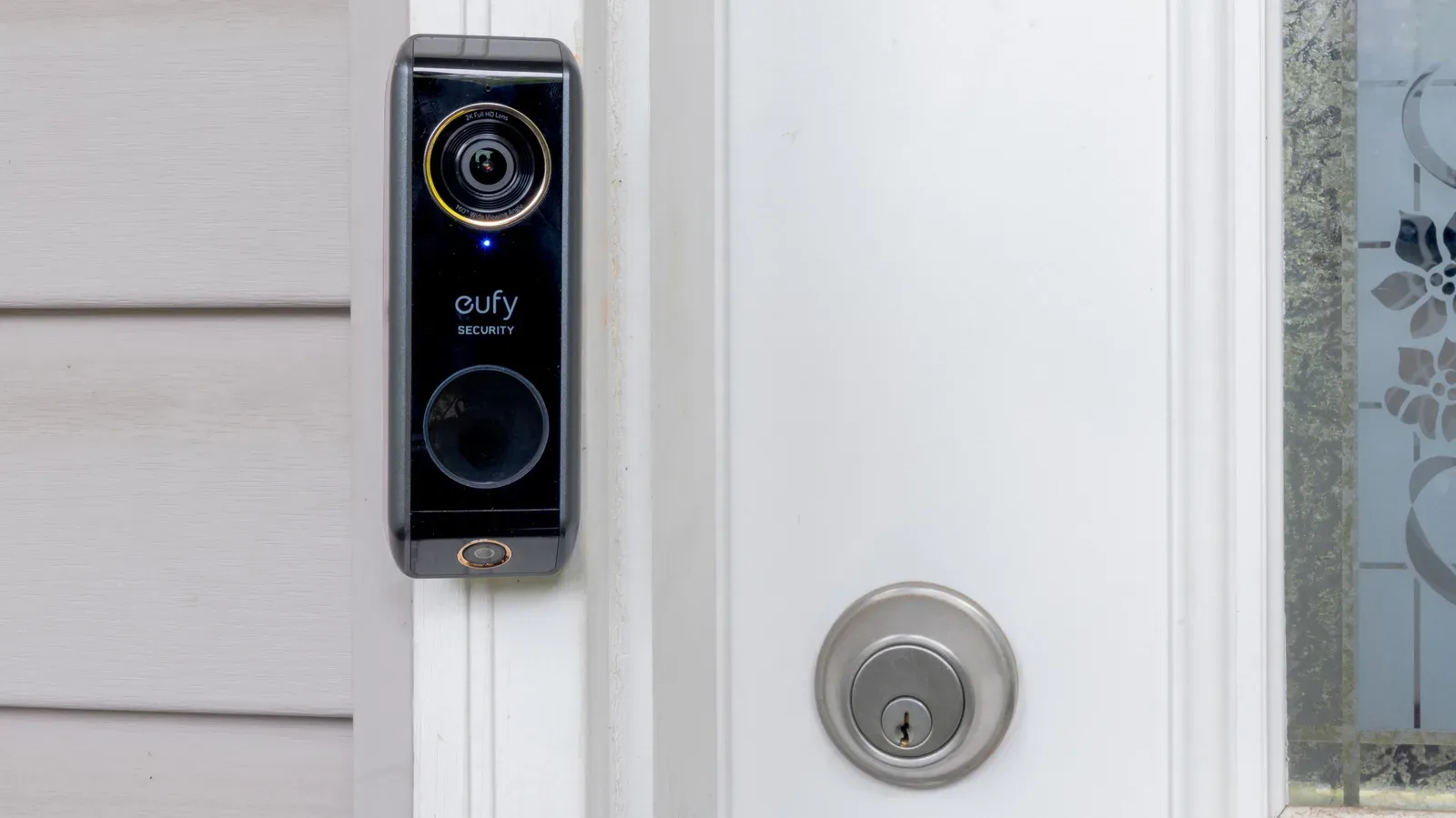
A video doorbell’s visible scene and its motion-detection area are not the same thing. That distinction explains a common frustration: a person can be plainly visible when an owner opens live view, yet the doorbell may not have recorded a motion event or delivered an alert when that person approached.
There is no universal distance at which every video doorbell stops detecting motion. Published figures differ substantially among products, and a maximum range should be treated as a best-case boundary rather than a promise that every movement within it will trigger an event. The kind of sensor inside the doorbell, where it is mounted, the direction a subject travels, its surroundings and the selected software settings all influence the result.
Range also is not automatically a measure of usefulness. A front door beside a busy pavement or road may benefit more from carefully limited detection than from the broadest possible coverage. A device that notices every passing vehicle, shifting shadow and tree branch can create a steady stream of alerts while using additional power on battery-powered models.
Published ranges vary widely
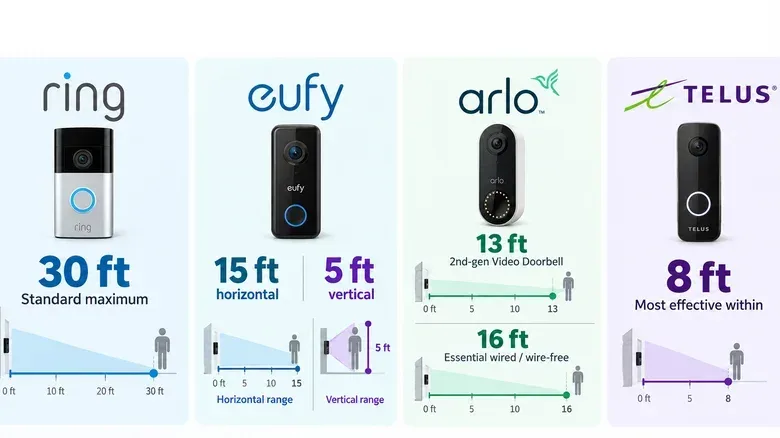
Ring describes roughly 30 feet, or 9 metres, as a standard maximum motion-detection range for its devices. It also notes that a larger moving object, such as a passing car, can produce an alert from farther away. That does not mean every Ring doorbell has an identical per-model maximum, nor that a person at 30 feet will invariably be detected in every installation.
Other published figures are considerably shorter. Eufy says its Video Doorbell can reliably identify horizontal motion up to 15 feet away and vertical motion up to 5 feet away. Arlo lists a maximum range of 13 feet for its second-generation Video Doorbell, while its Essential wired and wire-free doorbells are listed at 16 feet. TELUS says its doorbell motion sensor performs best within 8 feet.
Those numbers cannot be treated as a simple league table. They may describe different products, sensing methods and conditions. More importantly, they do not say that a person who appears within the camera image will definitely create an alert. A camera lens can capture a broad view, but motion detection is a separate decision made by hardware and software.
Seeing motion and detecting motion are different jobs
Live view is about what the camera can display. Motion detection is about whether the doorbell determines that a meaningful change has occurred in the part of the image or sensing area it is monitoring. That determination may be influenced by motion sensitivity, configured zones and the sensor’s strengths.
This is why a visitor walking almost directly toward a doorbell may be handled differently from a person crossing its view from left to right. It is also why the same device can appear inconsistent when its mounting height, angle or nearby activity changes. The practical question is not just, “How far can the camera see?” It is, “At what point, in which direction, and in which selected area will it decide to create an event?”
A published maximum range therefore should be read as one part of the product’s behaviour, not as a guarantee of alert coverage over an entire front garden, driveway or pavement. The entrance layout matters: a pedestrian crossing the field of view can create a different sensing situation from one who moves straight toward the camera.
Why sensor technology changes the result
One major factor is the type of motion detection a doorbell uses. Passive infrared, usually shortened to PIR, detects changes associated with heat. PIR sensors are more sensitive to side-to-side movement than movement heading directly toward or away from the camera. In an entrance setup, that means the path a person takes can matter as much as their distance.
The Wyze Duo Cam Doorbell is an example of a doorbell using PIR. If a user expects reliable early alerts from a direct approach, understanding that directional limitation is more useful than simply seeking the largest claimed range.
Another approach is Pixel Difference Analysis, or PDA. Rather than relying on a heat sensor in the same way, PDA compares one video frame with the next and looks for differences. Logitech’s Circle View is an example using PDA. This approach is tied to changes in the camera image, which helps explain why the contents of the scene, camera angle and visual disruptions can matter.
Some doorbells combine approaches. SimpliSafe video doorbells, for example, use both video analytics and PIR. “Video analytics” refers here to software examining video information to identify motion-related events. A combined system does not erase the need for a sensible placement or configuration, but it shows why two products with superficially similar cameras may behave differently at the door.
Distance is only one part of the trigger
TELUS provides a useful reminder that movement duration can also be part of the equation. It says that even at the most sensitive setting, its doorbell sensor requires continuous movement for seven seconds or more to trigger a clip. In that case, a short or interrupted movement may not meet the trigger requirement even if it occurs in the area where the sensor works best.
This helps put “missed motion” in perspective. An owner may assume an alert failed because someone was too far away. But the available information points to several other possibilities: the subject may have moved in a less favourable direction, passed through the detection area too quickly, entered an excluded zone, or been affected by the camera’s placement and surrounding conditions.
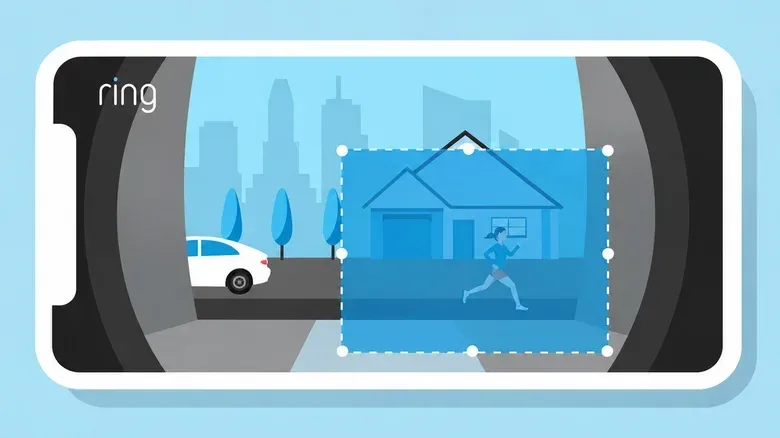
For Ring users, motion sensitivity and detection range can be adjusted up to the device’s maximum limit. Ring also supports up to three customisable motion zones per device. A motion zone tells the doorbell which areas in its field of view should participate in detecting and recording motion events. It is a useful control precisely because a camera’s useful view can extend beyond the part of the scene an owner actually wants to monitor.
Why the biggest range can create worse alerts
Increasing range or sensitivity can improve the chance of catching an approaching visitor sooner, but it can also make a doorbell more reactive to activity that is irrelevant to the front door. Ring identifies moving trees, sunlight, reflections and shadows as possible causes of unwanted alerts. It also says large vehicles may trigger alerts beyond its standard range.
That makes motion-zone selection especially important for entrances facing a road. A wide visible scene may include public pavement, traffic and vegetation, but an owner may only need an alert when someone reaches the approach to the door. Restricting detection to the relevant part of the frame can reduce triggers without changing what live view is able to show.
There is an important trade-off here. An overly narrow zone or low sensitivity might delay detection of a visitor. An overly broad zone or high sensitivity can produce frequent alerts for background activity. The appropriate balance depends on the route visitors take and on what else moves through the doorbell’s field of view. No single advertised distance resolves that choice.
Battery-powered doorbells have an additional compromise
For wireless and battery-powered doorbells, frequent detection carries a power cost. Google says its battery-powered Nest Doorbell naturally consumes more power when it is detecting a high-traffic area such as a busy sidewalk. Activity Zones, or a different camera angle, can reduce unnecessary triggers in that situation.
An Activity Zone is the same broad idea as a motion zone: it limits monitoring attention to selected portions of what the camera sees. The terminology varies by company, but the practical purpose is consistent. It separates a useful approach path from a visually busy background.
This is why the right configuration is often more valuable than pursuing the farthest possible sensing reach. A battery doorbell facing constant foot or vehicle traffic may spend more energy responding to events that do not matter to the owner. Narrowing the monitored area or changing the angle can reduce that burden while preserving coverage near the entry point.
Mounting also matters. Ring recommends installing its video doorbells 48 inches from the ground. Placement affects both the camera’s view and the geometry of approaching movement, so it can influence real-world detection even when the device’s advertised specifications remain unchanged.
Subscriptions can change features, not the sensor’s physical reach
It is also useful to separate detection range from the services attached to a doorbell. Ring lets customers receive and respond to motion alerts without a subscription. Viewing recorded video, however, requires Ring Protect. Smart Alerts that distinguish between people, vehicles and packages also require that subscription.
Those paid features can change what information an owner receives about an event and whether recorded footage can be reviewed. They do not make the hardware’s physical motion-detection range larger. A subscription may improve the categorisation or usefulness of alerts where supported, but it is not a substitute for correct placement, a suitable motion zone and realistic expectations about the doorbell’s sensor.
That distinction is valuable when comparing devices. A buyer should consider the published range, the detection technology, the available zone controls and the recording or alert features separately. Treating them as one specification can lead to the mistaken belief that a software plan fixes every missed detection.
What owners should take from the numbers
- Do not equate live view with an alert guarantee. A subject can be visible but fall outside the effective detection behaviour for that installation.
- Check the motion path, not only the distance. PIR sensors are more responsive to side-to-side movement than movement directly toward or away from the device.
- Use zones to prioritise the entrance. They can prevent a broad camera view from turning into a broad alert area.
- Expect environment to matter. Shadows, reflections, sunlight, trees and larger vehicles can contribute to unwanted events.
- Account for power use on battery models. High-traffic detection can consume more battery, so an Activity Zone or revised angle may be more practical than maximum coverage.
- Keep hardware and subscription questions separate. Recording and smarter classifications may be subscription-dependent, but they do not extend sensor range.
For shoppers and current owners alike, the most meaningful specification is not a headline distance in isolation. It is whether the doorbell can consistently recognise the movement that matters at a particular entrance without being overwhelmed by activity that does not. That is a configuration problem as much as a hardware one—much like other connected-device buying decisions, where a listed price or feature set needs to be read alongside its practical limits, as with the current AirPods Pro 3 listing.