A Game Boy Advance is not the hardware most people picture when they think of a digital audio workstation. Yet developer Hugo Duprez, who also uses the name SpriteFusion, has built Nano-daw, a compact music-making program for Nintendo’s handheld that presents sequencing in a recognisably modern, grid-based form.
The project was made over a weekend, but its ambition is easy to see in the interface: Nano-daw is organised around individual tracks and placed notes rather than an opaque, menu-heavy system. That makes it an intriguing homebrew experiment for musicians who know conventional desktop production software, as well as retro hardware fans interested in tools that ask an old console to do something other than run games.
What Nano-daw does on Game Boy Advance
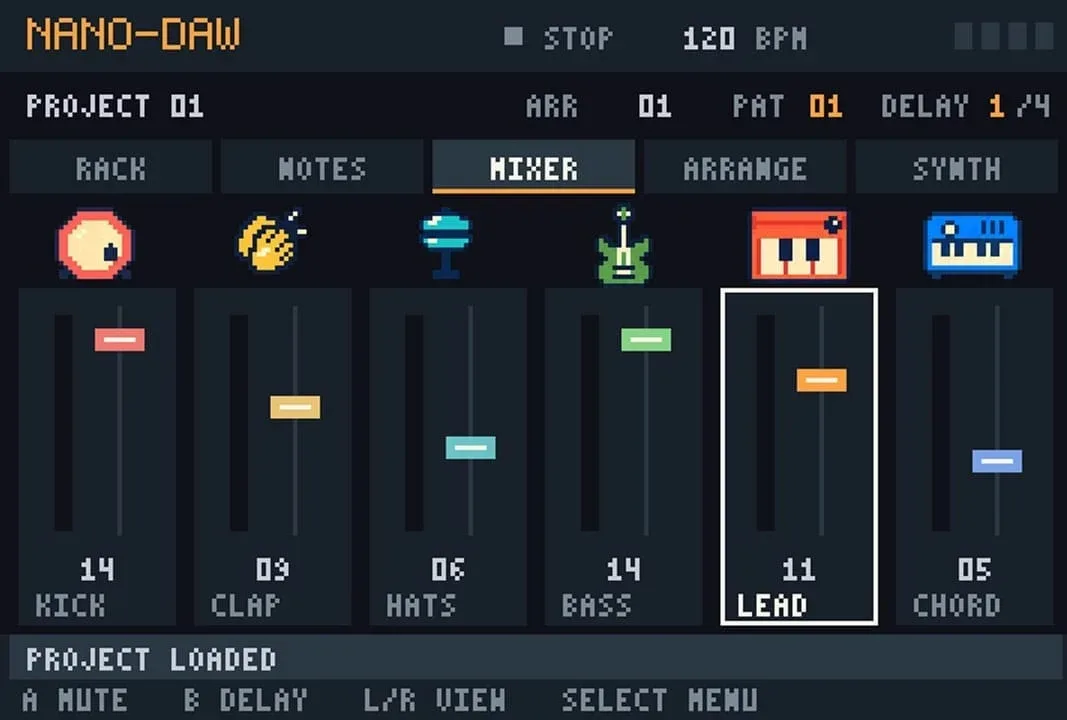
Nano-daw provides six tracks: kick drum, clap, hi-hats, bass, lead and chords. The program supports patterns of up to 16 steps, and users can alter the tempo from its stated 120 BPM starting point. BPM means beats per minute, the basic measure used to define a song’s pace. Higher BPM values generally mean a faster rhythm; lower values create a slower one.
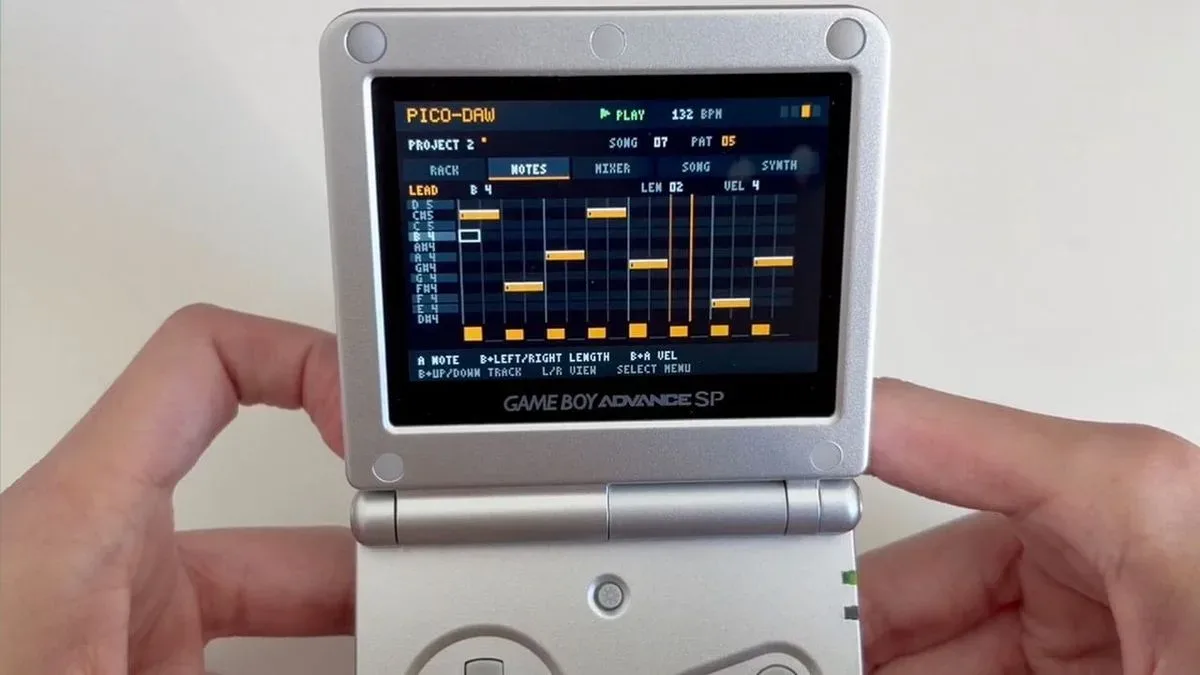
Notes are entered with the GBA’s D-pad and A button. That control scheme suits the core idea of step sequencing: move to a position in a pattern, then place a sound or note there. Rather than recording an uninterrupted live performance, a user builds a repeating rhythmic and melodic loop one event at a time.
The software is said to run at 59 frames per second. In this context, that figure describes the responsiveness of the program’s display and interaction rather than a measure of audio quality. A smooth visual update matters for a sequencer because the user is repeatedly navigating a grid, checking where notes sit, and adjusting patterns while a composition is playing back.
A DAW-inspired approach, scaled down
DAW is shorthand for digital audio workstation: software used to arrange, edit and produce music. Full desktop DAWs can cover recording, sound design, mixing and detailed automation. Nano-daw is much more narrowly focused, based on the available information, but the comparison remains useful because of its visual workflow.
Its note-placement layout is intended to resemble the kind of MIDI sequencing familiar to users of production programs such as Logic Pro or Pro Tools. MIDI, or Musical Instrument Digital Interface, is best understood here as note data: instructions describing events such as what note is played and when. It is distinct from a recorded sound wave. In a sequencer, the visible note blocks or steps let a musician construct those instructions directly.
That distinction is part of why Nano-daw’s presentation is notable. The limited six-track setup and 16-step pattern ceiling are constraints, but clear constraints can also accelerate creation. A musician is encouraged to establish the essentials—drums, bass, melodic lead and harmony—without first confronting a large desktop session full of channels and options.
Related coverage includes Nano-daw Brings a Six-Track Music Sequencer to Game Boy Advance.
There are already well-known music tools associated with Game Boy-era hardware, including Nanoloop and Little Sound Dj. Nano-daw’s apparent point of difference is not merely that it makes music on a handheld, but that it frames the process in a more immediately familiar DAW-like grid. It is a design choice aimed at accessibility: someone accustomed to arranging MIDI notes in a conventional sequencer should recognise the underlying logic even when the input device is a D-pad.
Why the six tracks matter
The instrument allocation also reveals the kind of compositions Nano-daw is built to encourage. Kick, clap and hi-hats form a compact drum section. Bass handles the low-end foundation, while lead and chords divide melodic focus from harmonic support. It is a practical template for beat-driven music, where a short loop can become compelling through pattern changes, timing and selective layering.
Six tracks do not turn a Game Boy Advance into a complete studio replacement, and Nano-daw should not be read as claiming to do that. Instead, the fixed palette serves a different purpose. It makes the musical roles explicit and reduces setup work. A creator can begin arranging an idea immediately, then develop variations by changing which steps are active, revising notes, or shifting tempo.
The 16-step maximum likewise fits a classic loop-building method. A short pattern provides a manageable visual unit: each column represents a possible placement point, and repeating it makes rhythmic relationships easier to hear. A producer can use that structure for a straightforward drum groove, a bass phrase that locks to the kick, or a lead line that deliberately crosses the rhythm.
A homebrew tool, not just a novelty
Projects like Nano-daw are a useful reminder that retro-game interest is not limited to replaying old cartridges. Hardware communities also keep exploring what familiar systems can become when they are treated as creative platforms. That can mean new games, utilities, technical demonstrations and, here, a music composition interface.
There is a practical appeal to a purpose-built handheld setup. The GBA has physical controls, a compact screen and none of the usual desktop distractions competing for attention. Those characteristics do not automatically make better music, but they can make a particular kind of sketching process more immediate. Nano-daw appears designed around that directness: select a position, place a note, hear the loop evolve.
It also belongs to the wider tradition of enthusiast software extending older systems in unexpected directions. For another example of how preservation and tinkering culture overlap on vintage platforms, see our look at MS-DOS copy protection, code wheels and the history of platform modification.
The AI-assisted development question
Duprez has described Nano-daw as a project built from scratch with AI assistance rather than a case of “vibe coding.” He said he used Astra to execute architectural decisions and optimisations, while reviewing every line and manually refactoring many portions of code.
That distinction is worth making carefully. AI-assisted development can describe a workflow in which a programmer remains responsible for the software’s design, decisions and review, using an AI system to help produce or transform code. “Vibe coding,” by contrast, is often used critically for a looser process in which generated code is accepted with limited understanding or verification.
Neither term alone establishes software quality. What matters in practice is ownership of the technical choices, scrutiny of generated output and the ability to diagnose problems. Duprez’s account places the human developer in charge of Nano-daw’s architecture and final code review, with Astra used as an implementation aid. That is particularly relevant for a time-limited project running on specialised older hardware, where constraints and optimisation decisions can be central to whether an idea works at all.
The weekend timeframe should therefore be read as a measure of rapid prototyping, not as proof that the work was automatic. Nano-daw’s value lies in the specific result described: a six-track, 16-step music sequencer for Game Boy Advance with a control model that prioritises legibility and quick placement of musical ideas.
What musicians and retro fans can take from it
For people who already work with sequencers, Nano-daw offers an unusually approachable conceptual bridge to GBA music-making. Its tracks correspond to common production roles, its tempo uses BPM, and its note grid speaks the language of MIDI arrangement. The hardware changes the feel of the process, but not the fundamental task of composing a pattern.
For newcomers, its limits could be an advantage. Start with a kick pattern, add hi-hats, find a bass rhythm that supports the beat, then use chords and lead for character. With a small number of parts visible at once, the relationship between the elements is easier to inspect. That is a useful lesson in arrangement whether the final goal is a handheld loop or a larger production elsewhere.
Nano-daw is available to download from Duprez’s site. Its bigger achievement may be the clarity of the idea: a familiar production workflow translated to a distinctly unfamiliar machine, without losing the simple pleasure of making a beat one button press at a time.