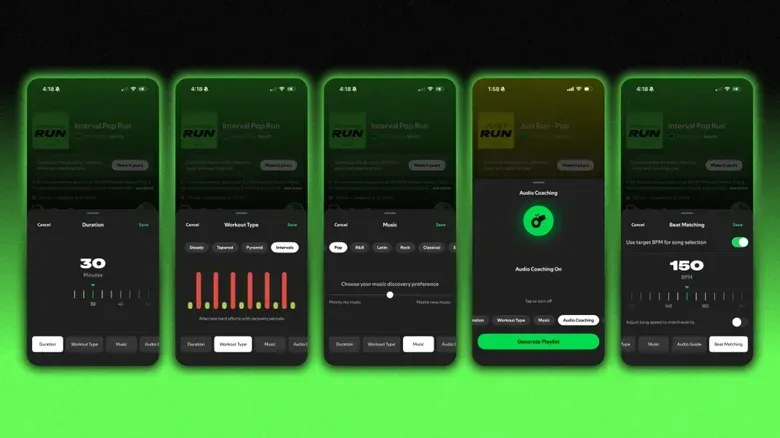
Spotify has added Running Mode to its Fitness hub, giving Premium subscribers in select markets a way to build a run around a chosen workout structure, music genre and tempo. It is available in the Spotify app on both iOS and Android, and its central idea is straightforward: choose the kind of run you plan to do, then receive a playlist assembled around music BPM.
That does not mean the feature is reading a runner’s pace and automatically changing songs to match every stride. Spotify previously had a running feature that did use pace detection, but that version was discontinued in 2018. The newer Running Mode puts the runner in charge before the session begins. Its tools include preset workout shapes, adjustable duration, Beat Matching, text-prompt playlist customization, genre selection and optional spoken encouragement.
For people who use music as a timing aid, the appeal is less about having an app invent a workout and more about reducing prep work. A runner can select a steady session, an interval structure or a changing-intensity plan without manually sorting a library into warm-up, hard-effort and cooldown tracks. The result is a more directed listening experience than pressing play on an ordinary playlist, while still leaving room to specify what the music should sound like.
Who can use Spotify Running Mode?
Running Mode is for Spotify Premium subscribers in select markets. It can be accessed through the Fitness hub in the Spotify app on iPhone and Android. If it does not appear in the hub, availability may not yet extend to that account or location.
The feature is designed for phones rather than a desktop listening workflow. That distinction matters because the setup is meant to happen just before a run, with controls for duration, intensity and musical direction all gathered in the app. Android users looking at other ways a phone can act as a larger computing device can also see the separate caveats around Android desktop mode on recent Pixel phones, but Spotify Running Mode itself is a mobile Fitness hub feature.
How to find and start a session
- Open Spotify on an iOS or Android device.
- Go to the Fitness hub.
- Select Running Mode.
- Pick a workout type and a genre.
- Set the session length, which can range from 10 to 90 minutes.
- Use Beat Matching or a custom playlist prompt if desired, then begin the run.
The fastest route is the 20-minute Just Run option. It is intended for runners who want a short session without sorting through the broader menu of presets. That makes it the sensible starting point when the priority is getting out the door rather than configuring every musical variable.
Runners who do want structure have several choices: Intervals, Pyramids, Easy, and Long and Advanced. These labels describe the intended pattern of effort and the way BPM is used across the session. BPM means beats per minute, a measure of musical tempo. In this setting, it is the pulse of the songs rather than a measurement of the runner’s actual movement.
What each workout format is meant to do
Intervals: alternating faster and slower sections
The Intervals option switches between faster stretches and breaks. Spotify uses BPM to mark those changes, supplying higher-tempo music for the more rapid portions and a different tempo during recovery-oriented sections. It is the most obvious choice for a runner who wants the soundtrack to signal when the session should change gears.
Related coverage includes How to Set Up Spotify Running Mode on iPhone and Android.
In practical terms, its value is clarity. Rather than repeatedly checking a screen or deciding track by track when to speed up, the musical pace provides a cue for the planned alternation. That is different from a pace-responsive tool: the playlist is built to guide the workout structure selected by the user, not to react live to detected running speed.
Pyramids: a complete arc from warm-up to cooldown
Pyramid sessions follow a sequence of Warm Up, Build, Peak, Downshift and Cooldown. The BPM changes are tailored to those phases. The name reflects an intensity curve that rises toward a peak and then falls away again.
This is useful for listeners who want their playlist to have a beginning, middle and end instead of a flat tempo from the first minute to the last. The warm-up and cooldown phases are explicitly part of the structure, while the middle stages create the build toward the highest-intensity point. Spotify’s approach gives the run a mapped musical contour without requiring the listener to construct one by hand.
Easy: a short, steady option
The Easy workout is a 20-minute run set at 135 BPM by default. It is the preset aimed at a manageable, consistent session rather than a pattern of accelerations. A fixed musical pace can be preferable when the goal is simply to keep the listening experience even and avoid the sharp changes of an interval plan.
The key word is “default.” Running Mode provides a starting configuration, not an instruction that every runner must follow a particular cadence or duration. The session length can be changed, and Beat Matching offers another layer of control over tempo preference.
Long and Advanced: extended, quicker default pacing
Long and Advanced is set at 150 BPM over 45 minutes by default. Compared with Easy, it begins with both a longer duration and a faster musical tempo. It is positioned for users who want to maintain a preferred rhythm over a more extended session.
Since Running Mode allows durations from 10 to 90 minutes, the 45-minute configuration should be understood as the standard starting shape for this option, not a hard limit. The duration control is especially important because it lets runners retain a selected workout style while adapting it to the time they actually have.
Beat Matching: separating music tempo from running cadence
Beat Matching is Spotify’s customization control for setting the desired tempo. Spotify says many users favor the standard 160 BPM area, while runners seeking a faster feel can choose 170 to 180 BPM.
There are two related but distinct meanings worth keeping straight here. Music BPM describes how quickly a song’s beat occurs. A runner’s cadence describes the rate of steps. Running Mode is working from the former: it organizes the soundtrack around the BPM setting chosen in the app. Its purpose is to help a listener select music that feels aligned with the kind of rhythm they want, rather than to claim that every song will precisely measure or mirror a person’s steps.
That distinction also makes the setup more approachable. A user does not need to treat the number as a fitness verdict. Selecting 135 BPM for an Easy session, around 160 BPM as a common preference, or 170–180 BPM for a faster-feeling mix is a way to shape the energy of the playlist. The best choice within the feature is the one that suits the planned run and feels workable to the listener.
Genres, daily updates and saving a playlist
Each workout option can be paired with genre-specific playlists. Spotify lists pop, hip-hop, EDM, country and rock among the available choices. That means a runner can choose the same session model on different days but alter its sound substantially: a Pyramid can be paired with rock one day and EDM another, for example, without abandoning the underlying intensity structure.
Running Mode playlists update daily. That keeps the feature from being limited to the same fixed run of songs every time, but Spotify also lets users save playlists they enjoy. Saving is the practical counterbalance to the daily refresh: it gives listeners a way to return to a particular selection rather than hoping it reappears in a later update.
There is an important trade-off in this design. Daily updates favor variety; saved playlists favor familiarity. Someone who wants surprise can rely on the refreshed selections, while someone who has found an especially effective set of tracks can preserve it for future runs. Neither approach requires abandoning the workout type, genre controls or duration settings that define the mode.
Using Prompted Playlist for more specific music requests
For more control, Running Mode includes Prompted Playlist. Tap View prompt, enter a text request, and Spotify will add music intended to match that request. The prompt can be broad, such as asking for high-energy music that has not been played recently, or highly specific about genre, era, mood and the setting imagined for the run.
This is where the feature moves beyond a conventional workout preset. A preset answers the question, “What shape should this run have?” A prompt answers, “What should it feel like?” Combining both allows the structured intensity curve to remain in place while the listener specifies a musical identity that is more personal than a genre button alone.
The most useful prompts are likely to describe concrete listening preferences: energy level, a period of music, styles or artists the listener wants to revisit, and the atmosphere they want for the session. Because the tool is intended to add tracks matching the mood of the request, it is more helpful to state what is wanted than to use vague wording. The feature is about playlist customization, not a promise of perfect results from every description.
Voice guidance is optional
Music is not the only audio Running Mode can provide. Users can turn on optional audio cues for encouragement and mid-run check-ins. These are designed as motivational prompts alongside the playlist, rather than a compulsory part of each workout.
That opt-in approach matters. Some runners may welcome spoken reminders when a session changes phase or when motivation dips. Others may prefer the uninterrupted flow of the tracks they chose. Running Mode supports both: activate the cues for a more guided experience, or mute them and let the music carry the session.
What Running Mode changes—and what it does not
Spotify’s new feature is best viewed as a playlist and structure tool. It offers a way to choose a run format, match music tempo to the desired feel, tailor the selection through genres or prompts, and optionally add coaching-style audio. It is a departure from the old pace-detection model, which automatically selected songs in response to detected running pace.
For Premium users in supported markets, the workflow is simple: open Fitness, choose Running Mode, select the kind of run, set a duration and make the soundtrack as general or specific as desired. Easy and Just Run minimize decisions; Intervals and Pyramids emphasize planned shifts in intensity; Long and Advanced starts from a longer, higher-tempo setup. Beat Matching, saved playlists and Prompted Playlist fill in the remaining preferences.
That combination is the feature’s clearest practical benefit. It gives runners a structured alternative to shuffling a familiar playlist, but does not force them into one genre, one length, one tempo or a constant stream of voice coaching. The running plan and the music can be adjusted independently enough to make the session feel deliberately prepared before the first step.