A collector’s least favorite side quest is usually the browser-tab marathon: checking a listing again, refreshing a retailer page, wondering whether the item sold out in the eight minutes spent making coffee, then repeating the process tomorrow. Apple’s Safari has a new built-in option intended to take some of that work off the player’s hands. Called Notify Me, the feature can monitor a webpage for a requested change and send an alert when Safari detects it.
Notify Me arrives with iOS 27, iPadOS 27 and macOS 27 Golden Gate. It is available inside Safari on iPhone, iPad and Mac, and does not require a separate price-tracking app, a browser extension or an account with a specific retailer. The basic idea is straightforward: open the page that matters, describe the change Safari should watch for, select how frequently it should check, and enable the alert.
For game collectors, that can mean keeping an eye on a restock of a controller, a limited-edition handheld accessory, a storage solution, a display case, or an item that has been sitting just beyond a planned spending limit. It could be useful for less collectible-minded shopping, too. The feature is not presented as a price tracker alone. Safari can be asked to look for availability changes, dates, news updates and other page-level changes described in plain language.
What Safari Notify Me is designed to monitor
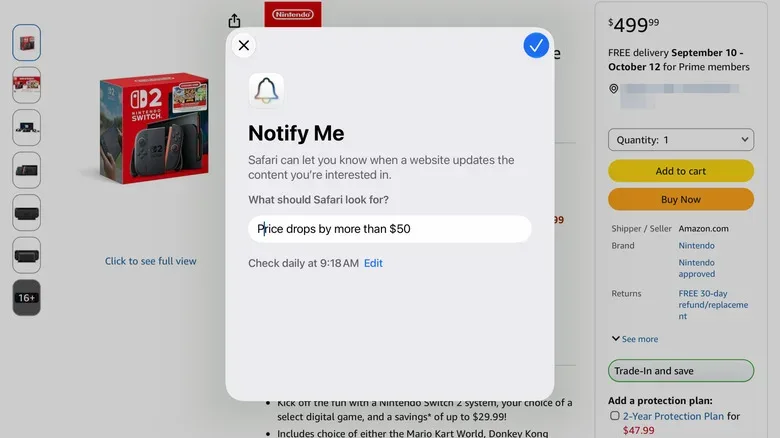
The clearest applications are product prices and stock status. A user can set a condition such as a product dropping below a chosen amount, or a particular color and configuration returning to stock. Safari then checks that same page at an interval selected by the user.
That creates a potentially handy middle ground between manually refreshing pages and signing up for every retailer’s marketing email list. Rather than merely bookmarking a product, the user gives Safari an actual condition to watch. Instead of being notified about every general sale, the alert can be tied to the specific listing and the specific detail that matters.
Examples of requests include:
- Alert me if this item falls below $100.
- Let me know when the gray and blue version is available again.
- Tell me if this RAM kit goes below $500.
- Notify me when this ticket page shows availability.
- Alert me when this page adds new tour dates.
The wording does not need to be framed as technical rule-building. Notify Me accepts a simple description of the desired change. That matters because stock pages can be messy: products have variant selectors, shifting listing layouts and sometimes a mix of marketplace sellers. Apple’s approach is meant to let the user state the result they want without separately configuring a conventional tracking service.
There is a useful distinction to keep in mind, though. Notify Me watches the page selected by the user. It is not described as a tool that surveys every seller on the internet for the cheapest copy of a game, card or collectible. If a price matters on three different stores or listings, monitoring each relevant page separately is the sensible approach. It also means the alert is only as helpful as the page being watched and the condition being described.
Related coverage includes How to Use Safari Notify Me for Price Drops and Restocks.
How to create a Notify Me alert in Safari
The setup process begins on the webpage you want Safari to follow. On iPhone, iPad or Mac, open the page in Safari and find the button with three horizontal lines on the left side of the address bar. Select Notify Me. Safari will open a prompt asking what change it should monitor.
- Open the desired product, ticket, news or event page in Safari.
- Select the three-horizontal-lines control at the left of the address bar.
- Choose Notify Me.
- Describe the change you want Safari to watch for.
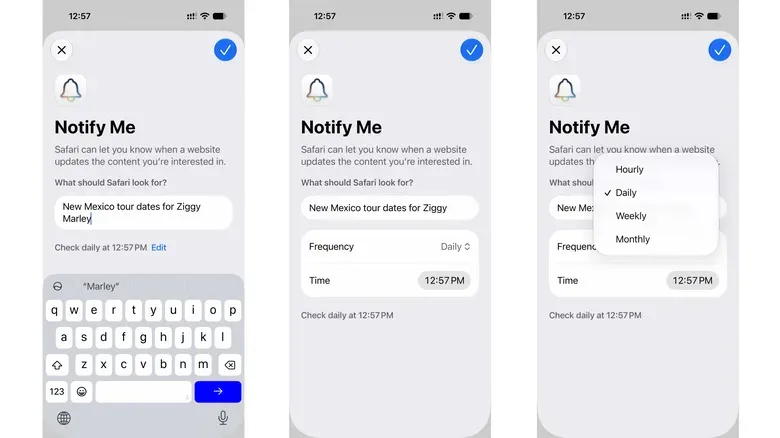
- Select the blue edit control to choose a checking schedule.
- Choose whether Safari should check hourly, daily, weekly or monthly.
- Confirm the alert with the blue checkmark in the upper-right area of the interface.
The scheduling step is more important than it may first appear. A fast-moving restock, a brief ticket release or a high-demand item calls for a more frequent interval. A slower target, such as a page awaiting an announcement or a product that is unlikely to move quickly, may not justify an hourly check. The choice gives users a way to match the cadence of monitoring to the urgency of the hunt.
Safari may ask for notification permission if notifications have not already been enabled for the browser. That permission is essential: a monitoring tool that sees the change but cannot get your attention is basically a digital lookout who declines to use the radio.
Choose the device where the alert will actually help
Notify Me runs on the device rather than in the cloud. That has a practical consequence: set up an alert on the Apple device where you are most likely to notice and act on it. For many people, that will be an iPhone because it travels with them. Someone who does most shopping or research from a desk may prefer the Mac. An iPad can make sense if it is the device routinely used for browsing listings at home.
The device-based design also means users should not assume that creating an alert on one Apple device automatically covers all the others. If the objective is to catch a time-sensitive stock return, creating the alert where notifications are most reliably seen is the cautious move.
This is especially relevant for hobby purchases. A desirable item can return to stock while someone is away from the desk where they initially found it. An alert landing on a phone may be more actionable than one that waits on a computer at home. On the other hand, a large purchase may be better monitored from the device where a person is prepared to compare details carefully rather than rush into checkout.
Beyond price tracking: tickets, dates and changing pages
Apple positions Notify Me as a broader webpage-monitoring tool. Price alerts and inventory changes are the most obvious use cases, but the same system can be used for concert ticket availability, tour schedules and news coverage on a topic. The common thread is not the product category. It is the fact that a page contains information that may change and that the user wants to know when a particular update appears.
For collectors and gamers, that could make it useful around convention information, product pages, event schedules or other listings that change over time. The feature does not replace careful reading of a page, verification of a seller or a budget. It is an alert mechanism, not a guarantee that a deal is good, that stock will last, or that the page has updated in the exact way a user hoped. Still, being told that a requested condition has appeared is considerably more useful than trying to remember which of 27 tabs contained the promising listing.
It also fits into a broader approach to keeping a collection organized and secure. Tracking a deal is one task; keeping the technology around a collection in good order is another. For example, anyone cycling older screens out of a setup may want to review our guide on responsibly rehoming or recycling an old TV without leaving personal data behind.
Editing or deleting Safari monitoring alerts
A Notify Me alert is not permanent once created. To change it or remove it, return to the page being monitored and select Edit in the banner at the top. That is the direct route when you already have the page open and want to adjust the request or its schedule.
Safari also provides a settings route. On the device, go to Settings > Safari, then scroll toward the bottom of the Safari settings screen to find Notify Me. From there, users can manage their existing alerts.
It is worth doing occasional cleanup. A restock alert that has already paid off, a price target that is no longer realistic, or an event page that has passed does not need to remain in the rotation. Removing outdated monitors should make the alerts that remain easier to recognize when they arrive.
A small feature with practical collecting value
Safari Notify Me will not settle the eternal questions of whether an item is truly rare, whether a listing is complete, or whether a bargain will remain a bargain after shipping. What it can do is reduce the repetitive checking involved in following a page. In a hobby full of limited runs, restocks, price swings and rapidly changing availability, that is a welcome bit of automation.
Its main strengths are its placement and simplicity. The feature is built directly into Safari, works across Apple’s current iPhone, iPad and Mac operating systems, allows plain-language requests and offers hourly through monthly check intervals. Used thoughtfully, it can turn a passive bookmark into an active watchpoint—without adding another extension to the browser or another shopping app to the home screen.