A keyboard cable is not a relic of the pre-wireless age. For PC players, it is still the simplest route to a dependable connection: press a key, send the input, no battery to charge and no radio conditions to negotiate. That does not mean every wireless keyboard is unfit for games, nor that every player needs to fear Bluetooth. It means the connection method can matter, especially when a game turns a narrow timing window into a missed ability, a lost duel or an unfortunate fall off a ledge.
The practical hierarchy is straightforward. Wired is the most consistently low-latency option. A keyboard using a dedicated 2.4GHz USB receiver can get very close and is often entirely suitable for gaming. Bluetooth offers the broadest convenience, including easy pairing with several kinds of devices, but is the connection with the greatest potential latency and the least appealing fit for games that reward instant reactions.
That distinction is useful because “wireless” is not one technical category. A Bluetooth keyboard and a keyboard communicating with its own USB dongle may both leave a desk cable-free, yet they do not necessarily behave alike. Players shopping for a compact setup, changing their desk layout or simply trying to understand why high-end gaming boards are so often wired should look beyond the word wireless on a product box.
Latency is the delay between press and result
Latency is the time it takes for an input to travel from the keyboard to the computer. It is normally expressed in milliseconds, where one millisecond is one thousandth of a second. Keyboard connection latency is only one component of the delay a player experiences: the game also has to process the input and display the result. But it is the part directly affected by choosing a cable, Bluetooth or a 2.4GHz receiver.
For ordinary work, a small delay is rarely consequential. Writing, email and spreadsheets do not usually demand a split-second response, so Bluetooth’s convenience can be a sensible trade. The same is broadly true for games where input timing is not the central challenge, including turn-based titles and many RPG situations. A player does not need to replace a perfectly useful Bluetooth keyboard merely because wired is faster on paper.
Competitive and action-oriented games change the calculation. In a shooter, a late movement or action input can turn a winning opportunity into a defeat. In any game built around precise reactions, an extra and inconsistent delay is another variable between the player and the result. That is why keyboards designed around performance frequently omit Bluetooth altogether, even when it would be handy for desktop use.
The numbers illustrate the gap. Bluetooth keyboard latency can be as low as about 8 milliseconds, which is tiny next to a commonly cited human reaction range of roughly 150 to 250 milliseconds. However, Bluetooth delay can also rise past 200 milliseconds. At that point, the lag is no longer a theoretical specification-sheet concern: it can make many games difficult or effectively unplayable. The important issue is not just that Bluetooth can be slower, but that its results can vary dramatically.
A wired keyboard connection is generally around 0.3 to 1 millisecond. A well-implemented 2.4GHz connection can often reach roughly 0.5 to 1 millisecond. Those figures do not promise that every input reaches a game at exactly that speed, and they do not replace the rest of a system’s latency chain. They do show why a good 2.4GHz setup is often viewed as a practical compromise, while a cable remains the baseline for consistency.
Related coverage includes Wired, Bluetooth or 2.4GHz: Which Keyboard Connection Performs Best?.
Keyboard performance is more than the connection
It is tempting to call a keyboard fast or slow based entirely on whether it has a wire. In reality, the connection is one part of a larger input path. A board’s switches, internal processing and reporting behavior also affect when a press becomes an input the PC can use.
Actuation speed
Actuation is the point in a keypress at which a keyboard recognizes an input. Actuation speed describes how quickly that activation occurs as a key is pressed. Some modern boards use Hall effect switches, which can offer customizable actuation points. The relevance is simple: a fast connection cannot recover time already spent waiting for a key to register. A player concerned with responsiveness should consider actuation alongside the connection choice rather than treating either specification as a complete answer.
Debounce behavior
Debounce is the filtering a keyboard uses to prevent unintended repeat inputs or electrical “chatter” from a keypress. It is a necessary bit of housekeeping, but its configuration contributes to total input behavior. A keyboard has to distinguish a deliberate press from an accidental rapid repeat without delaying intended inputs more than necessary. As with actuation, a cable alone does not tell the whole story.
Polling rate
Polling rate refers to how frequently the keyboard reports its state to the host computer. Higher polling can reduce the chance that reporting becomes a bottleneck, particularly when the rest of the keyboard is designed for fast input. Midrange and performance-focused keyboards increasingly address factors such as customizable actuation and polling rate. Bluetooth’s connection limitations, however, remain separate from those improvements. A technically sophisticated Bluetooth keyboard is still operating through a protocol with a potentially much wider latency range than a cable or a dedicated receiver.
This is also a useful warning against oversimplified purchasing logic. A gamer does not need the most extreme-looking latency claim for every genre, but should avoid assuming that one impressive switch feature cancels out a less suitable connection mode. The right choice depends on the game, the environment and how much consistency matters to the player.
Why Bluetooth remains useful
Bluetooth has clear strengths. It is widely available across modern devices, avoids occupying a USB port with a receiver, and makes a keyboard easy to pair with a laptop, tablet or other compatible hardware. For someone who values portability, a clean workspace or quick switching among devices, those benefits can outweigh a performance trade-off that they will never notice while typing.
It is also worth separating a sensible convenience choice from a bad gaming choice. Bluetooth can be adequate for slower-paced games and noncompetitive play. The problem appears when somebody expects it to be a no-compromise replacement for wired input in a reaction-sensitive setting. That expectation is hard to support when Bluetooth can range from negligible delay to more than 200 milliseconds of latency.
Musicians using a keyboard as input for a digital audio workstation may similarly prefer a lower-latency path, because precise timing matters there as well. But no universal rule says Bluetooth is unacceptable for every task. Its place is convenience-first computing. For a gaming desk that also serves as a work and travel setup, Bluetooth can be a useful extra mode, even if it is not the mode to select for a competitive session.
2.4GHz is the wireless option gamers should inspect
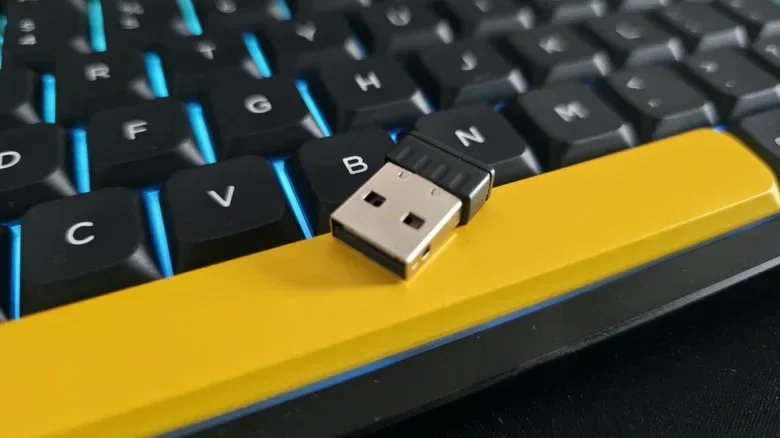
When a keyboard includes a small USB receiver, it is typically using a 2.4GHz wireless connection. This is not interchangeable with Bluetooth simply because Bluetooth also uses the 2.4GHz radio band. “2.4GHz” describes a part of the radio spectrum, not one single shared peripheral standard. Manufacturers implement their own receiver systems, so a Logitech keyboard cannot simply be paired with a Keychron 2.4GHz dongle.
That dedicated arrangement lets a manufacturer focus the connection on the needs of its own peripheral rather than the broad interoperability expected of Bluetooth. The result can be higher bandwidth and much lower latency. At its best, the gap between 2.4GHz and wired is small enough that 2.4GHz is often appropriate for gaming while preserving the freedom to position a keyboard without a cable.
For players who want wireless without willingly accepting Bluetooth’s worst-case delay, 2.4GHz is therefore the option worth testing first. It may be particularly attractive where a cable would be awkward, such as a living-room PC arrangement or a flexible desktop where the keyboard moves regularly. The decision is not really “wireless versus gaming performance” in absolute terms. It is whether that particular keyboard’s dedicated wireless connection stays reliable in that particular setup.
That matters for the broader PC-build conversation, too. As component availability and pricing pressures shape upgrade decisions, peripherals are one area where buyers can make targeted changes rather than treating every performance concern as a reason for a full system overhaul. For more on the larger pressures affecting PC hardware plans, see this look at AI demand, memory prices and PC gamers.
The caveat: fast wireless can still be disrupted
2.4GHz is not a magic shield against real-world signal problems. Unlike a wired keyboard, it depends on a clear and stable radio link. Interference can introduce dropouts, lost keystrokes or extra latency, which undermines the very advantage a player wanted from the dedicated receiver.
USB placement is one potential complication. USB 3.0 ports, often recognizable by their blue inserts, can generate noise capable of interfering with a nearby wireless signal. A crowded radio environment, such as a busy café or airport, can create additional interference. The receiver’s location can matter as well: some accessories work best when the dongle has a direct line of sight to the keyboard. A desktop tower with its USB ports tucked behind the case can therefore be less favorable than a receiver placed closer to the keyboard.
Even laptop placement may matter in the worst cases. Putting the receiver on one side of a laptop while the keyboard’s radio receiver is located on the other can sharply hurt performance. None of this means every 2.4GHz keyboard will suffer trouble. It means wireless performance is partly environmental, whereas a cable removes those radio-specific variables.
A practical choice for different players
- Choose wired if consistent low latency is the priority, you play reaction-heavy competitive games, or your desk has a noisy wireless environment.
- Choose 2.4GHz if you want cable-free flexibility but still plan to game seriously. Use the keyboard’s own receiver and pay attention to dongle placement, nearby USB 3.0 ports and possible signal interference.
- Choose Bluetooth if portability, broad device compatibility and convenience matter more than the lowest possible input delay. It remains suitable for work and many less time-critical games.
For a player deciding which mode to use on a multi-mode keyboard, the simplest routine is equally clear: use wired for the most demanding play, try 2.4GHz when wireless freedom is valuable, and reserve Bluetooth for convenience-led use. That is not an indictment of Bluetooth; it is choosing a tool for what it is designed to do.
The cable has one final advantage that is difficult to quantify in a benchmark: predictability. It does not care whether a room is full of other radio devices, whether a receiver is hidden behind a PC, or whether a USB port is producing interference. Wireless keyboards have earned their place, and 2.4GHz makes a compelling gaming case when conditions are good. But for the player who wants the most robust performance in every circumstance, the old wire remains remarkably hard to beat.