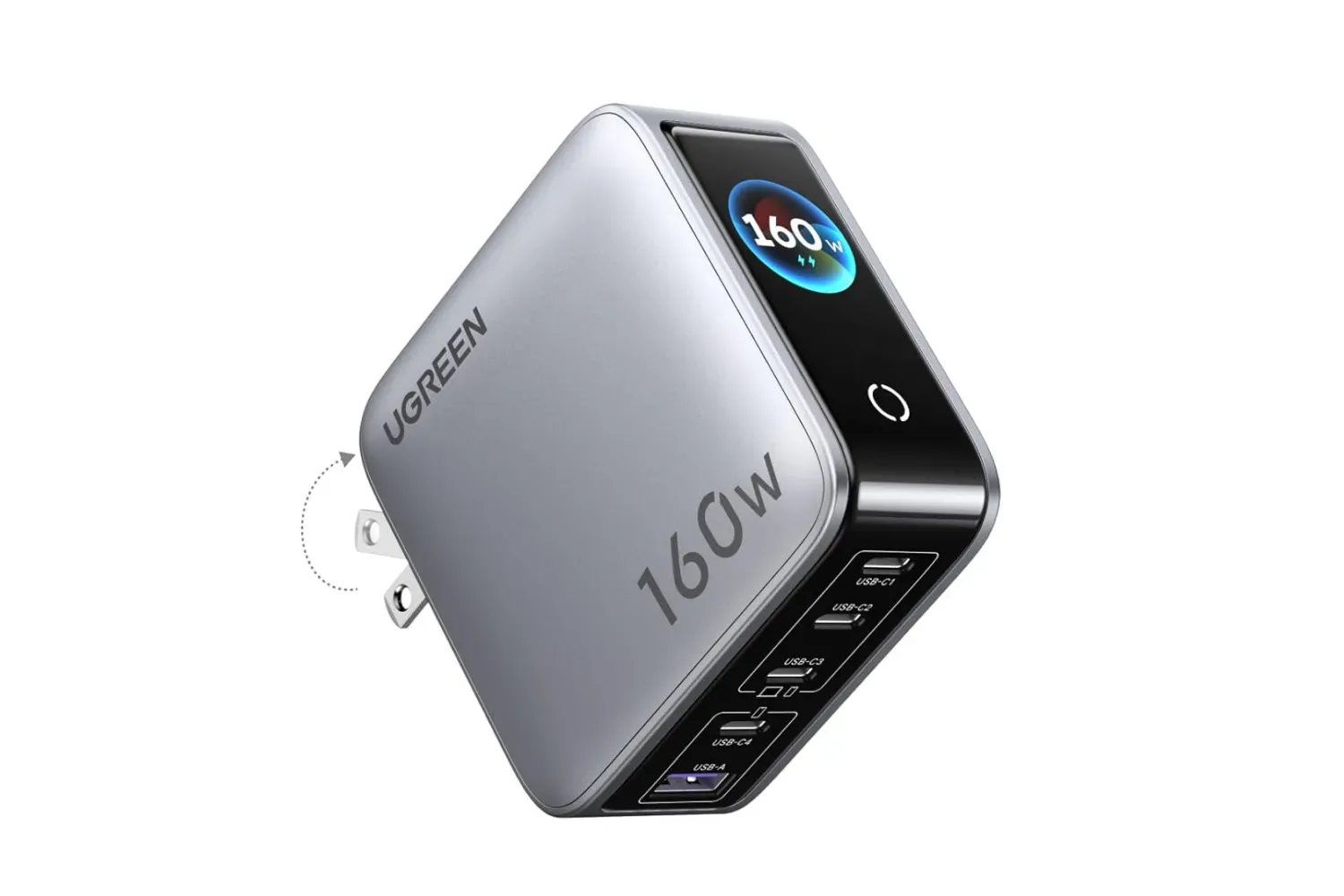
A crowded gaming desk has a predictable weak point: power. A laptop, phone, earbuds, tablet and other accessories can quickly turn a limited number of wall sockets into a daily rotation schedule. UGREEN’s 160W Nexode Pro charger is currently listed for $60, a 33% reduction from its stated $90 price, and its main pitch is straightforward: consolidate several charging jobs into one compact block.
The charger has five ports in total: four USB-C connections and one USB-A connection. That makes it more relevant to a setup with current USB-C devices while retaining a USB-A port for an older cable or accessory. The listed deal is described as limited-time, so the $60 price should be checked before purchasing rather than treated as a permanent price.
What the 160W rating means in practice
“160W” is the charger’s total power capacity, not a promise that every connected device will receive 160 watts at once. A watt, abbreviated as W, is a measure of electrical power. In charging terms, a higher figure can support power-hungry hardware when the charger, cable and device all support the relevant charging level.
The important detail for this model is that its available power is shared when multiple ports are active. UGREEN says the first and second USB-C ports, C1 and C2, can each provide up to 140W when used individually. USB-C3 is rated for up to 100W, while USB-C4 reaches up to 30W. Once several devices are connected, the unit distributes its total output between them.
That makes port choice matter. C1 and C2 are the sensible places to begin with a larger laptop or another device that needs more power. Lower-demand hardware, such as earbuds, a phone or smaller accessories, can then occupy the remaining ports. It is a practical arrangement for someone who wants a single charging point rather than several separate adapters competing for outlet space.
UGREEN gives one manufacturer performance example: a 16-inch MacBook Pro can charge from zero to 56% in 30 minutes through C1 or C2 at the stated maximum standalone output. That is a useful indication of the intended performance tier, but it is not a universal charging result. The actual rate for any device depends on what that device accepts and whether other equipment is also drawing power from the charger.
Five ports are useful, but they are not five independent chargers
The most useful way to view the Nexode Pro is as a power-sharing hub. Its advantage is flexibility: users can charge several compatible devices from one wall outlet, then change the allocation as their priorities change. Its constraint is equally clear: plugging in five devices means sharing the 160W total rather than preserving every port’s highest individual ceiling.
For a gaming-oriented desk, that could mean putting a Windows laptop on one of the higher-output USB-C ports, then using the other connections for a phone, tablet, earbuds or other peripherals. It can also help clean up a travel or living-room charging station where several personal devices need power at the same time.
The charger is described as suitable for iOS and Android phones as well as Windows laptops. It is also presented as capable of powering a gaming console, although the specific charging behavior of any console was not detailed. Buyers should therefore verify their particular device’s power requirements and charging support instead of assuming a high total wattage will enable every possible use case.
That same caution applies to cables. The charger may offer a high-output port, but the final result involves the connected hardware and cable as well. In short, a 140W-capable port is valuable headroom for supported equipment; it is not a blanket guarantee of 140W charging for whatever gets plugged into it.
A display adds visibility to the charging station
One distinguishing feature is the integrated smart display. UGREEN says it can show the overall temperature, total power output and output for individual ports. That is more information than a conventional wall adapter provides, and it could be helpful when several devices are attached and a user wants to understand how the charger is allocating its capacity.
The display does not change the charger’s power limits, but it does make its behavior more visible. For a shared charger, that is meaningful: the difference between a lightly used block and one feeding a laptop plus multiple accessories is exactly the sort of thing that is otherwise easy to overlook.
The Nexode Pro also has two stated operating modes: Fast Charging and Smart Cooling. Fast Charging prioritizes getting more power to devices in less time. Smart Cooling instead puts an emphasis on lower temperature, which UGREEN positions as better suited to overnight charging.
Those labels point to a simple choice of priorities. Fast Charging is for situations where replenishing a device quickly is more important. Smart Cooling is aimed at the longer, less time-sensitive charge window. Neither mode removes the need to consider how many devices are connected, but they give the owner a way to match the charger’s behavior to a particular routine.
Who this deal best fits
This is most compelling for someone already managing several USB-powered devices near the same outlet. A laptop user who also keeps a phone, tablet and earbuds nearby can replace a collection of individual adapters with one five-port unit. The mix of four USB-C ports and one USB-A port is especially useful in a transition period where not every cable has moved to USB-C.
It could also pair neatly with a portable-screen work or game setup, where display connectivity and power often need to be kept organized. For example, a portable gaming monitor with USB-C and Mini HDMI connectivity is the kind of adjacent desk gear that can increase the number of devices competing for convenient charging space.
The foldable plug is another practical touch. It is designed to make the adapter easier to store and carry, which broadens its appeal beyond a permanent desk fixture. A multi-port charger is inherently most valuable when it replaces several individual blocks, and a folding plug makes that consolidation easier to pack.
What to check before buying
- Count the devices that need charging at once. The five-port layout is the core value here. It makes less sense if only one device is normally charged at a time.
- Identify the highest-demand device. Put a compatible laptop or other major draw on C1 or C2 when it needs priority, since those ports offer the highest stated standalone output.
- Remember the shared 160W budget. Maximum per-port figures apply when those ports are used alone; output is distributed when multiple ports are occupied.
- Check device and cable support. Compatibility and charging speed depend on the complete chain, not solely on the charger's advertised maximum.
- Choose a mode for the situation. Fast Charging is intended for speed, while Smart Cooling is positioned for keeping temperature lower during overnight charging.
At $60, the UGREEN 160W Nexode Pro’s case is less about charging one device at an extreme rate and more about reducing adapter clutter without giving up meaningful laptop capacity. Its combination of five connections, a visible output readout, port-specific power tiers and foldable plug makes it a strong fit for people whose desk, bag or shared outlet has become a charging bottleneck. The discount takes $30 off the stated regular price, but as with any time-limited listing, availability and pricing can change.
Shop the products
Check current price, model and availability at the retailer.