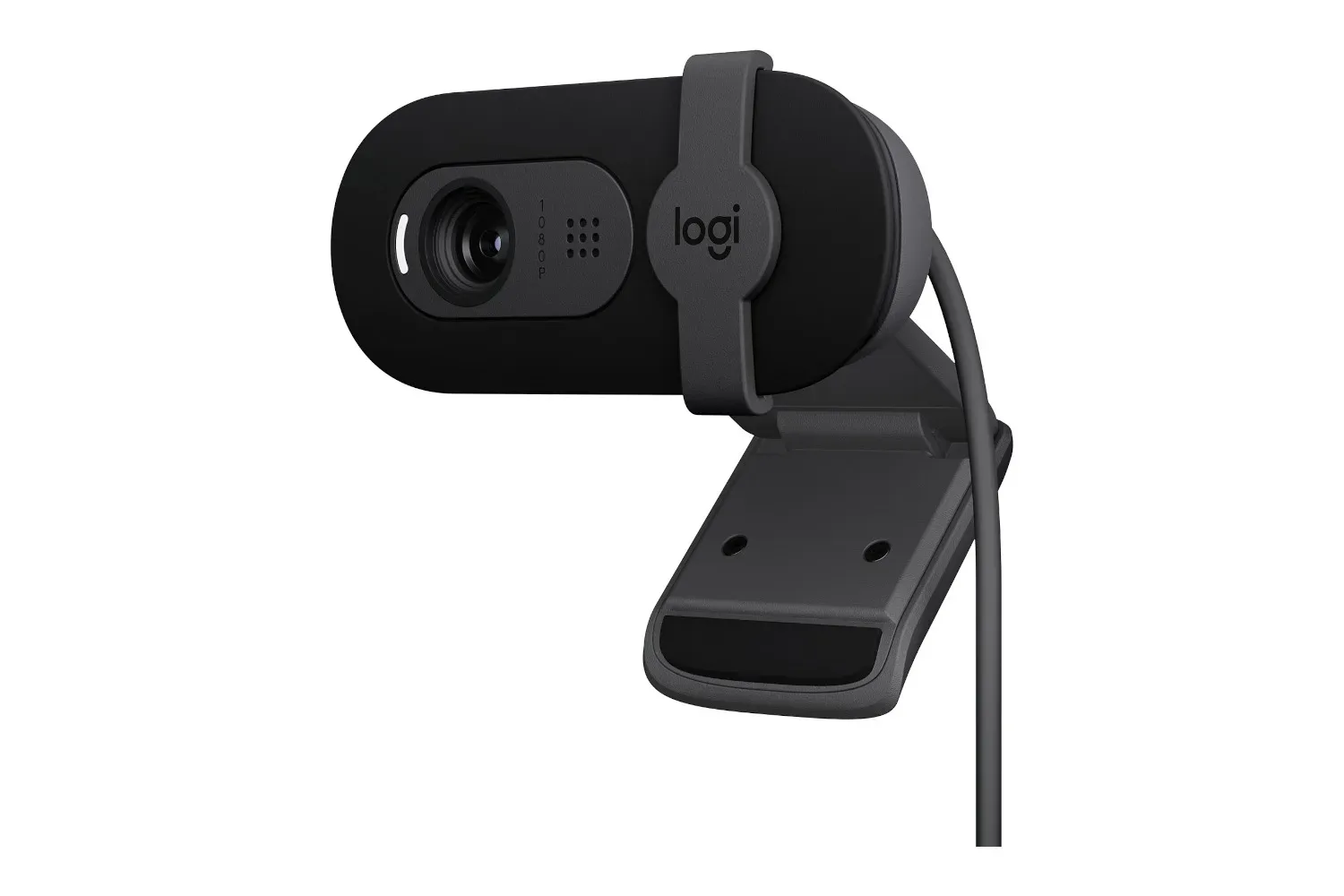
The Logitech Brio 101 Full HD webcam is currently listed at $25, versus a stated usual price of $40. That is a $15 reduction, or roughly 38%, for a compact USB webcam whose headline features are 1080p video, automatic light correction, a physical privacy shutter and plug-and-play setup.
It is an unglamorous sort of upgrade, which is exactly why it can be useful. A webcam sits at the center of video calls, remote catch-ups, streams and quick recordings, yet it is often the bit of a desk setup that gets left behind until an integrated laptop camera produces another grainy, badly lit close-up. At $25, the Brio 101 looks aimed at people who want a dedicated camera without making their monitor resemble a tiny television studio.
The listing describes this as a clearance deal, so prospective buyers should treat the price as time-sensitive rather than a permanent new baseline. Retail listings can change quickly, and the supplied information does not establish how long stock or the $25 price will remain available.
What the Logitech Brio 101 offers
The central specification is 1080p resolution. Also called Full HD, 1080p means a picture made up of 1,920 pixels across and 1,080 pixels down. In everyday use, that gives the camera more detail than a lower-resolution feed, helping a face and nearby objects appear clearer to the people on the other side of a call.
Resolution alone does not settle webcam quality, of course. A webcam can have plenty of pixels and still look strange when a desk is lit by a window on one side, an overhead light on the other, and the glow of a monitor delivering a third, entirely uninvited opinion. The Brio 101 also includes auto-light correction, intended to adjust the image when lighting conditions are less than ideal.
In practical terms, automatic light correction is the camera attempting to keep a subject visible and reasonably balanced as room lighting changes. It is not a promise of professional lighting, and the available details do not specify how the feature operates or its limits. But it is a meaningful convenience feature for a simple home workstation, particularly when the alternative is fiddling with settings before every meeting.
A physical answer to webcam anxiety
The other immediately practical feature is the Brio 101’s privacy shutter. This is a small physical cover that slides over the lens. When closed, it blocks the camera’s view regardless of whether a program has been left open or a meeting app has decided it would like one more surprise appearance.
That matters because a privacy shutter handles a different concern from simply closing an application. Software controls are still useful, but a physical cover is visible and easy to verify at a glance. It is a modest feature, yet it offers an uncomplicated piece of reassurance: closed shutter, no camera image. For anyone whose workday is a chain of calls, that clarity may be more valuable than another menu setting.
Related coverage includes Logitech Brio 101 Webcam Drops to $25 in a New Clearance Deal.
Who this deal makes sense for
The Brio 101 is best understood as a basic, dedicated camera for people who need a functional upgrade rather than a feature-heavy production device. The available details point to a few obvious uses:
- Remote work: A monitor-mounted 1080p camera can make regular video meetings easier than relying on a laptop’s built-in positioning.
- School and family calls: Plug-and-play simplicity is useful when the goal is to get on a call without turning setup into an IT support quest.
- Beginning streamers and creators: Full HD video and automatic light correction offer a reasonable starting point for someone testing whether they enjoy making video content.
- Desktop users without an integrated camera: A separate webcam covers a basic gap in many PC monitor setups.
The phrase plug and play is worth unpacking here. It describes hardware designed to work after it is connected, without requiring a complicated installation process. The supplied product details say the Brio 101 can be plugged in, placed on top of a monitor and used. That is especially appealing for a shared household PC or a machine that only occasionally needs a camera.
Monitor placement also has a practical benefit. Putting a webcam near the top edge of a display generally positions it closer to eye level than a laptop camera sitting below the screen. That can make a call feel more natural, because a user can look toward the camera without dramatically changing where they are looking. The exact result will depend on desk height, screen size and how the webcam is positioned, but it is one reason a dedicated camera can be useful even when a laptop already has one.
What 1080p does—and does not—tell you
It is tempting to treat 1080p as the entire buying decision. It is an important specification, but it is only one part of a webcam picture. Resolution indicates the amount of image detail a camera can capture; it does not, by itself, tell a buyer everything about colour, lighting, motion or how flattering a camera will be in a particular room.
That is why the automatic light-correction feature is meaningful alongside the 1080p label. A clear Full HD image is more useful when a subject is adequately visible. For calls, the goal is rarely cinematic perfection. Usually, it is simply to look clear, reasonably natural and present enough that nobody spends the first five minutes asking whether the video is frozen.
Buyers should also keep their own needs in view. The supplied information positions the Brio 101 as adequate for meetings, streaming and content-creation beginnings, but it does not provide details about advanced capture modes, controls or higher-end video capabilities. Anyone whose work requires unusually high image quality should avoid assuming that a $25 clearance webcam will perform like specialist equipment. The value proposition here is straightforward: a low-cost route to Full HD video and useful everyday conveniences.
How it fits into a desk setup
A webcam is one part of the broader desktop equation. Its placement can compete for space with speakers, lights and the monitor itself, while its view can be affected by how the desk faces a window. The Brio 101’s stated monitor-top mounting approach keeps the camera from demanding extra room on the desk surface, which is helpful in compact setups.
That is also relevant for people building a gaming and call-friendly workstation around one screen. A display’s shape, position and available space can influence how comfortably a webcam sits above it; our look at curved gaming monitors and desk readiness explores why the rest of a setup matters as much as a single hardware specification.
For the Brio 101 specifically, the sensible setup checklist is short:
- Place it securely on top of the monitor.
- Connect it to the computer as directed.
- Open the app or calling service that will use the camera.
- Check the framing and room light before an important call.
- Close the privacy shutter when the camera is not wanted.
None of those steps turns a webcam into a professional production rig, nor is that the point. The appeal is removing friction from a routine task. For a work-from-home call, a gaming group chat or an introductory livestream, being able to connect a camera and get moving is often the feature that matters.
The value question at $25
At its stated usual $40 price, the Logitech Brio 101 is already framed as an affordable webcam. At $25, it becomes more clearly a budget purchase for someone who has delayed replacing an older camera or needs one for a new desktop setup. The $15 saving is substantial relative to the usual price, not merely a symbolic few dollars shaved off a peripheral.
The key is to match expectations to the information available. Buyers receive a Full HD webcam, auto-light correction, a privacy shutter and a simple installation proposition. They should not fill in unlisted features from imagination, particularly if they need specialized streaming tools or an unusually high level of image quality.
Still, for standard calls and entry-level video use, the listed combination is sensible. A physical shutter gives the camera a useful privacy benefit; 1080p makes it suited to modern Full HD video communication; and auto-light correction addresses one of the most common obstacles to looking presentable at a desk. The Logitech Brio 101’s current $25 listing is therefore most compelling for practical buyers: people who want their camera to work, look clearer than a bare-minimum setup and then politely disappear behind a shutter when the call is over.
Shop the products
Check current price, model and availability at the retailer.