There are few things more quietly irritating than removing a Mac application, only to suspect its assorted leftovers are still hiding in the corners of the drive like a side quest that refuses to clear. AppZapper, the long-running utility built around clearing apps and their related files, has returned in a redesigned release called AppZapper 3000.
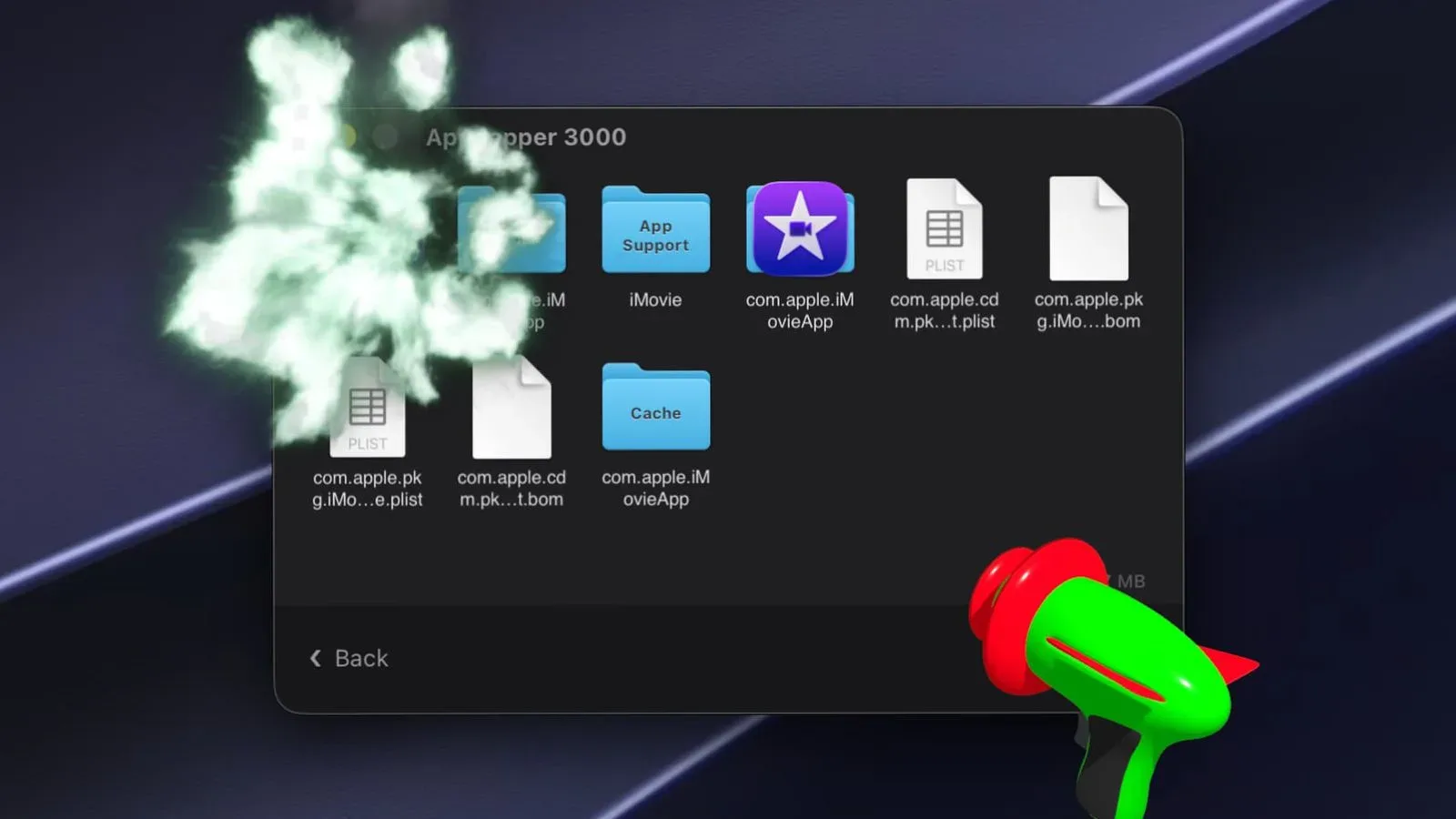
The new version keeps the central idea pleasingly straightforward: drop an application into AppZapper, review the associated files it finds, and use the Zap All control to remove the selected items. The process is accompanied by a laser-gun animation and sound, because deleting an outdated utility can apparently be treated with the gravity of a tiny space battle. Frankly, that is a more memorable exit than dragging an icon to Trash and hoping its forgotten support files have received the message.
AppZapper 3000 arrives 20 years after AppZapper first launched in 2006. Developer Austin Sarner describes the refreshed app as better suited to modern macOS security requirements and more capable of locating files connected to an application. The timing makes this less of a random numerical sequel and more of an anniversary makeover for a utility that has been helping users hunt down app remnants since the era when a Mac desktop might have contained iTunes, iChat, and an alarming number of Dashboard widgets.
What AppZapper 3000 is designed to do
Deleting an app on macOS can be simple, but an app itself is not always the only thing it leaves behind. Preferences, caches, support folders, saved data, or other related items may reside elsewhere on the system. AppZapper 3000 is intended to identify those associated files alongside the main application so the user can remove them in one pass.
Its workflow is built around drag and drop. A user places an application into AppZapper 3000, the utility searches for relevant files, and the user can then activate Zap All to delete the app and the files AppZapper has gathered for removal. The stated goal is speed: the program locates and deletes an app’s files in seconds.
That does not make the software a substitute for judgment. “Related” can be a useful category, but it is also one worth examining before permanent cleanup. Preferences and support files might contain settings, projects, offline content, or locally stored information that someone would rather preserve. A utility that can remove more thoroughly is useful precisely because the user should pause and confirm what is on the list.
Full Disk Access is part of the deal
AppZapper 3000 requires Full Disk Access in order to locate files on a Mac. That permission is central to how the app performs its search: if it is expected to find files spread across the system, it needs the access macOS otherwise restricts.
For prospective users, this is the key practical consideration. Full Disk Access is a significant macOS permission, not a decorative checkbox that exists solely to make setup screens longer. It is worth understanding why it is being requested and granting it only when comfortable with the app and its intended function. In this case, the stated rationale is direct: AppZapper 3000 needs broad visibility to identify an application’s associated files.
That consideration matters especially on machines used for game development, video production, coding, emulation, modding, or creative projects. Those systems can accumulate a spectacular amount of data in support directories and libraries over time. Clearing software no longer needed can be helpful, but it is sensible to check that an item marked for deletion is actually tied to the app being retired rather than something still in use elsewhere.
A tiny cleanup ritual for Mac game libraries
Although AppZapper 3000 is not a game launcher or a storage-management service, its purpose may resonate with PC and Mac players who keep sprawling collections of games, utilities, controllers tools, launchers, mods, and demos. A gaming Mac can become a museum of “I might need this someday,” and every retired beta client or abandoned helper app is another exhibit with its own possible leftovers.
For that audience, the utility’s appeal is not that it promises a magical cure for every storage problem. Large games often keep valuable saves, screenshots, mods, and personal configuration files that deserve special attention. Instead, AppZapper 3000 offers a focused way to deal with the application-removal part of maintenance. A user can decide what they no longer want, inspect the files found by the utility, and clear selected material without turning routine housekeeping into an expedition through multiple hidden Library folders.
Anyone maintaining older games or specialized software should still make backups before a major cleanup. This is particularly true for projects with irreplaceable saves or manually installed modifications. The basics of preserving digital material are often less glamorous than a Zap All button, but they matter. For retro-minded players managing limited storage, the same habit applies to compact hardware: our guide to protecting Dreamcast VMU saves and planning its 200 blocks is a reminder that space management has always come with consequences.
Design changes, themes, and the business end of the laser
The 3000 edition adds a new design and offers four themes. Cosmetic options do not change how file detection works, of course, but cleanup tools are usually opened during a moment of organizational resolve. A little personality can make a maintenance chore feel less like tax paperwork and more like sending an obsolete app through an appropriately theatrical sci-fi airlock.
The visual flair remains secondary to the actual removal process. The core interaction is still intentionally approachable: drag an app in, let the utility gather associated files, select Zap All, and let the laser effect mark the occasion. It is a familiar formula, now presented in an updated form built with present-day macOS permissions in mind.
The name change from AppZapper to AppZapper 3000 also signals the anniversary refresh without disguising what the program is for. This is not a reinvention into a giant system optimizer with dashboards, subscriptions, and vague meters claiming to improve everything. Based on the available details, it remains a dedicated uninstaller designed to locate an app and its related files.
Compatibility, trial option, and license pricing
AppZapper 3000 requires macOS 15 or later. That requirement is important for owners of older Macs or users deliberately holding back on operating-system updates. The app is not presented as a solution for every historical version of macOS; prospective buyers should confirm their machine meets the stated OS requirement before making it part of a cleanup plan.
The software can be downloaded for free to try before purchase. A single-user license costs $18. A $29 family pack supports use on up to five Macs. Those options make the tool comparatively easy to evaluate for someone who only occasionally needs to remove software, as well as for a household with several compatible Macs that could benefit from the same app-removal workflow.
A promotional offer is also available through September 21: entering the code MACRUMORS at checkout reduces the price by 20 percent. As with any time-limited promotion, users should verify the discount still applies before completing a purchase, particularly if they are reading about AppZapper 3000 close to or after that date.
An old utility with a modern macOS assignment
Twenty years is an unusually long run for a narrowly focused utility. AppZapper’s continued premise is understandable, though. Software installation is generally easy; software removal can be messier, particularly once preferences and supporting files are involved. AppZapper 3000’s redesign, updated file-finding approach, Full Disk Access requirement, theme selection, and free trial all revolve around making that job more manageable on macOS 15 and later.
Its appeal will come down to whether a Mac owner wants a dedicated tool for app cleanup and is comfortable granting the permission needed for a deeper search. For those who are, AppZapper 3000 offers a simple proposition: identify the app, check the related files, and press the button with the laser. Sometimes a small act of digital tidying deserves a little arcade drama.