Google is adding a more direct way for people to inspect the personal profile Gemini builds from their conversations. The new Memory summary, found in Gemini’s settings for eligible accounts, presents the details the AI has retained in a categorized list and allows users to revise or remove individual entries.
That matters because personalization is doing more than changing a chatbot’s tone. Gemini can use remembered preferences and facts to shape later answers. A user who has told the assistant they cannot consume lactose, for example, may receive recommendations that avoid milk-based products. That can be genuinely convenient, but it also illustrates why a visible, editable record is important: useful context and sensitive context can be the very same information.
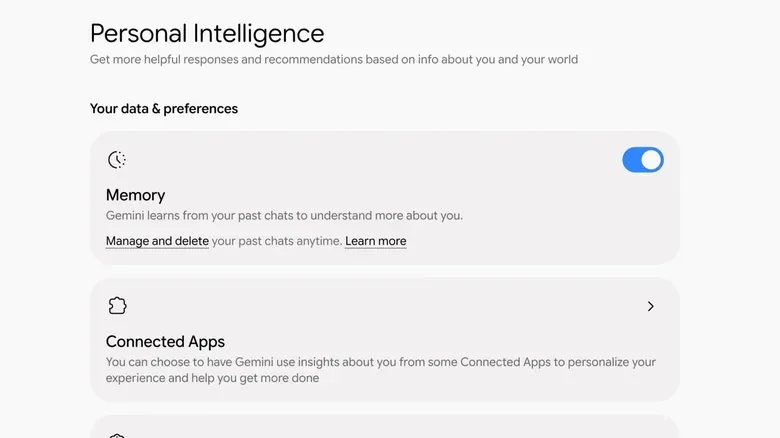
The feature is currently described as available to people in the US who have a paid Google AI plan and have memory enabled. It sits within Gemini’s broader Personal Intelligence controls, which can draw context from Google services including Gmail, YouTube and Search as well as information raised in chats.
What “memory” means in Gemini
It is helpful to separate two connected settings that can otherwise sound like one feature. The first is Keep Activity. This determines whether Gemini conversations are saved to, and associated with, a Google Account. For adults signed into a personal account, Keep Activity is enabled by default.
With Keep Activity on, past conversations can be reopened and continued when the user signs in again, including on another device. With it off, chats are not retained in the account and disappear after 72 hours. They also do not travel with the user between devices.
The second setting is Gemini’s actual Memory. It is the system that turns information from previous chats into reusable, personalized context. Gemini needs access to the user’s prior inputs to create those memories, so this feature depends on Keep Activity being enabled.
In less technical language, activity retention is the archive of conversations, while memory is a distilled profile built from material in that archive. The distinction has practical consequences. Someone may be comfortable returning to an old chat yet not want new enduring facts added to Gemini’s profile. Conversely, merely switching off Memory does not erase details already retained.
How the Memory summary works
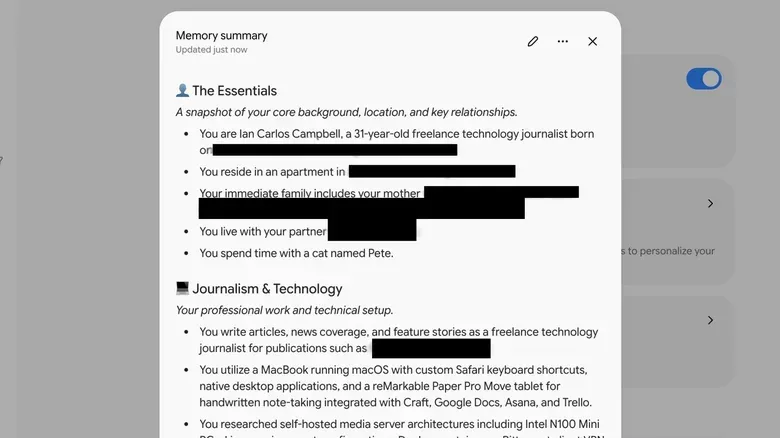
Eligible users can open the Gemini web app and select the gear icon in the lower-left corner. From there, choose Personal Intelligence and then Memory summary. Gemini generates a bulleted overview of the main details it has inferred or retained, organized into areas such as personal information, professional information and interests. Pet names may appear in the summary as well.
The summary provides a practical answer to a question that has often been difficult with personalized AI tools: not just whether the assistant remembers something, but what it thinks it knows. Those are not always identical. A preference mentioned casually might be stored as an enduring preference; a past career detail might no longer be current. Seeing the profile makes those potential mismatches reviewable instead of leaving them hidden behind increasingly tailored responses.
Selecting the pen-shaped Edit control in the summary window lets users change or delete individual lines. The interaction is deliberately familiar: entries can be rewritten or removed in a document-like editing view. Users can also use the text field at the bottom of the window to ask Gemini to add or subtract information. Choosing Save commits the revisions to Gemini’s memory.
There is an important qualification for anyone treating this as an erase-and-rewrite tool. Gemini retains a history of memory changes and when those changes happened. Editing the current summary therefore changes the profile Gemini uses going forward, but the adjustments themselves are tracked in a memory history.
Turning memory off is not the same as deleting it
Users who do not want Gemini to create additional remembered facts can turn off the Memory toggle in Personal Intelligence. That stops new information from being committed to memory. It does not, however, remove the existing facts Gemini has already learned.
For existing entries, the relevant options are to revise or delete them in the Memory summary, or to remove the underlying conversations in Gemini’s Activity area. In the web app, open Settings, choose Activity, locate interactions by date and use the X beside an item to delete it. Removing a conversation takes it out of the context pool Gemini uses to personalize future responses.
This creates a three-part control model rather than a single privacy switch:
- Keep Activity controls whether chats are saved to the account for reuse and cross-device access.
- Memory controls whether Gemini creates new reusable facts from the accessible history.
- Memory summary and Activity deletion provide ways to alter profile entries and remove conversations that supply personalization context.
For users, the central lesson is that disabling new collection and erasing earlier information are separate tasks. A quick setting change may limit what happens next, while a review of the summary and activity history is needed to address what is already there.
Why editable AI memory changes the experience
Personalization is often presented as a simple comfort feature, but it is better understood as a trade-off between relevance and control. A chatbot with no retained context makes each conversation more self-contained. A chatbot that knows preferences, interests and recurring constraints can skip repeated explanations and provide more tailored answers. The cost is that it requires the system to maintain a picture of the person asking.
The Memory summary does not eliminate that trade-off. Rather, it gives eligible users a dashboard for managing the version of themselves Gemini applies in conversation. That is especially useful when the information is outdated, overly broad, incorrect or simply something the user no longer wants involved in future requests.
It can also improve the quality of Gemini’s outputs. Personalization only helps when the retained context is accurate and relevant. If an old detail affects a current recommendation, the answer may be less useful rather than more useful. Editing a summary line lets the user correct that context at the profile level instead of having to explain the same correction each time a chat takes an unexpected turn.
There is also a basic housekeeping benefit. Users can check the summary periodically, treat it as an inventory of the personal facts that influence responses, and decide which items still deserve to be there. The goal need not be to remove everything. A person could preserve preferences that make routine assistance more useful while deleting details that no longer reflect their circumstances.
A practical approach for people who use Gemini regularly
Start by deciding what kind of continuity you actually want. If returning to previous conversations and using Gemini across devices is valuable, Keep Activity provides that convenience. If the idea of an account-linked conversation archive is not acceptable, turning it off means new chats will expire after 72 hours rather than remaining associated with the account.
If Keep Activity stays enabled, inspect the Memory summary rather than assuming the feature only holds obvious preferences. Review the categories, look for stale or inaccurate information, and remove entries that are too personal or no longer useful. Because changes are saved into the memory system, it is sensible to read the revised list before confirming it.
Finally, treat the Memory toggle as a forward-looking limit. Turn it off if Gemini should stop recording additional facts, then use the summary and Activity controls if older information needs attention. That division is less dramatic than an all-purpose “forget me” button, but it is clearer once the jobs of chat history and memory are understood.
As AI assistants become more useful by carrying context from one interaction to the next, controls like these become part of everyday account management rather than an obscure technical setting. The same broader question—how much user control remains after a service learns from ongoing use—also runs through other digital tools and subscription-backed creative software, including recent creator-tool changes in Final Cut Pro. In Gemini’s case, the new summary at least makes the personalized profile more visible and more editable for the accounts that can access it.