AI chatbots are increasingly useful for brainstorming, summarising, troubleshooting and planning—but a conversation can also be data. On several major consumer AI services, an account is enrolled by default in settings that allow future chats to help train or improve models. The controls are available, but their names, locations and consequences vary enough that a quick privacy check is worthwhile.
The key distinction is simple: opting out of model training is not the same thing as deleting chat history, turning off memory, or preventing every form of data use. A training opt-out generally applies only to future conversations. It does not retroactively remove material a company has already used, and it does not necessarily change how long a service retains chats to operate its product, detect abuse, provide contextual replies or improve other parts of the service.
For people who use AI for game-shopping research, build planning or deal tracking, that distinction is particularly important. A chatbot prompt can contain personal budget details, account information, voice clips or private project notes. Avoid entering anything you would not want handled under the platform’s applicable policies. That applies just as much when using AI alongside shopping tools such as price alerts and automated buying features for games and hardware.
What “training” means—and what switching it off does
Model training is the process of using information to improve an AI system’s future performance. Services may describe the control as helping improve a model, keeping activity, or sharing data for training and fine-tuning. Fine-tuning is a more targeted form of improvement that adjusts a model’s behaviour for particular tasks or preferences.
Turning an applicable training setting off means future eligible interactions should no longer be supplied for those purposes. It does not guarantee an interaction instantly disappears from a company’s systems. Retention is separate: providers can hold data for a stated period for service operation, safety and other reasons. In some cases, chats may continue to appear in your own history even after training is disabled; in others, disabling the setting also stops new interactions being saved to history.
Another separate feature is memory or personalisation. These settings can affect whether an assistant carries details between conversations or adapts replies to a user. They should not be assumed to change merely because a model-training control has been disabled. Review each control on its own merits rather than treating one privacy toggle as a master switch.
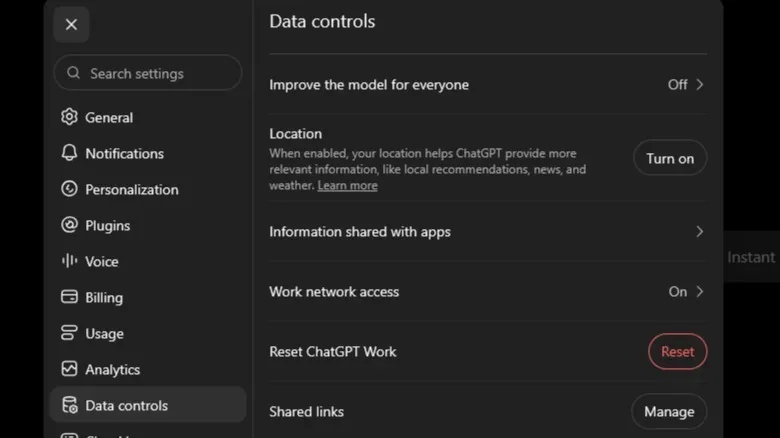
ChatGPT: disable “Improve the model for everyone”
For personal ChatGPT accounts, the relevant control is called Improve the model for everyone. It is enabled by default. Open Settings, then Data Controls, and turn that setting off.
The change applies to the account across web and mobile. Existing conversations can remain visible in chat history, so the setting is not a history-deletion tool. Its purpose is to exclude future conversations from model improvement.
For a one-off conversation that is more sensitive, ChatGPT also offers Temporary Chats. These are not used for training and are purged after 30 days. That makes Temporary Chats a different, situation-specific option from changing the account-wide improvement setting. It still should not be treated as a reason to put passwords, payment details or similarly sensitive material into a prompt.
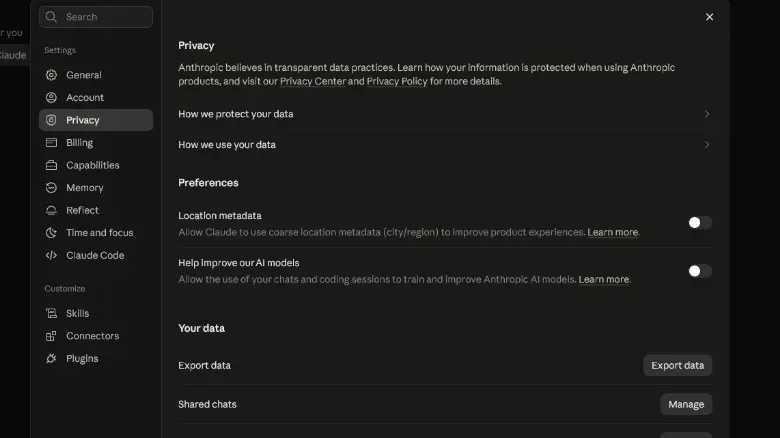
Claude: find “Help improve our AI models” under Privacy
Claude’s relevant option is under Settings, then Privacy. Look for Help improve our AI models and switch it off if you do not want future conversations used for that purpose.
Anthropic changed its consumer-data approach in August of the previous year, asking Free, Pro and Max users to accept or decline the revised terms by a stated September 28 deadline. The setting matters for more than future training use: leaving it enabled can mean conversations are retained for up to five years. Switching it off restores a 30-day deletion window.
That shorter window does not undo earlier model use. As with the other services, opting out is prospective: it prevents future use for training while material already trained on remains with the company.
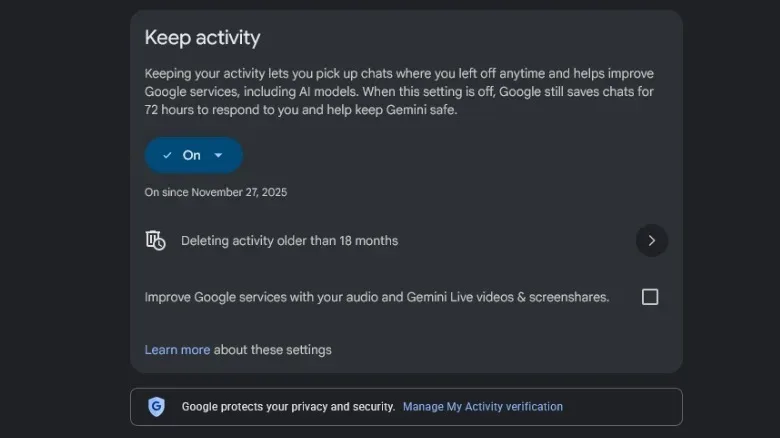
Gemini: “Keep Activity” affects training and history
Google’s Gemini control is now called Keep Activity, and it is on by default. When enabled, chats can be used to improve Google’s models. Google also says a subset of chats may be reviewed by people. A conversation accessed by a human reviewer can be retained for up to three years, even if the user later deletes their history.
Turning Keep Activity off stops Gemini conversations from being used for model improvement and stops new interactions from being kept in Gemini chat history. That is a more visible day-to-day change than some competing training opt-outs, because past conversations will no longer be saved for easy reference in the same way.
It is still not a zero-retention option. Google retains conversations for 72 hours to run the service, with the final 24 hours used to provide contextual responses. In practical terms, this means the assistant can still process what was said during the active exchange even though the account is no longer keeping an ongoing saved activity record.
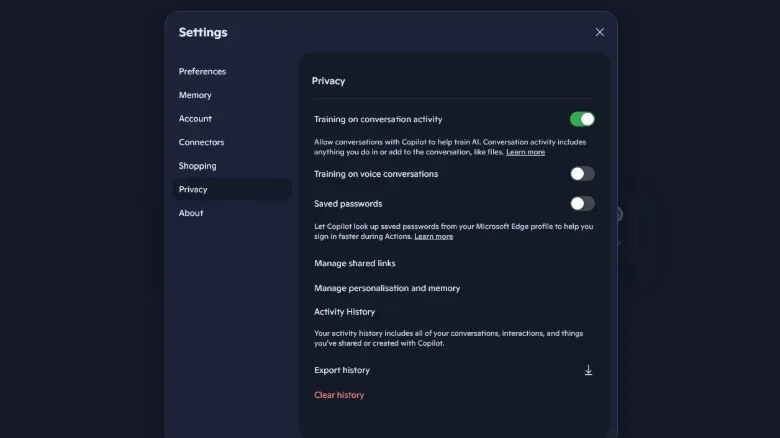
Microsoft Copilot: check text and voice separately
Copilot splits its model-training choices into two controls. Under the profile icon, go to Settings, then Privacy. There, review Training on conversation activity and Training on voice conversations.
Conversation-activity training is enabled by default, while voice-conversation training is disabled by default. The split matters because a user who is comfortable with typed prompts being used for improvement may feel differently about recorded speech, or vice versa. Check both rather than changing one and assuming it governs the other.
Disabling these options excludes future chats or voice conversations from model training. It does not stop Microsoft from using chats for advertising or general product improvements. That is a clear reminder that “AI training” is only one category of possible data handling.
Grok: opt out of data sharing in X’s privacy settings
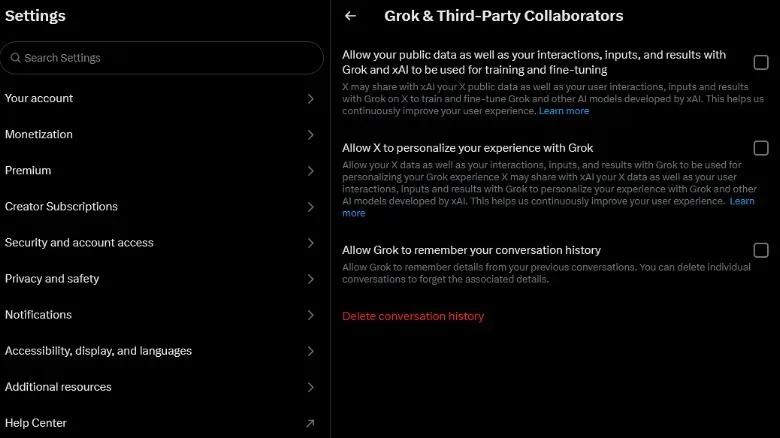
X enrols accounts in Grok training by default. The scope covers public posts as well as chats with the Grok chatbot, making this one especially important for people who post frequently but rarely use the assistant directly.
To withdraw future material from training and fine-tuning, go to Settings and privacy, then Privacy and safety, then Grok & Third-Party Collaborators. Uncheck the relevant data-sharing option.
The wording is worth reading carefully before saving changes. The practical objective is to remove public posts and Grok interactions from future training and fine-tuning, not to erase prior posts from the platform or reverse prior use.
Meta AI: the answer depends on where you live
Meta is the major exception to the simple “find the toggle and turn it off” approach. In the United States, users do not have an option to opt out of Meta AI training. Since December of the previous year, text and voice chats with Meta AI have also been used for advertising across Facebook, Instagram, WhatsApp and Messenger, without a US opt-out.
The most direct US privacy choice is therefore behavioural: do not engage with Meta AI if you do not want those chats used in this way. This is not equivalent to a settings fix, but it is the available route described for avoiding new Meta AI conversation data.
People in the UK and EU have a different path. Stronger privacy protections under the EU General Data Protection Regulation, commonly called GDPR, allow them to object to information being used for model training. Meta provides an objection form in its Privacy Center. An objection is a formal request for a company to stop processing personal information for a particular purpose; it is distinct from deleting an account or clearing a chat.
A practical privacy check before your next prompt
- Open the privacy or data-controls page for every AI account you actually use. A setting in one app does not carry over to another provider.
- Turn off future model training where the provider offers that choice. Make sure to review separate voice and text controls when they exist.
- Review chat-history, memory and personalisation options independently. They can have different effects from the training toggle.
- Use temporary or non-persistent chat modes for sensitive one-off requests where available. Note the stated retention period rather than assuming immediate deletion.
- Keep sensitive data out of prompts regardless of settings. Opt-outs are prospective and retention rules still apply.
The most useful expectation to set is a modest one: these controls reduce future training use; they do not rewrite the past or make a chatbot a private vault. A minute spent reviewing the settings can nevertheless put a meaningful boundary around the next conversation.