
Canceling an app subscription through an Apple Account may now involve one extra screen: a developer-written attempt to persuade you not to leave. Apple has introduced subscription retention messages, a feature that permits participating developers to show a message, image or tailored offer when a customer starts canceling an auto-renewing subscription.
It is a small change to the cancellation flow, but one worth understanding. A subscription screen that asks a customer to reconsider is not necessarily an error, a deceptive pop-up or a sign that an app has ignored the request. It can be an intended part of Apple’s billing system. Crucially, it does not remove the customer’s ability to cancel. The real task is separating a potentially useful short-term discount from a renewal arrangement that no longer makes sense.
For players and app users juggling recurring charges across games, media services, utilities and other software, the sensible response is neither to automatically dismiss every offer nor to accept one on impulse. Read the details, identify the post-offer price, and use the cancellation button if ending the service was the goal.
What a retention message is
A retention message is a prompt shown at the point a person tries to end an auto-renewing subscription billed through their Apple Account. Its purpose is straightforward: give the developer one final chance to explain the subscription’s value or make an offer that might encourage the customer to remain subscribed.
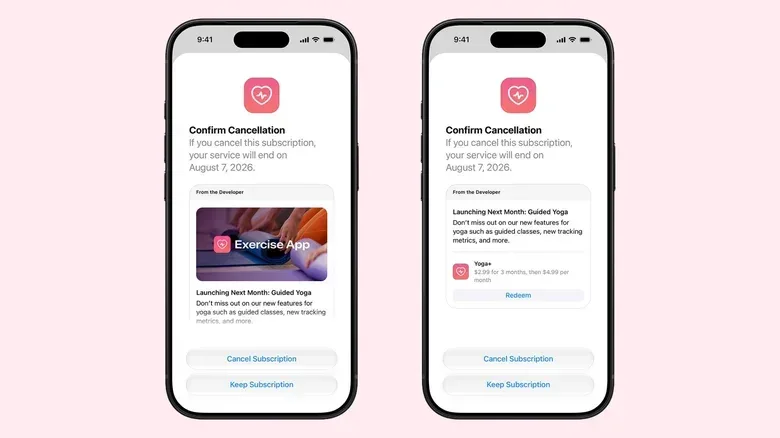
The content can take several forms. An app may display custom written text, an image, or a retention offer. Depending on eligibility, that offer could be a free trial or a discount on a future monthly charge. A message can also point to benefits that would no longer be available after cancellation, including exclusive in-app content.
Not every subscription will show one. Developers must implement the feature through App Store Connect, the platform used to distribute apps to Apple devices. Each app can have as many as 10 distinct retention messages. That means two people attempting to cancel the same service may not receive identical prompts or deals.
Developers can, for example, configure offers around a minimum period of prior payment. In practical terms, a long-standing subscriber may be eligible for an offer that a newer subscriber does not see. Developers seeking more control can apply for Apple’s Retention Messaging API, an application programming interface that is subject to Apple review and approval.
An API is a technical mechanism that allows software systems to communicate in a controlled way. Here, the Retention Messaging API is relevant mainly because it can give approved developers more flexibility over how retention prompts are managed. For a subscriber, however, the visible outcome remains simple: the app may present a reason or an incentive to keep the subscription while cancellation is underway.
Related coverage includes How to cancel an Apple subscription when an app asks you to stay.
How to cancel even when the app asks you to stay
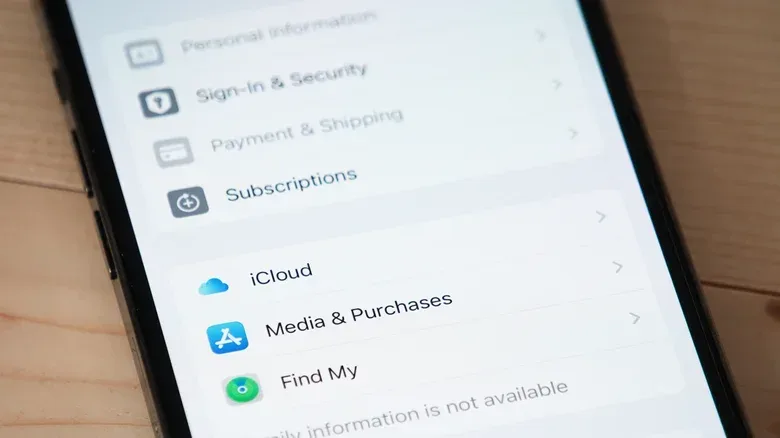
The standard account-level route on iPhone and iPad remains available. Go to Settings > Your Account > Subscriptions, select the app or service, then choose Cancel Subscription. Customers may also be able to begin cancellation in the app through which they subscribed.
If the developer uses retention messaging, the extra screen can appear after the cancellation action begins. The available choices include Cancel Subscription and Keep Subscription. When an eligible deal is being presented, there is also a Redeem button.
The labels matter:
- Cancel Subscription continues with ending the auto-renewing subscription.
- Keep Subscription means retaining the existing subscription instead of proceeding with cancellation.
- Redeem accepts the retention offer when one is available, so the terms of that offer deserve particular attention.
There is no separate setting to suppress retention messages altogether. They are limited in scope, though: they appear only when a person is trying to cancel. They do not interrupt ordinary iPhone or iPad use out of the blue. If the decision is still to leave, select Cancel Subscription. The system will not continue asking about the same cancellation after that choice.
Read an offer as a pricing decision, not a reward
The most useful habit is to pause before treating a discount as automatic savings. A lower charge can be valuable if the service is still being used and the reduced price fits the budget. But a retention offer is designed to preserve a recurring relationship, not merely provide a one-time perk.
Before tapping Redeem, look for two specific pieces of information: how long the offer lasts and what the charge will be after it ends. A free period or reduced monthly payment can be a legitimate reason to stay, especially if price was the only objection. It can also delay a cancellation that was prompted by lack of use.
That distinction is particularly relevant for game-related subscriptions and apps with exclusive content. A message may emphasize what will be lost after cancellation, but the decision still comes down to whether that content has enough ongoing value for the customer. Access that goes unused is not made economical simply because a lower price was offered for a limited time.
It is also important not to confuse the offer with a mandatory step. The retention prompt creates a choice; it does not establish an obligation to negotiate. Customers who have already decided the service is no longer wanted can select Cancel Subscription without accepting an alternative.
A quick cancellation checklist
- Open the subscription entry and confirm that it is the intended app or service.
- Start the cancellation process.
- If a retention screen appears, identify whether it is only a message or includes an actual trial or discount.
- For an offer, check its duration and the price that follows it.
- Choose Redeem only if continuing under those terms is genuinely preferable.
- Otherwise, choose Cancel Subscription and complete the process.
For a wider device-maintenance refresher, our guide to iPhone updates and CarPlay troubleshooting is also useful context for keeping Apple device settings in order.
Why developers and Apple want this option
The feature is built around a familiar subscription-business problem: some cancellations are driven by price rather than a complete rejection of the product. A targeted discount may be enough to keep a customer who otherwise would have left. For an app funded heavily or entirely by recurring revenue, retaining even a portion of departing subscribers can matter.
Apple also has a direct financial interest in subscriptions processed through its account system, taking a cut of up to 30 percent. The company has previously tested other discount mechanisms for developers, including contingent pricing. Retention messaging extends the available toolkit at the exact moment a subscription is at risk of ending.
That commercial purpose does not automatically make the feature harmful to customers. The same mechanism can surface a lower price to a person who still wants access. The key is that the user must make the value judgment rather than interpret the appearance of a deal as proof that keeping the subscription is best.
There is also a practical limit to how much a message itself should influence the decision. Developers can highlight what a customer will miss, but the prompt cannot determine whether those features are personally useful. A subscriber who no longer opens the app, has replaced its function elsewhere, or simply wants fewer recurring payments has a clear reason to cancel regardless of the wording.
Compatibility and a few boundaries to remember
Retention messages require iOS 15.1 or later. They are also available on the latest versions of macOS and visionOS. The feature concerns auto-renewing subscriptions billed through an Apple Account; it should not be assumed to describe every possible recurring payment a person might hold outside that billing arrangement.
Because setup is optional for developers, the absence of a retention screen does not mean anything is wrong, and the presence of one does not mean an app is refusing to cancel. It simply means the developer has used Apple’s supported retention system for that subscription.
The arrival of these prompts is also a useful reminder to review the Subscriptions menu periodically. A cancellation attempt can reveal an offer, but the more important discovery may be an old service that is no longer used at all. Customers do not need to wait for a retention message to audit recurring expenses; the account menu is where those decisions can be made directly.
In short, the extra screen should be treated as information and an optional proposal. Check the terms if the price cut could solve the problem. If it cannot, choose Cancel Subscription and move on.