Android is expanding its anti-scam toolkit with a new opt-in Messages setting that uses Gemini to identify potentially deceptive conversations. The central idea is straightforward: a suspicious message should not need to contain an obviously malicious link or a blatant demand for money before a phone offers a warning. The new Scam Detection setting is intended to assess the apparent intent behind a sender’s messages and flag a conversation when the pattern looks like it may be coming from a bad actor.
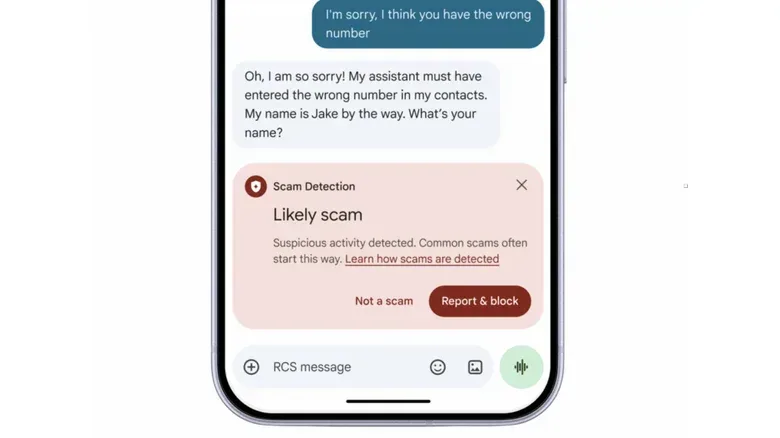
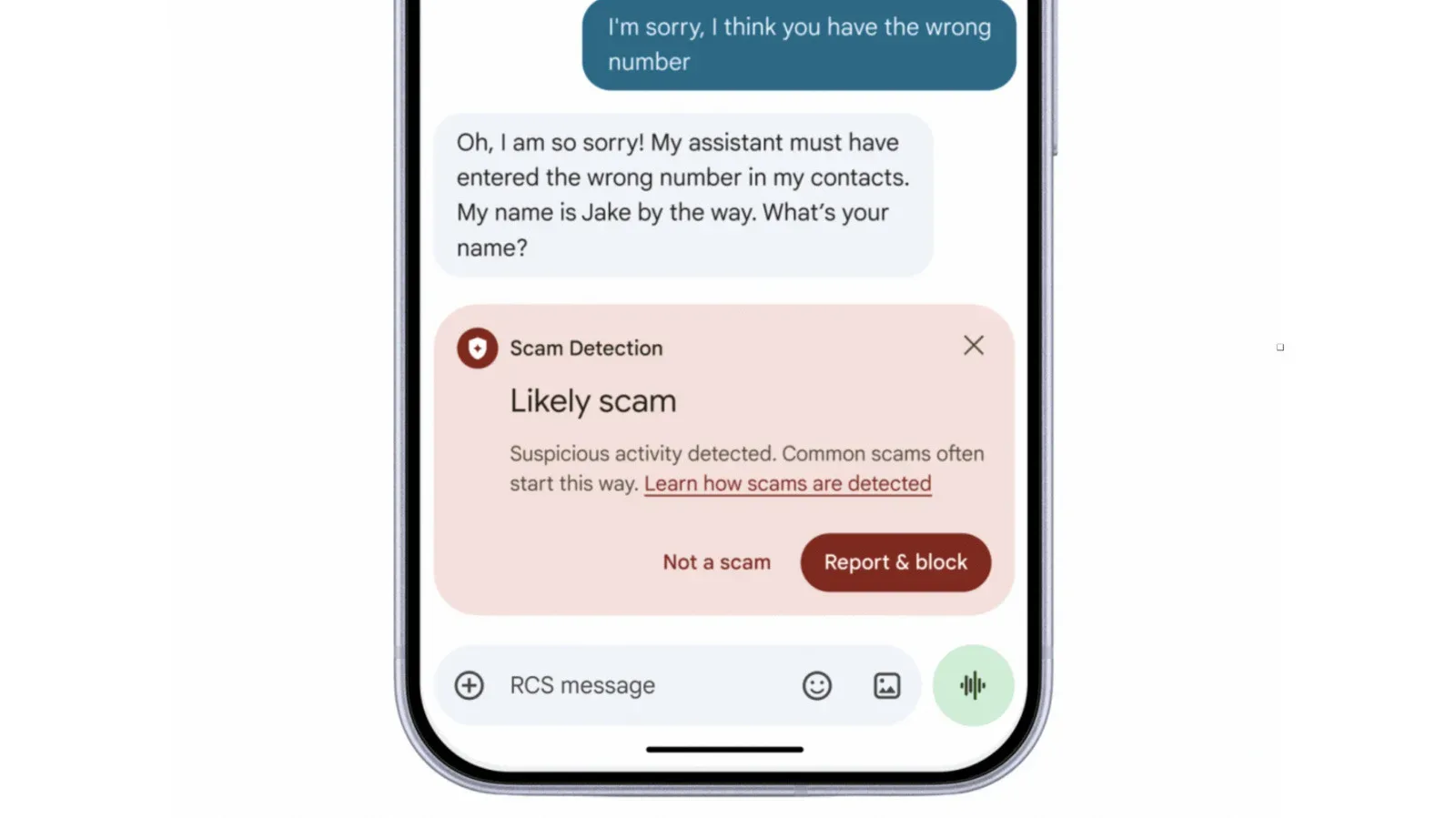
That focus matters because plenty of scams begin quietly. A stranger may claim to have the wrong number, mention a supposed shared interest, or use a casual message as a route into a longer exchange. One example describes a sender saying they meant to share a photo involving the recipient and their dog, then continuing to engage after being told they had contacted the wrong person. The initial mistake may appear harmless; the follow-up is what can turn an accidental message into a social-engineering attempt.
The setting is due to begin rolling out in the coming weeks. It is opt-in, meaning people must choose to enable it rather than having it switched on automatically. That distinction is important in a feature that evaluates the content and context of conversations: the protection may be useful, but it is not a replacement for a person’s own judgment, and users who want it will need to check that it is active.
What the Gemini-powered warning is designed to do
Scam Detection in Google Messages uses advanced Gemini models to evaluate whether a sender’s behavior may be deceptive. This is a different job from a conventional spam filter. A basic filter can look for known unwanted senders, familiar malicious phrases, or a risky URL. Intent analysis instead tries to interpret the conversational pattern: an unexpected approach, an implausible pretext, and an attempt to keep an unfamiliar recipient talking can together be more revealing than one line of text on its own.
That is especially relevant to scams built around persuasion. Social engineering is the practice of manipulating someone into sharing information, taking an action, or trusting a false identity. In a text-message setting, the attacker’s goal could be to establish rapport first and only later steer the conversation toward a link, a payment, personal information, or another sensitive action. A warning that arrives during the early relationship-building stage could give the recipient a useful pause before the exchange advances.
Android is also redesigning warnings related to links from numbers outside a user’s contacts. The stated aim is to offer more context and more time before a person taps. That extra moment is practical rather than cosmetic. A message can create urgency—particularly one framed as a delivery issue, account concern, or unexpected personal note—and a warning that explains why a link deserves caution can interrupt the rush to act.
No automated detector can establish with certainty that every suspicious-seeming message is fraudulent. Legitimate people can send confusing texts, and scammers can write messages that look ordinary. The appropriate reading of a scam alert is therefore a prompt to slow down, not proof by itself. Users should avoid treating a warning as an instruction to continue a conversation in order to “verify” the sender. If an unexpected message feels off, the safer choice is to avoid opening links, avoid sending sensitive details, and use a trusted route to contact an organization if a claim needs checking.
Private AI Compute and on-device link analysis
Android says message analysis will take place through Private AI Compute. Messages are encrypted and processed in a protected environment that is described as inaccessible to anyone, including Google. The privacy claim addresses an obvious concern with AI-assisted message screening: people may be reluctant to enable protection if they believe their private chats will simply be handed over for routine human review.
It is worth separating the terms involved. Encryption is a technique that protects information by converting it into a form that requires authorization to read. A secure processing environment, in this context, is a protected space intended to handle the analysis while restricting access. The practical promise is not that the phone will never analyze a message, but that it can do so without making the message content available to Google or other parties.
Gemini Nano will also conduct on-device checks of links in Messages before a user opens them. On-device analysis means the assessment happens locally on the phone rather than requiring the link evaluation to be sent elsewhere for processing. This is a separate layer from intent-based detection: a conversation could seem harmless while containing a dangerous destination, or it could feel suspicious before it ever includes a link. Combining both approaches gives Android multiple chances to intervene.
The on-device link capability is listed for Google Pixel 10+ phones, the Samsung Galaxy S26 series, Galaxy Z Flip and Galaxy Fold 8, plus other select devices. That device list is a meaningful limitation. Android features often arrive across many manufacturers and hardware tiers at different speeds, so owners should not assume that an Android version alone guarantees access to every AI-driven protection. Compatibility, manufacturer support, and rollout timing all matter.
Warnings that can appear before Messages is opened
Android previously introduced Scam Detection in chat notifications on Pixel devices, and that notification-level protection is now set to reach more hardware. The appeal is immediate: a person can be warned about a likely scam from the notification itself instead of having to open the thread first.
Honor, Motorola, OPPO, OnePlus, realme, vivo and Xiaomi are among the manufacturers expected to enable the notification feature later this year. That broader participation may matter more than the technical name of the model. A safety tool is most useful when it reaches people across the Android ecosystem rather than remaining confined to a single phone family.
Notification warnings can help with a common weak point in messaging safety: curiosity. Opening a message is not necessarily harmful, but it can make a sender’s story feel more immediate and can lead to quick taps on buttons or links. A concise alert before entering the conversation gives the user a chance to dismiss, block, report, or simply leave the message alone. It also means the system can be useful for people who rarely open unsolicited texts but still see their previews.
Screen sharing receives automatic privacy protection
Android 15 and newer devices are also set to receive automatic screen-sharing privacy later this month. When a user is sharing a screen with Chrome or Android WebView open, the feature will hide passwords, banking information, and credit-card security numbers by default.
This protection addresses a different scam path: the request to share a screen. A fraudster who convinces someone to start screen sharing may not need to know the victim’s password directly if they can watch it being entered or observe financial details on a webpage. Masking sensitive information by default narrows what is exposed during the session.
Android WebView is the component that lets apps display web content within the app itself. Its inclusion matters because sensitive pages are not viewed only in the standalone Chrome browser. An app may open a sign-in, payment, or support page internally, and the privacy feature is intended to cover that type of web content as well.
The protection is automatic on eligible Android versions, but it should not be mistaken for permission to trust every screen-sharing request. If an uninvited caller or message pressures someone to share their screen, the danger is not limited to three categories of data. The caller may still be able to guide the person into changing settings, revealing account activity, or approving a transaction. Automatic redaction is a valuable guardrail, not a reason to give an unfamiliar party a live view of a device.
Call forwarding safeguards target a quieter takeover route
In early December, call-forwarding protection is scheduled to reach Pixel phones and other select devices. It will prevent apps from secretly enabling call forwarding in the background. Android will also warn users when someone tries to persuade them to enter an MMI forwarding code.
An MMI code is a short sequence of characters and numbers that can invoke carrier or phone-service functions. In this case, the relevant risk is forwarding: if a scammer gets a person to enter the necessary code, incoming calls may be redirected. That can be dangerous because calls can be used for verification, recovery, and other account-related activity. The feature’s value is its attention to the moment of manipulation, rather than only the technical change that follows.
Blocking background changes by apps tackles a second route. Users may reasonably expect an app not to alter a communication setting such as call forwarding without clear consent. The planned safeguard makes that boundary more explicit, while the warning about MMI codes addresses a scammer attempting to turn the user into the one who triggers the change.
Bank-call verification in Brazil shows the wider direction
Android has also been working with banks in Brazil on bank-impersonation defenses. For incoming calls claiming to come from a bank, Android performs a verification check. If the caller does not pass, the call is ended and the user is alerted. More than three million fake calls have been blocked since the feature launched in June.
This is one of the clearest examples of a platform-level defense built around identity rather than just content. A scammer may sound convincing and may even know enough personal information to make a call appear credible. Verifying whether the claimed institution is actually behind the incoming call can stop the conversation before that performance begins.
There is no stated timeline for similar bank-call protection in the United States. More partner banks are planned, but availability outside the existing Brazilian effort remains uncertain. Users elsewhere should not assume an incoming call has been authenticated merely because it appears to carry a bank name or number.
What Android users can take from the rollout
These features point to a layered approach: analyze suspicious conversational behavior, inspect links, warn at the notification level, reduce sensitive data exposure during screen sharing, and defend phone settings from covert or manipulated changes. The layers matter because scams do not all begin or end in the same place. Some start with a text, some with a call, and some with a demand to install an app or share a screen.
- Enable the opt-in Scam Detection setting in Messages once it is available if the device supports it.
- Treat alerts as a reason to pause and independently verify claims, not as an invitation to engage with the sender.
- Be especially cautious with unexpected links sent by numbers that are not in contacts.
- Do not share a screen with an unsolicited caller or message sender, even with automatic privacy masking available.
- Be wary of anyone directing you to enter a short code into the phone dialer, particularly when they claim it is required to secure an account or resolve an urgent problem.
The rollout also reinforces a less glamorous but useful reality of phone security: software protections depend on the exact device, Android version, and manufacturer. Android 15 and newer is the stated requirement for the automatic screen-sharing privacy feature, while on-device link analysis and certain call protections are limited to selected devices. Checking the relevant settings and software updates is likely to be more useful than assuming every announced capability has already arrived.
For a broader look at how companies are positioning AI features inside consumer software, see this examination of Apple HomeView’s app approach. Android’s scam tools offer a distinct reminder that AI on a device is not only being framed as a creative or convenience feature; it is increasingly being used to decide when a routine-looking interaction might deserve skepticism.