Google’s Find Hub is best known as a place to locate Android phones, compatible tags and other connected devices. But it also has a more old-fashioned use: remembering where you deliberately put something that cannot realistically be tagged.
That makes it potentially useful for important paperwork and valuables that live in a drawer, a home safe, a bank safety deposit box, a PO box or another fixed place. Instead of showing a live position, Find Hub can keep a remembered location: a user-created record that says where an item was stored. Gemini can add that record from a natural-language request and retrieve it later when the details have escaped the human brain at precisely the worst possible moment.
The distinction matters. This is not a GPS feature for a passport, birth certificate or social security card. The document does not report its location, and Find Hub cannot confirm whether it remains where it was last placed. It is a structured memory aid: users record the location, may attach a photo and notes, and can then ask Gemini to surface the latest saved entry.
For people who already rely on Android and Gemini, the appeal is straightforward. A compatible tag can be awkward to attach to a slim document folder, unsuitable for certain belongings, or simply unnecessary when the real problem is recalling which of several secure locations was used. Find Hub’s Remembered section is designed for that latter problem.
What the Gemini and Find Hub connection actually does
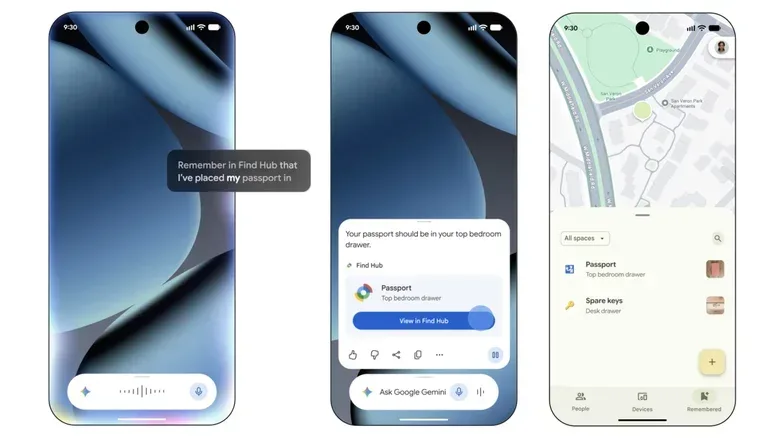
Find Hub contains a Remembered tab for saved item records. Gemini, when selected as the device’s default digital assistant, can create and look up those records with spoken assistant commands.
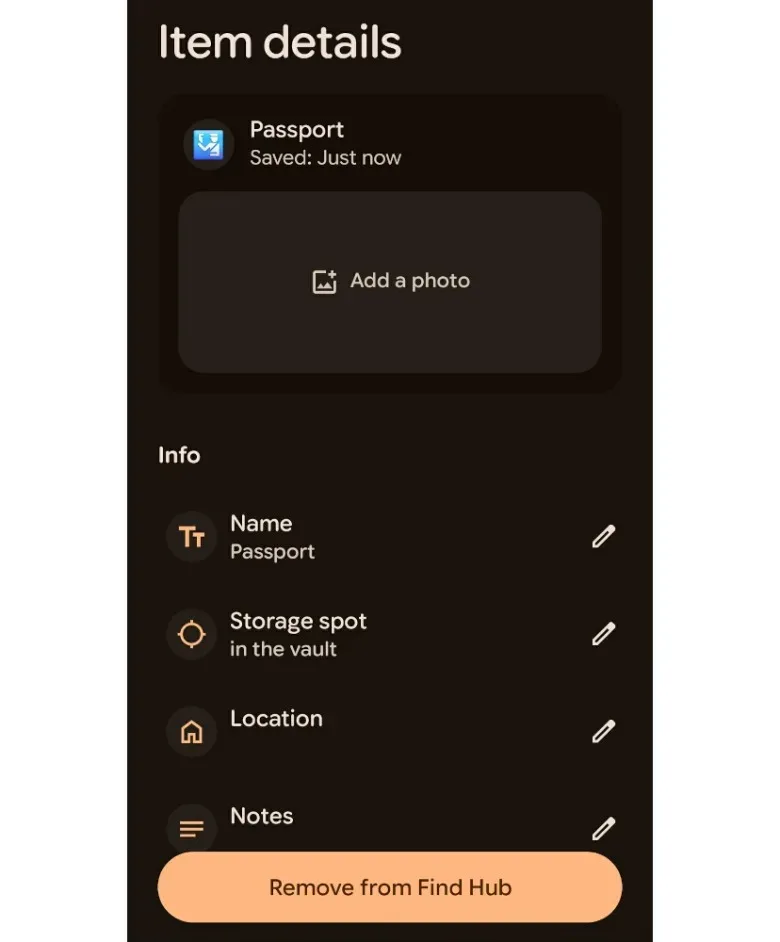
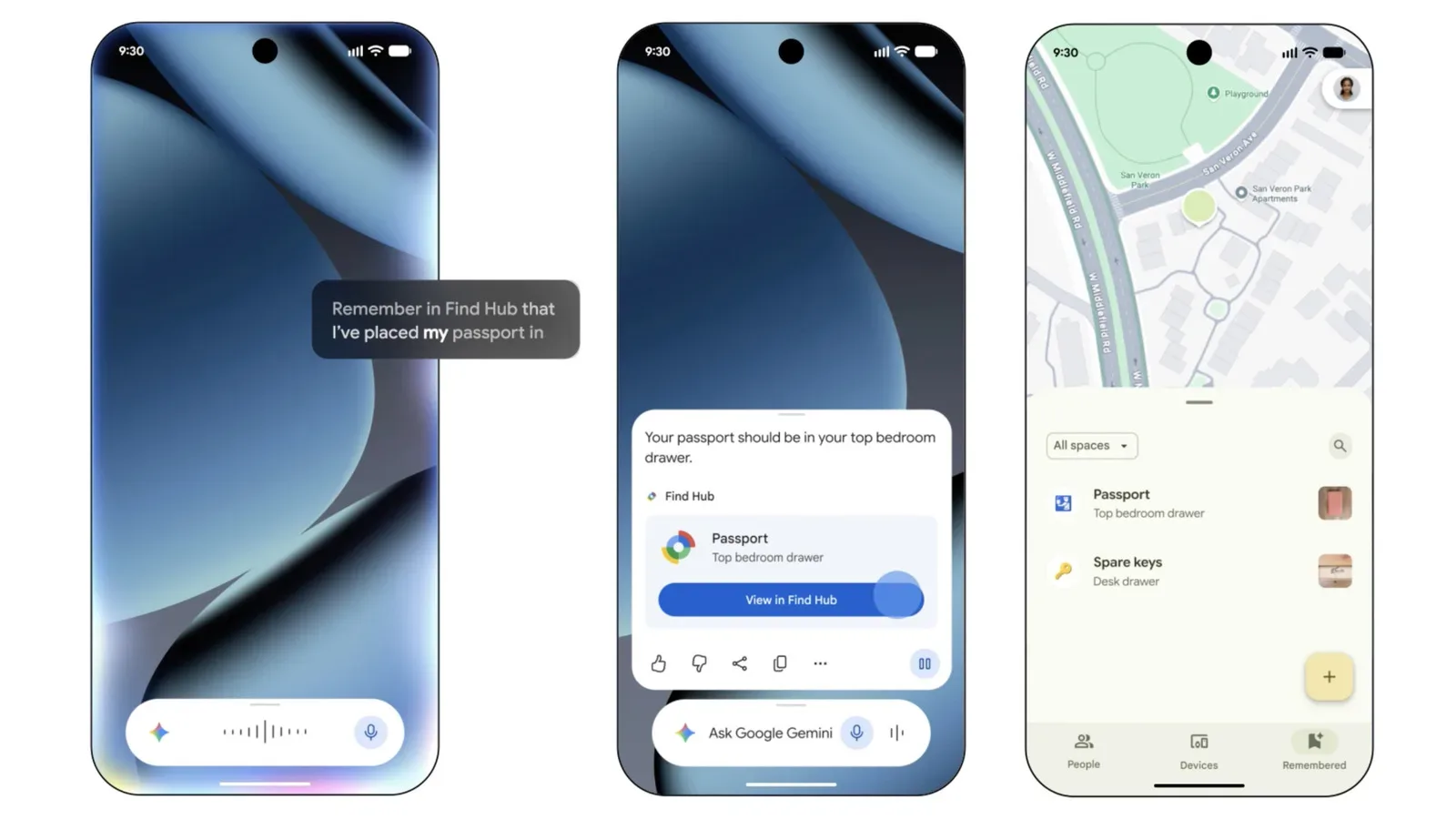
For example, a user can tell Gemini to remember that a passport was placed in a vault. Gemini confirms that it has saved the location and presents a link back to Find Hub. Opening that link leads to the item’s details, where the record can be expanded with useful context.
Those details can include:
- a photo of the storage location, such as a particular file box or cabinet;
- an exact address when several homes, PO boxes or safety deposit boxes are involved;
- notes that distinguish otherwise similar locations; and
- the saved location itself, which Gemini can return in response to a later question.
That information is especially useful when the basic description is not enough. “In the safe” may be perfectly clear at the moment an item is put away, but much less helpful months later if there is more than one safe, a shared filing system, or multiple possible addresses. A carefully labeled entry gives the person searching something more actionable than a vague recollection.
Setup: enable Find Hub, then make Gemini the assistant
The first requirement is that Find Hub is enabled. This can be done by downloading and setting up the Find Hub app, or through the Android settings path:
Settings > Google > All services > Find Hub
Gemini must then be selected as the default assistant. In the Google app, tap the profile icon in the top-right corner, then follow:
Gemini or Google Assistant > Digital assistants from Google > Gemini
Once those two pieces are in place, Gemini can be used as the conversational shortcut for saving a location. The Find Hub app remains important, however, because it is also where entries can be reviewed and enriched with photos, addresses and notes.
How to save a document’s location with Gemini
Use a direct instruction that identifies both the item and the place. A request in the style of “Hey Google, remember in Find Hub that I put my passport in the vault” creates a remembered-location entry.
After Gemini says it has saved the information, open the Find Hub link it provides. This is a worthwhile second step rather than merely accepting the confirmation and moving on. The Find Hub detail screen is where a quick voice note becomes a more usable retrieval record.
Make the entry specific enough to help later
A saved location works best when it differentiates one storage place from another without turning into a sprawling diary entry. The available photo and notes fields are there to reduce ambiguity.
A photo can be valuable for visual recognition: perhaps it shows the exterior of a labeled container or the relevant shelf area. Notes can capture a short clarifier about the item’s placement. Exact addresses are available for users whose secure locations span multiple homes, PO boxes or bank safety deposit boxes.
There is also a sensible privacy trade-off to consider. Because the feature can store addresses, photos and notes alongside the name of an important item, users should think carefully about how much specificity they need. The source material establishes that Find Hub supports these fields; it does not make the entry itself a substitute for physical security. A short, useful reminder may be more appropriate than recording every detail about a sensitive document or storage arrangement.
Manual entry is available when voice is not the right tool
Gemini is not mandatory for recording an item. In Find Hub, open the Remembered tab, select the plus icon and choose Manual entry.
This alternative matters for two practical reasons. First, some people may prefer to type sensitive labels and notes rather than say them aloud. Second, manual entry lets users build out a remembered-items list directly in the app, without making the assistant the starting point for every record.
In other words, Gemini provides convenience, not exclusivity. Find Hub is the place holding and displaying the item record; Gemini is a quick interface for creating it or asking for it later.
How to retrieve a saved location
When it is time to find the paperwork again, ask Gemini a plain question such as “Hey Google, where did I keep my passport?” Gemini responds with the item’s latest known location and a link to Find Hub.
The wording “latest known location” is important. It refers to the last location saved in the remembered record, not a live signal from the document itself. If the item was moved and the entry was not updated, the answer may be outdated. Users should therefore treat updating the record as part of putting an item away somewhere new.
The other route is to open Find Hub manually, go to Remembered, and select the relevant item. Its details can show the saved image, location and notes. That can be preferable when a user wants to browse several entries or needs the visual cue attached to the record.
Where this feature fits—and where it does not
Find Hub’s remembered locations are useful for items that are intentionally stored in a known place but easily forgotten later. Important documents are the clearest example supplied here, but the same structure can apply to other belongings that are hard to tag or do not need live location reporting.
It should not be confused with a compatible tracker tag. A tag-based item is part of a device-finding workflow; a remembered item relies on a user’s own saved description. The first can help establish a location through connected tracking hardware. The second answers the more mundane but common question: “Which safe place did I choose last time?”
That difference is also what gives the tool its modest usefulness. It cannot discover a lost document, determine whether someone moved it, or correct an inaccurate original entry. It can reduce the friction of keeping one reliable digital reminder, with a voice-based way to retrieve it when needed.
The feature lands amid a wider push to make AI assistants handle small administrative tasks rather than only answer open-ended questions. AI help-desk tools are also being positioned around everyday information needs; Find Hub’s remembered entries take a narrower approach, connecting an assistant to a personal inventory of locations.
For Android users, the practical routine is simple: enable Find Hub, use Gemini as the default assistant if voice-based saving and retrieval is desired, create a clear record, add only the details that will genuinely aid recall, and update it whenever the item moves. It is less futuristic than tracking a device on a map, but for a passport tucked away in a sensible place, remembered information may be exactly the feature that prevents an unnecessary search.