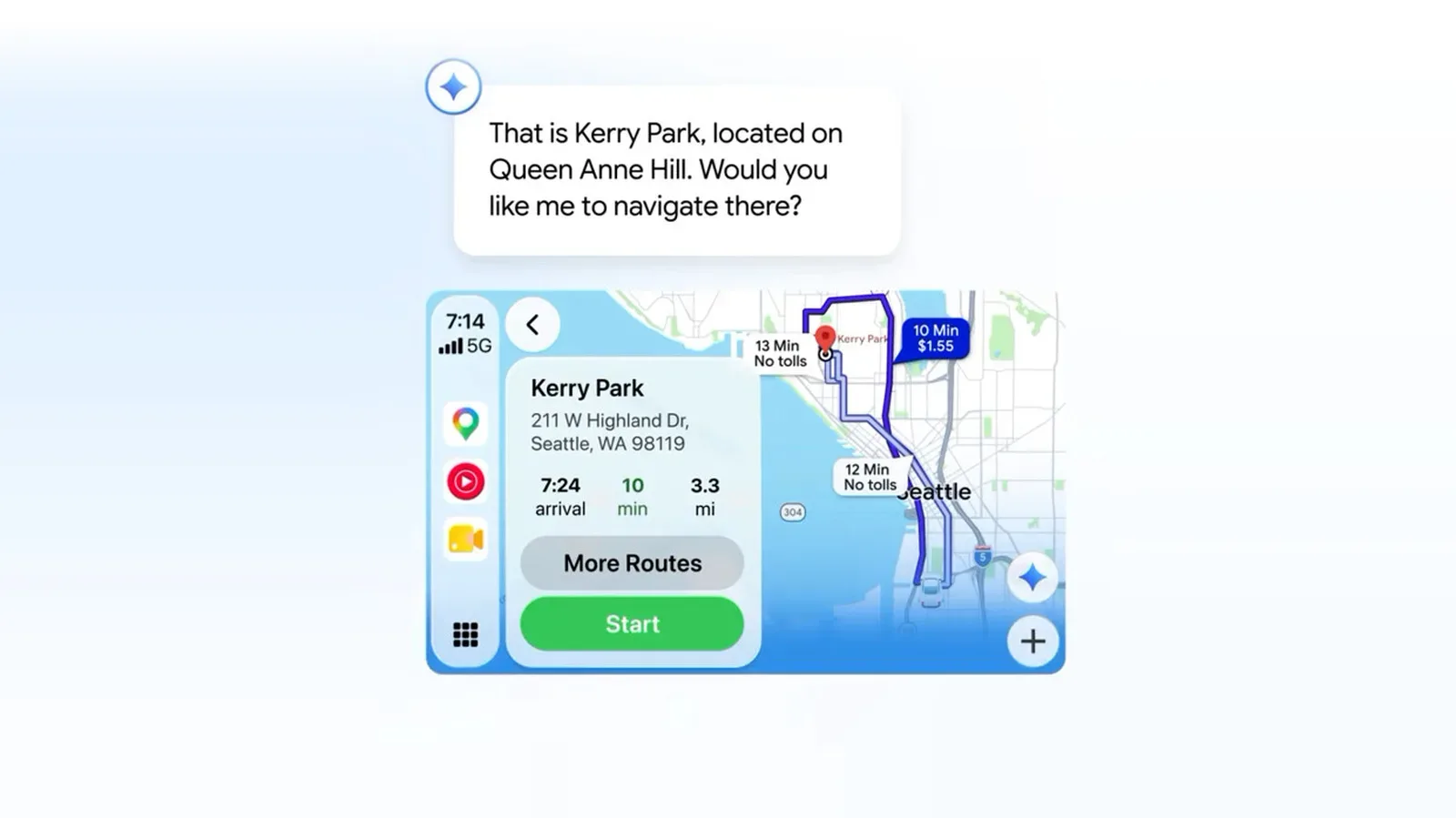
Google Maps is rolling out Gemini in navigation to Apple CarPlay, giving drivers who use the iOS Maps app a new way to ask for information while a route is on screen. The addition is framed around conversation rather than a fixed list of search commands: users can ask about possible stops, traffic disruptions and places, including questions with more than one condition.
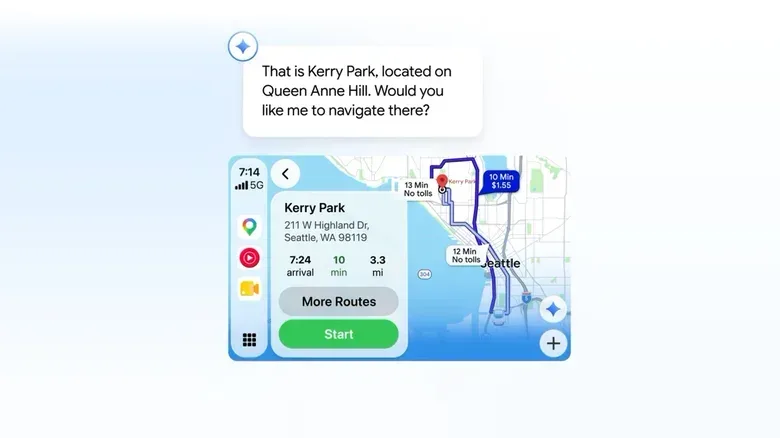
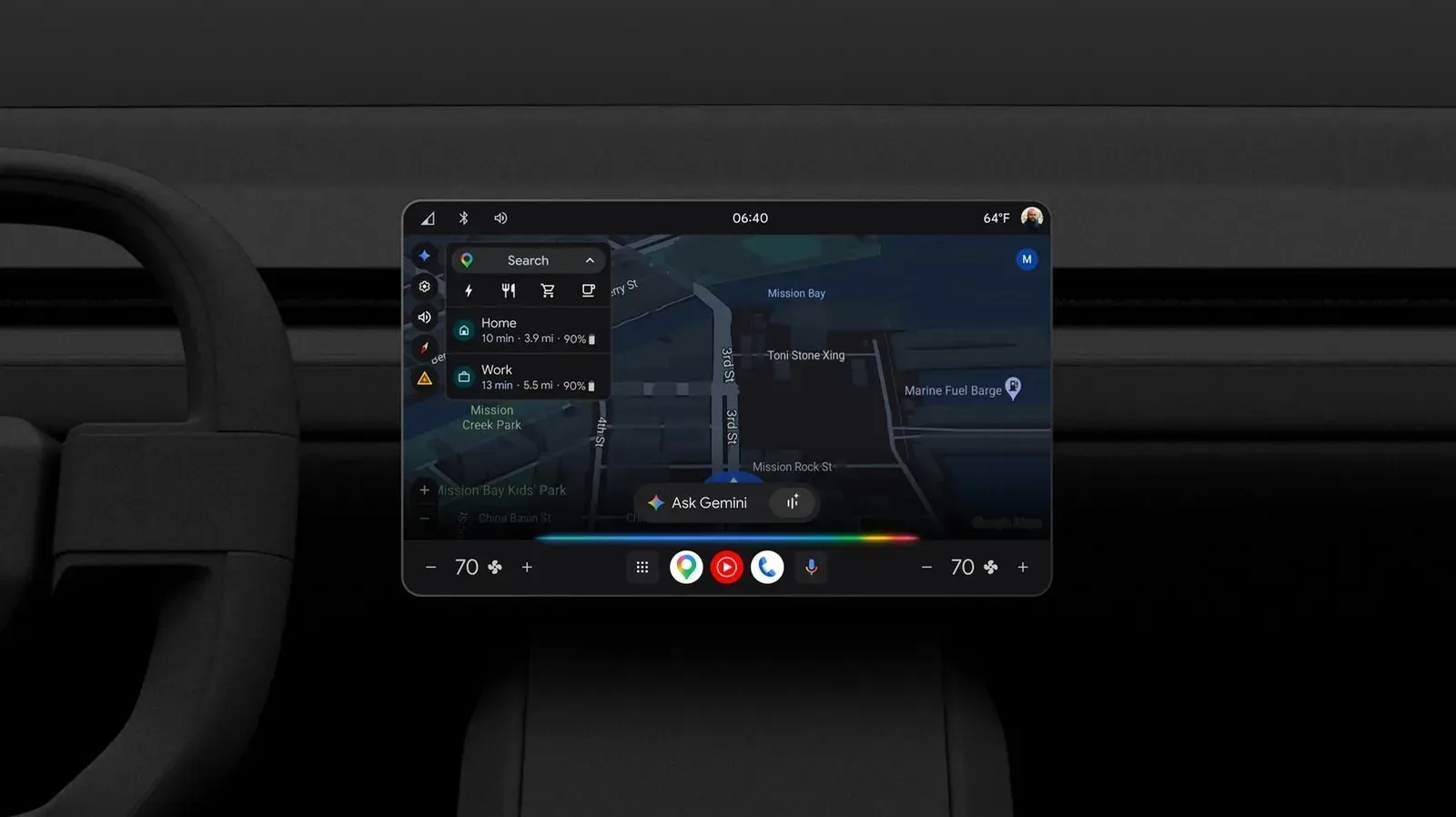
The feature appears as a Gemini icon toward the lower-right area of the Google Maps interface in CarPlay. Tapping that icon begins an interaction with the assistant. The rollout starts October 21 and is intended for CarPlay users in the United States and internationally, though availability may take several days to reach every device.
What Gemini in navigation is meant to do
At its simplest, Gemini in navigation is a conversational layer over a navigation session. Instead of limiting a driver to a short, directly phrased destination search, it is intended to understand requests that combine several ideas. The stated uses include finding stops while on the move, reporting traffic disruptions and retrieving information about places.
An example provided for the feature asks which park is known for attractive city-overlook views. That is useful because it illustrates the difference between a conventional exact-name search and a multi-part question. A multi-part question includes multiple constraints or descriptive details that must be considered together—in this case, a park, a reputation for views and a relationship to a city. The assistant is designed to handle that sort of natural-language phrasing.
That does not mean every driving request needs to become a sprawling prompt. Straightforward navigation tasks still benefit from being clear: naming a destination or directly asking for a type of stop leaves less room for ambiguity. The practical promise is that users do not need to translate every real-world question into a rigid search query before asking it.
How CarPlay users will access it
The required starting point is Google Maps on CarPlay, not a separate Gemini app interface. Once the update is available, the new icon should be visible near the bottom right of the Maps display. A tap starts the conversation.
- Open Google Maps through CarPlay.
- Look for the Gemini icon at the bottom right of the Maps interface.
- Tap the icon to begin asking questions about stops, disruptions or places.
Because this is a staged rollout, the icon may not be present immediately even for users who expect to receive the feature. A gradual rollout means availability is distributed over time rather than switched on for every eligible user at once. In practical terms, the absence of the button on the first day is not, by itself, evidence that the function will not arrive.
Why the interface change matters
Car screens put a premium on keeping an interaction brief and understandable. The visible Gemini button matters because it gives the new feature a clear entry point inside the mapping experience people are already using. There is no indication here of a redesigned Google Maps navigation layout or of a separate workflow for route guidance; the described change is an assistant control embedded in the existing CarPlay Maps view.
That distinction is important. This is not presented as Gemini replacing Google Maps navigation. It is an added way to ask questions while using Maps. Route guidance remains the core setting, while Gemini is positioned as a means to surface useful contextual information and help identify potential stops.
There is a small but meaningful design parallel with game interfaces: a new capability is only helpful when people can discover it without leaving the activity they are focused on. For a more overtly game-like take on interfaces becoming the entire experience, see The Main Menu’s UI-driven horror setup. In the CarPlay case, the interface has a less theatrical job: keeping the assistant accessible within a navigation screen.
What “conversational” means here—and what it does not
Conversational in this context means a user can phrase a need as an ordinary question rather than selecting a succession of categories and filters. Someone might know the kind of place they want but not its exact name. They may also want to include a characteristic that makes a generic category search less useful, such as a particular view or other relevant detail.
The rollout description supports requests around three broad areas:
- Stops on the go: asking for places that may be useful during a trip.
- Traffic disruptions: reporting an issue affecting the road.
- Place information: asking questions about locations, including requests with multiple details.
It is equally important not to assume broader capabilities that have not been specified. The information available does not establish which exact prompts Gemini will accept, how it will respond in every situation, whether any particular request changes an active route, or which version requirements may apply beyond the rollout to Google Maps for iOS through CarPlay. Drivers should treat the new icon as the supported access point and rely on what is shown within the app as the update reaches them.
CarPlay arrives just after an Android Auto Gemini expansion
The CarPlay rollout follows the beginning of a separate Gemini update for Android Auto: Gemini Personal Intelligence. When enabled on Android Auto, Personal Intelligence allows Gemini to draw on information from a user’s other Google apps in order to tailor its replies. The stated goal is more specific details in responses that relate to a person’s questions and prompts, alongside improved reasoning.
Personalization and the newly announced CarPlay capability should not be treated as identical features. The CarPlay update described here centers on Gemini in navigation within Google Maps and its ability to support conversational questions about travel and places. Personal Intelligence is specifically described for Android Auto and, when enabled, involves using information from other Google apps. The distinction matters for users trying to understand what will actually appear on their dashboard platform.
Google’s two moves nevertheless point in the same direction: Gemini is being placed closer to driving-related tasks, rather than kept solely in a standalone chatbot context. On CarPlay, that means an in-navigation entry point for questions. On Android Auto, it also means a personalization option that can use connected Google-app information when the user turns it on.
Practical expectations for the rollout
For Google Maps users on CarPlay, the immediate check is visual and simple: open Maps and look in the lower-right portion of the display for Gemini. If it is there, tapping it is the documented way to start. If it is not, patience is warranted while the phased deployment proceeds.
Drivers may find the feature most relevant when a need is more nuanced than “navigate to this exact address.” Requests about a kind of stop, a place with a particular quality, or an issue on the road fit the purposes identified for Gemini in navigation. The assistant’s touted strength with multi-part questions could reduce the need to simplify those requests into isolated keywords.
Still, the basic priority of navigation does not change. A conversational assistant can help narrow down an option or retrieve place information, but it does not remove the need for drivers to use vehicle systems responsibly and avoid letting a question become a distraction. The feature is most coherent as a supporting tool inside Maps: one that aims to make useful information easier to request without taking the driver out of the navigation environment.
A modest addition with a clearer role than a general chatbot
Gemini’s arrival in Google Maps through CarPlay is a focused update rather than a broad platform overhaul. Its value will hinge on whether the assistant can make requests about stops, disruptions and locations feel sufficiently natural to be preferable to traditional search. Google’s emphasis on questions containing multiple details suggests that is the key test.
For now, the concrete change is straightforward: Google Maps on CarPlay is gaining a Gemini button, and that button opens a conversational navigation assistant. It is beginning to reach users in the US and around the world, while the Android Auto side is separately beginning to receive Gemini Personal Intelligence for users who enable it.