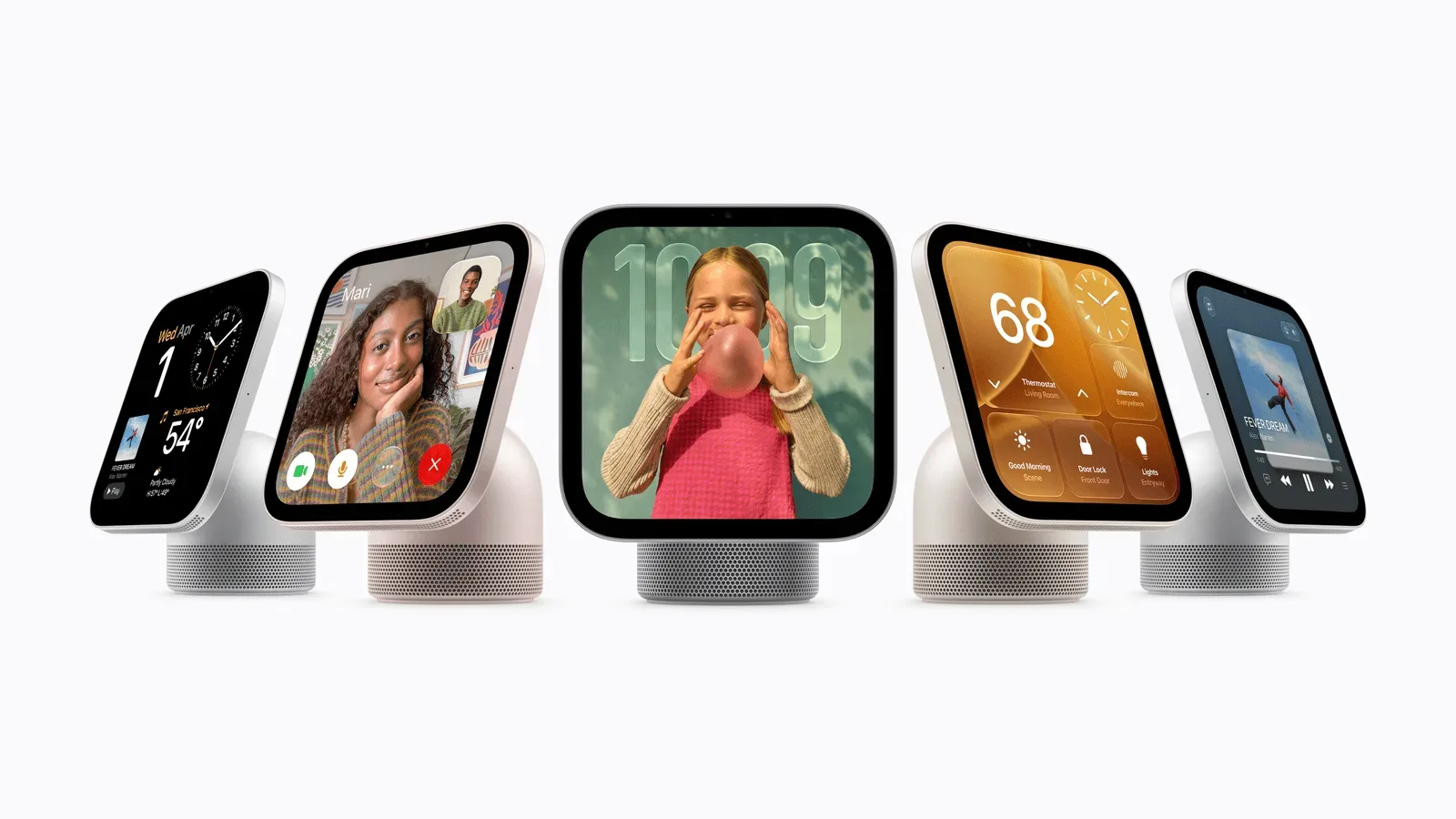
Apple’s HomeView is positioned as a shared-screen device for the home rather than simply a small display with a clock attached. It is available for pre-order ahead of a planned November 13 launch, with a $299 price and two configurations: a tabletop model with a speaker base and a wall-mounted version.
The headline functions are familiar smart-home territory: voice assistance, media playback, timers and connected-accessory controls. The more revealing details, however, concern how HomeView is meant to work when several people pass through the same room, when a visitor needs a few controls but not private information, and when an iPhone is nearby to supply content. Its software model also has an important limitation: there is no App Store on the device.
Here is a closer look at 10 HomeView capabilities and the practical questions they raise before launch.
1. Recipes are treated as an active task, not a static webpage
HomeView can turn a recipe viewed in Safari into a more usable cooking guide by separating the ingredients and instructions. A Start Cooking control launches the directions one step at a time, while the device can handle multiple voice-activated timers.
That distinction matters in a kitchen. A normal recipe page is designed for reading: it may put ingredient quantities, preparation notes and every step in one long document. A step-by-step presentation is designed for doing. It reduces the need to repeatedly scroll or to remember whether the next timer is for the oven, a pan or a resting period.
Multiple timers are equally important because cooking rarely follows one countdown. The supplied information does not explain how those timers will be named, displayed or managed, so those are details still to learn. But the basic feature suggests HomeView is intended to remain visible during an activity rather than merely answer a single request and disappear.
2. Siri has voice, touch and typed entry points
Hands-free activation works with either “Siri” in English or “Hey Siri.” HomeView also offers a swipe down from the top of the screen to invoke Siri, plus Type to Siri.
Those alternatives are more significant than they first sound. Voice is convenient when hands are occupied or when a request is simple: set a timer, play music or control a connected accessory. It is not always the best interaction in a shared room. A typed request can be preferable when speaking would be disruptive, while the gesture-based route gives users a direct on-screen fallback.
The English-only qualification applies to the shorter “Siri” invocation described here. Potential buyers should avoid assuming that every Siri language or every invocation method has the same availability until Apple provides fuller regional and language details.
3. Apple Intelligence has a line between general and personal requests
HomeView includes Apple Intelligence functions through Siri, but its requirements differ based on the request. Members of a household can ask general-knowledge questions through Siri AI even without an Apple Intelligence-capable iPhone or iPad. Requests involving personal context, however, require one of those compatible Apple devices.
Personal context means information tied to an individual rather than a general fact. The available information does not spell out every supported request, but the distinction establishes a useful expectation: the standalone HomeView can answer some broad questions, while individualized assistance depends on a qualifying phone or tablet being part of the setup.
That separation may be especially relevant to a household device. A display in a kitchen or living room has to serve a room without casually exposing one person’s data to everyone else. The feature set described for guests, discussed below, follows the same principle.
The wider questions around AI tools—especially data handling, safety and agents acting on a user’s behalf—continue to receive scrutiny, as covered in ongoing debates over AI safety and data concerns. HomeView’s published distinction is not a complete privacy specification, but it does show that personal requests are not being presented as identical to basic general-knowledge queries.
4. Guests get utility without access to personal data
Visitors can control smart-home accessories, see weather information, set timers and play music. They can also send audio to HomeView through AirPlay using peer-to-peer discovery. At the same time, personal data remains private.
This is a practical feature for a device that may sit where guests naturally gather. Someone visiting for dinner could play music or turn on a relevant accessory without being granted the owner’s personal information. In other words, HomeView is being framed as a communal endpoint for certain functions, not a fully unlocked personal account on a counter.
Peer-to-peer discovery refers here to devices finding each other directly for AirPlay rather than requiring the visitor to be treated like a regular household member. The information provided does not define every permission, setup step or restriction involved. Still, the intended balance is clear: convenient temporary use, bounded access.
5. The interface can change as a person approaches
HomeView can detect when someone is near and adapt its interface according to proximity. From across the room, it presents less information in a larger format. As someone gets closer, it can shift to show more.
For a shared display, this is an interface decision as much as a sensor feature. Large, sparse information is useful at a distance because it can be read at a glance. Detailed controls and denser information are useful only when a person is close enough to act on them. The change aims to make one screen serve both situations without demanding constant manual navigation.
There is also a privacy-adjacent benefit in keeping the distant view less detailed, though Apple’s description here should not be read as a promise that proximity behavior alone protects all sensitive information. What is confirmed is the layout’s ability to adapt; exactly which items appear at each distance remains unspecified.
6. Faces give the screen an ambient role
HomeView supports customizable faces in the style of Apple Watch faces. Apple says some can fit different points in the day, including waking in the morning and winding down at night. The Snoopy face changes its animation based on the time, weather and holidays.
Calling these “faces” is useful shorthand. Rather than being a full app screen, a face is the persistent visual state a user may see between interactions. On a wall or tabletop, that idle state matters: it determines whether the product feels like useful household information, a decorative object or an attention-grabbing screen.
The supplied examples indicate that HomeView’s faces can be responsive, not merely static designs. Time, weather and holidays can influence Snoopy animations. There is no complete list of faces or customization options yet, so buyers interested in a particular style should wait for a full lineup rather than assume feature parity with any other Apple device.
7. Third-party software works through a linked iPhone, not an on-device store
HomeView has no App Store. Instead, it has software capabilities compared to CarPlay, allowing it to present supported CarPlay audio and video apps from a linked iPhone. At present, Apple TV is the only CarPlay video app mentioned, which means additional developer support would be needed for a broader video-app selection.
This is perhaps the most important expectation-setting detail. A conventional app platform lets users download software directly onto the device. HomeView’s model, as described, is more dependent on the iPhone and on developers choosing to support the relevant CarPlay capabilities. It may produce a more focused experience, but it is not an open-ended catalog of native tablet-style apps.
The implication for prospective owners is straightforward: assess it around the Apple services and iPhone-linked apps you already use, not around imagined standalone software. The video situation is particularly narrow based on the information currently available.
8. Handoff can move ongoing content from iPhone to HomeView
HomeView supports Handoff for songs, podcasts, calls, videos and recipes. Handoff is Apple’s continuity mechanism for moving an activity from one device to another, rather than restarting it from scratch.
Its value is clearest in transitions. A person might begin listening on an iPhone, enter a room and continue through HomeView. A recipe started on a phone can move to the larger shared display. The feature also encompasses calls and video, though the available information does not establish how every call or video control will look or behave on the device.
Handoff reinforces the broader role Apple appears to be building: HomeView is not necessarily meant to replace an iPhone. It is a stationary place to continue the content or task that began on one.
9. Live Activities can keep time-sensitive information visible
Live Activities are supported, allowing content such as a running timer or an incoming Intercom message to remain visible while another app is in use.
A Live Activity is a compact, updating status item for something in progress. On a household screen, that can prevent a timer or message from being buried the moment someone switches to music controls, a recipe or another screen. The feature is modest, but it addresses a basic problem with multifunction devices: an important temporary status should not vanish simply because the user opened something else.
The confirmed examples are timers and incoming Intercom messages. It would be premature to assume every kind of iPhone Live Activity or notification will be represented in the same way on HomeView.
10. Built-in environmental sensors can feed smart-home automation
HomeView includes temperature and humidity sensors. Their readings can be used in Home app scenes and automations, and the device can operate as a home hub for remote control of HomeKit and Matter accessories.
A scene is a saved collection of accessory settings that can be triggered together. An automation performs an action when a chosen condition occurs. In this case, temperature and humidity readings can become conditions within the Home app. The exact compatible accessories and automation designs have not been detailed, but the core idea is that HomeView can contribute environmental information rather than only display controls.
Its hub role has a different purpose. A home hub enables control of supported HomeKit and Matter devices when the user is away from home. Matter is a smart-home standard referenced alongside HomeKit in HomeView’s remote-control support. For households that already use compatible lights, sensors or other accessories, this could make HomeView part of the underlying home-control setup, not just another screen placed in the room.
What the pre-launch details actually establish
HomeView’s confirmed pitch is a shared, adaptive household display anchored to Apple’s existing devices and smart-home ecosystem. Its potentially useful elements are concrete: guided recipes, several ways to reach Siri, private-versus-guest access boundaries, timers that remain visible, handoff from iPhone, and sensor-driven Home automations.
There are meaningful limits as well. Personal-context Apple Intelligence requests need an Apple Intelligence iPhone or iPad. The product does not have an App Store. Its linked-iPhone video-app outlook is limited at present, with Apple TV identified as the existing CarPlay video app. And several operational specifics—from exact face selection to the particulars of proximity views and permissions—are still not set out in the available details.
For $299, in either tabletop speaker-base or wall-mounted form, the decision will likely hinge on whether a home already benefits from an iPhone-centered shared screen and compatible smart-home accessories. The November 13 launch should provide a clearer view of how those pieces work together in day-to-day use.