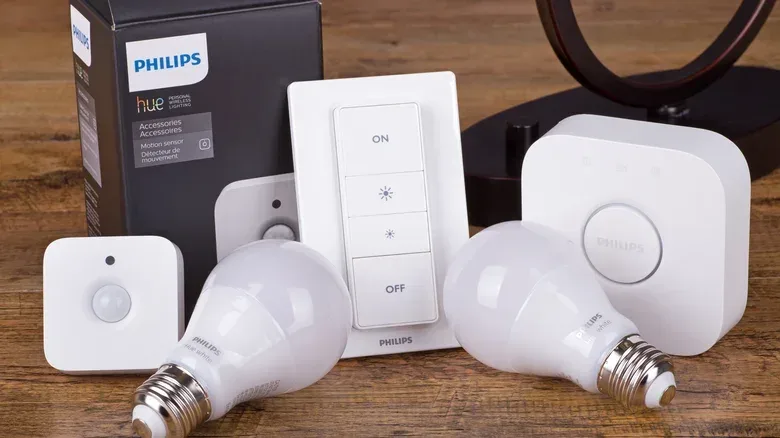
Smart lighting can feel like an easy first step into a connected home: screw in a bulb, join it to Wi-Fi, and suddenly the lamp can change color, dim from an app or respond to a voice command. It is a satisfying upgrade, particularly for a desk lamp, a display shelf or any corner where dramatic color is the entire point.
But a house is not a single-player setup. It has roommates, partners, children, visitors and the person who has lived there long enough to reach for the hallway switch without even looking. That simple instinct exposes the central weakness of the smart bulb: turn off power at a normal wall switch and the bulb is no longer powered, network-connected or available to an app or voice assistant. The smart feature set has effectively been defeated by the control everyone already understands.
For primary lighting in shared rooms, a smart switch is often the less flashy but far more accommodating upgrade. It puts the intelligence at the wall control rather than inside every individual bulb. People can still use the physical switch normally, while connected controls and automations remain part of the setup. It is the smart-home equivalent of choosing a dependable co-op menu over asking every player to install an app before they can press Start.
The issue is not whether smart bulbs are good
Smart bulbs have real strengths. They can be comparatively inexpensive, offer color-changing effects and are simple to put in a lamp. They are also a particularly sensible option for renters who cannot modify the wiring in a home. A plugged-in living-room lamp is another natural fit: the bulb can remain powered while its brightness or color is handled through its connected controls.
The friction starts when a smart bulb is installed in a fixture controlled by a conventional wall switch. A smart bulb needs a continuing supply of electricity to remain online. When somebody switches that circuit off, the bulb goes dark and disconnects from Wi-Fi. Scheduled actions and voice commands cannot operate it again until somebody physically restores power.
This is not necessarily a technical failure. The wall switch did exactly what a wall switch has always done: it cut power. The problem is that the result conflicts with the expectation created by “smart” lighting. A light intended to answer an app, a speaker or an automation only works as a connected device when it is left electrically on. In a shared space, leaving a familiar switch permanently untouched is a rule that is easy to forget and difficult to teach without making the lighting system feel oddly precious.
Power interruptions can add another unwanted moment. Many smart bulbs return at full brightness after an outage, which is less than ideal if a nighttime storm has already interrupted everyone’s sleep.
Why a switch changes the household experience
A smart switch replaces the wall switch and is wired into the home’s electrical system. Instead of turning an individual lamp into the connected product, it controls the power to the light or fixture from the place people expect to find the control.
That distinction is important because accessibility is not only about adding more ways to command technology. It is also about retaining the low-effort way that already works. A visitor should not need an account, an app, a tutorial or the right voice-assistant phrasing to light a bathroom. A child, an older relative or a roommate who simply does not care about smart-home gear can use a tactile wall control in the ordinary way.
In practical terms, a smart switch lets a household accommodate different comfort levels with technology without forcing every person toward the same interface. The user who likes routines, remote access or voice control can keep those options. Everyone else can press the switch. That is a more useful kind of compatibility than colorful lighting alone in the rooms where people need to see where they are going.
Automation without the accidental off switch
Automation means a programmed action, such as a light turning on or off as part of a schedule or routine. With a smart bulb behind a conventional switch, that automation depends on nobody cutting power to the bulb. With a smart switch handling the fixture, the normal wall control is part of the connected system rather than an accidental hard reset for it.
This does not mean a smart switch makes every lighting concern disappear, but it removes a common source of confusion: the routine did not fail because Wi-Fi or an app necessarily misbehaved; the bulb may simply have been switched off at the wall. Fewer mysterious failures mean less troubleshooting and fewer household rules that exist solely to protect a gadget from normal use.
That underlying reliability matters most in kitchens, hallways, bathrooms and living rooms. These are high-traffic areas where several people may use the lights across a day, often without thinking about smart-home routines at all. They are also rooms where a dependable, obvious physical control is usually more valuable than a rainbow palette.
One fixture, many bulbs: where the value calculation changes
Fixtures with multiple bulbs are another strong case for starting at the switch. A chandelier or other multi-light overhead fixture can require several smart bulbs if intelligence is being added bulb by bulb. Each device needs to be bought and configured, and each becomes an individual connected product that may eventually need replacing.
A single smart switch can manage every bulb on its circuit. That approach avoids treating each ordinary bulb as a separate networking project. It also means a household can select ordinary bulbs for the fixture while still gaining smart control where it is most useful: at the wall and through compatible connected controls.
The cost difference can be substantial depending on the fixture. Individual smart bulbs can range from about $5 to $50 apiece, with pricing influenced by brand and color-changing capability. A smart switch can cost as little as $11 per unit in a bundle. For a six-bulb fixture, the distinction is not just between one purchase and six purchases; it is also between configuring a single switch and maintaining six separate smart endpoints.
That does not make a switch automatically cheaper in every situation. A one-bulb lamp and a hardwired six-bulb chandelier are different jobs. But it gives a useful purchasing rule: count the bulbs on the circuit before assuming the bulb-by-bulb route is the bargain.
Compatibility is the pre-installation boss fight
Smart switches are not universally plug-and-play. Before choosing one, check that the switch is compatible with the home’s system. Many models require a neutral wire, a wiring connection used by the switch to support its connected functionality. That requirement should be verified before buying rather than discovered after a switch is already out of the box.
There is another check for fixtures beyond lighting. Some smart switches can control ceiling fans and other wired loads, not only lights. In that context, a load rating is the specification that indicates what device or electrical load the switch is designed to handle. The rating on the switch needs to match the intended device. “Smart” is not a substitute for confirming that the hardware is suitable for the fan or fixture involved.
For anyone improving a gaming room as part of a broader home setup, the same design principle applies elsewhere: choose the technology that works for the whole room, not just the person who likes configuring it. The case for keeping familiar hardware useful also comes up in our look at giving old speakers a useful second life with a TV.
Can a smart switch and smart bulb share a setup?
They can, but the relationship needs to be understood. If a smart switch cuts power to a smart bulb, the bulb loses its connected functions until power returns. Once the bulb is powered, its app and voice features can again be used for functions such as color changes or brightness adjustments.
The major warning is dimming. Smart dimmer switches should not be used to control fixtures fitted with smart bulbs. A setup that combines both categories is therefore not the default answer for an overhead room light; it is a deliberate arrangement that needs the right kind of controls and a clear understanding of what stays powered.
A simpler division of labour is usually more functional. Put smart switches in shared, high-traffic spaces where dependable physical control matters most. Use smart bulbs in lamps, rental homes and decorative locations where their colors and app-driven adjustments genuinely add something. A desk backdrop, a shelf display or a lamp that remains plugged in can benefit from the bulb’s chameleon-like qualities without asking the rest of the household to remember a special rule about the wall switch.
A practical buying checklist
- Start with the room: Choose switches for busy shared spaces; consider bulbs for lamps and decorative lighting.
- Count the bulbs: A multi-bulb fixture may be more practical to control from one smart switch.
- Preserve a physical option: If guests and household members need lights without an app, the wall switch matters.
- Check wiring before purchase: Confirm whether the model needs a neutral wire and whether it works with the home’s system.
- Match the load: For fans or other wired devices, verify the smart switch’s load rating.
- Avoid smart-bulb/smart-dimmer conflicts: Do not use a smart dimmer switch to control fixtures containing smart bulbs.
Color-changing bulbs still deserve a place in a smart home. They are excellent specialists. But a smart switch is the stronger foundation when the goal is lighting that remains easy for every person in the house to use. The most successful setup is not the one with the most app controls; it is the one that continues to work naturally when someone walks in and flips the switch.