Picking an iPhone storage tier is one of those decisions that seems sleepy right up until the phone begins issuing desperate low-storage warnings in the middle of a trip, an update, or a boss fight. Color is easy. Screen size is easy. Storage is the part that quietly decides whether the device stays relaxing to use two years later or becomes a digital apartment where every new download requires evicting something else.
For a large share of people, 256GB is enough. It is a roomy baseline for messaging, social apps, photos, music streaming and a sensible collection of games. The answer changes, however, when an iPhone is also a 4K camera, a RAW photography tool, an offline entertainment library, a travel companion, or a pocket-sized current-gen gaming machine. In those situations, 512GB is not simply a luxury spec. It can be the capacity that prevents routine storage management from becoming an unpaid part-time job.
The right question is not “How much storage sounds huge today?” It is “What will live locally on this phone during its busiest week?” Think holidays, flights, poor reception, game downloads, camera-heavy events and a pending iOS update all arriving at once. That is the scenario storage needs to survive.
What 256GB can realistically handle
A 256GB iPhone has plenty of room for ordinary phone life. A typical photo can take roughly 3MB, which means the raw arithmetic points to space for tens of thousands of images before allowing for everything else. No one should treat that as a literal promise: videos, apps, system files, messages, downloaded media and photo formats all alter the total. Still, it illustrates the point. Standard snapshots alone are not likely to overwhelm 256GB for most owners.
That capacity is especially comfortable for people who stream rather than download. If music and films are generally accessed over Wi-Fi or cellular data, if old pictures are kept in cloud storage, and if only a few games stay installed at any time, 256GB offers a healthy amount of breathing room. It also leaves room for the unpredictable things every phone collects: message attachments, browser data, social-media caches, downloaded documents and the mysterious “System Data” category that seems to regard free gigabytes as a personal challenge.
But advertised capacity is not empty capacity. iOS itself can occupy as much as 24GB, and local requirements may expand when the device stores additional material such as offline maps or AI-related models. That does not make 256GB small; it means shoppers should avoid planning as if every one of those gigabytes will be available for games and footage.
A simple 256GB profile
- You mostly take ordinary photos rather than long, high-resolution video.
- You use cloud photo syncing and are content to keep older originals off the handset.
- You stream music, movies and shows more often than you download them.
- You keep a rotating selection of smaller or mid-sized games installed.
- You have dependable internet access and do not mind reinstalling an app or game when necessary.
If that sounds familiar, 256GB should be a practical fit rather than a compromise. Buying beyond your needs is no more efficient than repeatedly running out of room. The goal is a phone that has headroom, not a vault whose unused storage wins a staring contest with your bank account.
Why video makes storage disappear so quickly
Video is where reassuring storage math goes to get mugged in an alley. Standard 4K footage can use around 440MB per minute. That means a few minutes here and there may be harmless, but a full day of concerts, family events, travel clips or creative recording stacks up rapidly. A 30-minute collection at that approximate rate is already well into double-digit gigabytes before any editing project, duplicate export or downloaded entertainment enters the picture.
Related coverage includes Is 256GB Enough for an iPhone? When 512GB Makes Sense.
Apple ProRes is a much more dramatic storage commitment. A minute of ProRes video can reach roughly 6GB. That level of quality can be valuable for people who need the format, but it changes storage planning completely. Ten minutes can consume about 60GB. A short shoot, several takes and a reluctance to delete source footage can turn a 256GB device from comfortable to crowded in a hurry.
RAW images create a similar, if less explosive, consideration. Individual RAW photos may be as large as 50MB. A few dozen are manageable. A substantial shoot is another matter, particularly if the phone also holds regular photos, edits and exported versions. Anyone who shoots in RAW or ProRes should base a purchase on their actual capture habits, not on the amount of space consumed by casual snapshots.
Storage is cheapest when it prevents a workflow problem before that problem arrives at an airport, wedding, convention, or once-in-a-lifetime view.
For creators who want the iPhone to function as a serious capture device, 512GB is the less stressful choice. It provides room to keep recording instead of checking a storage meter after every take. It also helps when a file cannot be backed up immediately because Wi-Fi is unavailable, slow, expensive or simply not trustworthy enough for a large upload.
Mobile games are now a serious storage category
Gamers have an equally persuasive reason to look past 256GB. Modern iPhone releases increasingly include large, visually ambitious games rather than only compact puzzle titles and endless runners. Resident Evil 4, for example, takes more than 30GB. Install several similarly substantial games and their extra data, patches and save-related overhead, and a meaningful portion of 256GB is gone.
That does not mean every player needs 512GB. Someone who focuses on one premium game at a time, plays smaller titles, or is happy to redownload games later can work within 256GB. The pressure rises for a person who maintains a library instead of a single active game. Five or six 30GB-class titles could push beyond 150GB before photos, videos, operating-system space and all the normal apps that make a phone a phone.
Travel makes the difference more obvious. Downloading a large game at home is one thing. Needing to reinstall it through weak hotel Wi-Fi, limited mobile data, or no useful connection at all is another. Extra local storage turns an iPhone into a better offline handheld: the games, movies, albums and maps are already there when the network decides to become a turn-based strategy game. For a broader look at how storage differs from working memory, see why RAM forgets while SSD storage retains data.
The cloud changes the calculation, but does not erase it
Cloud storage can make 256GB feel considerably larger. iCloud users can enable photo optimization so older photos and videos do not all remain in full resolution on the device, while more recent material stays readily available. Streaming services also reduce the need to carry a permanent offline music and movie collection. Clearing cache-heavy apps can reclaim space when temporary data begins to pile up.
This approach is ideal for people with reliable connectivity and a willingness to let the cloud act as their deeper archive. It is less ideal for someone who wants every original photo locally accessible, avoids recurring cloud plans, or routinely visits areas where internet access is unreliable. Cloud tools are useful, but they are not a substitute for local capacity when the connection is absent and the content is needed now.
There is also an emotional distinction worth acknowledging. Some users are comfortable treating their phone as a window into a larger online library. Others want the device itself to carry their complete photo history, favorite games and emergency entertainment. Neither approach is wrong. They simply produce different storage needs.
When 512GB is the sensible upgrade
A 512GB iPhone makes the most sense for people who know their storage will grow, rather than merely hoping it will not. It creates enough room to keep large games installed, retain a substantial offline library, capture 4K footage without immediate triage, and leave safe operating space for apps and system updates. It is particularly suited to frequent travelers, enthusiastic mobile gamers, photographers using RAW, and video creators working with ProRes.
- Choose 256GB if you use cloud storage, stream most media, shoot mostly photos, and keep a modest game lineup.
- Choose 512GB if 4K recording is regular, RAW or ProRes matters, several large games stay installed, or offline access is important.
- Consider more than 512GB only if the iPhone will routinely hold extensive professional-grade video, a vast local media library, or a large game collection alongside it all.
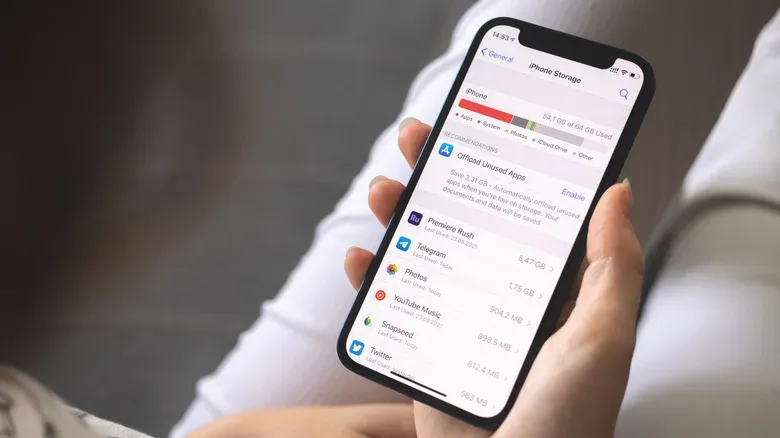
Before buying, open the current iPhone’s storage settings and look at what actually occupies space. Photos, videos and games are the obvious suspects, but downloads, messages and applications can tell a more honest story about future needs. Then add room for a longer ownership period. Storage requirements tend to expand as camera habits change, games get larger and a device accumulates the everyday clutter of digital life.
For many people, 256GB remains the sensible sweet spot. For the person filming in 4K, shooting RAW, keeping Resident Evil 4 and other large games ready to play, or traveling beyond reliable Wi-Fi, 512GB buys something more useful than a spec-sheet number: the freedom to stop negotiating with the storage meter.