YouTube’s homepage has long operated as a broad recommendation surface: a place where subscriptions, viewing behavior and the platform’s own suggestion systems collide. That can be useful when a viewer wants a quick answer to “what’s next?” It can be less useful when they know exactly what sort of rabbit hole they want—retro hardware footage, a narrowly defined game genre, live music, practical tutorials, or simply something far outside their normal routine.
Custom Feeds are YouTube’s answer to that narrower request. Introduced in October 2026, the feature lets signed-in users describe a desired stream of videos in natural language, then keeps that tailored feed accessible at the top of the homepage. Rather than asking people to reshape their entire main recommendation page around one temporary interest, it provides a separate starting point for that interest.
The key word is prompt. In this context, a prompt is plain-language text that tells an AI-powered system what kind of material to surface. It is not a conventional playlist that a user manually fills video by video, and it is not necessarily a permanent rewrite of the Home tab. It is an instruction for constructing a focused view from YouTube’s enormous library of uploads.
That distinction matters. More than 20 million videos arrive on YouTube daily, making the broad homepage an inherently busy place. A viewer can appreciate their regular mixture of channels and recommendations while still wanting a button for a particular mood, hobby or research session. Custom Feeds are designed to make that button possible.
How to create a Custom Feed
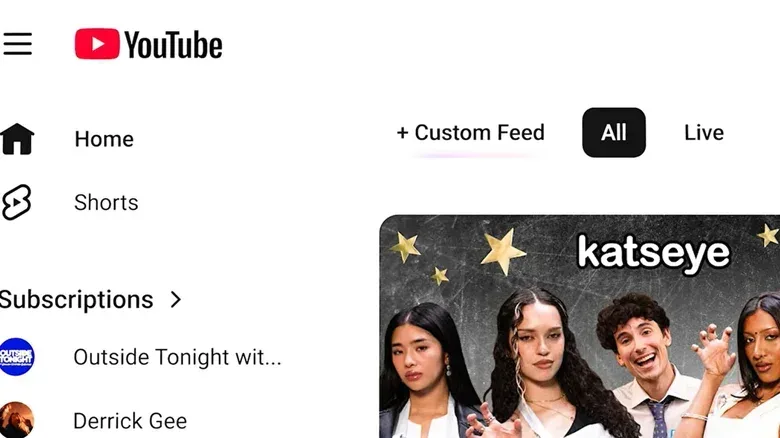
Start from the top of the YouTube homepage. Look for the + control; in some versions of the interface it may be labeled Custom feed. Selecting it opens a text box where you can describe what you want to watch.
YouTube’s own example is highly specific: a request built around retro-tech nostalgia, including 1980s commercials, vintage PCs and CRT glow. That style of prompt communicates both a topic and a tone. But the prompt does not have to be an elaborate shopping list. A more open-ended request, such as asking to explore something completely different from the usual feed, is also supported.
Once made, the feed appears along the top of the screen for easy return visits. It can also be refined later: the prompt box remains at the top of the custom feed, so a viewer can revise the instructions instead of beginning from scratch.
A practical way to write better prompts
Because the feature responds to natural language, the most productive approach is to state the category of videos you want and add a few boundaries if they matter. The supplied examples show two legitimate prompt styles:
Related coverage includes YouTube Custom Feeds Give Your Homepage a More Focused Starting Point.
- Specific: define the era, subject and visual or cultural flavor, such as vintage computers and CRT-focused nostalgia.
- Exploratory: ask for a deliberate change from the habits represented in your ordinary homepage.
For gaming viewers, the useful principle is to describe the lane rather than assume the main algorithm will infer it from every other thing they watch. Someone might want a dedicated feed for older-game preservation discussions, competitive match analysis, speedrunning, controller repair, soundtracks or a particular style of long-form video. The feature’s value is that these interests can live beside the ordinary Home experience rather than compete to dominate it.
That does not mean every prompt guarantees perfect results. The available information establishes that YouTube uses the prompt to assemble the feed, but does not explain the precise ranking logic behind each result. It is sensible to treat the first version as a starting point and use the visible prompt box to make the request more precise if the results are too broad.
Limits, syncing and the 30-day expiry rule
Custom Feeds have different saved-feed limits depending on membership. Users without YouTube Premium can save up to three Custom Feeds. YouTube Premium subscribers can save up to eight.
Those limits suggest an important practical point: saved feeds are best treated as reusable lanes for recurring interests, not as an unlimited archive of every passing curiosity. A person who frequently watches certain kinds of content can reserve their slots for those repeat needs, then replace a feed when their interests change.
The feeds sync between mobile and desktop provided the user is signed in to the same account. That is valuable for a feature based on a stored prompt: an interest established on a phone does not have to be rebuilt from scratch at a computer.
There is one maintenance detail to remember. A Custom Feed expires after 30 days without use. Expiration is not presented as a permanent loss of the underlying idea; users can create another feed with a new prompt. Still, anyone who expects a dedicated lane to stick around should open it periodically. In practice, it makes Custom Feeds closer to active shortcuts than permanent, carefully catalogued collections.
Availability has two meaningful restrictions
As described, Custom Feeds are currently available only in English in the United States. They also require search history to be enabled. Those qualifications are easy to miss because the creation process itself is simple, but they determine whether the control is available at all.
Search history is the setting that records searches made through YouTube. The requirement means people who have disabled that history for privacy or account-management reasons will not be able to use Custom Feeds unless they change that setting. The feature therefore offers more direct control over what is requested on the homepage, while also depending on a data-history setting that some users may intentionally keep off.
Custom Feeds are also subject to YouTube’s community guidelines. Put plainly, a custom instruction is not a bypass for the platform’s rules. The feed is a way of organizing discovery within YouTube’s existing policy framework, not a separate unmoderated catalog.
How Custom Feeds fit into the updated homepage
The rollout arrives alongside other Home-page changes, especially in YouTube’s mobile app. A row of feeds can appear across the top of the page, including categories such as Live and Music. These are quick routes into broad types of content, whereas Custom Feeds provide a space for a user-written request.
Not every top-row option will appear for every account. The Movies & TV feed, for example, depends on having Primetime Channel subscriptions. The Subs feed—short for subscriptions—has also moved to the top bar. Users who want to leave the feed view and return to their standard recommendation page can select the Home tab on the left.
The overall interface now separates several ways to decide what to watch:
- Home: the normal, broadly personalized recommendation view.
- Subs: a route centered on a viewer’s channel subscriptions.
- Category feeds: entry points such as Live or Music, where available.
- Custom Feeds: user-prompted, focused homepage views.
This structure is useful because “more control” does not have to mean abandoning recommendations altogether. A person can keep the normal Home tab for casual browsing, use subscriptions when they want to prioritize creators they actively follow, and switch to a Custom Feed when they have a sharply defined intent.
Why this could be useful for game and tech audiences
Game and technology video audiences often move between very different needs. One evening might call for broad entertainment; another might mean finding a narrow historical topic or watching a particular type of tutorial. A standard homepage can learn from viewing habits, but it can also merge unrelated interests into one unpredictable scroll.
Custom Feeds offer a way to compartmentalize those interests. A viewer can make one focused request for a recurring subject, retain another slot for discovery beyond their usual recommendations, and preserve the regular homepage for everything else. It is a small but meaningful change in the relationship between viewer and algorithm: instead of only signaling preferences through clicks and watch history, the viewer can state an immediate intention in words.
It is also worth keeping expectations grounded. The feature is about discovery and homepage organization, not ownership of videos or a replacement for subscriptions. It does not turn a prompt into a manually curated, permanent playlist, and the 30-day inactivity expiry makes it unsuitable as a long-term reference shelf. For durable lists of videos, users would still need to rely on the platform’s other organizational tools.
But as a front-door tool, the idea is straightforward and potentially useful. When YouTube’s default homepage feels too general, Custom Feeds provide a temporary, editable destination built around the viewer’s own description. That focus may be especially welcome when the ordinary feed is trying to serve every interest at once—an issue familiar to anyone who has moved from a game trailer to a repair guide to an old commercial break without ever consciously deciding that was the plan.
For more on making technology work around specific needs rather than generic defaults, see our guide to testing USB port and cable speeds before an SSD becomes a loading-screen villain.