Xbox is testing two new ways to get controls into Xbox Cloud Gaming sessions, aimed at two distinct frustrations of streaming play: not having a gamepad nearby, and feeling the delay between pressing a button and seeing the game respond.
One preview lets players on supported smart TVs use a phone as a controller. The other allows US users of the Nano Controller to connect the device directly to Xbox Cloud Gaming over Wi-Fi. Both are early-access features with limits around supported hardware, regions and games, but together they show a practical effort to make cloud sessions easier to start on the biggest screen in the house.
A phone can become the TV’s Xbox Cloud Gaming controller
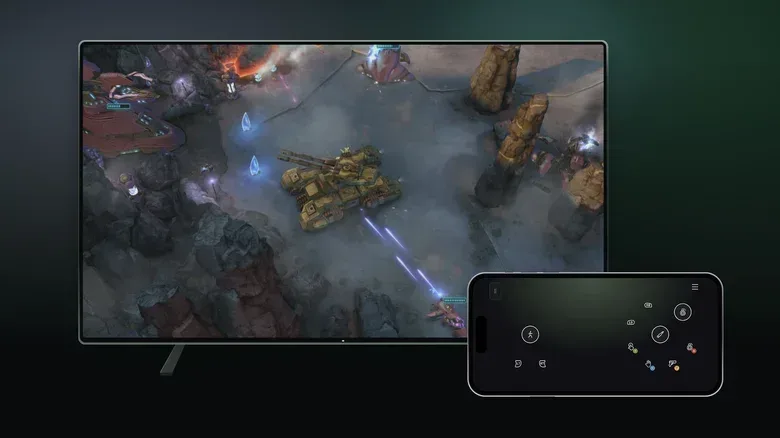
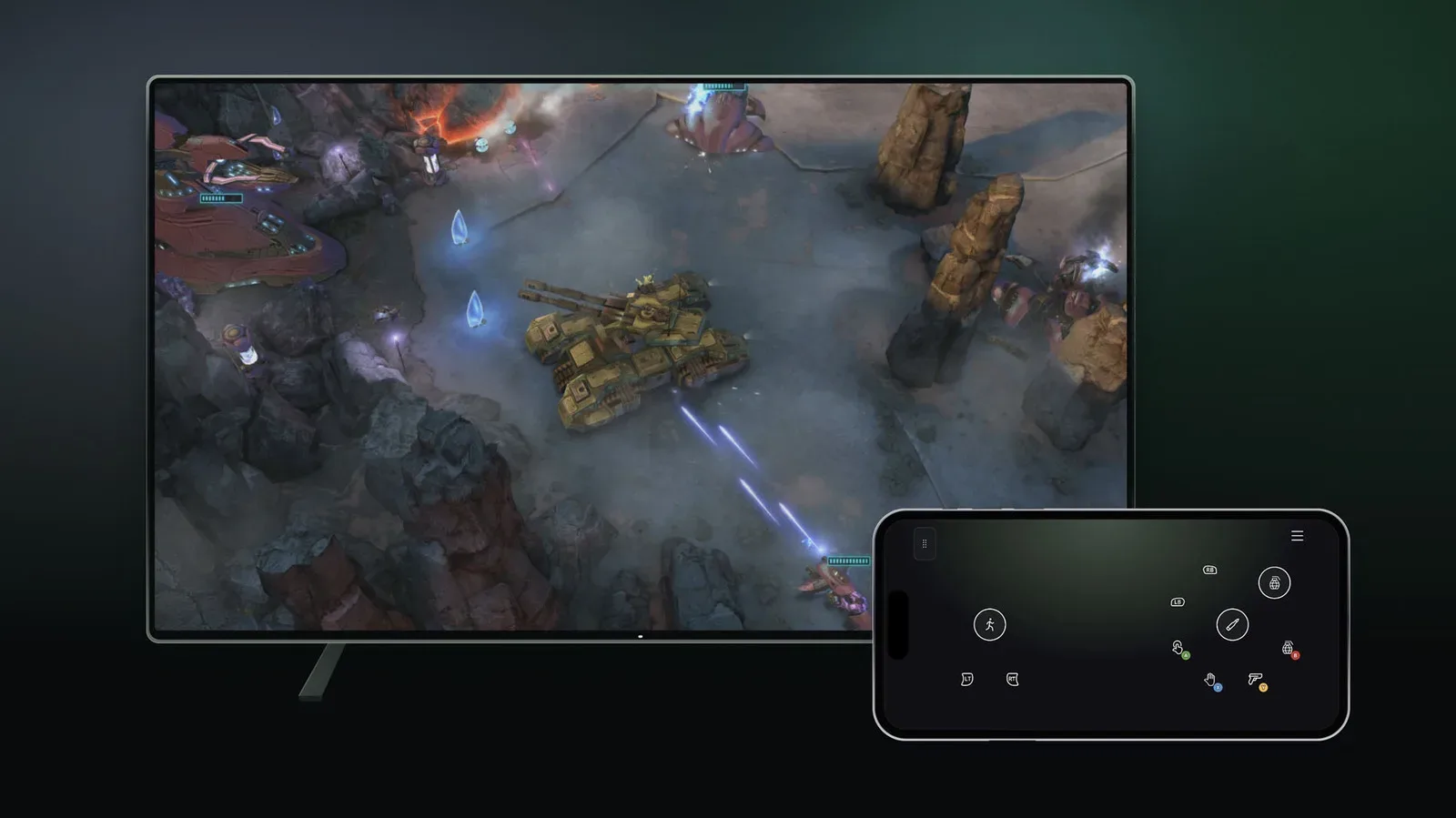
On select smart TVs, Xbox Cloud Gaming users can now try a phone-based controller option. Rather than requiring a separate controller application download, the control interface opens in a web browser. That lowers the setup barrier for the person who wants to play a quick game from the sofa, only to discover the usual controller is in another room, out of charge or already claimed by someone else.
To find the preview on an eligible TV, players can open the Cloud Gaming interface and go to Settings > Account, then enable Preview Features. Its presence behind that switch is important: this is a test feature, not a promise that every Xbox Cloud Gaming user, television or game has the option today.
Some games also have custom controller layouts. In practical terms, that means the virtual buttons displayed on the phone are not necessarily one generic, fixed arrangement. A layout can be tailored to the controls a particular game needs, which should matter more than it may initially sound. A simple game that asks players to select actions, confirm choices and move a cursor has very different demands from one that needs precise movement, camera control and several simultaneous button presses.
Where touch controls make the most sense
A phone controller is not automatically a substitute for a physical gamepad. Touchscreen inputs have no physical buttons to feel for, no trigger travel and no thumbsticks that return to center. That can make fast-paced games or titles with dense control schemes more difficult to handle, especially when a player must keep looking away from the TV to find the correct on-screen input.
The more compelling use case is convenience. Turn-based games are a clear example: timing is less punishing, players generally have more time to choose an action, and the difference between a physical face button and an on-screen tap is less likely to decide an encounter. It could also be useful for a brief session when a traditional controller simply is not available.
That distinction is worth keeping in mind as cloud services broaden beyond consoles and PCs. Access is valuable, but it is only one half of the experience. The control method still shapes which games are comfortable to play. A phone can remove the need to buy, charge or locate a controller for a casual session; it does not change the fact that many games were designed around tactile inputs.
Related coverage includes Xbox Tests Phone Controls and Wi-Fi Nano Controller Support for Cloud Gaming.
Nano Controller Wi-Fi support targets input lag
The second test focuses less on convenience and more on responsiveness. US players can connect the Nano Controller directly to Xbox Cloud Gaming through Wi-Fi after setup. The purpose is to reduce latency.
Latency is the delay in a system. In cloud gaming, input latency describes the time between pressing a button and seeing the resulting action on screen. It is part of a longer chain: the controller sends the command, the command travels to the cloud service, the game responds, and the resulting video returns to the display. Even when a game is running smoothly visually, extra delay in that chain can make controls feel sluggish.
Direct Wi-Fi connectivity is designed to reduce one part of that path. Rather than having controller input take an additional route through the device used for streaming, the Nano Controller can connect through Wi-Fi to the cloud gaming setup. The goal is not a guarantee that every session will feel identical—network conditions and the wider streaming path still matter—but it is a sensible attempt to remove unnecessary delay from controller input.
There is a setup requirement before the feature can be used. Players can configure the Nano Controller through the Xbox beta app on Android or the Xbox Accessories app on PC, then follow the Wi-Fi connection instructions. Once configuration is complete, opening Xbox Cloud Gaming under the same account used for setup should allow the controller to connect via Wi-Fi.
PC setup has an extra preview requirement
Android and PC are both listed as setup routes, but the PC path comes with an additional condition: users need to be enrolled in the Xbox Insider testing program to try Wi-Fi connectivity through the PC app. That is another reminder that the functionality remains in preview and may change as it is tested more widely.
The present platform scope is also narrow. Nano Controller Wi-Fi connectivity works on smart TVs and the web for now. It should not be read as blanket support across every place Xbox Cloud Gaming might be accessed. Players interested in the feature should verify that their streaming device and intended game are supported rather than assuming a configured controller will work everywhere.
Two ideas cloud gaming has seen before, adapted for Xbox
Neither concept arrives without precedent. Google’s now-defunct Stadia service supported a Wi-Fi-connected controller and also allowed phones to serve as controllers for TV play. Netflix’s game-streaming efforts have likewise included phone-as-controller functionality.
That history does not make the Xbox tests less useful. It clarifies the problems these features are trying to solve. Phone controls address the friction of starting a game on a TV without dedicated hardware in hand. Direct Wi-Fi controller links address the responsiveness challenge that is especially visible in streamed games. They are complementary rather than competing options: one favors immediate access, while the other favors a more traditional control experience with a path intended to trim delay.
For players, the most useful question is therefore not which method is universally better. It is which one fits the game and the moment. Someone opening a turn-based title for a short session may be satisfied with a browser-based phone layout. Someone who prioritizes a physical gamepad and wants to minimize potential input lag will have more reason to investigate Nano Controller Wi-Fi support, provided they are in the US and using a currently supported destination.
What preview status means for players
Both controller options are explicitly labeled previews. Availability may be limited, as may the range of supported devices and games. That means a feature appearing in settings is not the same as universal access, and a player’s results can depend on their TV, region, game and setup route.
- Phone controls: Available as a preview on select supported smart TVs through the Cloud Gaming interface’s Preview Features setting.
- No dedicated app required: The phone control interface opens in a browser.
- Custom layouts: Some games offer layouts designed around their specific controls.
- Nano Controller Wi-Fi: Available to users in the US after setup through the Xbox beta app on Android or Xbox Accessories on PC.
- PC caveat: Wi-Fi connectivity through the PC app requires Xbox Insider enrollment.
- Current Nano scope: Wi-Fi connectivity is limited to smart TVs and the web at this stage.
The larger takeaway is that cloud-gaming hardware does not have to be a one-size-fits-all proposition. A screen, a phone and a browser may be enough for certain games. For other sessions, a Wi-Fi-capable controller may be the more meaningful addition because responsiveness is central to the experience. Xbox is testing both routes rather than insisting that one solves every situation.
That flexibility also fits a broader definition of what it means to play a game. Cloud gaming tries to make the game available across different screens; controller choices determine how approachable that availability feels. Players who prefer a non-screen-based, social format can find a starkly different kind of game adaptation in this look at D&D World of Warcraft as a tabletop campaign. Xbox’s new previews, by contrast, are concerned with making a streamed TV session easier to begin and potentially more responsive once it does.
For now, expectations should stay measured. The phone controller may be most appealing for slower, simpler input situations, while Wi-Fi connectivity for the Nano Controller is an attempt to improve one important component of cloud responsiveness rather than eliminate every form of delay. Still, the pair of tests offers two concrete options: play without a conventional controller when circumstances demand it, or use a directly connected controller when reduced input latency is the priority.