
Wireless earbuds are easy to judge by battery life, features or brand, but none of those details matter much if the buds will not stay comfortably in place. For people with smaller ears or narrower ear canals, a loose fit can turn a short listening session, a workout or a gaming commute into a repeated cycle of readjustment.
Fit is not merely a comfort concern. With AirPods, it can affect stability, the amount of outside sound that reaches the ear, perceived bass response and the effectiveness of noise-control features. The right approach depends on which design you own: the open, tip-free AirPods 5 have limited physical adjustment, while AirPods Pro models use swappable ear tips and include a built-in check for the acoustic seal.
There is also no reason to assume both ears require the same setup. Ear shapes differ from person to person, and a person’s left and right ears can differ as well. Treating each side separately is often the practical way to find a secure fit rather than forcing a matched pair of tips because they arrived that way in the box.
Why a secure fit changes the listening experience
An earbud that sits securely is less likely to move when talking, walking or exercising. That obvious benefit also has audio consequences. A close seal limits the path through which ambient sound can enter the ear canal. Less outside sound can make music easier to hear, particularly low-frequency sounds such as bass, without constantly pushing the volume higher.
It is useful to distinguish two related ideas. Passive noise isolation is the physical blocking effect created by an ear tip and the shape of the earbud. Active noise cancellation, or ANC, is the electronic feature available on AirPods Pro 3 that works to reduce unwanted sound. They are not the same thing, but a poor physical fit can undermine the experience of using noise control because external sound has more room to leak in.
In practical terms, if an earbud feels as though it might fall out, sounds thin, or lets in much more surrounding noise than expected, fit is a sensible first thing to investigate. That does not mean every audio concern is a seal problem, but it is one variable users can address without changing their listening setup.
AirPods 5: position is the main adjustment
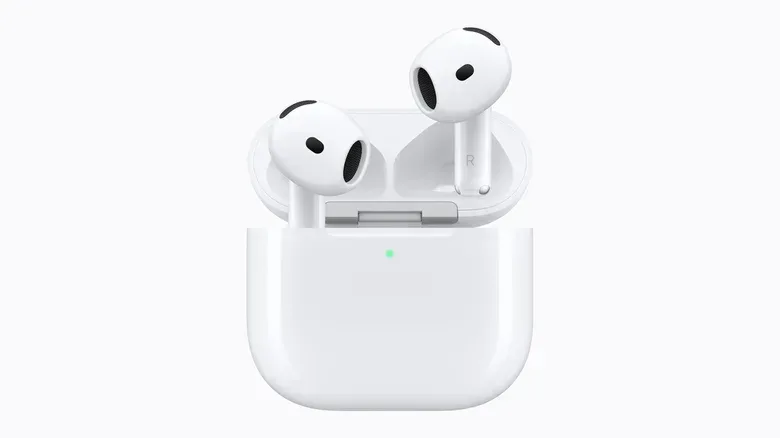
AirPods 5 do not use removable ear tips. That makes their setup simpler, but it also leaves fewer ways to tailor their shape to a smaller ear canal. Start by inserting each bud and rotating its stem toward the face until the earbud settles into its most stable position.
The goal is not to force the bud deeper than is comfortable. Instead, the rotation helps the body of the earbud sit against the contours of the outer ear in the intended orientation. If that position is secure, it may be all that is needed. If it remains loose, there is no smaller silicone tip to swap in.
When an ear hook is the better answer
Third-party ear hooks can provide a more dependable hold for users who like the standard AirPods design but need support during movement. These accessories loop around the ear and hold the buds in place externally. Options from KeyBudz and AhaStyle are cited in the roughly $10 to $15 range.
Hooks address retention rather than creating an ear-tip seal. That distinction matters: they may stop a bud from slipping out during a workout, but they do not turn tip-free AirPods into in-ear sealed earbuds. Still, for someone whose priority is keeping the earbuds in place, they can be a lower-cost option than changing models.
If inserting and rotating the earbuds still produces an insecure fit, it may be worth considering whether a tip-free design is simply a mismatch for that ear shape. AirPods Pro offer a more adjustable route because their tips come in multiple sizes.
AirPods Pro: try every included tip size
AirPods Pro owners should not assume the medium tips installed out of the box are correct. They are only the default. The first-generation model includes small, medium and large tips. The second generation adds extra small, while AirPods Pro 3 adds an XXS option, resulting in XXS, XS, S, M and L choices.
That broader selection is especially meaningful for smaller ears. A user who cannot make a conventional bud stay put may find that an XS or XXS option provides a much more dependable contact point. Conversely, the smallest available size is not automatically best: an undersized tip can also fail to seal. The correct tip is the one that feels comfortable and stays stable while producing a good seal.
How to replace an AirPods Pro tip
- Hold the earbud and firmly pull the installed tip away from its connector until it releases.
- Line up the replacement tip with the oval base on the earbud.
- Press the new tip into place until it clicks.
- Wear the earbuds for a few minutes, moving normally, before deciding whether the fit is secure and comfortable.
Do this one ear at a time if necessary. A small tip in one ear and a medium tip in the other is a normal possibility, not a sign that the setup has gone wrong. Comfort and seal should guide the decision on each side.
Listening to bass-heavy music can offer a simple informal check: if a different tip makes bass fuller while remaining comfortable, the seal may have improved. That is not a substitute for the software test, but it can help users notice the real-world difference a tip change makes.
Use Apple’s built-in seal check
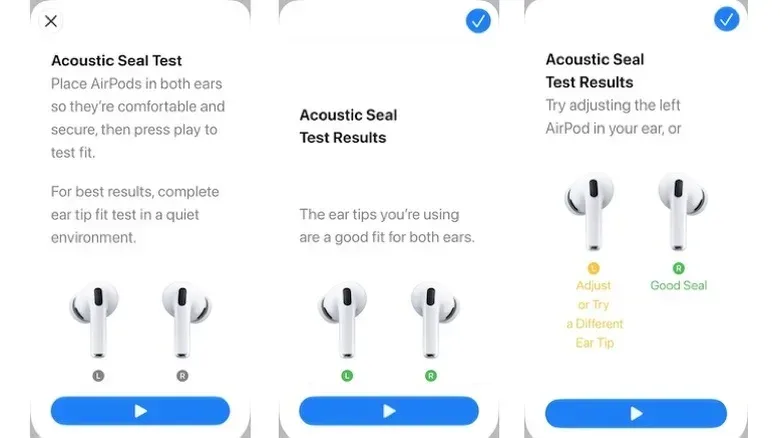
AirPods Pro provide a software-assisted way to assess the fit. On newer wording, it is called the Acoustic Seal Test; AirPods Pro 1 and 2 may show the earlier Ear Tip Fit Test name. Both are intended to identify whether the ear tips are making an appropriate seal.
With the AirPods Pro inserted, open Settings, select [Your AirPods], then choose Test Acoustic Seal or Ear Tip Fit Test. Tap Continue, then Play. The test plays audio and returns a result indicating either a Good Seal or the need to Adjust the earbuds or Try a Different Size.
This is particularly useful because a tip can feel subjectively fine yet not seal effectively. If the result calls for adjustment, reseat the AirPod first. If it still fails, change the tip and run the test again. Work through sizes methodically rather than changing both sides repeatedly without noting what improved.
A strong result should be balanced with physical comfort. The ideal fit is not one that feels painfully tight; it is one that remains stable and comfortable while giving the listener the needed seal. For more everyday Apple-device context, see our coverage of a reported Apple TV docuseries involving Justin Timberlake.
Foam tips can offer a different kind of fit
Most AirPods Pro include silicone tips. Silicone is the standard choice and, when cared for properly, can last as long as the earbuds. But comfort and stability are personal, and some people find foam more accommodating for smaller ear canals.
Foam tips are generally compressed before insertion. After they are placed in the ear, the material expands and conforms more closely to the canal. This can create a snug and comfortable fit, potentially improving the physical seal for users who have struggled with silicone.
AirPods Pro 3 include foam-infused tips, though some users may still prefer fully foam third-party alternatives. Comply and Foam Masters sell foam tips for AirPods Pro in the approximate $25 to $30 per-set range. The trade-off is durability: foam tips need replacing more often than silicone.
Check connector compatibility before buying
Do not buy replacement tips based on name alone. Apple changed the ear-tip connector on third-generation AirPods Pro, so a package must explicitly match the particular AirPods Pro model it is intended for. A foam tip that looks correct in a product image is not useful if it cannot attach properly.
That compatibility check matters for silicone replacements as well, but it is especially easy to overlook when shopping for foam tips as a comfort upgrade. Confirm the generation first, then choose the material and size strategy.
A practical fit routine for smaller ears
- For AirPods 5: insert and rotate the stems toward the face; if retention is still the problem, consider compatible ear hooks.
- For AirPods Pro: test more than the installed medium tips, including the smallest supplied options.
- Fit ears independently: use different sizes left and right if that is what produces the best result.
- Run the Acoustic Seal Test or Ear Tip Fit Test: use its result to guide reseating or swapping tips.
- Consider foam: if silicone is not comfortable or secure enough, compatible foam tips may provide a closer fit, with more frequent replacement expected.
- Verify the connector: particularly for AirPods Pro 3, ensure third-party tips are made for that model.
For small ears, the important takeaway is that the preinstalled configuration is a starting point, not a verdict. A few careful adjustments can improve security, sound and noise control. If the design itself remains uncomfortable after those steps, choosing earbuds that better match the ear may be more useful than endlessly trying to make an unsuitable shape work.