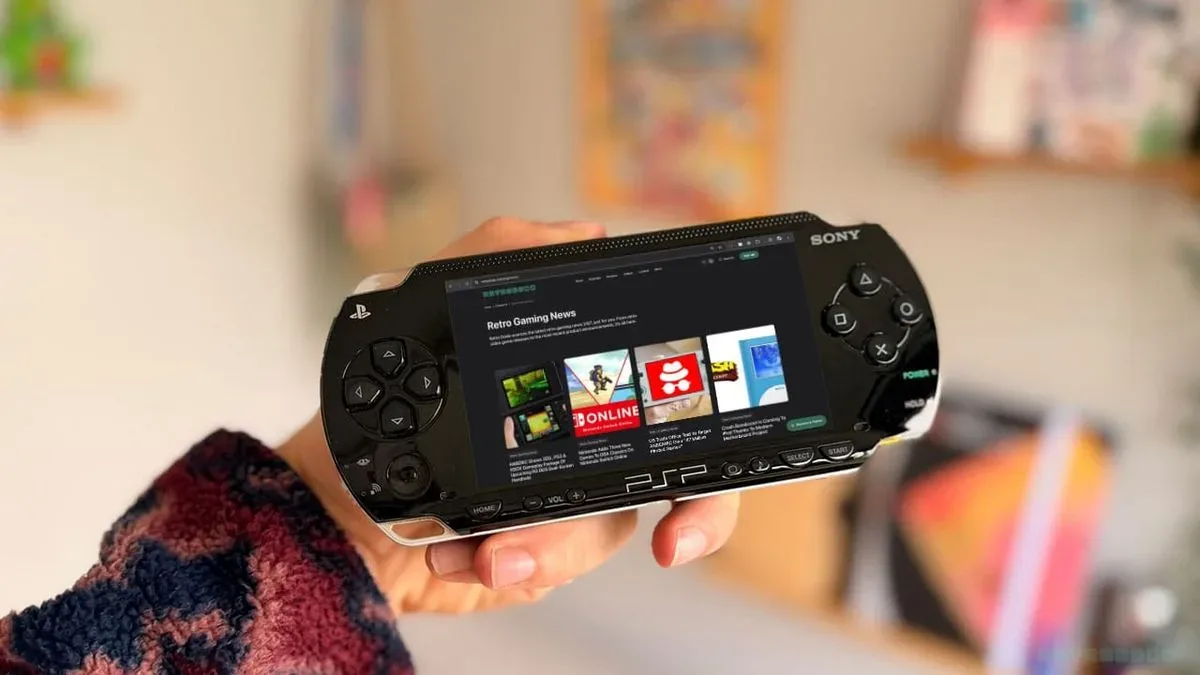
The PSP has received a new reason to leave the shelf: Tilefinch, a homebrew browser built by Steve Janovitz for compatible versions of Sony’s handheld. It is designed to make web access on the aging portable substantially more useful than the browser that shipped with the system during its original era.
That does not turn every PSP into a pocket contemporary computer, and there are important compatibility limits before anyone starts dusting off an old Memory Stick. But Tilefinch is notable precisely because it asks more of hardware that remains beloved long after its commercial heyday. On a platform with a continuing developer and modding community, it is another example of enthusiasts finding fresh practical roles for old devices.
What Tilefinch is built to do
Tilefinch is a browser application that runs on the PSP’s 333 MHz MIPS32 processor and 64 MB of RAM. Its stated capabilities include browsing websites, playing videos and games, and entering text. Those are broad tasks for a handheld from an earlier web era, particularly one whose original browser is not remembered as a standout part of the PSP experience.
The technical terms matter here. Homebrew means software made outside the console maker’s official commercial release pipeline. In Tilefinch’s case, the PSP must be able to run homebrew through custom firmware. Custom firmware is modified system software that permits a handheld to launch software the standard official environment would not ordinarily run.
Tilefinch also requires the PSP’s 64 MB memory mode. This is why the project is not a universal installation for every model carrying the PSP name. The extra memory is a hard practical requirement rather than an optional performance boost.
Which PSP models can run it?
The compatible systems named for Tilefinch are:
- PSP-2000
- PSP-3000
- PSP Go
The original PSP-1000 and the PSP E1000 Street are not supported. Owners of either model should not assume that copying the files over will provide a working browser; the required 64 MB memory mode is the dividing line.
This distinction is worth checking before spending time configuring networks or altering a Memory Stick. PSP model names can be easy to blur together when buying second-hand hardware or returning to a long-stored collection. Tilefinch’s compatibility list is specific, and it is sensible to verify the model before beginning.
Related coverage includes Tilefinch Gives PSP Owners a New Way to Browse the Modern Web.
What is needed before installation
A compatible PSP alone is not enough. The installation and normal use requirements are straightforward, but each is essential:
- A PSP-2000, PSP-3000 or PSP Go with 64 MB memory mode
- Custom firmware capable of running homebrew
- About 20 MB of free Memory Stick space for regular browsing and updates
- A Wi-Fi network that the PSP can join
The Memory Stick requirement is modest, yet it deserves attention on systems still carrying old game saves, media and homebrew applications. Leaving the stated free space available is part of making room for ordinary browser use and updates, not merely the initial copy process.
Wi-Fi is equally central. A browser cannot do much without a usable connection, and Tilefinch relies on a network profile saved in the PSP’s Network Settings. The project uses connection profile 1 by default, though users can select a different profile through Settings → Device & storage.
How to install Tilefinch
Once the compatibility and setup requirements are satisfied, installation uses the PSP release archive and the standard game-folder layout on the Memory Stick.
- Download the PSP installation ZIP from the latest Tilefinch release.
- Extract the archive.
- Copy the entire TILEFINCH folder to PSP/GAME/ on the Memory Stick.
- Confirm that the launcher file is located at PSP/GAME/TILEFINCH/EBOOT.PBP.
- Check that the accompanying slot-a, slot-b, data and NOTICES items are alongside the launcher as provided.
- Safely disconnect the PSP.
- On the handheld, launch Tilefinch from Game → Memory Stick.
The folder structure is not a cosmetic detail. The launcher location identifies the path from which the PSP is expected to start the application, while the associated folders and files belong with it. Copying only the EBOOT.PBP file, or placing the TILEFINCH folder one level too high or low, would not match the stated installation layout.
Set up the network profile first
If the PSP does not already have a saved Wi-Fi connection, create one through the handheld’s Network Settings before trying to browse. By default, Tilefinch selects connection profile 1. A user with several stored networks can change that selection within Tilefinch under Settings → Device & storage.
This is a small configuration point with outsized importance. A successful launch only confirms that the app is installed and that the PSP can run it; it does not by itself establish internet access. Separating installation, launch and network configuration makes it easier to identify where a problem lies if the browser opens but cannot get online.
Why this matters for the PSP community
The PSP was already ambitious for a portable system of its generation, combining wireless networking and a browser with its game and media functions. Yet the web has changed dramatically since the original browser was introduced, and historical hardware features can become less useful even when the hardware itself still works.
Tilefinch is an attempt to narrow that gap within the boundaries of the machine. The project does not erase the realities of a 333 MHz processor, 64 MB of memory, a small display and legacy networking hardware. What it offers is a new browser designed for those constraints, with web browsing, video playback, games and text entry listed among its functions.
That approach reflects an enduring appeal of retro handheld tinkering: preservation is not only about keeping a device unchanged. It can also mean extending its usefulness while respecting what it is. A PSP kept for its game library can now potentially serve another purpose, provided it is one of the supported models and is configured for homebrew.
Portable gaming hardware remains a lively design space, whether it is a classic system being given new software or a newer device being shaped around travel-friendly controls. For a modern comparison in the latter category, see our coverage of the CRKD Atom+ controller’s approach to easier Switch 2 travel.
Practical expectations before trying it
Tilefinch is best approached as a homebrew project for people comfortable with their PSP’s firmware status, file management and wireless settings. The requirements are clearly defined, which helps: the right model, custom firmware, free storage and an accessible Wi-Fi network are the starting checklist.
It is also important not to confuse compatibility with every PSP variation. The PSP-1000 and E1000 Street are excluded, while the PSP-2000, PSP-3000 and PSP Go are the systems named as suitable. Prospective users should keep that model split front and centre rather than treating “PSP support” as a blanket promise.
For those with the appropriate hardware, Tilefinch presents a compelling new use for a familiar portable. The installation is concise, the storage demand is small, and the feature list reaches beyond simply loading pages. It is a reminder that a long-lived machine can still gain genuinely new software capabilities when a dedicated community continues building for it.