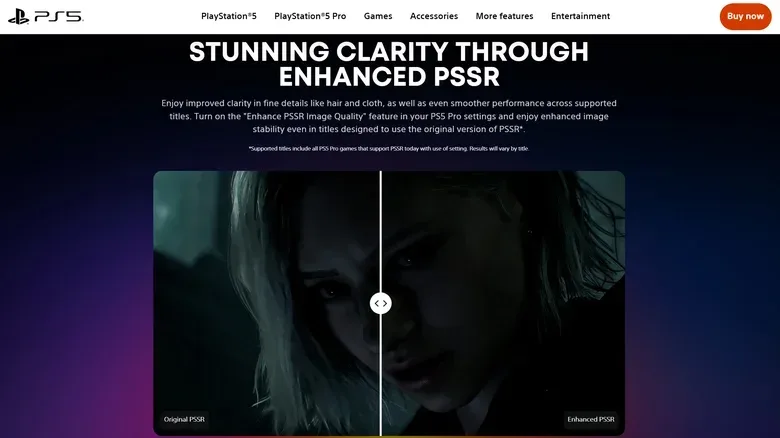
PS5 Pro owners no longer need to hunt through the console settings to try Sony’s newer image-upscaling model. PlayStation system software 26.06-14.00.00 now turns on Enhance PSSR Image Quality by default, applying the updated PlayStation Spectral Super Resolution implementation to compatible games that were originally built around the first version of PSSR.
It is a small change in presentation, but potentially a meaningful one in practice. The option had previously existed as a manual system-level override. That meant a player could own a PS5 Pro, play a compatible title, and never realize there was a separate toggle intended to improve its image reconstruction. With the new default, supported games should use the enhanced model automatically.
The limits matter as much as the improvement. This update does not add PSSR to every PS5 game, and it does not mean every title carrying a PS5 Pro Enhanced label uses PSSR in the first place. Games without existing PSSR support are unaffected. The change concerns a subset of PS5 Pro titles: those designed for the original PSSR technology and eligible for the newer model through the system setting.
What PSSR does on PS5 Pro
PSSR is Sony’s machine-learning upscaling technology for PS5 Pro. In simple terms, a game can render its picture at a lower internal resolution, then use an algorithm trained to reconstruct a sharper higher-resolution image for the display. That approach can free up performance resources compared with rendering every frame at the final output resolution from the start.
Upscaling is not merely a matter of enlarging pixels. Modern image reconstruction attempts to use information from the current frame and, in many implementations, details from preceding frames to infer edges, textures and fine geometry. The potential benefit is a picture that looks closer to a higher-resolution render while leaving developers room to target smoother performance or add more demanding visual effects.
That balancing act is particularly familiar to console players who must often choose among display modes. A Quality or Pro mode may prioritize image fidelity, while a Performance mode may emphasize frame rate. PSSR is intended to reduce the severity of that trade-off, but its results still depend on the individual game, its rendering pipeline, and the content shown on screen.
The first version did not always produce an equally clean result. Reported issues included shimmering surfaces and distortion around small text. These artifacts are most noticeable in precisely the places an upscaler has the hardest job: thin lines, densely patterned materials, distant foliage, rapid camera motion and tiny UI lettering. Once a player notices instability in those areas, it can become difficult to ignore.
Enhanced PSSR, not necessarily a universal upgrade
Sony has described the newer technology as upgraded or enhanced PSSR, rather than formally naming it PSSR 2.0. The update uses a changed neural network and overall algorithm. Its stated goals include clearer fine details, improved image reconstruction and more stable imagery in motion.
Those terms are worth unpacking. Fine-detail clarity refers to the retention or reconstruction of small visual features such as individual hair strands, leaf edges, wire fences and distant environmental detail. Stability in motion refers to whether those features hold together as the camera or object moves instead of flickering, breaking apart or leaving distracting traces behind. An afterimage is a lingering visual remnant that can appear when information from earlier frames is not incorporated cleanly into a new one.
Developers using the enhanced approach have pointed to reduced flicker and afterimages, along with more refined rendering of hair and foliage. That does not establish that every scene in every compatible game will look better, however. Sony has not said that the new setting improves every PSSR title in every circumstance. It also has not explained why the option, which arrived in March, has taken roughly six months to become the default.
That caution is appropriate for any reconstruction technique. An algorithm can make substantial gains on a difficult pattern or motion-heavy shot while producing a different, less desirable result in another edge case. The PS5 Pro setting remains reversible for that reason.
How to check or turn off the PSSR setting
For a PS5 Pro with system software 26.06-14.00.00 installed, Enhanced PSSR Image Quality is now enabled by default. Players who see unexpected visual behavior in a game that used the original PSSR implementation can disable the override and return that game to its earlier PSSR behavior.
- Open Settings on PS5 Pro.
- Select Screen and Video.
- Open Video Output.
- Find Enhance PSSR Image Quality.
- Disable the option to stop applying the enhanced override to applicable original-PSSR games.
Players should also use the game’s Pro or Quality mode where available if they want to take advantage of the visual improvements associated with the feature. The system-level setting is not a substitute for a title’s own graphics menu, and it cannot make an unsupported game use PSSR.
It is sensible to judge any difference using repeatable scenes rather than a quick glance at a menu or a single still image. Fine text, foliage, hair, distant geometry and camera pans are the categories most likely to reveal the kinds of image-stability improvements enhanced PSSR is intended to deliver. Equally, display conditions can influence what is visible; viewing distance, screen size and monitor placement all shape how easily detail and artifacts can be perceived. For that broader setup question, see this guide to monitor and laptop viewing distance.
Why making the toggle automatic matters
Putting the setting on by default is less flashy than a game patch, but it removes friction from one of PS5 Pro’s platform-level features. Before this update, a player needed to know that the manual option existed, understand what it was meant to affect, and decide whether to use it. Those are high hurdles for a setting whose benefits concern subtle characteristics of image quality rather than a plainly labeled frame-rate cap.
The new behavior makes enhanced PSSR the normal experience for the compatible audience while preserving player control when results are not ideal. It is a pragmatic middle ground: Sony is broadening adoption without forcing owners to live with the override if a particular game produces unwanted effects.
There is also an important distinction between a console enhancement label and a specific rendering technology. “PS5 Pro Enhanced” can describe a range of improvements, while PSSR is one technical method a developer may use. Players should therefore avoid assuming that the new default applies to every game marketed as Pro-enhanced, or that it changes every game in their library.
Other changes in system software 26.06-14.00.00
The update is not exclusively for PS5 Pro users. It adds an on-screen voice-chat indicator that displays the name of the person currently speaking. Players can choose where that indicator appears, which may be useful for keeping track of voices in a busy party or multiplayer session without having to open another interface.
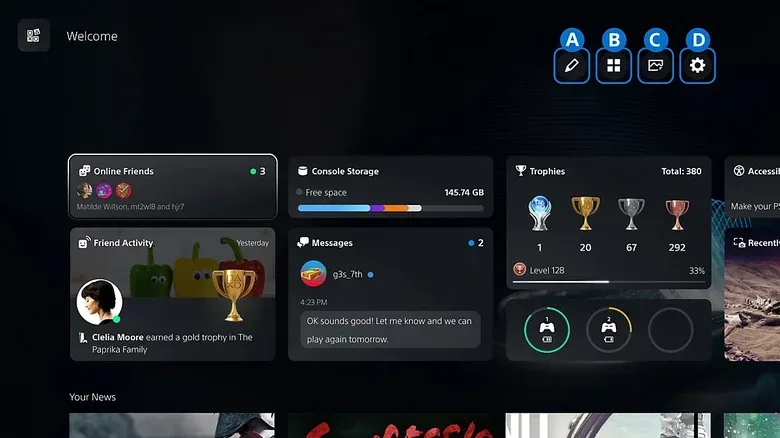
Welcome Hub is also receiving a Community Activity widget with two discovery features. Trending Now highlights 10 multiplayer games or modes drawing notable player activity, while Top 10 shows the most popular games from the prior week in the player’s region.
For PS5 Pro owners, though, Enhanced PSSR Image Quality becoming the default is the headline adjustment. It makes the improved image-reconstruction path easier to access for the games it supports, without pretending that one switch can retrofit advanced upscaling across the entire PlayStation catalog.