A dead controller is a uniquely unglamorous way to interrupt a game. It does not matter whether the player is in a tense boss encounter, midway through a local multiplayer match or simply settling in for a short session: the flashing low-battery warning turns an evening of wireless play into a hunt for a cable.
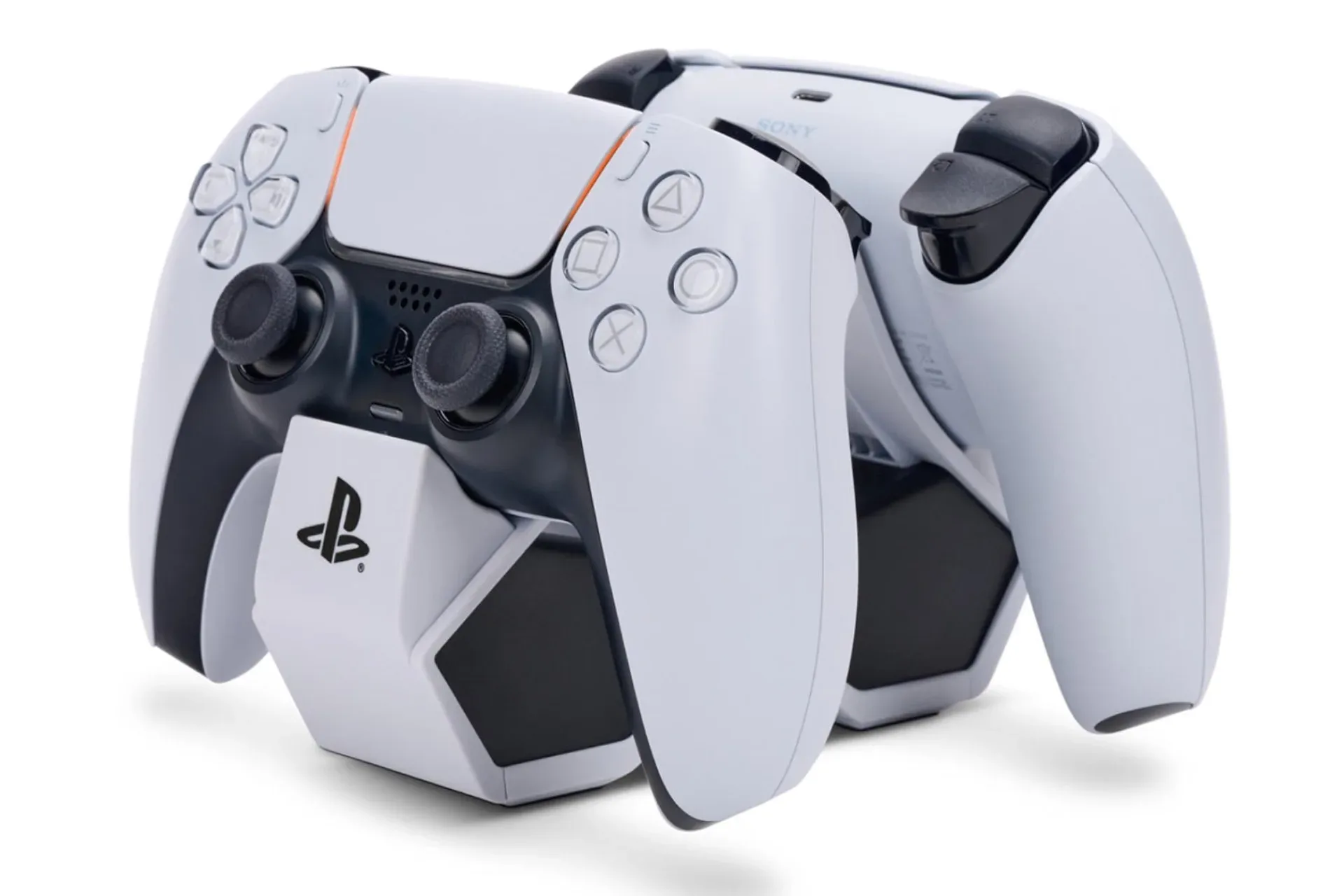
For Black Friday week, PowerA’s officially licensed PS5 twin charging station was listed on Amazon for $20, reduced from $28. That price was described as close to the product’s lowest recorded Amazon price, though storefront pricing can change quickly. The headline feature is straightforward: the dock holds and charges two PlayStation 5 DualSense controllers at the same time.
It is not a new console feature or a must-have upgrade for every PS5 household. It is a small convenience accessory. But it addresses several everyday friction points at once: depleted controllers, loose charging leads, occupied console ports and the perennial mystery of where the spare pad has gone.
For players thinking about the broader logistics of moving a console and its accessories, our guide to flying with a PS5, handling the DualSense and considering Remote Play covers a different but related part of keeping a PS5 setup manageable.
What the PowerA station is designed to do
The PowerA station uses two dedicated controller slots. Rather than connecting a DualSense to the PS5 with a cable, a player places each compatible controller in the dock after play. The practical idea is not merely to replenish battery power; it is to establish a routine. Controllers go back to one place when a session ends, and they should be ready when the next one begins.
That routine matters most for households with two controllers. A second DualSense may be used regularly for couch co-op, competitive games, guests or as a charged backup. With a single USB cable, someone still has to decide which pad gets charged first, move the cable between controllers, or leave both near the console. A twin dock gives both controllers a designated charging position.
It may also appeal to solo players who rotate between two pads. That approach means one controller can remain available while the other charges, instead of forcing a player to continue while tethered to the console. The station cannot make a controller battery last longer during a session, but it can make the next session less dependent on whether somebody remembered to plug a controller in.
Why a separate AC adapter is consequential
The charging station runs from its own AC adapter rather than taking power from the PS5. In plain terms, it uses a wall outlet. That distinction is central to how it fits into an entertainment setup.
Related coverage includes PowerA’s Official PS5 Twin Charging Station Is Listed at $20.
The upside is that the PS5’s USB ports remain available for other equipment, such as a headset or external drive. The dock can also charge controllers independently of the console’s power state: the PS5 does not need to be switched on or left in rest mode solely for controller charging. For users who prefer not to rely on the console to top up their pads overnight, this is the product’s most meaningful functional advantage.
The trade-off is physical rather than technical. Buyers need a free outlet close enough to where the dock will sit. Behind a television, spare sockets can be scarce after accommodating the display, console, speakers, networking gear and other accessories. A charging dock may simplify the controller side of a setup while adding one more power adapter to manage.
That is worth checking before purchase. The best placement is one where the station can remain accessible and tidy without putting a cable under strain or turning the shelf into a crowded charging corner. The supplied information does not establish the dock’s cable length or exact dimensions, so those are details buyers should verify in the listing if placement is a concern.
Official licensing: what it does and does not mean
PowerA’s dock is officially licensed by Sony and made specifically for the DualSense. In this context, “officially licensed” means the accessory is authorized for use with the PS5 controller ecosystem and designed around that particular controller. It also means the product is presented as matching the PS5’s visual language rather than functioning as a generic charging solution intended for many controller types.
That is useful compatibility context, especially with a dock that depends on a controller fitting securely into dedicated slots. It should not be read as a promise that the accessory adds new capabilities to the DualSense or changes the controller’s underlying battery characteristics. The value proposition remains focused on charging, storage and organization.
The design is intentionally uncomplicated: two slots and no setup process or configuration described. For many accessory buyers, simplicity is a feature. A device that requires no app, menus or console settings has fewer steps between finishing a game and getting the controllers put away.
The less glamorous benefit: reducing setup clutter
A charging station is also a storage solution. DualSense controllers have a habit of migrating—to sofa cushions, side tables, another room, or a bag after a friend visits. A dock gives each controller an obvious home on a TV stand or shelf.
That organization may be more valuable than the charging itself in homes where multiple people use the console. It makes the question “Where is the other controller?” easier to answer, and it reduces the temptation to leave a USB lead stretched from the console to a couch or floor. The result is a neater display, which is part of PowerA’s pitch for the product.
Of course, a dock only improves tidiness if it fits a player’s habits. Someone who mostly plays with one controller and is already disciplined about plugging it into the PS5 may not need a separate station. Likewise, anyone with no convenient outlet by the television may find that a standard cable remains the less complicated answer.
Who the $20 deal made the most sense for
At the reported $20 sale price, the station was most compelling for a few specific PS5 setups:
- Two-controller homes: Both DualSense pads can be charged and stored together.
- Local multiplayer players: A guest controller is less likely to be flat when somebody arrives for a match.
- People using the PS5’s USB ports: The station’s independent AC power keeps those console ports free.
- Players who dislike rest-mode charging: Controller charging does not depend on leaving the PS5 active or in rest mode.
- Setup-conscious owners: The dock can replace loose controllers and a visible charging cable with a fixed home on the media unit.
Conversely, the case is weaker for an owner with only one controller, little shelf space and a perfectly serviceable cable routine. The station has no indicated configuration features to justify buying it for novelty alone. It earns its place by making a repeated task easier.
Warranty and buyer feedback add useful context
PowerA backs the charging station with a two-year limited warranty. “Limited” is important wording: the provided information confirms the warranty term but not its full conditions, exclusions or claim process. Buyers who view the dock as a daily-use item may want to read those terms, particularly because the accessory will be handled routinely alongside expensive controllers.
The listing also carried a 4.7-out-of-5 average from more than 5,000 Amazon ratings at the time described. That is a substantial volume of buyer feedback and suggests broad satisfaction, but it is not the same thing as a controlled product assessment. Ratings can help identify whether a product has generally met customer expectations; they cannot guarantee that a dock will suit a particular room layout, outlet situation or controller count.
A practical pre-purchase checklist
The station’s uncomplicated purpose makes the buying decision fairly simple. Before checking out, consider the following:
- Count the controllers. The twin design has the clearest benefit when two DualSense controllers are in regular rotation.
- Check outlet availability. The dock uses its own AC adapter, so identify a nearby free socket or decide whether your power arrangement can accommodate one more plug.
- Choose a permanent home. A shelf or TV stand works best if the dock is easy to reach after playing and does not compete with other equipment for space.
- Confirm the price at checkout. The $20 figure was a Black Friday-week listing and was close to the product’s low on Amazon, not a guaranteed permanent price.
- Review listing details that affect your setup. If cable routing or shelf space is tight, verify measurements and included components directly before ordering.
There is no grand technological leap here, and that is arguably the point. PowerA’s licensed PS5 twin charging station is designed to make one of gaming’s most repetitive chores nearly invisible: put the controllers down, let them charge, and pick them up ready for the next session. For a two-DualSense household with an available outlet, the reported $20 price made that small quality-of-life upgrade easier to justify.
Shop the products
Check current price, model and availability at the retailer.