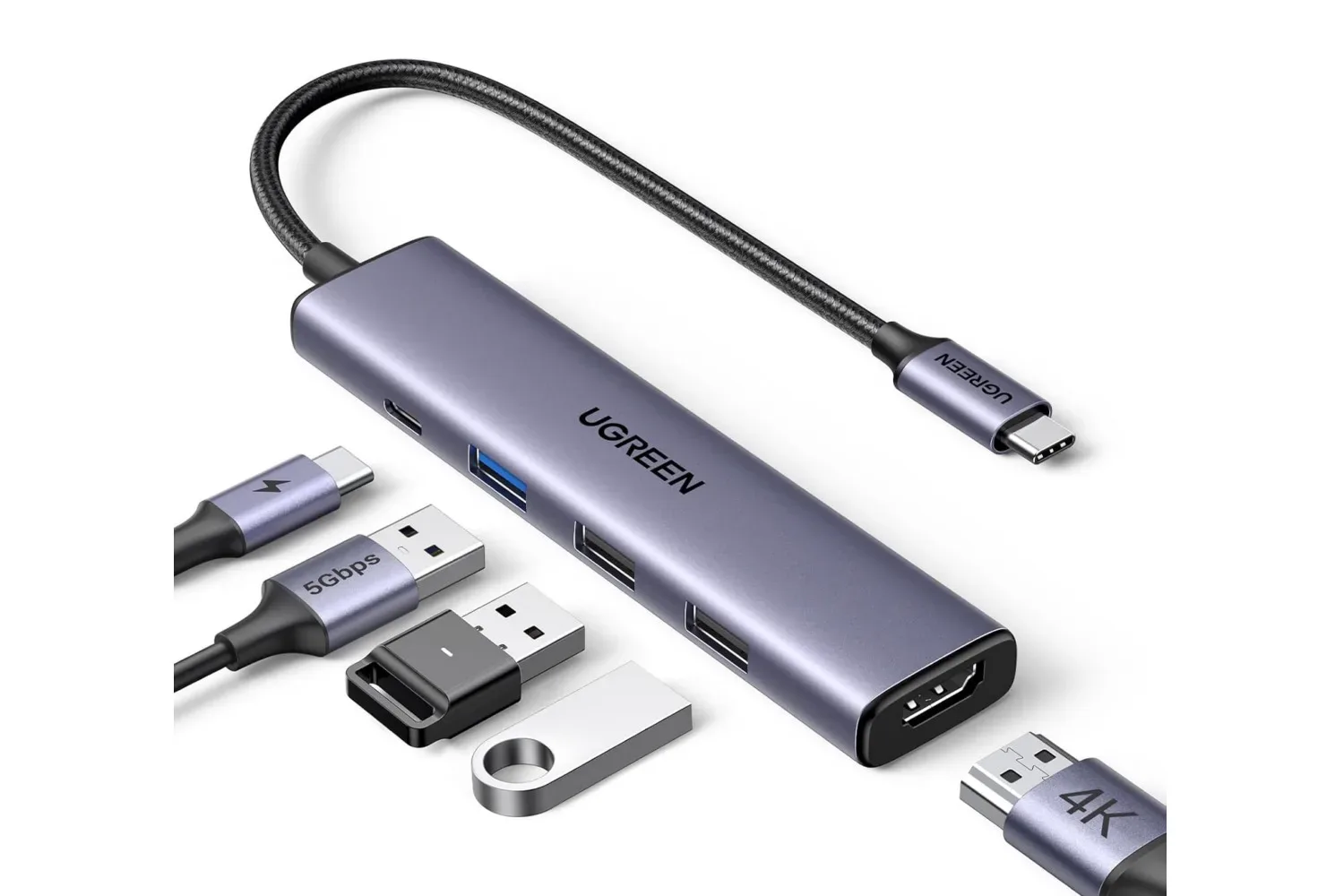
A laptop’s single USB-C port can become a fast bottleneck once a desk setup starts demanding a display, storage, mouse, keyboard and power connection at the same time. The grey Ugreen 5-in-1 USB-C hub is currently listed at $12, a $4 reduction from its stated $16 retail price. The offer is described as limited-time, with no end date specified.
For PC players who shift between a compact laptop setup and a more permanent desk, the appeal is straightforward: one USB-C connection can add HDMI output, USB-A ports and USB-C power pass-through. It is not a dock packed with specialist connections, but the listed configuration covers several everyday peripherals in a small five-port arrangement.
What the five ports are for
The hub connects through a device’s USB-C port and provides the following connections:
- One 4K HDMI port
- One USB-C port rated for 100W Power Delivery (PD)
- One USB-A data port rated at 5Gbps
- Two USB-A ports rated at 480Mbps each
Those numbers matter because the ports are not interchangeable. HDMI is the video connection, intended for adding a monitor or other compatible display. The USB-C PD port is for power delivery rather than being described as an extra data connection. The 5Gbps USB-A port is the higher-speed data option, while the pair of 480Mbps USB-A ports are better suited to peripherals that do not need a high transfer rate.
In practical terms, that creates a sensible division of labor. A keyboard and mouse are natural candidates for the 480Mbps ports, leaving the 5Gbps USB-A connection available for a storage drive or another device where file-transfer speed is more important. The HDMI connection can support a second screen for keeping a game, chat, guide, browser or work window visible without continually rearranging a laptop display.
That second-screen flexibility can be especially helpful for people who use one machine for both work and games. A desktop-like setup does not necessarily require a large, complicated dock if the immediate need is simply display output, a few legacy USB-A accessories and a way to keep the laptop powered through its USB-C connection.
Power Delivery, explained
USB-C Power Delivery is a charging standard that allows compatible equipment to negotiate higher levels of power over USB-C. In this hub’s specification, “100W PD” identifies the power-delivery rating of its USB-C PD port. The hub itself is not described as including a charger.
That distinction is worth making before buying any hub. A power-delivery port can be useful for routing power through the hub while its other connections are in use, but the eventual charging behavior depends on the laptop, the charger and their compatibility. The supplied information identifies the hub’s 100W PD rating, not a guaranteed charging result for every connected device.
Related coverage includes UGREEN 5-in-1 USB-C Hub Deal Adds HDMI, USB Ports and 100W Power Delivery for $12.
The same restrained approach applies to display expectations. The port is listed as 4K HDMI, which establishes the advertised display capability, but the available information does not specify refresh-rate limits, display modes or the behavior of individual laptops. Buyers planning around a particular monitor should check their computer and display requirements rather than assuming every 4K setup will behave identically.
What the data-speed labels mean
Gbps means gigabits per second, while Mbps means megabits per second. The naming makes the hierarchy clear: the hub’s 5Gbps USB-A port has a substantially higher listed data rate than its two 480Mbps USB-A ports.
That does not make the slower ports unhelpful. Input devices such as a mouse and keyboard generally do not need the bandwidth associated with transferring large files. The higher-speed port is the one to prioritize when moving data between a laptop and an external drive. Organizing connections this way means the hub’s more capable data connection is not occupied by an accessory that gains little from it.
It is also useful to separate “port count” from “port type.” This model turns one USB-C connection into five, but it does not provide five identical high-speed USB ports. Its value comes from offering a mix of video, power and peripheral connectivity in one place. Someone needing several high-speed drives, multiple display outputs or a more elaborate desktop expansion should recognize that those needs go beyond the connections listed here.
Compatibility and setup
The hub is described as plug-and-play, meaning no extra driver installation is presented as necessary to begin using it. It is said to work with devices using USB-C or Thunderbolt, including MacBook models with M1, M2, M3, M4 and M5 chips, Windows laptops and Surface laptops.
“Compatible” should still be read as a starting point, not a substitute for checking a particular machine. A USB-C connector is the physical port shape, while the functions made available through it can vary by device. The supplied details establish broad USB-C and Thunderbolt compatibility, but do not list every laptop model or promise every feature on every system. Anyone buying primarily for an external display or charging pass-through should verify those capabilities on their own laptop.
For a less complicated setup, though, plug-and-play operation is a meaningful convenience. It reduces the ritual of arriving at a desk to a single cable: connect the hub to the laptop, then attach the display, power cable and chosen peripherals. That can make a laptop easier to use as a gaming station without permanently turning a workspace into a cable maze.
Who this $12 hub fits best
At its currently listed price, this Ugreen hub looks most relevant to someone who needs basic expansion rather than an all-in-one workstation dock. It can suit a laptop owner who still uses USB-A accessories, wants HDMI for an additional screen and values the ability to connect USB-C power while the hub is attached.
The product’s limitations are mostly visible in its own specifications. There is one HDMI output, one higher-speed USB-A data connection and two slower USB-A connections. There is no claim here of Ethernet, card readers, extra display connections or additional high-speed USB-C data. Framing it as a compact port-expansion tool rather than a universal solution gives the configuration its fairest reading.
That focus also makes the discount easier to judge. The grey model’s stated reduction is 25%, taking it from $16 to $12. Prime members are offered free shipping by the retailer, while the deal itself is labeled limited-time and has no published expiration date. Availability and pricing can change, so the live listing is the place to confirm both before checkout.
For players keeping an eye on PC-side setup changes as well as software developments, our coverage of new PC gaming policy changes around Nexus Mods offers another look at the practical ecosystem surrounding a gaming laptop. Hardware expansion may not be glamorous, but a spare display connection and room for a mouse, keyboard and drive can make that machine far easier to live with.
Shop the products
Check current price, model and availability at the retailer.