PC gaming on a laptop is always a negotiation between performance, desk space and heat. A cooling stand cannot turn a modest notebook into a new machine, but it can be a practical addition for anyone whose setup regularly involves a warm chassis, an awkward viewing angle or both.
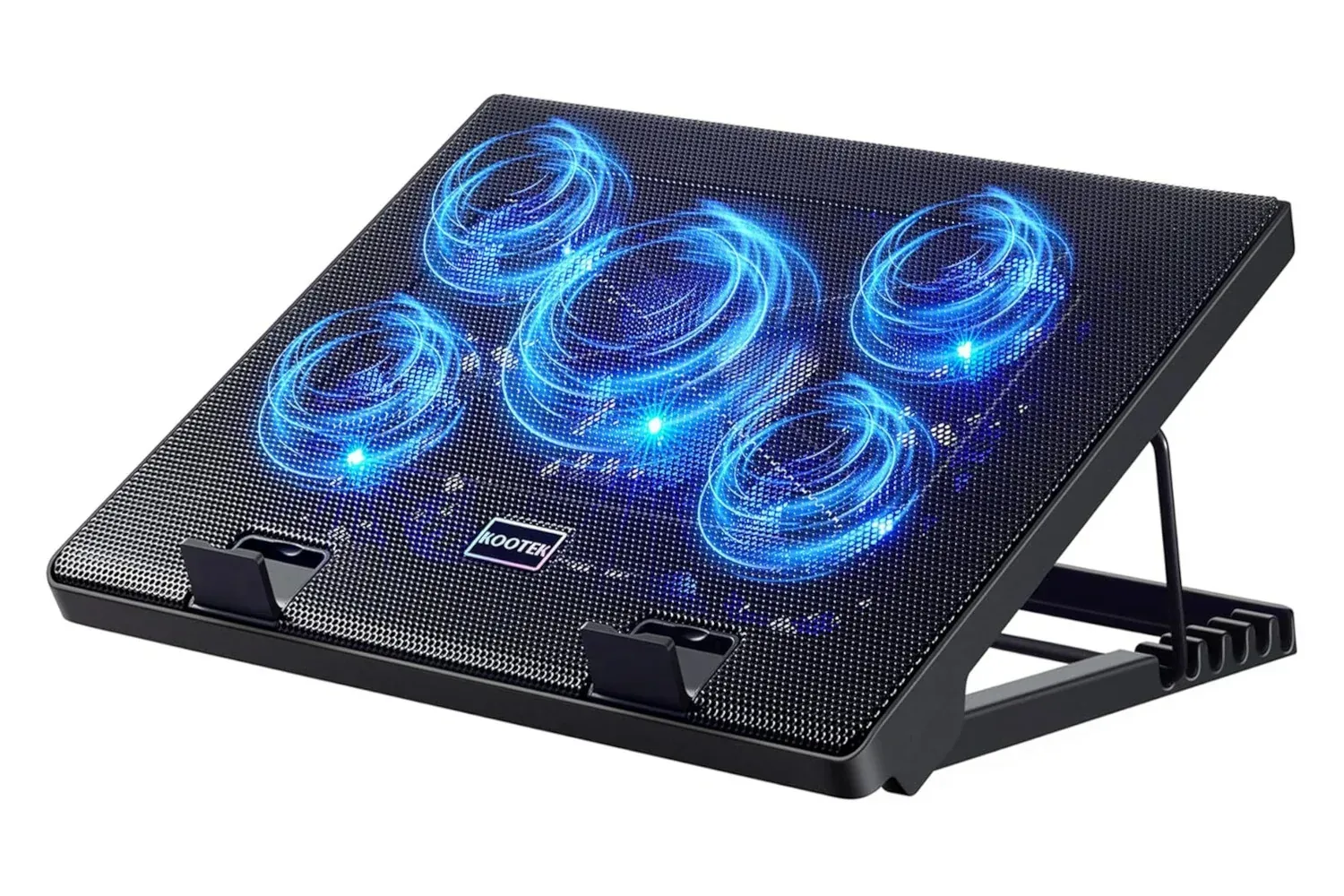
The Kootek Laptop Cooler Stand is currently listed at $26, a price described as a 13% discount. The stand combines an elevated platform with active cooling: it uses five fans, includes a blue LED, provides two additional USB ports, and is designed for laptops from 12 to 17 inches. It is also described as lightweight, with features intended to keep the laptop from moving while in use.
That collection of basics makes it more than a conventional riser. For players and students who use one machine for work, streaming and games, the appeal is in addressing two ordinary but recurring setup problems at once: airflow around the laptop and a more adjustable screen-and-keyboard position.
What the $26 stand includes
The core feature is the five-fan cooling arrangement. Fans in a laptop cooling pad move air beneath the computer, where many notebooks place intake vents. That may help the system access cooler surrounding air rather than relying solely on airflow around a flat desk surface. The product is described as using surprisingly quiet fans, an important consideration when a laptop is being used near a microphone, during voice chat, or in a shared room.
It is worth separating what a cooling pad does from what it does not promise. It is an external airflow accessory, not a replacement for the laptop’s own internal cooling hardware. The actual benefit will depend on the particular laptop’s underside vent placement, its workload, the surrounding temperature and whether the machine is already obstructed or dusty. The supplied information does not provide temperature measurements, fan-speed specifications or performance testing, so buyers should not assume a specific reduction in heat or noise.
Still, a raised and ventilated base can be a sensible fit for a laptop that feels uncomfortably hot during lengthy sessions. It can also be useful where a player wants to avoid placing the machine on a soft surface that may restrict ventilation.
Adjustable elevation is part of the point
The stand has multiple adjustable levels. In everyday terms, that means the display can sit higher than it would on a desk, while the keyboard sits at an incline. The value here is flexibility: the best angle is not necessarily the same for someone writing coursework, managing spreadsheets, watching streams or playing with an external keyboard and mouse.
Ergonomics is the term for arranging equipment to suit the user’s posture and movement. A laptop stand may help create a more comfortable setup by changing the relationship between the screen, wrists, elbows and shoulders. It cannot make every laptop layout ideal, especially because raising a laptop also raises and angles its built-in keyboard. But multiple height settings give the user some room to find a more workable position rather than being locked into a single flat angle.
Related coverage includes Kootek Laptop Cooling Pad Drops to $26 for PC Gamers Seeking a Cooler Setup.
Anyone who primarily uses external peripherals may get the clearest benefit from the elevated display position. Those who rely on the built-in keyboard should consider whether an inclined typing surface feels comfortable for their own use. The useful feature is adjustment, not the assumption that one setting suits everyone.
USB expansion and compatibility considerations
Beyond cooling and elevation, the Kootek stand includes a pair of extra USB ports. A port on an accessory can be handy when a mouse, keyboard, controller receiver or another low-clutter desk essential needs a place to connect. The supplied details do not specify USB standards, transfer speeds, charging behavior or how the stand is powered. Buyers with a particular storage drive or charging requirement should therefore verify those details on the listing before treating the ports as a substitute for the laptop’s own connections.
The stated 12- to 17-inch compatibility covers a broad range of notebook sizes, including many gaming laptops. Screen size is a helpful first check, but it is not the only one. Laptop chassis dimensions, weight, the position of underside vents and the placement of the stand’s retaining features all matter. The listing notes features designed to hold the laptop in place; checking the fit of an unusually deep or heavy notebook remains prudent.
Portability is another part of the pitch. The stand is described as lighter than expected, which could matter for users moving between a desk, a dorm, a classroom or a different room. That said, it remains an extra piece of hardware to carry. A buyer who games in one fixed location may care more about its footprint and fit; someone who travels frequently may weigh the convenience of cooling and elevation against the added bulk.
Who this deal makes the most sense for
At the listed $26 price, this is chiefly a practical accessory rather than a high-end upgrade. It should be most relevant to people who have already noticed one of the problems it is intended to address: heat during sustained use, limited desk comfort, or a shortage of accessible USB connections.
- Laptop PC players who use their machine for extended gaming sessions and want a raised, actively cooled platform.
- Students and remote workers who spend long periods on a laptop and would appreciate several height choices.
- Hybrid desk setups where a mouse, keyboard or wireless receiver makes the two extra USB ports useful.
- Owners of 12- to 17-inch laptops who want a lightweight stand with retention features.
It may be less compelling for a user whose laptop stays cool, whose desk setup already has a monitor arm or separate stand, or whose computer’s underside design does not benefit much from a fan base. The deal does not change those compatibility questions.
Price claims need a little caution
The available listing information puts the Kootek stand at $26 and characterizes that as 13% off. Product pricing and promotions can change, so the current listing should be checked before purchase. There is not enough information here to independently establish a historical “record low” price, and that claim should not be treated as confirmed solely from the current figure.
For laptop owners evaluating wider PC hardware choices, it is also useful to remember that a cooling stand is an accessory-level improvement. It may improve the physical setup and support airflow, but it does not alter the laptop’s processor, graphics hardware, display or internal cooling design. For more context on notebook hardware trade-offs, see our look at the M6 MacBook Pro’s memory-bandwidth split.
As a low-cost way to add an adjustable platform, five fans and extra USB connectivity to a compatible laptop setup, the Kootek Laptop Cooler Stand’s listed $26 price is the meaningful detail. Verify the live price and the physical fit for the specific notebook, then decide whether active cooling and adjustable elevation solve an actual problem in the setup rather than simply adding another illuminated desk accessory.
Shop the products
Check current price, model and availability at the retailer.