Apple’s white Magic Keyboard with Numeric Keypad is listed at $109, a $20 reduction from its stated $129 price. It is a straightforward peripheral deal rather than a sweeping workstation overhaul, but the distinction matters for MacBook and iPad users who routinely run into the limits of compact laptop layouts.
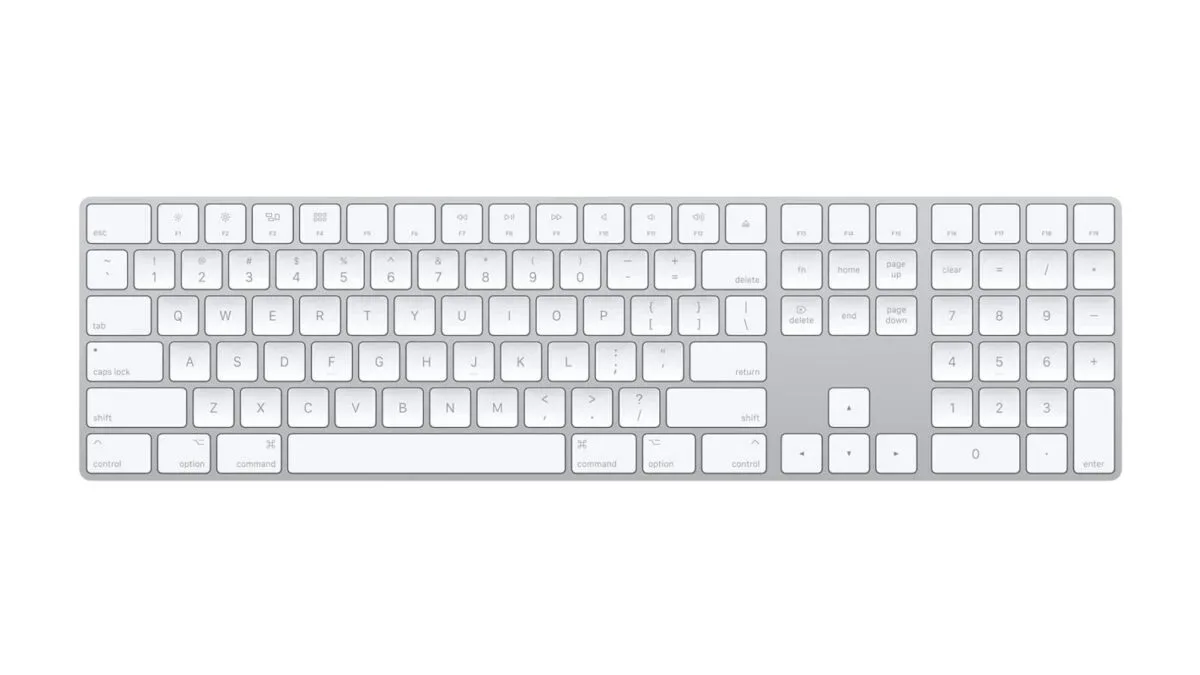
The extended Magic Keyboard’s defining feature is not wireless connectivity alone; it is the extra real estate. Alongside the standard letter keys, the board includes a dedicated numeric keypad, full-size arrow keys and document-navigation controls. Those additions target the kind of desk work where a compact keyboard can feel less like a space-saving choice and more like a recurring tiny inconvenience.
For players, writers, students, spreadsheet users and anyone who spends long stretches moving through documents, the appeal is easy to understand: fewer layer-key combinations, less reaching for a mouse, and a more conventional desktop-keyboard layout while using a Mac, iPad or iPhone.
What the extended layout adds
A numeric keypad, often called a numpad, is the block of number keys at the keyboard’s far right. It is different from the horizontal row of numerals above QWERTY. Its grid arrangement is useful when repeatedly entering numbers into spreadsheet cells or finance applications, which is why Apple specifically positions the feature for those uses.
The value is practical rather than glamorous. Someone occasionally typing a date or a password may not notice the difference. Someone entering columns of quantities, IDs, scores or budgets probably will. A numpad lets those numbers be entered from one fixed cluster instead of repeatedly stretching across the top row.
The keyboard also retains a dedicated navigation area between the main keys and numpad. That includes full-size arrow keys and controls intended for moving through a document. This can be relevant to text editing and programming as well as numerical work: line-by-line cursor movement, longer jumps through a file and general navigation often happen frequently enough that small layout compromises become noticeable.
Its top row includes shortcut and media controls. That means users can handle common functions such as media playback without leaving the active document. It is not a specialized gaming keyboard with game-specific keys or elaborate controls; it is an Apple desktop keyboard designed around broadly useful input and navigation.
A desk companion for a MacBook or iPad
The Magic Keyboard with Numeric Keypad connects through Bluetooth to Macs, iPads and iPhones. The stated minimum operating-system requirements are macOS 10.12.4, iPadOS 13.4 and iOS 10.3, which suggests compatibility reaches back far beyond current hardware for supported devices.
The compatibility list cited for the listing spans hardware from the 2017 iMac Pro through the M5 MacBook Pro and MacBook Neo, along with numerous iPad models. That breadth makes this less of a purchase solely for a fixed iMac desk. A MacBook owner using an external monitor can place the notebook to one side or close it, then work at a more comfortable distance from the display with a full-width keyboard in front of it.
An iPad can also become a more conventional writing or admin station when placed on a stand and paired with an external keyboard. The keyboard does not transform the tablet into a Mac, and buyers should not expect it to add desktop-only software features. But it does change the physical side of using an iPad: longer writing sessions, document navigation and number entry can all be handled from a layout closer to a traditional desk setup.
That flexibility is relevant to PC and console-adjacent habits, too. Many people split time between games, guides, Discord, spreadsheets, editing tools and browser tabs. A desk keyboard will not replace a dedicated controller where a game needs one, but the navigation cluster and numpad can be useful in the less glamorous portions of the hobby: organizing captures, tracking collections, managing a server or writing about games. For a reminder that gaming work can involve more than simply playing, see this look at a World of Warcraft add-on built around flagging potentially suspicious gold activity.
Battery and pairing: convenient setup, older cable
The keyboard uses an internal rechargeable battery. Apple’s stated estimate is about a month or more between charges, with actual endurance depending on use. For a wireless desktop accessory, that should make charging an occasional maintenance task rather than a daily routine.
A Lightning-to-USB cable is included. Connecting the board to a Mac via that cable both charges it and pairs it, avoiding the usual need to open Bluetooth settings for initial setup. Bluetooth pairing is the process of establishing a remembered wireless connection between two devices; once completed, a keyboard can generally reconnect without repeating the full setup procedure.
There is an important caveat: this model uses Lightning rather than USB-C. Buyers whose current devices and accessories have consolidated around USB-C may need to keep its included cable accessible specifically for charging. That does not prevent the keyboard from working wirelessly, and a roughly monthly charge claim means it may not be a major concern for every desk. Still, connector type is part of the ownership experience, especially for anyone trying to reduce cable clutter.
Size, feel and the features not to assume
The extended keyboard measures 16.48 inches wide and 4.52 inches deep. It is a long, shallow board, built for a surface where the added width is welcome rather than burdensome. Buyers with a narrow desk should account for the numpad’s footprint before treating it as a simple swap for a compact keyboard.
Apple describes the typing experience as comfortable and precise, but keyboard feel is inherently personal. This is a notably flat design with shallow key travel. Key travel is the distance a key moves when pressed; it strongly influences how a keyboard feels and sounds. People accustomed to thin laptop keyboards may appreciate the familiar low-profile approach. Those who prefer the deeper movement and more pronounced feedback commonly associated with mechanical keyboards may find it less satisfying.
That distinction is worth taking seriously because a keyboard is not just a specification sheet. The numpad, arrows and navigation keys may solve a layout problem, yet a buyer who dislikes shallow keys could still prefer a different full-size option. The listed information also does not mention Touch ID, so shoppers should not assume this version includes a fingerprint sensor for authentication.
Who this discounted model makes sense for
- Spreadsheet and finance users: The dedicated numpad is the clearest reason to choose this layout.
- MacBook owners with monitors: It can make a laptop-based desk arrangement feel more like a conventional desktop workstation.
- iPad users who write or manage documents: Bluetooth support and the extended key layout can suit a stand-based tablet setup.
- People who value Apple’s low-profile keyboard design: The shallow, flat build is a preference, not a universal benefit.
It is less compelling for people who rarely type numbers, need the smallest possible travel keyboard, want USB-C charging throughout their setup, or specifically want Touch ID. The compact Magic Keyboard format may be enough if desk space is the higher priority.
At $109 in white, the sale reduces the cost of Apple’s extended keyboard without changing its basic trade-offs. It offers a dedicated numpad, useful navigation keys, Bluetooth support across Apple devices and an internal battery rated for a month or more. In return, buyers get a wider board, shallow keys and a Lightning charging port. For the right desk workflow, the extra keys are the feature that matters—and the one a compact laptop keyboard cannot provide.
Shop the products
Check current price, model and availability at the retailer.