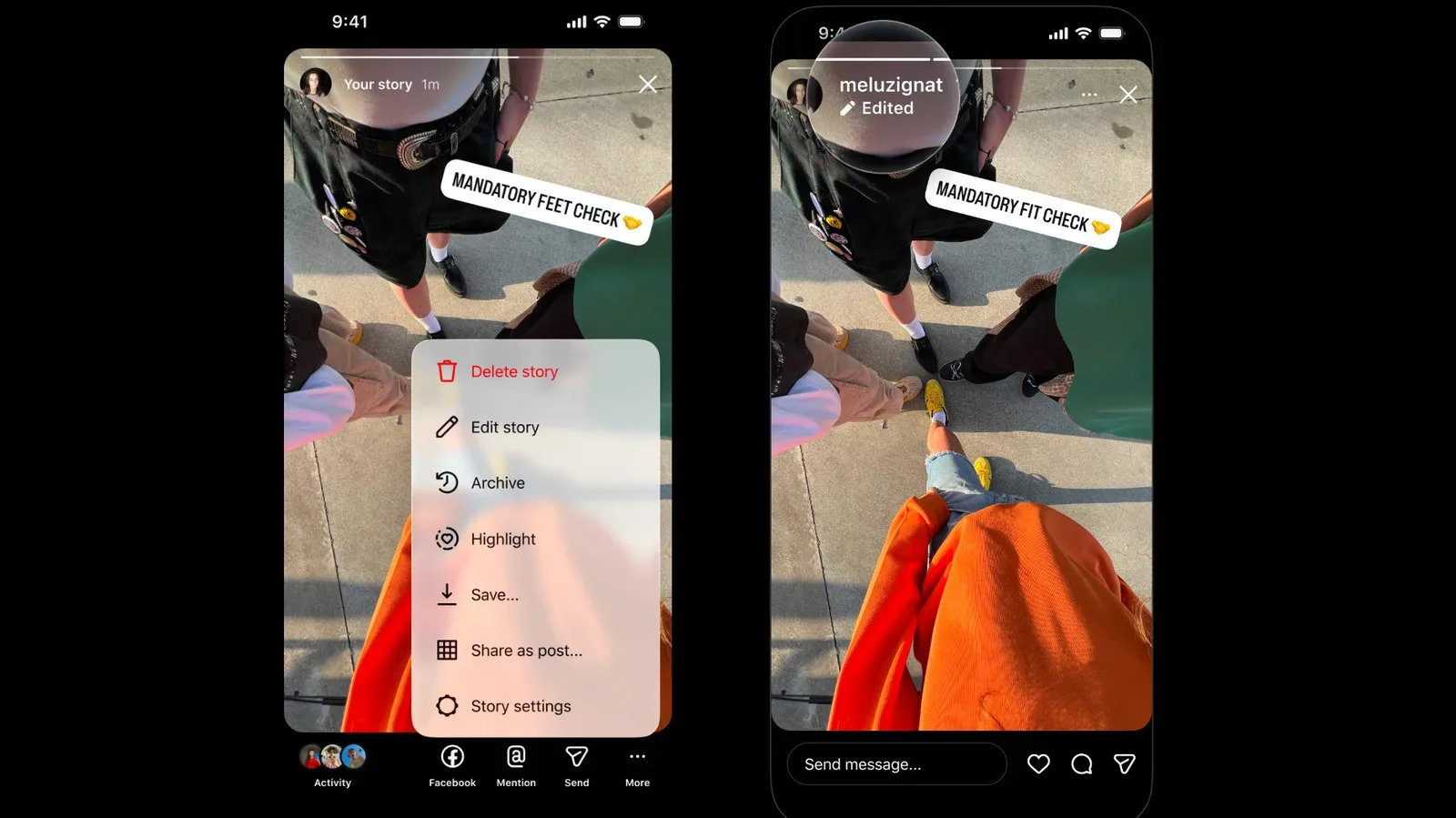
Instagram is rolling out a long-requested quality-of-life update: Stories can now be edited after they have been shared. The catch is a firm one: users have 15 minutes to make changes.
That window is enough to repair the errors that most often trigger the familiar delete-and-repost ritual: a typo in an on-screen caption, an incorrect bit of wording, or music that no longer fits the post. Instagram says the update also allows people to add or change music and rewrite captions without throwing away the Story’s existing views, likes and replies.
For casual users, it is a modest but welcome safety net. For creators, community managers and anyone publishing a multi-part update, it solves a more consequential workflow problem. A Story is not simply a standalone post; it can be one slide in a sequence. Deleting an error after subsequent slides have gone live can interrupt that sequence in a way a straightforward correction does not.
How the new Story editing option works
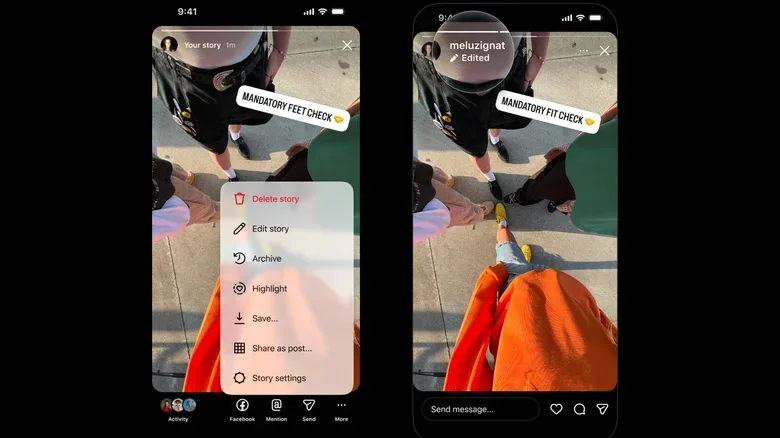
Once the feature is available on an account, an already-published Story can be changed by opening its more menu and choosing edit story. The capability is rolling out now, so the menu option may not appear for every user at the same time.
The edit period begins after sharing and lasts 15 minutes. Instagram will mark a changed post with an edited label for viewers. That label matters: it gives an audience notice that what it sees may not be exactly what appeared at the moment of publication, while still allowing the original post to retain its engagement.
The supplied details identify several kinds of revision that are possible:
- Correcting typos and other text errors.
- Changing the caption or replacing it altogether.
- Adding music or swapping the music already attached to a Story.
Instagram has not presented this as open-ended retroactive editing. The 15-minute restriction is the central rule, and the edited label remains part of the viewer experience.
Why avoiding deletion changes more than convenience
Before this update, correcting a published Story meant deleting it and posting a revised version. That process has obvious downsides. Any views, likes and replies attached to the removed Story are lost rather than carried to the replacement. A repost also creates a new item rather than repairing the original one.
Sequencing makes the issue particularly awkward. Stories display slides in reverse chronological order, meaning a replacement cannot simply be dropped back into the original place once other images have been posted immediately before and after it. An otherwise small correction can therefore alter the rhythm and order of a connected set of updates.
Think of a creator posting a short event recap in several Story slides. A spelling error in the first upload might be trivial in isolation. But deletion and re-upload can make the corrected slide appear in a different position from the one intended, potentially confusing viewers moving through the set. Editing preserves the existing post rather than forcing that reorder.
There is a measurement implication, too. Metrics are the audience-response figures attached to social posts, such as views, likes and replies. For a professional creator or social-media manager, those figures can be important records of how an update performed. A delete-and-repost do-over creates a fresh post and breaks the continuity of those responses. The new tool keeps the same Story live while its mistake is fixed.
A limited undo button, not a way to rewrite history
The short deadline is an important part of the design. Instagram is offering an immediate correction window rather than making Stories permanently editable. That approach addresses a practical publishing mistake while placing a clear boundary around later changes.
The visible edited label provides a second boundary. Viewers are not expected to infer that a Story is unchanged after a modification; the app indicates that an edit took place. The available information does not detail the contents of a prior version or establish an edit history for viewers. What is clear is that the label is applied when people view an edited Story.
In practical terms, the update should reward a quick second look immediately after publishing. Users who spot a mistake in the first few minutes can correct it without dismantling their Story sequence or discarding engagement. Users who discover a problem after the 15-minute period should not assume the new tool will apply.
Stories catch up with a feature already familiar elsewhere in Instagram
The addition closes a conspicuous gap between Stories and standard Instagram posts. Instagram has long allowed edits to regular posts after publication, while Stories lacked the same flexibility despite being a core part of the app for more than a decade.
Instagram head Adam Mosseri acknowledged the demand for the feature, saying,
“A lot of people have been asking for this, so I’m excited to get this one out there.”
It is a reminder that publishing tools affect the quality of a post after the camera roll and creative work are done. Better editing controls do not make an image or video stronger by themselves, but they reduce the penalty for a last-second mistake. That is especially relevant for accounts that publish quickly, run live coverage, or use Stories as an ongoing conversation rather than a single polished upload.
There is an adjacent creator-tool trend across digital platforms: editing and production controls increasingly matter as much as the initial share button. For a broader look at changes aimed at creative workflows, see Apple Creator Studio’s video, audio and AI editing updates.
Composer changes arrive alongside the edit button
Instagram is also updating the Stories composer, the part of the app used to build a Story before it is published. Background color options are being expanded to include gradients and other effects. The app is additionally making it easier to share and format several images at the same time.
A gradient is a background that transitions between colors rather than using one flat color. These additions concern how a Story is assembled before posting, while the new edit function addresses what can happen after a Story is live. Together, they add flexibility at both ends of the process: more presentation choices during composition and a brief opportunity to correct the finished post.
What users should expect now
The rollout is underway, not necessarily complete for every account. Users looking for the capability should open the more menu on a recently published Story and check for the edit option. When it is available, it is best treated as a quick correction tool: review the revised text, audio choice and presentation before the 15-minute deadline passes.
The update will not eliminate the value of checking a Story before it goes public. It does, however, turn a minor publishing mishap from an all-or-nothing choice into a repairable one. Instead of choosing between leaving an error in place or losing a Story’s position and engagement, users can now make the correction—and let the rest of the sequence keep moving.