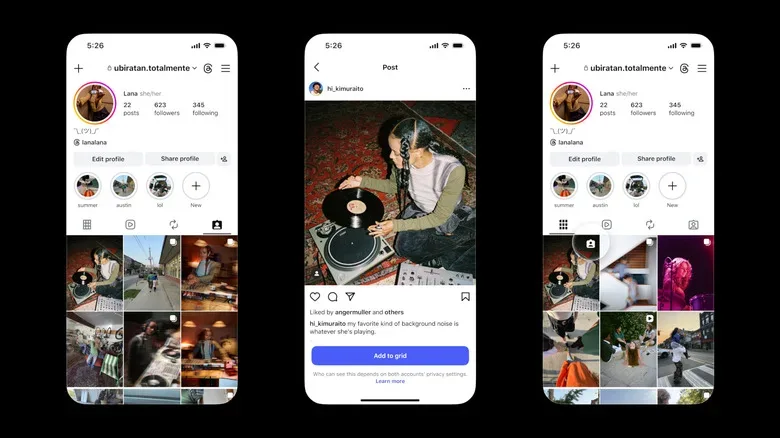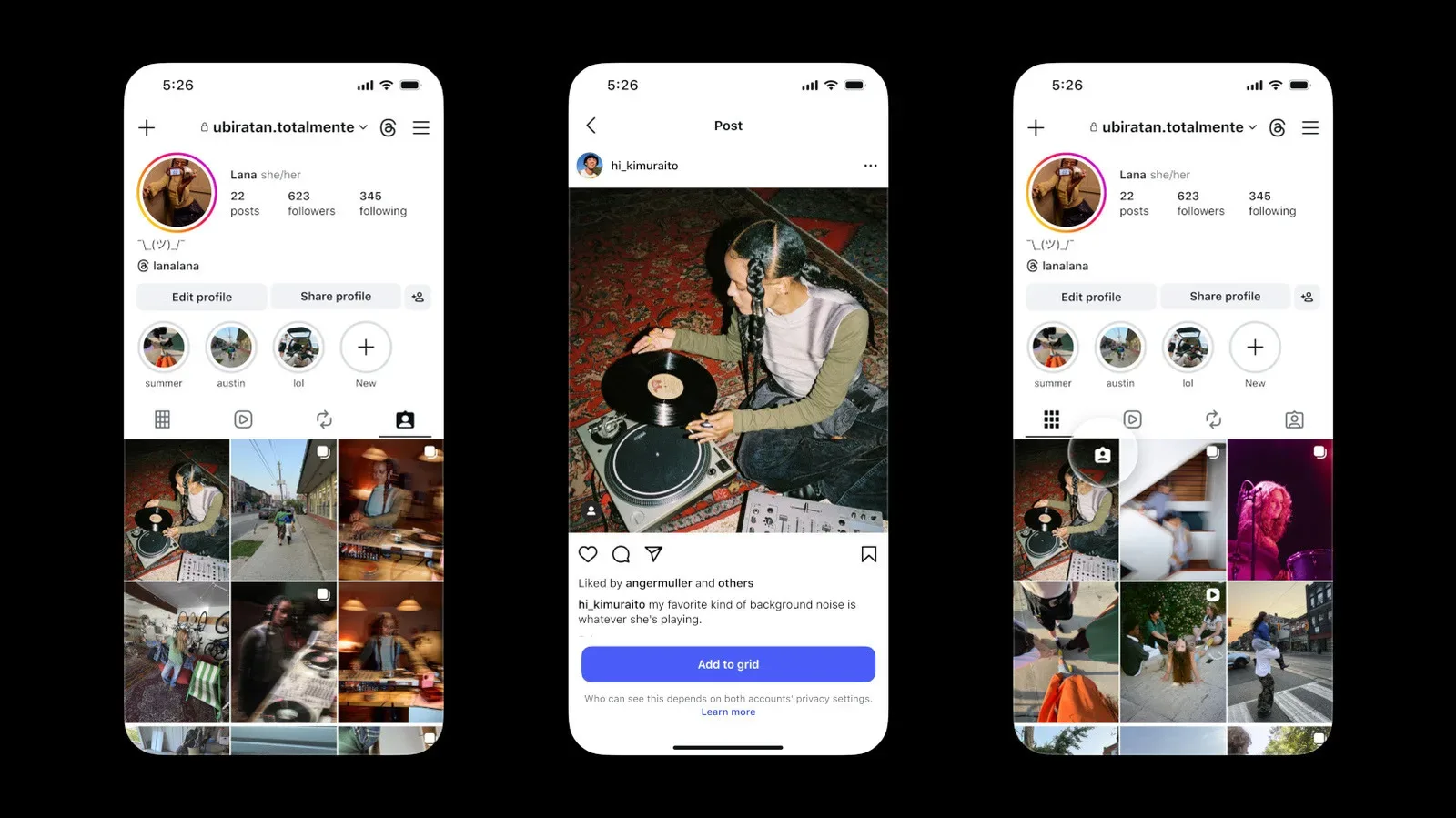
Instagram is giving profile owners a new way to curate the square-by-square storefront that has become their public calling card. Users can now add posts in which they have been tagged directly to the main profile grid, rather than leaving those appearances exclusively in the separate Tagged tab.
It is a modest interface change with a potentially useful effect for game creators, collectors, convention regulars, streamers, community organizers and anyone whose best on-platform moments are sometimes captured by someone else. A collaborator’s photo, a group shot from a tournament, a cosplay meet-up, a shelf display posted by a friend or a memory from a launch event can now sit beside a user’s own uploads on the primary grid.
The Tagged tab is not disappearing. It remains the place where users can browse posts that other accounts have tagged them in. The new option simply allows selected tagged posts to be promoted from that separate area into the grid visitors usually see first.
That distinction matters. A tagged post has traditionally been visible as an association with an account, but it has not necessarily formed part of the visual story told by that account’s main page. With the new control, users can decide which outside-posted moments deserve a place in that story.
How tagged posts can be added to a grid
Instagram provides more than one route for moving a tagged post onto a main profile grid. That is helpful because tags can surface at different moments: immediately after another person publishes a post, while reviewing a particular post later, or during a broader cleanup of the Tagged tab.
- From a direct-message notification: A user who receives a DM notification after being tagged can use that notification to add the post to the grid.
- From the post itself: Open the tagged post and use the three-dot menu in its upper-right area to find the relevant option.
- From the Tagged tab: Press and hold a post in the Tagged tab to bring up the option to add it.
In each case, the action is presented as Add to grid. Instagram also displays a reminder beneath that control: placing a tagged post on a profile does not override the privacy rules governing the accounts involved. Who can see the post still depends on the privacy settings of both the profile owner and the person who originally shared and tagged them.
That privacy note is more than routine fine print. A grid placement is not the same as taking ownership of the original upload. The original poster’s account and its settings continue to matter. Users considering a feature post from a collaborator, a collector friend or an event attendee should keep that in mind, especially where private accounts are concerned.
A profile grid can now include more of the community around it
For gaming and collecting communities, the grid has long worked as a hybrid of scrapbook, portfolio and bulletin board. It can show a carefully lit photo of a rare cartridge one day, a tournament snapshot the next and a creator collaboration after that. Until now, the cleanest way to make a third-party photo part of that presentation might have involved reposting, making a new upload or simply accepting that the photo lived under the Tagged tab.
Related coverage includes Instagram Lets Users Add Tagged Posts to Their Main Profile Grid.
The tagged-post option creates a different path. It lets the original post remain where it was published while allowing the tagged person to feature it on their own grid. That could be useful for a streamer included in a collaborative image, a retro-gaming collector photographed at a local swap, or a community member appearing in a group picture from a game launch.
It also gives users a way to recognize work that is genuinely collaborative without making their feeds feel like a collection of duplicate posts. The value is not just cosmetic. A visible grid placement can make a relationship, appearance or shared project easier for visitors to spot when they land on a profile.
At the same time, the feature is selective by design. No one needs to turn every incoming tag into a grid post. The Tagged tab can continue to hold the wider record of mentions, while the main grid becomes a smaller, intentional selection.
Order is not fixed: tagged additions can be rearranged
Posts added from tags will appear in reverse chronological order by default. In other words, the newest eligible addition initially takes the most recent position in that set of grid content. But Instagram’s profile reordering tools mean that default placement does not have to be permanent.
Users can rearrange posts on their profiles, regardless of when those posts were originally made. That ability arrived in June, following an announcement made a year earlier. Combined with the new tagged-post option, it means a profile owner can place a featured collaboration or favorite group image where it best suits the overall layout rather than where the calendar happens to put it.
For a creator page, that can mean keeping a new partnership beside related work. For a collector, it may mean placing an event photo near the items or displays connected to that event. For an account that treats its profile grid as a carefully planned visual archive, it means a tagged post need not interrupt the arrangement just because it was added later.
The same flexibility makes the feature less high-stakes. A user can test where a tagged post looks best, shift it around later and adapt the profile as new content arrives. The grid is no longer quite as tied to the simple order in which an account’s moments were posted or tagged.
Removing a tagged post does not mean deleting it
Instagram also allows a tagged post that has been added to the grid to be removed later without deleting the original post outright. This is an important boundary: the user can withdraw the grid placement without erasing someone else’s upload.
That makes the tool suitable for temporary spotlights as well as permanent profile fixtures. A creator could feature a collaboration while it is timely, then remove it from the main grid when reorganizing their page. A collector might showcase a convention memory for a period and later return the grid to a product-focused layout. The original tagged post remains distinct from that curation decision.
In practical terms, the addition and removal options make the main grid feel more like an editable display case. The Tagged tab remains the broader inventory; the grid becomes the front-facing selection.
What to consider before adding a tagged post
The new capability is straightforward, but a little planning can help users get the most from it. The strongest grid additions are likely to be posts that add something the profile could not easily show on its own: a shared milestone, a group photo, a memorable in-person event, or work created alongside another account.
- Check the original account’s privacy setting. Visibility continues to depend on the privacy configurations of both accounts.
- Think about what visitors see first. The main grid is generally the first impression; the Tagged tab remains available for the fuller list of mentions.
- Use reordering intentionally. A post can be moved after being added, so it does not need to stay where reverse-chronological placement first puts it.
- Keep the original context in mind. Adding a tagged post to a grid is a presentation choice, not a replacement for the original upload.
- Remember that removal is reversible curation. Taking an added post off the grid does not require deleting the post itself.
For accounts that cover games, hardware, events or collectibles, this can be especially handy on busy days with plenty of community activity. Someone scrolling through today’s game releases, for example, may later encounter launch-day photos or collaborative posts that are worth highlighting on a personal or creator profile. The choice now exists to surface those tagged moments in the same visual space as self-published work.
A small change with a broader profile-management effect
Instagram’s update does not change who authored a tagged post, and it does not eliminate the Tagged tab. What it changes is the divide between being visible in someone else’s post and being visibly represented on one’s own profile front page.
That opens a more practical form of profile editing. People can preserve favorite group pictures, give collaborator posts a more prominent home, and organize their grids around the aesthetic or community story they want visitors to see. With post reordering already available, the new feature adds another adjustable piece to that layout.
For users whose interests are built around shared hobbies rather than solo posts, that is the key appeal. Some of the best gaming, collecting and pop-culture memories happen when another person is behind the camera or publishing the update. Instagram now provides a direct way to make selected tagged memories part of the grid without forcing them to remain one tab removed.