GPT-6 Astra began rolling out on September 3, but finding it in OpenAI’s ecosystem is less like picking up a power-up and more like navigating a menu with several conditional unlocks. The model’s availability changes depending on a user’s subscription, the ChatGPT surface they are using, account rollout status and, in some cases, workplace administrator settings.
The key wrinkle is naming. In regular ChatGPT conversations, eligible users should not expect a model picker option literally called “Astra.” OpenAI labels the GPT-6 Astra-powered option GPT-6 Pro in standard ChatGPT. Meanwhile, some Plus subscribers are meant to access the model as Astra through ChatGPT Work and Codex rather than the usual Chat interface.
That distinction matters for anyone opening ChatGPT, not seeing Astra, and assuming the rollout has skipped them. Access is gradual, and eligibility does not guarantee that an account has received the model yet. OpenAI has not provided a firm completion date for eligible accounts.
Who can access GPT-6 Astra?
GPT-6 Astra’s initial availability is divided by plan and product. Free and Go users are not included in the rollout at this stage. The regular ChatGPT path is intended for the $100 Pro plan, the $200 Pro plan, Business and Enterprise accounts. In that conventional ChatGPT setting, the Astra technology appears as GPT-6 Pro.
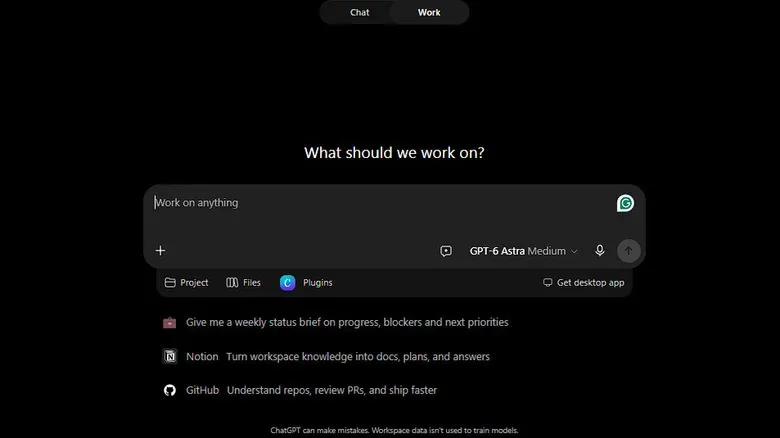
Plus users have a more specialized route. Rather than looking in ordinary ChatGPT chats, they should look for Astra in ChatGPT Work after it reaches their accounts. It can also be selected in Codex. This means the same subscriber may see different model choices depending on whether they are in Chat, Work or Codex.
Enterprise users may face an additional gate even when the wider rollout has reached their organization. Workspace model-access permissions can determine whether GPT-6 Pro is available. In practical terms, employees who cannot find the model may need to check with the person or team managing their Enterprise workspace rather than treating the absence as a software error.
Where each eligible group should look
- $100 and $200 Pro, Business and Enterprise: Open a normal ChatGPT conversation, open the model picker, and check the Pro section for GPT-6 Pro.
- Plus: Open ChatGPT Work on the web or mobile app and select Astra when the model is listed for the account.
- Desktop users with Plus: In the desktop app, select ChatGPT, change from Chat to Work, then choose Astra if it has rolled out.
- Codex users: Astra can be chosen in Codex, although the Codex CLI needs to be version 0.153.0 or later.
There is no universal “you have it now” location. A person might gain Astra access in Work before it appears elsewhere, because the rollout of those services is handled separately. That is especially relevant to people who move among the web interface, mobile app, desktop software and developer tools during the same day.
If Astra is missing, check the boring stuff first
A missing model entry does not necessarily mean a subscription is ineligible. The staged rollout is the most straightforward explanation, and OpenAI has not specified when every qualifying account will receive access. Still, there are a few practical checks worth making before waiting for the cosmic model-picker alignment.
Related coverage includes How to Find and Manage GPT-6 Astra in ChatGPT.
- Confirm that the correct ChatGPT area is open: regular Chat for GPT-6 Pro on applicable Pro, Business and Enterprise plans, or Work for Plus users.
- Verify that the desktop app is current. OpenAI recommends manually selecting Menu > Check for Updates, even if the application seems to have updated on its own.
- For Codex CLI use, confirm that version 0.153.0 or newer is installed.
- On Enterprise, check whether the workspace administrator has enabled model access.
- Try another supported surface, such as Work on the web or mobile, while recognizing that availability can differ by platform during the rollout.
The interface-hopping requirement is a reminder that software features are increasingly tied to which version of an app is running and which workspace a person occupies. That broader shift is visible across consumer tech; for example, recent iOS 27 interface and accessibility changes likewise place meaningful controls behind specific system menus rather than a single obvious switch.
Work’s local setup does not remove cloud considerations
ChatGPT Work may be attractive for tasks involving local files or desktop applications, but users should not interpret “local” as meaning that all information remains exclusively on the device. OpenAI notes that messages and task context can still be stored in the cloud even when Work is operating locally.
That is a particularly important detail for anyone considering Astra for code, documents, production notes, personal material or other potentially sensitive context. Before loading a sprawling folder or pasting an entire project history into a chat, users should understand the relevant workplace policies and the data-handling expectations attached to their account. The model’s availability is only one part of the decision; the route by which context is provided matters too.
Usage limits may be the real boss fight
Getting Astra is not the end of the logistical puzzle. OpenAI says its usage can consume an allowance faster than GPT-5.6 Sol, with the precise impact depending on the job’s complexity, the amount of supplied context, the reasoning demanded and other settings. A short, direct question is therefore not equivalent to asking the model to reason through a large coding task with extensive attached material.
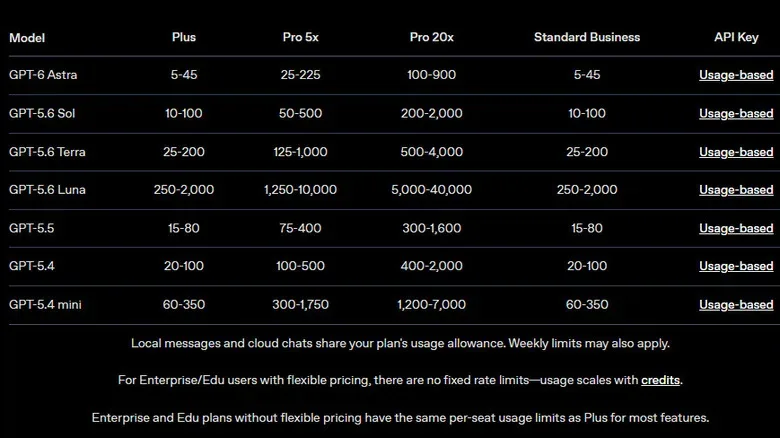
The published estimates for local Astra messages over a five-hour period are wide:
- Plus: roughly 5 to 45 messages.
- $100 Pro: roughly 25 to 225 messages.
- $200 Pro: roughly 100 to 900 messages.
Those ranges should not be read as guaranteed message totals for every prompt. They illustrate how much the nature of the request can affect consumption. A user repeatedly giving Astra long files, massive background context or difficult multi-step reasoning may burn through access much more quickly than someone using concise prompts with narrow goals.
Users can review their current allowance and reset timing in ChatGPT’s usage dashboard. Checking that page is sensible before committing Astra to a long task, particularly when the work cannot be easily paused or transferred to another model midway through.
There are also separate limits in standard ChatGPT. On the $100 Pro plan, GPT-6 Pro shares a weekly pool of 50 messages with GPT-5.6 Sol Pro. The $200 tier allows 200 GPT-6 Pro messages per week. The distinction between a five-hour local allowance and weekly Chat limits is easy to miss, but it is central to choosing where to use the model.
Use the heavyweight model with a plan
OpenAI’s guidance for making Astra usage go further is refreshingly practical: reserve it for work that actually benefits from it. Users can reduce avoidable overhead by keeping prompts specific, attaching only files that are genuinely relevant, and setting clear expectations for output format and length. Stating which reasonable assumptions the model can make may also eliminate needless clarification turns.
For a coding workflow, that could mean describing the component or bug precisely, providing the few files tied to it, specifying the language and desired output, and identifying assumptions that do not need another round of questions. For analysis or planning work, it means defining the deliverable rather than dropping a mountain of context and asking the model to “figure it out.” The reward is not just a cleaner answer; it may also be fewer messages charged against the allowance.
Astra’s most valuable role may be the difficult assignment where deeper reasoning or a larger amount of relevant context is genuinely needed—not every routine query that happens to be within reach of the model picker.
Developers can access Astra through the API
GPT-6 Astra is also available through the API. The standard listed pricing is $10 per million input tokens and $50 per million output tokens. Developers handling very large requests should pay close attention to the threshold at 272,000 total input tokens.
Once a request exceeds that amount, input and cache rates are charged at twice the standard rate, while output is charged at 1.5 times the normal rate. That makes context discipline important on the API side as well. Sending large amounts of material “just in case” can affect both usage behavior and cost.
For now, the clearest approach is to verify the plan, select the right ChatGPT surface, keep software updated, and watch the usage dashboard once Astra arrives. GPT-6 Astra is rolling out, but it is doing so through several doors—and each one comes with its own label, conditions and meter.