Amazon is offering a $5 discount to eligible shoppers who try its text-based Alexa shopping feature for the first time. The promotion turns a familiar retail action—searching for something to buy—into a conversation over SMS, with the discount intended to encourage shoppers to test the newer route.
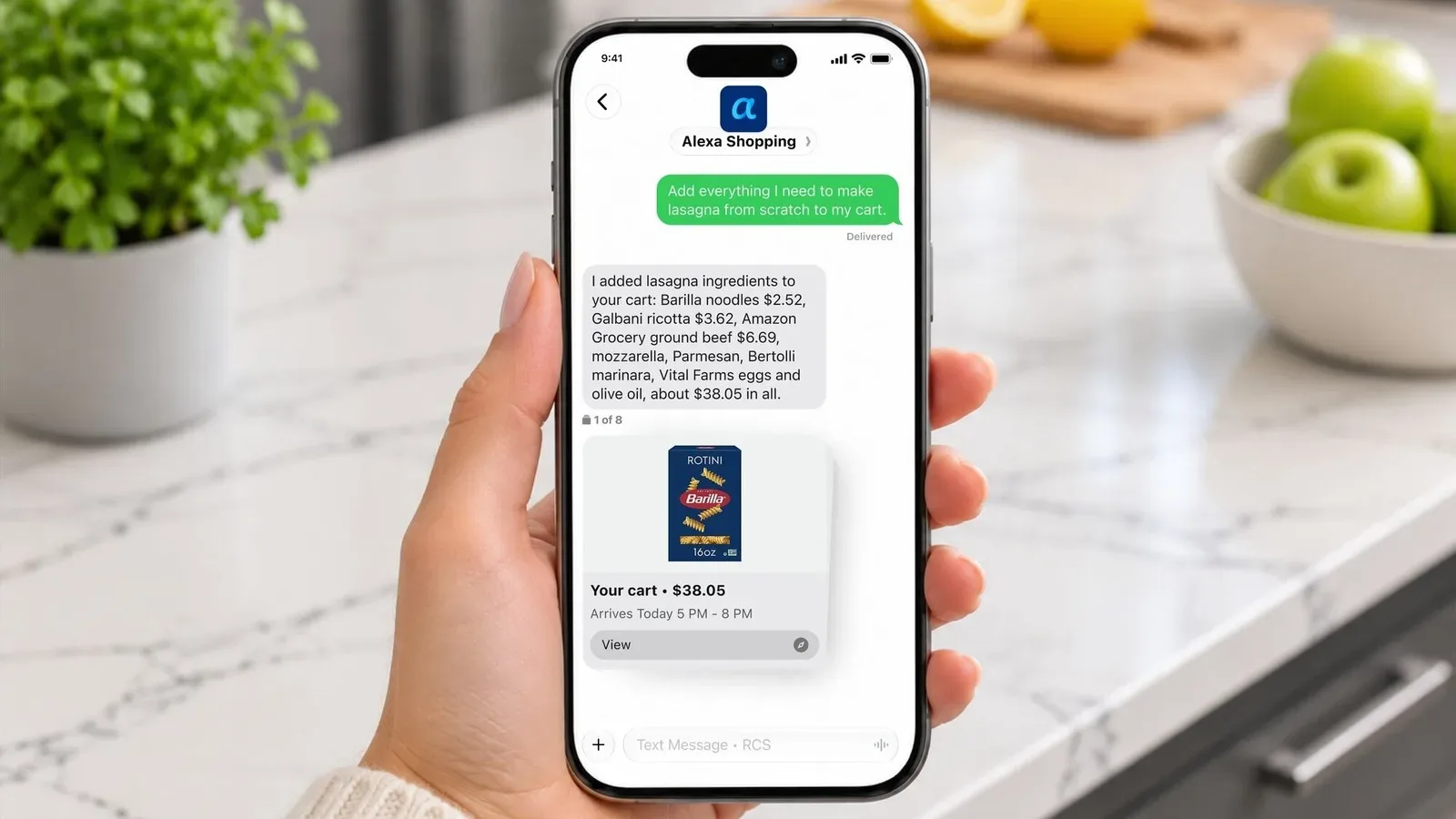
The basic proposition is straightforward: sign into an Amazon account, start the “Text Alexa” process, verify the phone number associated with that account, and reply to the resulting Alexa Shopping text message with a shopping request. The first qualifying purchase made through that experience receives an instant $5 discount.
It is a modest promotion rather than a sweeping price cut, but it is notable for what Amazon is trying to normalize. Alexa has long been available through Echo hardware and a phone app. Text messaging creates a more visual, slower-paced alternative to voice shopping—one that may be more comfortable for people who want to type a specific request, send a picture, and review what they are being shown before committing to an order.
How to activate the $5 Alexa text-shopping offer
Shoppers need to begin from Amazon’s text-shopping entry point while signed in to the Amazon account they intend to use. Selecting the “Text Alexa” option opens a prompt to confirm the phone number tied to that account. After choosing the option to agree and text, the user receives a message from Alexa Shopping.
From there, the shopper can reply with what they want to find. Alexa can be used conversationally to narrow down an item, much as it can through an Echo device or the Alexa app. The text workflow can also accept a photo, allowing Alexa to identify an item from an image and help guide the shopper toward a purchase.
The $5 discount is described as applying instantly to a first eligible order. That wording matters. This is not presented as a general $5 account credit for any later checkout, nor as a recurring reward for every text conversation. It is a one-time incentive connected to using the feature and completing a qualifying first order.
A sensible step-by-step approach
- Sign in to the Amazon account that will place the order.
- Open Amazon’s Text Alexa entry point and choose “Text Alexa.”
- Confirm the phone number associated with the account, then agree to receive the message.
- Reply to the Alexa Shopping message with a product request, or send a photo when image identification is useful.
- Review the suggested item, seller, model, quantity, and final checkout details before ordering.
- Make sure the product is eligible and confirm that the $5 discount is reflected before completing the purchase.
That final review is not just housekeeping. Text can be convenient for making a request, but shopping often involves decisions that are easier to evaluate on a product page: comparing variants, checking specifications, confirming which seller is fulfilling an item, and looking at the price attached to the exact model selected. Alexa can help locate an item; the buyer should still verify that it is the right one.
What qualifies—and what does not
The promotion applies to eligible items sold by Amazon as well as eligible products from third-party sellers on Amazon’s marketplace. A third-party seller is an independent merchant listing through Amazon rather than Amazon itself. That broadens the potential catalog, but it also makes listing review particularly important: similar-looking products can come from different sellers and may not be identical offers.
Several categories are excluded. The $5 discount cannot be used for gift cards, subscriptions, or digital content. In practical terms, this means a shopper should choose an ordinary eligible physical product rather than assume that any item visible in the store will work.
- Eligible in principle: items sold by Amazon and third-party sellers on the site, subject to the promotion’s qualifying terms.
- Excluded: gift cards, subscriptions, and digital content.
- Timing: the promotion may end at any time.
The “may end at any time” language makes this an offer worth checking before planning a purchase around it. It does not establish a guaranteed end date. Anyone interested should confirm the current terms in the feature’s FAQ and qualification information at the time they use it.
There is also a distinction between a product search and an eligible discounted transaction. A shopper may successfully text Alexa, get product suggestions, and still need to make sure the particular item chosen is not in an excluded category. The safest habit is to treat the checkout screen as the final authority: if the discount does not appear there, do not assume it will be added later.
Why text may solve some of voice shopping’s friction
Voice shopping has an obvious convenience advantage: asking for an item can be quicker than opening an app and typing a query. But it can create uncertainty when a request is vague or when several closely related products exist. A spoken request for a controller, headset, charging cable, storage drive, or game accessory can point to a large number of near-matches.
Text retains the conversational part of an assistant while giving the shopper a written trail of the request and response. It also makes it easier to provide details such as a brand, color, platform, capacity, or model name. If an item is already in front of the shopper, photo input offers another way to begin the search without having to identify it perfectly in words.
None of that removes the need to compare options. An AI assistant is a tool for discovery and product matching, not a substitute for checking a listing. The practical advantage is that text can reduce the effort of finding candidates; the practical responsibility remains choosing the correct candidate.
Useful checks before you submit an order
- Confirm the exact product name and any platform or compatibility details.
- Check the seller and make sure the listing is for the intended product, not an accessory or alternate version.
- Compare options when there are multiple models, sizes, colors, or storage capacities.
- Verify that the order is not a gift card, subscription, or digital-content purchase.
- Look for the $5 reduction in the order total before finalizing checkout.
Those checks are especially relevant for games and electronics, where the same broad search term can surface very different products. A name may refer to a physical edition, a digital purchase, an accessory, or a related item. Since digital content is excluded from this particular offer, being precise about the product type matters as much as finding the correct title.
What the incentive says about Alexa’s shopping push
The $5 offer is a direct nudge toward a specific behavior: using Alexa as a shopping interface. Amazon is not simply advertising the existence of text support; it is attaching a small, immediate reward to a shopper’s first eligible transaction. That lowers the perceived cost of trying an unfamiliar purchasing flow.
For many people, the conventional Amazon app remains the default because it puts product images, listings, variants, and comparisons directly in front of them. Text-based Alexa shopping does not necessarily replace that experience. Instead, it can function as an extra doorway into the same marketplace—one aimed at moments when a conversation, a typed request, or an image is a more natural starting point than a conventional search bar.
There is a broader lesson for shoppers here: a discount can be worthwhile without making a rushed purchase worthwhile. The best use of a one-time $5 offer is on something already needed and clearly eligible, rather than on an impulse item chosen solely to trigger the promotion. Because the deal excludes several common purchase categories and can be withdrawn, a brief eligibility and price check remains the sensible move.
Text Alexa is therefore best viewed as an optional shopping tool with a first-order incentive attached. Use it to describe or photograph an item, review the results carefully, and make sure the discount appears on an eligible order. For shoppers who prefer a written interaction over speaking to an Echo device, that may be enough of a reason to test the feature—particularly when the first qualifying order comes with $5 off.
For another example of how digital services are expanding across devices and payment-adjacent experiences, see Google Wallet’s iPhone launch and its missing tap-to-pay feature.