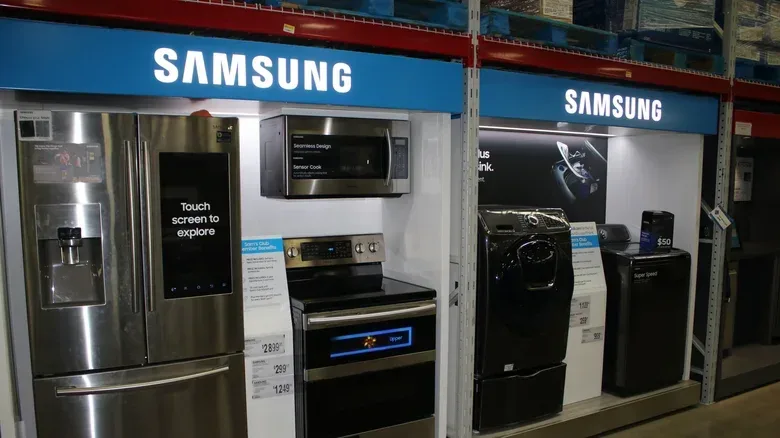

A refrigerator is one of the least glamorous purchases in a home, right up until the old one stops cooling and suddenly everyone becomes an expert in cubic feet. That urgency can make a connected model look compelling. A smart refrigerator can join Wi-Fi, report a door left open, provide maintenance notices and, on some models, let an owner view or adjust temperature zones from an app. Higher-end versions add cameras, large touchscreens, shared notes and tools intended to keep track of what is inside.
Those features are not inherently frivolous. A door-open alert could be useful. Remote temperature information may be reassuring. A screen in a busy kitchen can be a shared calendar, recipe display or family message board. The trouble is that the purchase is not simply a decision about refrigeration anymore. It is also a decision about an internet-connected computer, its data practices, its repairability and the length of time its software will remain useful.
That matters because a refrigerator is expected to outlast the normal support cycle of personal electronics by a wide margin. Home appliances are described as lasting roughly eight to 19 years on average. Buyers should therefore separate the cooling hardware they need from the connected extras they might enjoy—and decide whether the latter justify their upfront and long-term trade-offs.
Start with the job the appliance must do
The best refrigerator feature is still reliable refrigeration. Storage capacity, useful shelf layout, energy efficiency and even cooling matter more than whether a front panel can show a calendar. A display does not help if everyday items will not fit, and no app compensates for food freezing in the wrong compartment.
This sounds obvious, but smart-home shopping can change the order in which people assess a product. Screens, cameras and “AI” labels are immediately visible; temperature consistency and usable space are less flashy. The practical approach is to treat connected functions as a later comparison point after the core appliance requirements are satisfied.
- Capacity: Check whether the interior works for the food and containers the household actually uses, not simply the advertised exterior format.
- Cooling: Prioritize balanced temperature performance across the relevant zones.
- Efficiency: Consider power efficiency as a baseline ownership issue, rather than assuming connectivity is a substitute for it.
- Access: Think about daily use: doors, drawers, frequently used drinks and leftovers all need to be convenient.
- Connected features: Only after those basics should alerts, app controls, cameras and a touchscreen enter the equation.
There is also a difference between modest connectivity and a refrigerator built around its screen. Basic features—such as temperature status, maintenance notifications and door alerts—may carry a relatively small premium compared with a conventional model. The price jump can grow dramatically when a fridge becomes a full kitchen dashboard.
The screen premium can be substantial
The clearest reason to pause is price. In September 2026, two 29-cubic-foot four-door Samsung Bespoke refrigerator variants illustrated the gap: the Bespoke Fridge with AI and a display was listed at $5,000, while a $3,600 version retained some smart functionality but used a beverage center instead of the screen. That is a $1,400 difference before a buyer has decided whether the display will remain valuable for the life of the appliance.
That comparison does not establish that either refrigerator is a bad buy. It does show the right question: what does the extra $1,400 accomplish that cannot be handled elsewhere? For someone who truly wants the fridge’s particular screen-based setup, the answer may be personal and legitimate. For a cost-conscious household, however, it is a meaningful amount to spend on a feature category that can become dated faster than compressors, shelving and insulation.
A separate smart display may fulfill much of the “family hub” idea at far lower cost and with far less permanence. The Echo Show 16 is cited at $500 and can also function as a TV; Apple’s HomeView is cited at $300. An iPad or Android tablet can also serve as a shared kitchen screen, though those devices are not specifically optimized for communal sharing. The broader point is not that every household needs another display. It is that a replaceable device provides more flexibility than integrating a display into an appliance expected to remain in place for many years.
That flexibility changes the risk calculation. If a standalone display no longer meets a family’s needs, it can be moved, repurposed or replaced without touching the fridge. When a built-in panel becomes less useful, its replacement is not a simple tablet upgrade.
Connectivity creates a privacy and network decision
“Smart” means the refrigerator communicates with other systems, often through the home Wi-Fi network and a manufacturer’s app or services. This enables the helpful parts: remote controls, status reporting and notifications. It also means the appliance can collect data.
Some collection has a direct functional purpose. A service may need device information to deliver a maintenance alert or identify an error. But smart-appliance data may also be useful for marketing. On Samsung touchscreen refrigerators, ads can appear unless they are disabled. That makes the screen more than a passive kitchen fixture: it can be a place where the manufacturer’s commercial messaging reaches the home after the appliance has already been purchased.
Privacy-conscious buyers should understand what information the app requests and whether the desired features require an account. They should also look for settings related to marketing, personalization and advertisements before assuming the default experience is the most private one. A refrigerator may not seem as sensitive as a phone, but a connected device can still reveal patterns about how a household uses it.
Security is a related, but separate, issue. Any Wi-Fi-connected appliance is another device attached to the local network. The available evidence does not suggest a typical home refrigerator is likely to be individually targeted, but commercial freezers in Europe were recently sabotaged by hackers. The incident is a reminder that connected cooling equipment is still connected equipment: software and network access expand the set of things that need to be protected.
For a useful plain-English primer on why connected devices and gaming systems can behave differently on home networks, see what NAT types mean in online gaming. A refrigerator does not need the same connectivity behavior as a console, but the shared lesson is that internet features depend on network configuration and software—not magic arriving through the router.
What “another attack surface” means
Attack surface is a security term for the possible ways a system could be accessed, misused or compromised. A non-connected refrigerator has fewer digital entry points because it has no Wi-Fi-based app functions to protect. Adding network features does not mean an appliance will be attacked. It means its security posture now depends partly on the device software, the manufacturer’s support and the owner’s home network.
That is why “I probably will not be a target” is not the whole decision. The relevant consideration is whether the benefit of connecting the fridge is worth adding another managed device to the household. For many people, it will be. For others, a door alarm that works locally—or simply the habit of checking the door—may be enough.
Repairability and obsolescence may be the bigger gamble
Smart functions can have one legitimate service advantage: they may help diagnose an issue. Yet extra hardware also creates extra potential points of failure. Cameras, displays, networking components and electronics are additional components beyond the mechanisms that actually cool and circulate air. If something goes wrong, service can become more complicated and potentially more expensive.
The longer concern is obsolescence. In this context, it does not necessarily mean the refrigerator immediately stops keeping food cold. It means the connected portion can lose capabilities as software support, apps, integrations or online services change. The appliance itself may remain physically usable while the premium interface becomes reduced, unsupported or dependent on a service that is no longer maintained.
Consumer electronics demonstrate how quickly platform support can move on. The supplied example is that watchOS 27 cannot be installed on the 2022 Apple Watch Ultra. Whether a person agrees with that particular support boundary is beside the key refrigerator question: an appliance intended to last years may contain a device-like interface whose useful support window is much shorter.
There is no guarantee that every smart refrigerator will lose support early, and buyers should not assume the worst automatically. But neither should they count a long list of app and screen features as if each will remain unchanged for the complete appliance lifespan. A model’s value should make sense even if its smartest features eventually become limited.
A sensible way to decide
There is no universal rule that says a connected refrigerator is wasteful. The right choice depends on the buyer’s budget and which features they will genuinely use. The value case is strongest when the connected features are inexpensive additions to a refrigerator that already wins on capacity, efficiency and cooling. It is weaker when the screen is the central reason a much more expensive model is being considered.
A pragmatic checklist can keep that distinction clear:
- Choose the fridge based on space, efficiency and cooling before evaluating the app or display.
- Calculate the exact price difference between the smart model and a comparable alternative with the physical features you want.
- Identify one or two connected functions that will solve a real household problem, rather than counting a long feature list.
- Decide whether a separate smart display or existing tablet would handle the shared-screen role for less money.
- Review privacy, ad and account settings before connecting the appliance.
- Assume that online features may not last as long as the refrigeration hardware, then ask whether the purchase still makes sense.
There is one especially simple option for anyone who finds a smart fridge attractive because of a sale, capacity or other non-digital perk: leave it offline. The refrigerator can be bought and used as a refrigerator without activating its connected functions. That does not erase the initial cost of built-in smart hardware, but it avoids the ongoing network, data-collection and service-dependency concerns associated with connecting it.
For many households, the ideal refrigerator will be the one that quietly preserves food, fits the weekly shop and does not demand much attention. Smart features can add convenience, but they should be a bonus—not a reason to accept a much higher price, a more complicated repair path or a long-term software bet that the buyer did not intend to make.