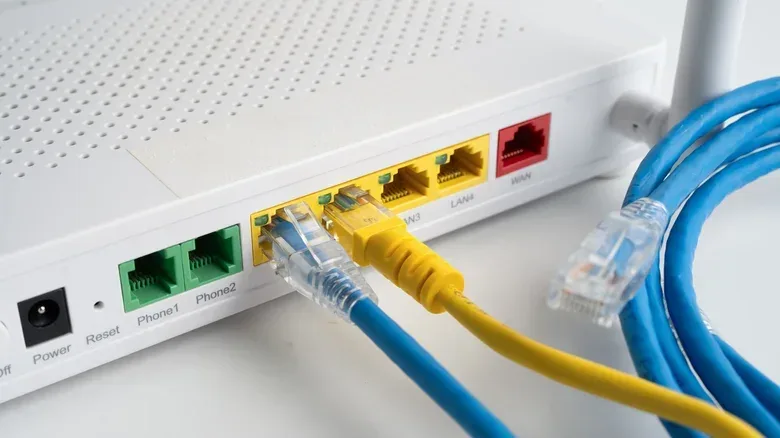

A NAT type warning is one of online gaming’s least friendly bits of jargon. It can appear in a console network test or a multiplayer menu, then quietly imply that matchmaking, voice chat, invites, or a co-op session may not work as intended. The immediate temptation is to change every router setting in sight. Usually, that is unnecessary.
If multiplayer, parties, and voice chat already work reliably, a NAT result is mostly useful information rather than an emergency. But repeated disconnects, failed attempts to join friends, lobby errors, and trouble finding matches can point to a genuine compatibility issue. The important distinction is that NAT type concerns which devices and players your system can communicate with; it does not measure download speed and does not itself change ping.
NAT, explained without the networking fog
NAT means network address translation. It is a mechanism that lets multiple devices in one home share a single public-facing internet address. A router handles that translation: traffic goes out from consoles, computers, phones, and other devices, while the router keeps track of how replies return to the appropriate device.
The reason this became common is IPv4, the older IP-address system that underpins much of the internet. IPv4 has room for roughly four billion unique addresses. That sounded enormous when the standard was developed in the 1980s, but became constrained as homes accumulated computers, phones, consoles, smart TVs, and other connected hardware.
For ordinary browsing and streaming, this translation layer is generally unobtrusive. Gaming can expose its limitations because some multiplayer features need other players or services to initiate communication back toward a particular console or PC. If a router does not know to allow that incoming communication, the game may report a restrictive NAT result.
IPv6 is the newer addressing system and has a vastly larger address pool. In principle, it removes the address scarcity that made NAT so useful, because devices can have their own addresses. The transition is incomplete, though. Many devices and networks operate in a mixed environment, using IPv6 where possible while retaining IPv4 compatibility. That leaves NAT relevant for plenty of current gaming setups.
The labels differ by platform, but the idea is similar
There is no single official NAT-type naming system used everywhere. That is why the same underlying situation gets a different label depending on where a player checks it.
- Xbox and PC: Open, Moderate, and Strict.
- PlayStation: Type 1, Type 2, and Type 3.
- Nintendo Switch and Switch 2: A, B, C, D, and F.
In broad terms, Xbox/PC Open, PlayStation Type 1, and Switch A represent the least restricted end. Moderate, Type 2, and Switch B are generally healthy, router-based home-network results. Strict, Type 3, and the more restrictive Switch classifications indicate a greater chance that the system cannot accept or establish the connections a game wants. Switch D signals a heavily limited connection, while F means the console cannot connect at all.
These labels should not be treated as a universal quality score. A game can use its own methods and show its own status. More importantly, the practical question is not whether a label sounds ideal; it is whether the network can support the game modes and social features a player actually uses.
Why “Open” is not necessarily the home-network prize
“Open” sounds like the obvious target, but it can be misleading. In this terminology, it can describe a device directly connected to the internet without the restrictions normally imposed by a router. That is not automatically a sensible or secure household setup.
A router does more than share one connection between devices. It also supplies firewall and other protective functions. Connecting a console or PC straight to a modem could make networking less convenient for the rest of the home and removes that router protection from the directly connected device. A conventional router setup that reports Moderate, Type 2, or B can be perfectly suitable for online play.
Compatibility is the real concern. An Open setup can connect broadly. Moderate devices can generally communicate with Open and other Moderate players. Strict is the most limiting category: a Strict device may only be able to connect successfully with an Open player. In arrangements where a player is chosen to host a session, a restrictive NAT can therefore make invitations, custom games, and joining friends more troublesome.
Why some games expose the problem more than others
NAT matters most when a game uses peer-to-peer, often shortened to P2P, networking. In a P2P session, players’ machines need to communicate with one another, instead of every gameplay connection going exclusively to infrastructure operated by the game’s developer.
That does not mean a game with dedicated servers is automatically unaffected. Even where a developer provides servers for the main multiplayer experience, separate features can rely on direct player-to-player communication. Voice chat, custom lobbies, co-op modes, and friend connections are examples of features that may still surface NAT-related trouble.
This also explains why a player might have a fast connection and still fail to join a friend. Bandwidth is the amount of data a connection can move; ping is a measurement related to delay. NAT type is neither. It is about the route and permissions that determine whether the relevant devices can establish communication in the first place. Faster broadband does not automatically turn a Strict NAT into a more compatible one.
Check the status before changing anything
The most sensible first move is to find the NAT result on the platform itself, then compare it with the actual symptoms. The paths supplied by the systems are straightforward:
- PS5: Settings > Network > Connection Status > Test Internet Connection.
- Xbox Series X|S: Settings > General > Network Settings, then look under Current Network Status.
- Nintendo Switch or Switch 2: Settings > Internet > Test Connection.
Individual games may also place a NAT readout in their multiplayer menu or network settings. A player who sees Open/Type 1/A or Moderate/Type 2/B and has no recurring multiplayer problem has little reason to start reconfiguring the router. Even a more restrictive result should be addressed in response to a real failure pattern, rather than as a purely cosmetic score chase.
Console connection quirks are only one part of a home setup. For PS5 owners working through broader setup questions, our guide to the disc formats a PS5 can play covers a separate, but similarly practical, side of configuring the system.
First troubleshooting target: double NAT
A common cause of restrictive results is double NAT. This happens when there are two devices performing router duties and therefore two layers of address translation. One familiar arrangement is an internet provider’s gateway connected to a separate personal router, with both devices acting as routers.
The fix is about assigning clear roles, not simply adding more equipment. If a separate router is used behind an ISP gateway, putting the gateway into bridge mode can prevent it from doing a second layer of routing. If the second device is intended only to provide wireless coverage or additional wired connections, its access-point mode, often written AP mode, can stop it from duplicating router functions.
Those settings are configuration changes, not one-size-fits-all buttons. The relevant interface and options depend on the hardware in use. Still, the diagnostic principle is simple: a home network usually works better for this purpose when it does not have two devices independently translating addresses.
UPnP versus manual port forwarding
If double NAT is not the issue, the next concepts are ports, UPnP, and port forwarding. A port is a numbered channel that networked software uses for particular kinds of communication. A game or service may need the router to accept and direct traffic through specific ports to the console or gaming PC.
Port forwarding is the manual approach. The router is configured to send traffic arriving on selected ports to a specified device on the home network. This can solve a connection problem, but it can also be tedious: different games can require different ports, and the device receiving the forwarding needs to be identified correctly.
UPnP, short for Universal Plug and Play, is the automated approach. With UPnP enabled, a device on the local network can request that the router open the ports it needs. That convenience is why it is often suggested for gaming, particularly for households playing a variety of titles.
The tradeoff deserves more attention than a generic “turn it on” recommendation. UPnP gives local devices the ability to ask for ports to be opened. If a malicious party gained access to the home network, that capability could be abused to request ports that grant more control. A UPnP configuration that responds to requests from outside the home local-area network is especially dangerous. A player who uses only a small number of games may prefer the more deliberate, narrower approach of manually forwarding the relevant ports.
There is no universally correct choice between the two. UPnP prioritizes convenience across changing games and services; manual forwarding can reduce unnecessary exposure when the required ports are known and the setup is stable. Either choice should follow an understanding of the router’s settings, not blind changes made in hopes of lowering a label.
When the limitation is outside the home: CGNAT
Sometimes the router is not the only translation layer involved. Carrier-grade NAT, or CGNAT, is when an internet provider applies NAT across a wider group of customers. In that case, the public-facing address associated with a household router is itself behind another level of translation operated by the provider.
CGNAT can make the usual home-router adjustments insufficient. IPv6 can be a workaround, although platform support is not identical. Xbox uses IPv6 fully, while PS5 and Switch 2 support IPv6 but still require IPv4 alongside it. Enabling IPv6 on a compatible router may help in some circumstances, but it is not a guaranteed cure for every NAT result or every provider arrangement.
If the router is correctly configured, double NAT has been ruled out, and persistent Strict or similarly restrictive results continue, the useful next conversation is with the ISP. Asking whether the connection is behind CGNAT and whether a dedicated public IP is available addresses the part of the path a household cannot control itself.
A practical order of operations
- Confirm there is an actual problem. Check whether matchmaking, parties, voice chat, friend joins, or disconnects are consistently failing.
- Read the platform’s NAT status. Treat Open/Type 1/A and Moderate/Type 2/B as generally workable results, not as reasons for unnecessary changes.
- Look for two active routers. Resolve double NAT with bridge mode on the gateway or AP mode on the second device where appropriate.
- Choose a ports strategy thoughtfully. Use UPnP for automatic requests if its convenience fits the network’s risk tolerance, or manually forward relevant ports when a narrower setup is preferred.
- Consider the ISP layer. If the issue persists, investigate CGNAT, IPv6 support, and the possibility of a dedicated public IP.
NAT warnings have an intimidating name, but their value is fairly concrete: they are a compatibility clue. For players whose online features work normally, the best repair may be no repair at all. For those repeatedly blocked from sessions, identifying whether the obstacle is a double-router layout, closed ports, or provider-level CGNAT turns a vague status message into a focused troubleshooting path.