
There is a particular kind of desk-upgrade anxiety that begins with a perfectly ordinary question: is the headphone jack good enough? From there, it can escalate rapidly into product pages, wattage figures, impedance ratings and the apparent assumption that a serious listening setup requires a small tower of metal boxes.
It does not. A dedicated digital-to-analog converter and headphone amplifier can be useful, but a stack of separate components is not a compulsory endgame. The sensible choice comes down to a few practical questions: whether the existing output is clean and loud enough, what the headphones actually demand, how many inputs and outputs are needed, how much desk clutter is acceptable, and whether swapping individual parts later matters.
For many PC and laptop listeners, one combined DAC/amp is the cleanest answer. For someone using unusually difficult headphones, several sources or a rotating cast of audio hardware, separates can earn their extra cost and cabling. The mission is not to buy the most boxes. It is to solve the limitation that is actually in front of you.
First check whether there is a problem to solve
Not every headphone setup needs external hardware. If a computer or laptop headphone output plays clearly at a comfortable level, without unwanted noise or other dissatisfaction, adding a DAC and amp is optional rather than urgent. More equipment does not inherently turn listening into a better experience.
Some modern laptops are more capable than the reputation of built-in audio might suggest. MacBooks from 2021 onward, for example, can support low- and high-impedance headphones. With headphones rated from 150 to 1,000 ohms, their headphone jacks can supply up to 3 volts RMS.
RMS, short for root mean square, is a standard way of expressing an audio signal’s effective voltage. The useful takeaway is not that every buyer needs to chase a voltage figure. It is that an onboard output can have meaningful capability, and that the match between its output and the headphones matters more than the number of devices on a desk.
An external solution becomes more relevant when the current output cannot reach a satisfying level cleanly, when the listener wants different connectivity, or when the headphones need more from an amplifier. Those are concrete reasons to shop. “A stack looks more advanced” is less persuasive.
What each component actually does
A DAC converts a digital audio signal into an analog signal. Digital audio is the information delivered from a computer, phone or another digital source; headphones ultimately need the analog signal that drives their speakers.
Related coverage includes DAC/Amp Combo vs. Stack: How to Choose for Your Headphones.
The headphone amplifier then takes that analog signal and provides the level needed to power the headphones. In the simplest terms, the DAC translates and the amp supplies the muscle.
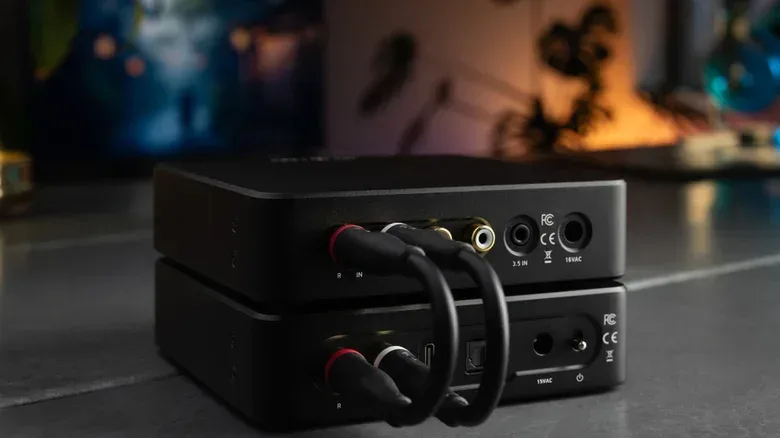
A DAC/amp combines both jobs in one chassis. A stack splits them into two pieces: a DAC connected to a standalone headphone amplifier. Both arrangements cover the same basic chain. The separate route should therefore be viewed as a choice of flexibility and features, not an automatic declaration of superior results.
The combo case: less cable management, fewer compromises
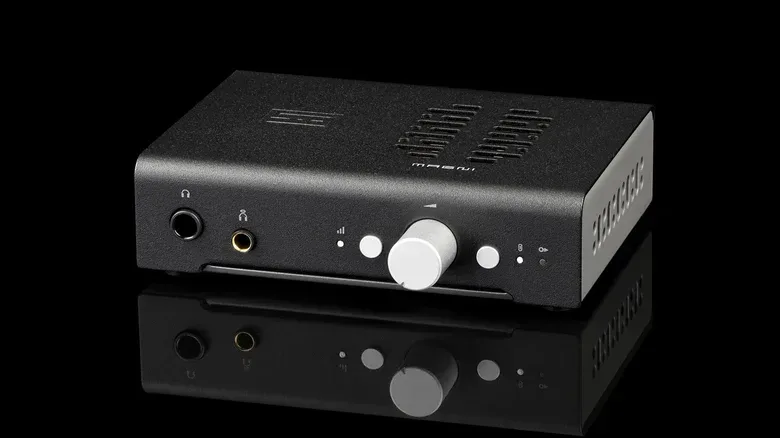
A DAC/amp combo is usually the logical first stop for a listener improving computer audio without expanding their desk into an electronics side quest. One enclosure means fewer wires, one fewer power adapter and less space consumed by hardware. It also keeps the path from computer to headphones straightforward.
Portable USB-C DAC/amp dongles offer an even smaller route, especially for phone-oriented use. Desktop DAC/amps, however, generally provide more connectivity and power. Which size makes sense depends on whether the gear must travel or will live beside a computer.
Combos can also make the budget decision much clearer. Consider Schiit’s Magni 6. With its optional internal USB DAC, it costs $169. Buying the Magni 6 amplifier without the DAC costs $99, while the separate Modi 5 DAC costs $149, or $164 with a power adapter. That split setup climbs above $250 before an interconnect cable is included.
The Modi 5 brings optical and coaxial inputs, which may be valuable when those connections are needed. But those inputs alone do not establish that the separate configuration will sound better. That distinction is the whole game: a feature only has value when it serves the setup in front of you.
Higher-priced combos can also carry serious output and extras. The $549 JDS Labs Element IV is rated for up to 3.2 watts per channel into 32 ohms. It includes automatic gain switching, EQ and preamp outputs for powered speakers. That means a single device can potentially handle demanding headphones while also acting as part of a desktop speaker arrangement.
Gain is amplification level. Gain settings allow equipment to better accommodate different headphone needs. EQ, or equalization, changes selected parts of the audio frequency balance. Preamp outputs can send signal onward to powered speakers. These are not trophy features; they are potentially useful tools. The key is whether they eliminate another item the buyer would otherwise need.
The trade-off is simple: a combo locks its DAC and amp together. If only one stage becomes the part you want to change later, the other cannot be retained as an independent component. For a buyer who wants one capable, tidy solution for the foreseeable future, that is usually an acceptable compromise—and often a benefit.
When a stack is the better tool
Separate components are worth considering when flexibility is a real requirement rather than a theoretical possibility. A listener with several headphones, especially models with very different needs, may appreciate a dedicated amplifier’s gain choices, extra headphone outputs or additional analog inputs. Someone who frequently changes the rest of their hi-fi system may prefer the ability to replace a DAC while keeping an amplifier, or do the reverse.
This modularity is the stack’s central strength. It is not merely about upgrading for its own sake. It prevents a working half of a combo from becoming inseparable from the half that no longer suits the system.
Power requirements can be another legitimate reason to separate. Headphones are not all equally demanding. High-impedance models can need substantial power, while planar magnetic designs can pair low impedance with low sensitivity.
Impedance, measured in ohms, describes an electrical characteristic of the headphones. Sensitivity indicates how readily headphones produce sound for a given input. Neither specification should be treated as a one-number shopping shortcut. The useful approach is to consider them together, then compare the headphones’ needs with an amplifier’s capabilities and noise performance.
The HiFiMAN Susvara Unveiled illustrates why the full specification matters. It is rated at 45 ohms and 86 dB sensitivity. Despite the relatively low impedance figure, its low sensitivity means it can demand serious amplification; The Absolute Sound advises at least 6 watts. In a situation like that, a standalone amplifier may be the more suitable route than assuming a typical combo will cover the job.
There is a counterpoint, and it matters just as much: excessive power is not a universal upgrade. A highly powerful amp can produce audible hiss with very sensitive headphones. So the productive question is not “what is the biggest amp?” It is “does this amplifier suit these headphones without introducing unwanted noise?”
Connections and controls can make the decision
A dedicated headphone amplifier may offer more analog inputs, more gain settings and more headphone connections, including balanced outputs. Balanced connectors are an example of an extra connection option rather than an automatic must-have. If the headphones and desired setup call for that output, it can matter. If not, it is another port that does not change the listening routine.
These options are not exclusive to separate hardware. A well-equipped DAC/amp can include substantial connectivity, as the Element IV’s speaker-oriented preamp outputs show. But dedicated amps are more likely to provide the expanded feature set because they focus their space and cost on amplification and control.
There is also a practical tax on those options. A stack needs interconnects between the DAC and amp, as well as another power cable. That consumes room and adds another setup consideration. Readers already optimizing a computer area can apply the same restraint used for other desk hardware: identify the need before making the desk more complex. For adjacent upkeep, see this guide to cleaning a PC GPU safely.
Pricing reinforces the point. Topping’s A70 Pro headphone amp costs $499 by itself, which is more than many DAC/amp combos. That can be entirely reasonable for a buyer who requires its amplifier-focused advantages. It is not automatically a better-value move for someone who simply wants clean, enjoyable headphone sound from a computer.
A practical decision path
- Start with the current output. If it is clean and comfortably loud, no purchase may be necessary.
- Check the headphones’ specifications and needs. Look at impedance and sensitivity together, then assess the amplifier’s available power and noise performance.
- List connections you will genuinely use. Optical or coaxial inputs, analog inputs, speaker preamp outputs, gain settings and balanced outputs should solve an actual requirement.
- Decide whether upgrade modularity has near-term value. A stack is useful when changing one component independently is part of the plan, not merely a vague possibility.
- Count the full setup cost. Include component prices, interconnects and extra power requirements—not just the appealing entry price of one piece.
- Account for physical friction. More space, cables and power adapters are a fair trade only when their features are needed.
The sensible answer is usually the smaller one
For most people, the combo is the better starting point: compact, simpler to operate, typically better value, and capable of substantial performance without the cable clutter. A decent desktop DAC/amp can offer more than enough power and connectivity for many headphones, while keeping a computer setup manageable.
A stack becomes persuasive when its advantages are specific: demanding headphones that call for serious amplification, a varied headphone collection, desired analog inputs or output options, and a genuine preference for upgrading the DAC and amp independently. It is a tool for solving more complicated needs, not a mandatory badge of audio seriousness.
So resist the urge to treat two boxes as an automatic level-up. Check whether your current jack is inadequate, match equipment to the headphones rather than to marketing shorthand, and spend on the capability you will use. The best upgrade is the one that makes the music easier to enjoy—not the one that creates the largest cable-management boss fight.