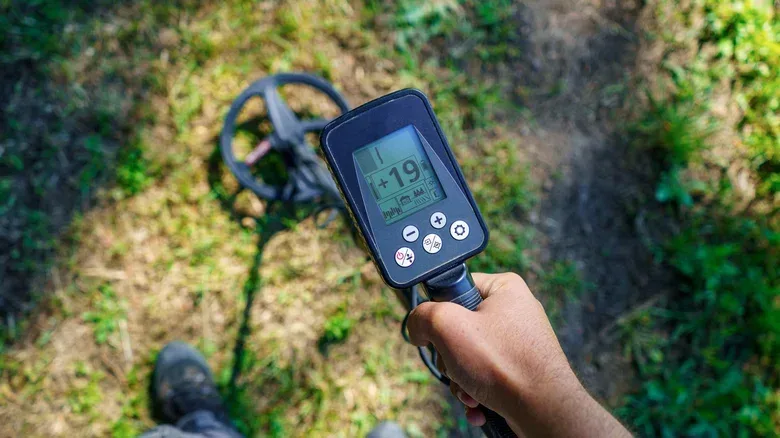

A smartphone metal-detector app sounds like a gimmick from the era when every new download claimed it could turn a phone into a flashlight, ruler, spirit level, or paranormal investigation kit. In this case, though, there is real hardware involved. The catch is that the useful version of the claim is much narrower than the name metal detector suggests.
Many smartphones include a magnetometer: a sensor that measures magnetic fields. Its everyday job is helping the phone understand direction for compass functions. A metal-detector app reads changes captured by that sensor and can alert the user when a suitable object is close by. It is not creating a universal metal-finding beam, and it is not equivalent to the dedicated detectors used for searching ground, beaches, or other large areas.
That distinction matters before anyone installs an app expecting to locate jewelry, precious metals, or a hidden cache. A phone can provide a quick, low-cost way to check for certain magnetic objects nearby. It is much less suited to the broader kind of detecting associated with specialist equipment.
The phone sensor behind the app
The key component is the magnetometer, which has been a common smartphone feature since the late 2000s, including in the iPhone 3GS era. A magnetometer takes measurements related to Earth’s magnetic field. When a phone’s compass knows which way the device is facing, this sensor is part of what makes that possible.
Metal-detector apps repurpose those measurements. Rather than presenting them primarily as a compass direction, an app watches for a change in the magnetic field around the handset. If a magnetic metal object comes sufficiently close, the reading can shift. The app may display a meter, change color, vibrate, or make a sound to flag that movement in its readings.
It is important to describe that accurately: the app is detecting a magnetic-field disturbance, not identifying every kind of metal by sight, by composition, or at a long distance. The phone is functioning as a sensor reader, while the app supplies the interface and alert behavior.
That also explains why app-store descriptions deserve scrutiny. Different apps can package the experience differently, but they generally rely on the same underlying magnetometer capability. An elaborate visual scanner does not, by itself, mean that an app has gained access to a more powerful kind of metal sensing.
Ferromagnetic metals are the practical limit
The most important technical term here is ferromagnetic. In this context, it refers to metals that respond strongly enough to magnetic fields for a phone magnetometer to notice at close range. The useful examples are iron, steel, nickel, and cobalt.
Related coverage includes Can Your Phone Really Work as a Metal Detector?.
If the item someone lost is a steel screw, an iron nail, or another small ferrous piece, a phone app may be a reasonable thing to try. Move the handset through the likely area and watch for a reading that changes as it approaches the object. It will not turn a frustrating search into a guaranteed recovery, but it can narrow attention toward a nearby magnetic item.
The limitation is just as practical as the benefit. The word metal covers a huge range of materials, while a phone magnetometer has a much more selective job. An app that works around a nail should not be assumed to work around every metal object someone might care about.
In particular, claims about finding gold, silver, or expensive jewelry should raise an immediate question: is the app only reading the phone’s magnetometer? If so, the promise does not match the sensor’s basic capability. The phone is not equipped to treat non-ferromagnetic valuables as if they were obvious magnetic targets.
Why a dedicated detector is fundamentally different
A conventional metal detector is not simply a phone magnetometer with a larger handle. Commercial detectors can generate an electromagnetic field. Put plainly, the machine actively produces a field and looks for how nearby conductive metals affect it. That approach reaches beyond the narrower group of ferromagnetic materials a phone can notice through its compass-related sensor.
Conductivity is the relevant idea in that comparison. A conductive material allows electricity to move through it. Specialist detectors can use their generated field to detect metals that conduct electricity, even when those metals are not the strongly magnetic materials a phone is best positioned to notice.
This is why the two tools should be evaluated as different categories rather than competing versions of the same product. A handset may be handy for a very short-range search for a magnetic object. A dedicated detector is built for wider metal-detection work and a wider set of target materials.
It is a useful reminder for tech purchases generally: software can expose or repurpose an existing sensor, but it cannot automatically replace hardware the device does not contain. The same habit of identifying the real limiting component helps with other everyday tech problems, including the difference between a fast connection and actual game responsiveness in a guide to diagnosing bad ping despite fast internet.
Reasonable uses for a phone metal-detector app
With the hype removed, there is still a practical niche for these apps. They are most credible as a quick finder for small nearby ferrous items. If a nail, blade, screw, or similar bit of metal falls into clutter and is difficult to see, a phone may help indicate where to look more closely.
- Best fit: locating a nearby iron, steel, nickel, or cobalt item that is already expected to be in a limited area.
- Useful expectation: an alert or changing measurement suggests that something magnetic is influencing the phone’s sensor.
- Not a reliable use: scanning for gold, silver, or high-value jewelry.
- Not a replacement: broad searching for varied metals with a dedicated detector.
The app does not know whether a magnetic reading comes from the missing screw someone wants or another magnetic object in the area. Users therefore need context. A changing signal is a prompt to inspect a spot, not proof of a particular find.
How to assess an app’s claims
Because free options exist on both Android and iOS, an upfront charge alone is not a convincing reason to choose one metal-detector app over another. The central capability is the phone’s magnetometer, so a paid presentation cannot change the physical limits described above.
A sensible checklist is short:
- Check whether the phone has a magnetometer, since the app depends on that sensor.
- Read user reviews for signs that the app behaves as expected and is not overloaded with misleading claims.
- Prefer descriptions that acknowledge magnetic or ferromagnetic targets over claims that promise every valuable metal.
- Treat a free option as a low-stakes way to see whether the tool is useful for a specific, close-range task.
- Skip apps that imply a phone can provide the breadth of a purpose-built detector without additional hardware.
This is not an argument that every phone detector app is deceptive. A straightforward app can accurately present the magnetometer’s readings and be useful in the right moment. The problem begins when a basic sensor-reading utility is marketed as treasure-hunting technology capable of detecting materials outside its likely range.
What results should look like in the real world
A credible result is modest: bring a phone close to an appropriate magnetic object and observe the app’s reading respond. The response will be about proximity and the object’s magnetic properties, not a treasure map or a material analysis.
That modest result can still be worthwhile. Phones are already in pockets, and a free tool can be convenient for a quick search. But the useful framing is “a magnetometer reader with an alarm,” not “a full metal detector hiding in an app store.”
Once that is clear, the technology becomes easier to judge. A phone can help find some nearby magnetic metal. It cannot promise a general search for every metal, and it cannot credibly turn a compass sensor into a gold-and-silver finder. For dropped ferrous odds and ends, that may be enough. For serious detecting, it is a reason to use the equipment designed for that job.