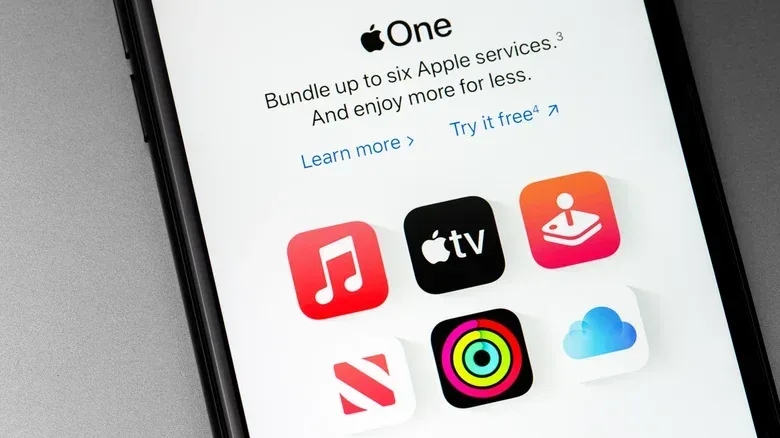
Subscription bundles are built to make one question feel simple: is it cheaper to put everything on one bill? Apple One’s answer is a qualified yes. Its Individual, Family and Premier tiers can cost less than subscribing to the included services separately, but a bundle only represents a real saving when its components match services a person or group would otherwise pay for and use.
That distinction matters more after recent price increases. Apple Music’s individual plan rose by $1 per month and its Family plan by $3. Apple TV’s monthly price moved from $13 to $15, while its annual price increased by $20. Apple One also increased: Individual now costs $22 per month, Family costs $28, and Premier costs $40.
For people who already pay for multiple eligible services, the math can be compelling. For someone adding a bundle simply because it appears discounted, the unused parts are still part of the monthly charge. Apple Arcade can be a nice extra, for instance, but it should not be treated as savings if nobody in the group intends to play it.
The three Apple One tiers at a glance
Apple One combines digital services and iCloud storage. iCloud storage is the cloud capacity allocated for items such as backed-up data and stored files. A shared storage pool means the group draws from one total allowance; it does not mean every member can automatically browse every other member’s files.
- Individual — $22 per month: Apple Music, Apple TV, Apple Arcade and 50GB of iCloud storage.
- Family — $28 per month: Apple Music Family, Apple TV, Apple Arcade and 200GB of shared iCloud storage, shareable with up to five additional people.
- Premier — $40 per month: everything in Family, plus Apple Fitness+, Apple News+ and 2TB of shared iCloud storage.
On the stated standalone pricing, Individual is about $13 per month below paying separately for all of its included components. Family is about $17 lower than its services bought separately. Premier’s components would total $75 per month individually, making its $40 price a stated $35 monthly reduction.
Those are useful reference figures, but they are not a universal recommendation. The more useful calculation starts with a household’s existing subscriptions. Add only the services people already pay for—or are certain they would pay for without the bundle—then compare that number with the Apple One tier. Treat any newly included service as a bonus, not as money saved.
Individual: best for one person already using the core four
The Individual plan is straightforward. At $22 per month, it is designed around one account holder who wants Apple Music, Apple TV, Apple Arcade and 50GB of iCloud storage. Apple Music alone is listed at $12 per month and Apple TV at $15, so a person already paying for both has reached $27 before considering Arcade or storage. In that case, the $22 bundle is immediately lower than the two-service total.
But the storage allowance deserves attention. Fifty gigabytes can be adequate for a person with modest needs, yet storage is often the part of a subscription setup that changes quietly over time. Someone paying separately for more storage may find that Individual no longer has the right capacity even if its entertainment and music selection does.
It is also important not to confuse Individual with a plan intended for multi-person music listening. Services in Apple One can generally be shared with a Family Sharing group, but Apple Music is the stated exception: multi-person Apple Music access requires the Family tier. If the household needs several people to have Apple Music, Individual is not a substitute merely because it includes the service.
For a solo subscriber, then, the decision is less about whether four service names look impressive and more about a pair of checks: will 50GB work, and are Apple Music and Apple TV both already regular parts of the monthly budget? If either answer is no, separate subscriptions may remain the cleaner option.
Family: where sharing can change the equation
At $28 per month, Family adds a 200GB shared iCloud pool and the Apple Music Family plan. It can be shared with up to five other people, for a six-person group in total. Divided equally among six people, $28 works out to roughly $4.67 per person per month—less than $5.
The low per-person figure is real arithmetic, not an automatic verdict. It works only when the group actually shares the cost and when the members want the included services. One person paying the entire $28 for a group that barely uses Apple Music, Apple TV or Arcade has not necessarily found a bargain. Conversely, several people who would have subscribed separately can make the tier much more efficient.
Notably, members do not have to live in the same household for this family-plan arrangement. That gives a group of relatives or trusted friends more flexibility than some competing family plans. Still, the practical side of any shared bill should be settled before choosing a tier: who pays, who contributes, whether the storage allowance is sufficient, and whether everyone needs music access rather than only occasional access to other services.
Family may also be the most sensible upgrade for someone whose needs do not fit Individual’s storage ceiling. The increase from 50GB to 200GB is substantial, while the tier also changes Apple Music from single-person access to the Family plan. It is not necessarily the right choice for every solo user, but it has a clearer purpose than simply “more stuff.”
Premier: evaluate News+, Fitness+ and storage before calling it a deal
Premier costs $40 per month and includes the Family tier’s lineup plus Apple Fitness+ and Apple News+. The former is listed at $10 monthly and the latter at $13 monthly. Premier also increases the shared iCloud allocation to 2TB; 2TB of iCloud storage is listed at $10 per month on its own.
For a group that would independently pay for News+, Fitness+, 2TB of storage and the services already included in Family, Premier has the strongest stated bundle discount. Its components add up to $75 per month separately, a $35 difference from the $40 package price.
That does not mean Premier is automatically the “best” Apple One plan. It is the most expansive one, which is different. A household that needs 2TB and already subscribes to News+ can have a very clear upgrade case. The additional inclusion of Fitness+ then carries practical value without driving the decision. A group that only needs music and a little cloud capacity, however, could be paying an extra $12 each month over Family for features it would never otherwise purchase.
A disciplined comparison makes this clearer:
- List every service currently paid for individually.
- Mark which people need access to Apple Music.
- Identify the storage amount actually required now, rather than guessing from the largest tier.
- Price the equivalent standalone combination.
- Only then compare it with Individual, Family and Premier.
This approach prevents the familiar bundle trap: upgrading because the discount percentage sounds large while adding products that have no independent value to the buyer. Premier’s strongest case is not that it includes everything. It is that its extra services and 2TB allocation can replace expenses already on the bill.
Family Sharing, access and file privacy
Family Sharing is the group arrangement through which eligible subscriptions can be available to other members. In the Apple One context, Apple Music requires the Family plan when multiple people need access. Other included subscriptions are already shareable with a Family Sharing group. That means someone interested only in Apple Arcade does not necessarily need Apple One: Apple Arcade is available separately for $7 per month and can be shared with the group.
This is an important counterweight to bundle enthusiasm. A family that primarily wants Arcade should compare the $7 standalone cost against the $28 Family bundle, rather than assuming Family is a necessary gateway to shared play. The bundle earns its place when its other components are also valuable.
Shared iCloud capacity also should not be mistaken for shared personal files. The storage pool is communal, but individual files are not visible to other members by default. A person can choose to share files, but storage sharing itself does not open private material to the rest of the group.
For music listeners managing libraries across devices, it is also worth checking settings before interpreting a missing library as a plan problem. Sync Library is the setting to check when an Apple Music library is missing on another device. A change in billing tier and a synchronization issue are separate problems, even if they appear at the same time.
How extra iCloud+ storage works with Apple One
Apple One’s included storage does not set an absolute ceiling. Subscribers can add iCloud+ capacity on top. Premier subscribers can pair its 2TB allowance with the 12TB iCloud+ plan, which costs $60 per month, for a maximum of 14TB. That amount of storage will be excessive for many people, but the option is relevant to groups whose needs exceed even Premier’s included allotment.
The migration rules matter when switching plans. If an existing iCloud+ subscription has less storage than the selected Apple One tier, the smaller iCloud+ plan is cancelled, stored data remains intact, and a prorated refund is issued. A prorated refund is a partial refund reflecting the unused portion of a prepaid billing period.
If the existing iCloud+ plan has more storage than the chosen Apple One tier, it can remain active alongside Apple One’s included storage. A subscriber who decides the extra space is unnecessary can cancel iCloud+ afterward. In both cases, the key is to compare the existing capacity with the capacity that comes with the intended Apple One tier before changing anything.
A practical buying rule: pay for usage, not the bundle label
Apple One is easiest to assess as a replacement for specific recurring charges, not as an all-purpose discount club. Individual fits a person using the core services with modest storage needs. Family is tailored to multi-person Apple Music use and a shared 200GB pool, especially when the monthly bill will genuinely be split. Premier is most compelling when News+, Fitness+ and 2TB storage are already useful rather than theoretical extras.
Anyone moving from individual Apple subscriptions into Apple One will not be billed twice for services included in the chosen bundle; billing for those individual included services stops. That removes one friction point from changing plans, but it does not eliminate the need to review what is actually used.
The best tier is therefore not necessarily the cheapest sticker price or the biggest claimed monthly saving. It is the lowest-cost arrangement that covers the services a person or group truly uses, gives Apple Music access to everyone who needs it, and provides enough storage without paying for unused capacity.