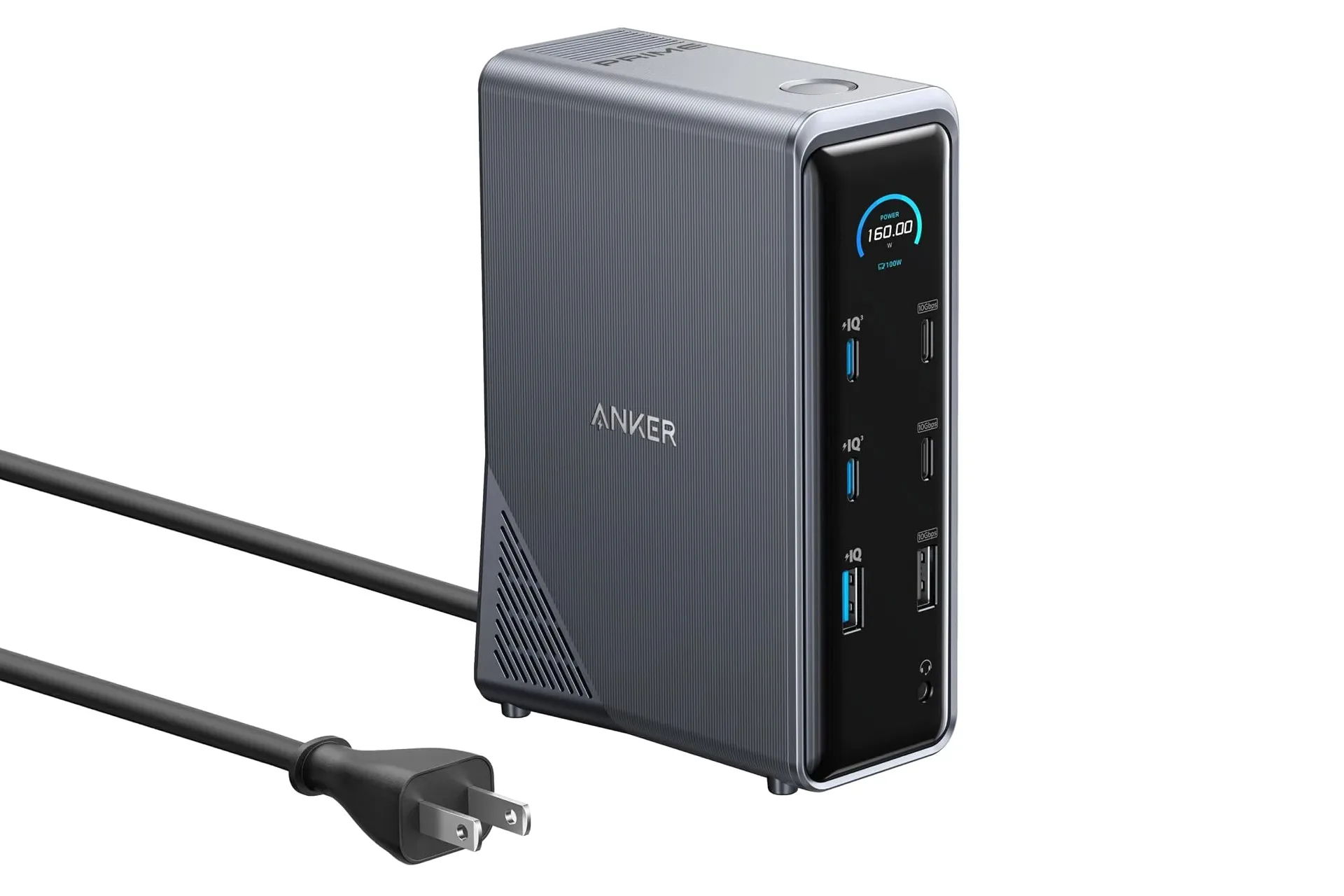
Desk setups accumulate side quests quickly. A laptop needs a display connection. An external SSD needs a fast port. A keyboard, mouse, phone, earbuds and other battery-powered accessories all want their turn at the cable pile. The Anker Prime Docking Station is currently listed at $170, a $100 reduction from its stated $270 regular price, or roughly 37% off.
The key attraction is not merely the number of sockets. It is the attempt to separate a workstation’s three competing jobs: charging devices, moving data and sending video to displays. The dock is advertised as a 14-in-1 model and includes a 160W shared charging section, USB ports rated as high as 10Gbps for data, Gigabit Ethernet, an upstream USB-C laptop connection, legacy USB-A expansion and two HDMI outputs specified for up to 4K at 60Hz.
That makes the deal potentially meaningful for someone trying to make a laptop desk less dependent on swapping cables every time they sit down. It also calls for a careful read of the port layout: high wattage, high transfer speed and display support are different capabilities, and the headline figures apply to different parts of the dock.
The $170 price and what is actually being bundled
The current listed price is $170 for a limited time, against a quoted normal price of $270. That is a straightforward $100 difference. As with any time-limited retail price, the practical takeaway is the current listing rather than an assumption that the reduction will remain available.
At that price, the dock’s proposition is a single desk-side point for a laptop and its peripherals. The connection inventory described includes:
- Two USB-C charging ports, each rated for up to 100W individually
- One USB-A charging port rated for up to 12W
- 160W total charging output across that charging group
- Two USB-C and one USB-A USB 3.1 Gen 2 ports for data, each rated for up to 10Gbps
- Three additional USB-A 2.0 data ports rated for up to 480Mbps
- One 1Gbps Ethernet port
- One USB-C upstream port for the laptop connection
- Two HDMI ports, each specified for up to 4K at 60Hz
The useful distinction is that this is not presented as a row of identical USB ports. Its front-facing ports are divided into a charging side and a data side. The rear adds networking, the laptop uplink, three lower-speed USB-A ports and the two display outputs. In everyday use, that division can reduce guesswork—provided accessories are connected to the side that matches their purpose.
160W is a shared charging budget, not an automatic 160W delivery to one device
Charging specifications are easy to read too broadly. The dock has a stated total output of 160W for its dedicated charging ports. Each of its two USB-C charging ports can reach up to 100W individually, while the USB-A charging port is rated at up to 12W. Those figures should be understood as port and total limits, not as an indication that every connected device will receive its maximum at the same time.
In plain terms, wattage measures electrical power. A higher number can allow compatible hardware to charge more quickly or support more demanding devices, but charging behavior depends on the device and the dock’s available shared power. With several products connected, the 160W total is the ceiling the group works within.
For a desk, the arrangement is most immediately relevant to the small items that repeatedly occupy wall adapters: a phone, wireless earbuds, a watch, tablet or other USB-powered accessory. It also keeps the charging ports distinct from the ports intended for storage and other data devices. That separation matters because a USB connector’s shape alone does not tell the full story of what it is intended to do.
Anyone evaluating power accessories alongside a dock can also find more context in this breakdown of how a 20,000mAh power bank relates to phones, Steam Deck and laptops. A dock’s wall-powered charging budget and a portable battery’s capacity are different measurements, but both reward checking the actual power needs of every device involved.
Why the 10Gbps ports matter more for external storage
The dock’s three designated high-speed data ports—two USB-C and one USB-A—are identified as USB 3.1 Gen 2 and rated for read and write speeds of up to 10Gbps. The stated comparison is that they are 20 times faster than USB 2.0, whose 480Mbps maximum applies to the three USB-A ports on the rear.
Gbps means gigabits per second, while Mbps means megabits per second. These are connection-rate ratings, not a promise that every file copy will reach that exact speed. Still, the difference makes the intended allocation clear. An external SSD or USB storage device belongs on a 10Gbps port when transfer performance matters; basic peripherals can use the USB 2.0 ports without consuming a faster connection.
That is a practical form of port management. A mouse and keyboard generally do not need the bandwidth available to a fast external drive. Reserving the higher-rated ports for storage, while assigning lower-bandwidth accessories to USB 2.0, makes better use of the physical connections described here.
Fast transfer rates do not remove the need for safe storage practices, either. Once a file copy appears complete, removable drives should still be properly ejected rather than treated as instantly idle. The reason is explained in our guide to why an external drive should be ejected even after the progress bar finishes.
Dual 4K HDMI is the display feature to verify against a specific laptop
The two rear HDMI ports are each specified to transmit video at up to 4K resolution and 60Hz. 4K refers to a high-resolution display format, while 60Hz means the display can update up to 60 times per second at that stated mode. On paper, the dock provides the physical display connections needed for a dual-monitor layout from one desk hub.
However, a dock connector does not by itself establish the full capabilities of the computer attached to it. The supplied information identifies an upstream USB-C port as the connection point for a laptop, but it does not provide a compatibility list, operating-system requirements, supported laptop models or a description of how every laptop handles dual external displays. Those are details a buyer should confirm for their own machine and monitors before treating dual 4K/60Hz as a guaranteed personal setup outcome.
The same caution applies to charging expectations. The product’s port ratings describe the dock’s capabilities, but a particular laptop’s charging behavior is determined by the combination of the laptop, cable and negotiated USB-C power delivery. The sensible purchase checklist is therefore short but important: verify laptop display support, check monitor inputs and resolutions, confirm the needed cable types, and identify which accessories genuinely benefit from 10Gbps data ports.
Ethernet and older USB-A still make a desk dock more flexible
Beyond charging and displays, the rear panel includes a 1Gbps Ethernet port. Ethernet is a wired network connection; the 1Gbps rating denotes a connection speed of up to one gigabit per second. For a desk that already has access to a network cable, it is one more function that can run through the docking station rather than requiring a separate adapter.
The three USB-A 2.0 ports are less exciting on a spec sheet, but they are not superfluous. Their stated limit of up to 480Mbps is well below the 10Gbps ports, yet that is sufficient for many ordinary low-bandwidth peripherals. Their inclusion also acknowledges that not every desk accessory has moved to USB-C.
Put together, the ports create a hierarchy rather than a uniform bank of connections: high-output charging in one group; faster data connections for storage in another; lower-speed USB-A expansion in the rear; then separate paths for laptop connection, wired networking and HDMI displays. That organization is arguably the most useful feature of the design, because it gives each common desktop task an obvious home.
Who should pay attention to this deal
The Anker Prime Docking Station’s current $170 listing is most compelling for people whose laptop desk already involves multiple separate adapters: charging bricks for accessories, a storage connection, display cables, a network adapter and several USB peripherals. Consolidation is the point. One upstream USB-C connection is described as linking the dock to the laptop, while the other ports stay in place for the desk’s regular equipment.
It is less clearly justified for a minimal setup that only needs a single peripheral or one occasional external drive. The source material supports a broad set of capabilities, but it does not establish that every buyer needs all of them. The value rises with the number of functions someone can replace or centralize.
At the stated discount, the dock combines a substantial shared charging allocation with fast USB data, dual HDMI, Ethernet and extra USB-A connectivity. The buying decision should rest on the specific workstation it will serve—not merely the “14-in-1” label. Count the devices, identify which ones need fast data or charging, and confirm the laptop and monitors can take advantage of the display setup. Do that, and the $100 reduction is easier to judge as a useful desk upgrade rather than another cable-shaped inventory item.
Shop the products
Check current price, model and availability at the retailer.