
An iPad can be more than a larger screen for the same handful of apps. Its display and touch interface make it particularly useful for information that benefits from being seen at a glance: a sprawling plan, a week of meals, a reading queue, a visual journal or a map of ideas. The useful part is not simply installing more software. It is choosing a tool whose structure matches something you already want to remember, arrange or revisit.
The 10 apps below are free to start, although most reserve particular capabilities for subscriptions or one-time lifetime purchases. That distinction matters. A good free tier lets a person establish whether an app fits into daily life before adding another recurring bill. Paid plans can be worthwhile when they remove a real constraint, such as a limit on media series, cross-device syncing, collaboration or access to health data.
There is also a notable range in how these apps use artificial intelligence. Some avoid it altogether; others use it for narrow jobs such as interpreting a meal-planning request, summarizing material or answering questions about a journal. That is a more practical dividing line than whether an app has an AI label. Ask what the feature actually does, what information it needs access to, and whether you would still use the app without it.
Sofa turns an unwieldy watchlist into a manageable library
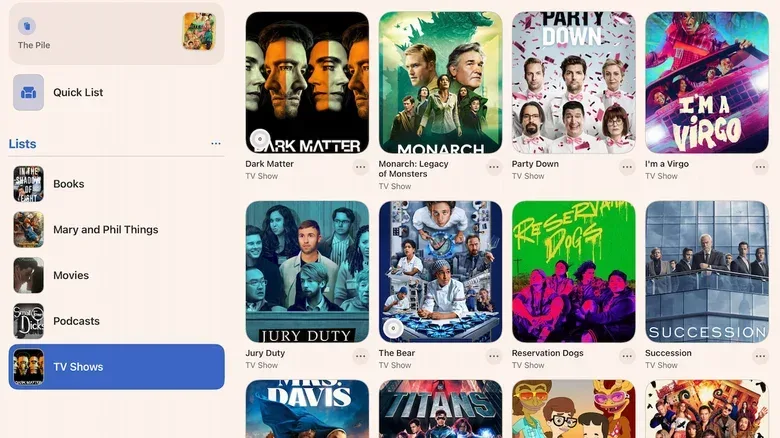
Sofa is a media tracker for people who routinely lose track of what they meant to watch, read or finish. It can collect books, films, television shows and user-defined categories into one visual catalog, using title imagery and information to make the list more browsable than a basic note.
Its most immediately practical feature is episode tracking. Mark episodes as watched, leave notes if helpful and keep two series in progress on the free tier. That may sound modest, but a deliberate limit can be enough for anyone who prefers to focus on the current shows instead of turning their queue into an archaeological dig.
The paid plan expands tracking to unlimited titles and adds custom ratings plus smart lists. A smart list is a list populated by rules or filters instead of one built item by item, which is useful for making views such as unwatched films or series with a particular status. Sofa lists its subscription at $5.99 a month, $49.99 a year or $249.99 for lifetime access. Its ad-free free offering appears to cover the core tracking job well, so the premium plan is best treated as an upgrade for meticulous catalogers rather than a requirement.
Bear offers notes without turning every thought into a project
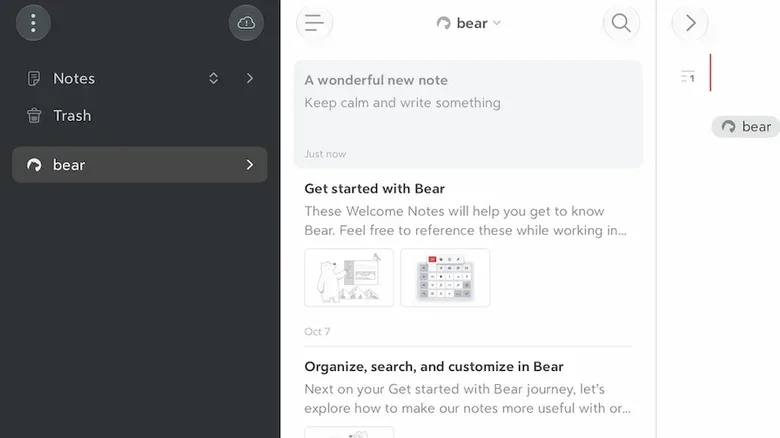
Bear is designed for capturing writing in a comparatively uncluttered environment. It supports tags, links, to-do items and search, while leaving those tools out of the way when all that is needed is an empty page. That balance is important for journaling and quick notes: a system can be powerful without demanding that every sentence be filed, formatted and optimized.
One of Bear’s foundations is Markdown, a lightweight way to apply formatting with plain-text symbols rather than navigating a large formatting ribbon. Markdown can make writing feel less interrupted because headings, emphasis and similar structure are entered directly in the note. People unfamiliar with it do not need to make it their whole personality; Bear can still function as a straightforward note app.
Tags are its other key organizational tool. Adding a tag such as #job to a thought makes related entries searchable later, whether they are complaints, meeting notes or ideas worth revisiting. Bear’s $3-per-month or $30-per-year subscription adds syncing across devices and export or publishing options using HTML and ePub. HTML is the standard language used to structure web pages, while ePub is a common ebook format. Those additions make sense for writers maintaining an archive or preparing material for elsewhere, but they are not necessary to enjoy Bear as a personal notebook.
Flipboard puts topic-based reading on an iPad-sized canvas
Flipboard approaches current reading as a magazine-like feed. Rather than starting with a single publication or a chronological social timeline, it asks users to select interests. Those can be broad subjects such as science, music and sports, or more focused ones including the UEFA Champions League, blues music and sustainable design.
The iPad benefit here is visual: large images and clean layouts can make browsing stories feel more intentional than hopping from link to link. Users can follow authors and sites as well as subjects, and can block sources they do not want in their feed. That control is worth using. A personalized reader only becomes useful when its mix is regularly adjusted rather than accepted as a mystery algorithm’s final decree.
Flipboard is free. It can surface material that is otherwise associated with paywalls, but readers should still recognize that an app’s ability to link to or display material does not turn it into a replacement for every publisher’s own access rules. Its strongest use is discovery: finding the subjects, writers and publications one wants to keep reading.
HappySpoon makes meal planning concrete
HappySpoon combines a weekly meal plan with recipes, portion scaling and a grocery list sorted by store aisle. For households, the appeal is less about producing a novelty recipe than reducing a chain of small decisions: what is being cooked, what ingredients are needed and how much to buy for different appetite sizes.
The app’s AI can interpret ordinary-language directions. A user might ask for menus that use a specific ingredient, repeat simple breakfasts or exclude lunches. It can then generate a plan and shopping list. Portion scaling accommodates adult-sized and kid-sized eaters, making the final quantities more tailored than a generic recipe list.
That said, the AI component is free for two weeks, and it is sensible to distinguish the initial planning boost from an enduring need. After a few menus have been established, some households may find the non-AI planning features sufficient. Continuing AI access costs $5.99 per month or $49.99 per year. The practical test is simple: does the subscription prevent food waste, save enough planning time or make cooking at home materially easier? If not, a saved set of repeatable meals may accomplish the same goal.
MindNode gives branching ideas a usable shape
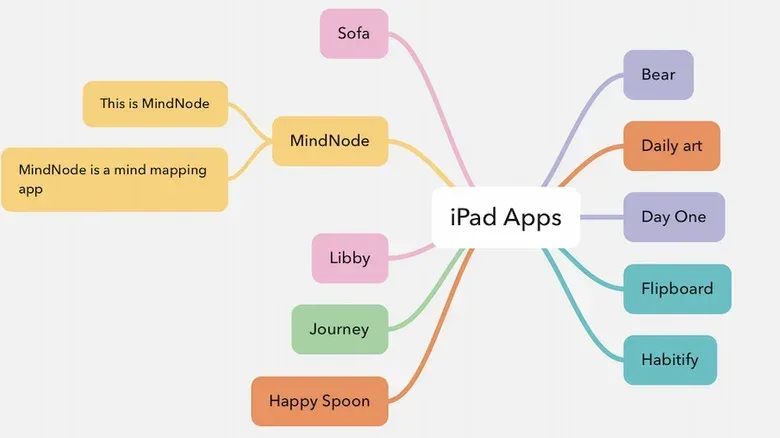
MindNode is a mind-mapping app for ideas that do not naturally arrive in list form. A mind map begins with a central topic and expands outward through connected branches. It can be useful for planning a meeting, unpacking a fitness goal, outlining a project or exploring a decision with several competing paths.
The central advantage is visibility. A conventional outline establishes hierarchy through indentation; a map shows relationships spatially. MindNode also offers an outline view, so the same information can be switched from a broad visual layout to a linear structure. That flexibility means a user can brainstorm freely first and turn the result into more sequential action afterward.
Premium access costs $2.99 monthly or $24.99 annually. It adds more editing choices, photos and emoji in nodes, real-time collaboration, task reminders and checklists. Real-time collaboration means collaborators can see edits as they occur rather than exchanging separate versions. The plan also includes Apple Intelligence functions that can propose ideas or summarize a map. Those extras may help groups or frequent planners, but the basic question comes first: does thinking visually reveal connections that a regular list hides?
Journey favors detailed life records and templates
Journey treats a journal as a broader record rather than solely a daily paragraph. Entries can live alongside calendar appointments, important dates, photographs, multimedia and location maps. Over time, habit tracking, graphs and statistics can add a retrospective layer, particularly when entries are tagged with moods.
Its templates provide the clearest reason to choose it over a blank-page diary. A travel-planning template can include hotel, flight, rental-car and budget fields, with expected spending compared against actual spending. Other templates cover personal goals and a 30-60-90-day career plan. A template is not a magical organizer; it is a repeatable structure that prevents routine details from being forgotten.
Journey’s premium tier is $6.99 per month, $49.99 per year or $199 for lifetime access. It includes sharing-oriented features and an AI function that can answer questions about an existing journal, such as entry counts over a month or a summary of a specified period. This is meaningfully different from an AI writing a diary entry on someone’s behalf: the feature is intended to retrieve or condense material the user has already created. Still, anyone maintaining personal records should review what permissions and sharing practices they are comfortable with.
Libby is the no-premium reading option
Libby connects a library card to a local library’s digital lending collection. It supports ebooks, audiobooks, periodicals, graphic novels and comics, subject to what an individual library offers. Users can read in Libby’s own ereader or send eligible titles to Kindle.
Digital lending still has waits. Libraries can have limited copies of ebooks just as they do physical books, so a popular title may require a hold. Libby handles the waiting list and can also be used to request titles that are absent from the catalog. That limitation is not a flaw in the app so much as part of how borrowing works: access is tied to the participating library’s collection and availability.
There is no premium plan. That alone makes Libby a standout for iPad owners who read often, listen to audiobooks or want to explore comics and periodicals without adding another subscription. It is also a useful reminder to check a local library card’s digital benefits before assuming every book needs to be bought.
Day One lowers the barrier to starting a journal
Day One is aimed at people who want help getting a journaling practice off the ground. When an entry begins, it can record contextual details including date, time, location, weather and moon phase. It also supplies prompt categories such as Reflection, Fitness, The Year Ahead and Mindfulness.
For a more automated record, the app can use photos, maps and calendar information to assemble elements of the day. An app-specific passcode adds a layer of protection to the journal, and AI-based features can be disabled. Those controls matter because a journal is often more sensitive than an ordinary note collection, especially when it combines location, images and personal reflection.
Unlimited entries are free. The $49.99 annual subscription expands media capacity with unlimited photos, videos and audio recordings, and includes IFTTT integration. IFTTT, short for “If This Then That,” is a system for connecting actions across services through conditional rules. In this context, it can extend how journal material is captured or organized. Users who write mostly text should not assume they need the paid level; it is more relevant for an extensive multimedia archive.
Habitify focuses on repeatable goals, not app busywork
Habitify asks users to define what they want to do, which days it repeats and the target attached to it. The goal is to monitor progress while avoiding the trap where maintaining the tracker becomes harder than maintaining the habit.
Siri integration is central to that lower-friction approach. Rather than opening the app to log each action, users can log a habit through Siri and ask for an update on progress. The paid $49.99 annual plan places Apple Health and Google Health integration behind its paywall, enabling data gathering with permission. It can also connect with an Apple Watch or Fitbit, and can monitor screen time when reduced device use is one of the goals.
The distinction is useful: a habit tracker records a commitment and evidence of progress; it does not create the commitment for someone. Start with a small, clearly described behavior and a realistic schedule. Wearable and health integrations become valuable only when that additional data actually helps measure the stated goal.
DailyArt turns a few minutes of screen time into art discovery
DailyArt presents artwork with accessible background on the piece, artist and style. One offering features Autumn Landscape, made in 1899 by the pseudonymous Hishida Shunsō. Selecting artists and related links can open paths into more work, while the daily format offers a simple alternative: look at one piece today and return tomorrow.
Its collections can be organized by artist, artistic movement and themes, including art depicting people working with their hands or cats. Quizzes and games add an optional interactive route into the material. The free version contains an ad bar. Premium costs $4.99 monthly or $29.99 yearly, removing ads and unlocking unlimited searches across a large library of high-quality artwork and accompanying information.
DailyArt works best as a gentle, cumulative learning tool rather than a replacement for serious study. A brief explanation and linked collection can prompt curiosity; the user decides whether to stay with the daily encounter or follow the thread through an artist, movement or subject. For a small regular ritual, that is plenty.
How to choose without building a subscription pile
Start with the bottleneck, not the app’s most impressive feature. Choose Libby if the immediate problem is finding more reading material. Choose Sofa if the problem is remembering media already in progress. Bear, Day One and Journey all involve personal writing, but they solve different versions of it: simple tagged notes, prompted journaling with rich context, and template-led records with broader life planning.
Then use the free tier long enough to discover whether the tool has a place in an existing routine. Keep an eye on annual pricing, lifetime offers and features that only sound essential. Anyone already evaluating Apple-related bundles and subscriptions may also find our guide to when Apple One plans actually save money useful for putting another recurring cost in context.
The best iPad app is usually the one that makes a real task easier without asking to become a task of its own. These choices span reading, planning, writing, tracking and discovery, but their common strength is clear: each gives information enough room to be seen, shaped and used.