A simpler way to store detached Joy-Cons
JoyOff 1.0.0 is the initial release of a Nintendo Switch homebrew app designed to reduce battery drain while Joy-Cons are stored for extended periods. It detects connected original wireless Joy-Con L and R controllers, clears their saved Bluetooth pairing, enables shipment low-power mode, and disconnects them.
The release was published on October 22, 2026, with an application archive and a separate source archive. Once the operation is complete, the controllers no longer remain connected to the Switch and enter the documented low-power state for storage.
How the release works
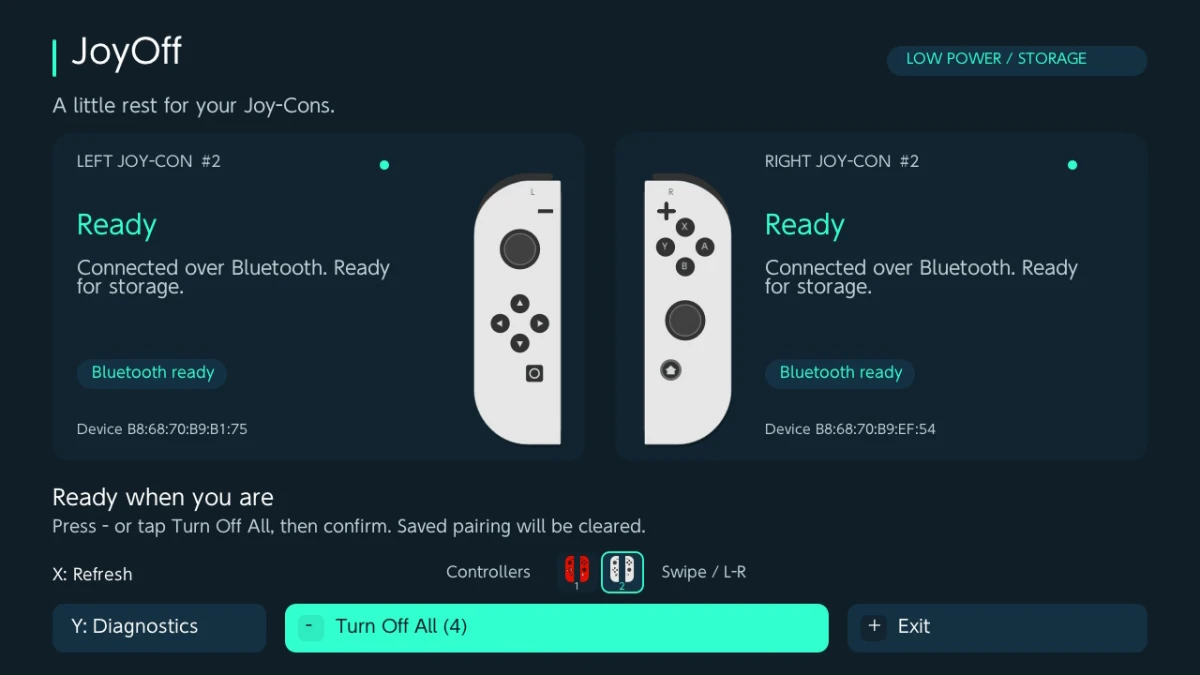
Launch JoyOff through Homebrew Menu in full application mode, using a title override. Detach the Joy-Cons from the console and connect them wirelessly. The app refreshes controller discovery automatically, then presents detected devices across one or more controller pages.
Press Minus or select Turn Off All to open the confirmation screen. After confirmation, JoyOff processes all ready controllers across every page. The results screen reports the outcome for each controller individually, which helps identify a device if an operation does not complete successfully. Because the controllers disconnect during the process, touchscreen controls remain available for leaving the app.
The operation clears the saved Bluetooth pairing. To wake the controllers and pair them with a Switch again, attach them to the console. If the operation stops partway through, pairing may already have been removed, so check the per-controller results before using the devices again.
Controller detection and controls
JoyOff shows each controller’s color, connection state, and operation result. Displayed colors come from stored HID color information, so they may not match replacement shells. Controller pages group left and right devices for display only; the grouping does not create or define controller pairs.
Minus opens and confirms the Turn Off All action. B or Plus cancels, returns, or exits where appropriate. X refreshes detection, Y opens diagnostics, and ZL opens the About screen. L and R move between controller pages.
The touchscreen can activate buttons, use the miniature page legend, and switch pages with horizontal swipes. These touch controls remain useful after the Joy-Cons disconnect, when physical controller input is no longer available.
Supported hardware and system requirements
The application requires a Nintendo Switch running custom firmware version 13.0.0 or newer, original Joy-Con L or R controllers connected wirelessly, and Homebrew Menu in full application mode. MissionControl is not required for the documented operation.
JoyOff is intended for original Nintendo Switch Joy-Cons. Pro Controllers, Joy-Con 2, and third-party controllers are outside the app’s stated scope. The utility runs on the Nintendo Switch; the release materials do not present it as a PC tool for placing controllers into storage mode.
Optional diagnostics
Diagnostics are available from the Y button. TXT logging is disabled each time JoyOff launches, so the app does not create diagnostic logs by default. While idle in Diagnostics, Minus or the logging toggle enables or disables logging, and X can refresh discovery to capture information about connected controllers.
Logs are saved to the Switch SD card at sdmc:/joyoff-debug.txt. Turning logging off does not remove existing log files. This provides a way to collect discovery information when troubleshooting without enabling diagnostic output during normal use.
What is included in version 1.0.0
Version 1.0.0 is the initial release, so there are no earlier JoyOff versions to compare against and the release notes list no separate fixes or incremental changes. JoyOff-1.0.0.zip contains the application file for use through the Switch homebrew environment, while JoyOff-1.0.0-source.zip contains the corresponding source and license notices.
The Switch application is distributed under LGPLv3 with accompanying GPLv3 terms. The project also includes adapted graphics and renderer components with their respective notices and attributions.