Editorial feature, October 18, 2026: This is a researched history and buying framework, not a hands-on review of the newly announced Xbox Nano. The Nano’s price, timing and availability describe Microsoft’s announcement and may change by region. Our argument for Xbox’s controller lineage is an opinion; hand fit and game support can change the answer for you.
The shape that became a language.
My argument is simple, though not neutral: Xbox’s greatest controller achievement is not that it has produced a universally perfect pad, but that it has made continuity feel like competence. Across generations, an Xbox controller has usually asked players to relearn less than its rivals’ hardware sometimes has. That familiarity travelled to Windows through XInput, turning the Xbox layout into a kind of shared PC dialect. The result is a line of controllers whose best ideas often arrive as refinements rather than revolutions—and whose “best” model depends as much on hands, games, software and habits as on the plastic itself.
That qualification matters. “Best controller” is a subjective editorial judgment, not a measured universal fact. A compact pad may be ideal for a child or an adult with smaller hands, yet tiring for someone who prefers a broad grip. A premium model’s adjustable sticks and paddles may be transformative for one player and unnecessary clutter for another. The right comparison must also leave room for PlayStation’s symmetrical sticks, Nintendo’s distinctive experiments and the many bodies that standard designs serve imperfectly. Controller history is therefore not just a march toward technical improvement. It is a record of how bodies meet software, and how repeated habits turn arrangements of buttons into instinct.
That story begins in 2001, with the original Xbox and its famously enormous Duke gamepad. The Duke was not merely large in reputation; its scale made the console’s first physical statement unusually easy to read. Microsoft was entering a market with no established Xbox muscle memory, and the controller announced a new platform through weight, width and an abundance of surface. It was imposing, sometimes awkward, and historically useful precisely because it made the next step so obvious: Xbox needed a shape that more players could inhabit without negotiation.
The smaller Controller S became that step and, in time, the familiar foundation of the brand. Its significance was not only that it reduced the Duke’s reach. It established a recognizable relationship among the twin sticks, face buttons, shoulder controls and central Xbox button that would survive successive hardware changes. The lesson was quietly important: a controller becomes comfortable partly by being physically persuasive, but also by letting the player’s memory do more of the work. Once a layout becomes dependable, novelty starts to look less like progress and more like a tax.
When Xbox 360 arrived in 2005, the controller carried that emerging grammar into a wireless-first era. The central Guide button gave the machine a visible social and system-level identity, while the overall arrangement remained close enough to the Controller S that returning players could concentrate on games rather than translation. Wireless freedom changed the living-room relationship with the console, but the deeper achievement was continuity. The 360 pad helped make “Xbox controls” a portable idea—something players could recognize across genres, rooms and eventually platforms.
Xbox One, launched in 2013, revised the ergonomics without discarding the sentence structure. Its controller introduced impulse triggers, adding a form of game feedback through the triggers themselves, and later variants broadened the family rather than replacing its basic logic. The shape became a conversation between familiar reach and more deliberate texture. This is where Xbox’s philosophy becomes clearest: the company could add sensation, materials and tuning while preserving the locations that software had already taught millions of players to expect.
The 2015 Xbox Elite controller pushed that philosophy toward customization. Remappable paddles, trigger stops and swappable components treated the pad less like a fixed appliance and more like equipment. That distinction is important. The Elite did not prove that every player needs extra controls; it showed that “better” might mean moving decisions closer to the individual hand. A trigger stop can suit a shooter, while a full pull can matter in a racing game. The premium controller’s achievement was not luxury alone, but the admission that one default shape cannot encode every useful preference.
Xbox One S-era controllers added Bluetooth, a practical change with consequences beyond the console. Bluetooth made the controller easier to approach as a general-purpose device, while Microsoft’s XInput API had already helped standardize Xbox-style input on Windows. On PC, that familiarity became especially powerful: button prompts, expected stick placement and plug-in recognition often aligned with the controller already associated with the console. DirectInput and newer GameInput coexist, so the PC is not literally an Xbox-only ecosystem, but XInput helped make Xbox conventions feel like a default language rather than one dialect among many.
The Xbox Adaptive Controller, launched in 2018, widened the meaning of compatibility. It is a hub with 3.5mm ports and USB connections for accessible custom setups, not a substitute for every player’s needs and not a claim that one standardized pad can solve physical access. Its importance lies in treating the controller as a system that can connect to different switches and devices. In a history often told through the shape of a handheld object, the Adaptive Controller reminds us that control can be distributed across a person’s available movements, environment and assistive hardware.
Elite Series 2, released in 2019, refined the premium branch with adjustable-tension sticks, shorter hair-trigger locks and a rechargeable battery. Elite Series 2 Core followed in 2022 with a reduced component package, not a wholly new generation. That distinction prevents a common historical mistake: mistaking a product tier for a new design language. The Elite family explored how much adjustability a familiar Xbox skeleton could carry. It also made the tradeoff plain: added control can mean added cost, maintenance considerations and decision-making before a game even begins.
The Series X|S controller of 2020 brought the mainstream line forward with a refined size, textured surfaces, a Share button and a hybrid D-pad. None of those features needed to overthrow the established arrangement. The Share button acknowledged a culture in which capturing and distributing play had become ordinary; texture addressed grip as a tactile relationship; the hybrid D-pad served both directional precision and broader everyday use. The controller’s identity remained legible because the changes were layered onto habits rather than demanding their replacement.
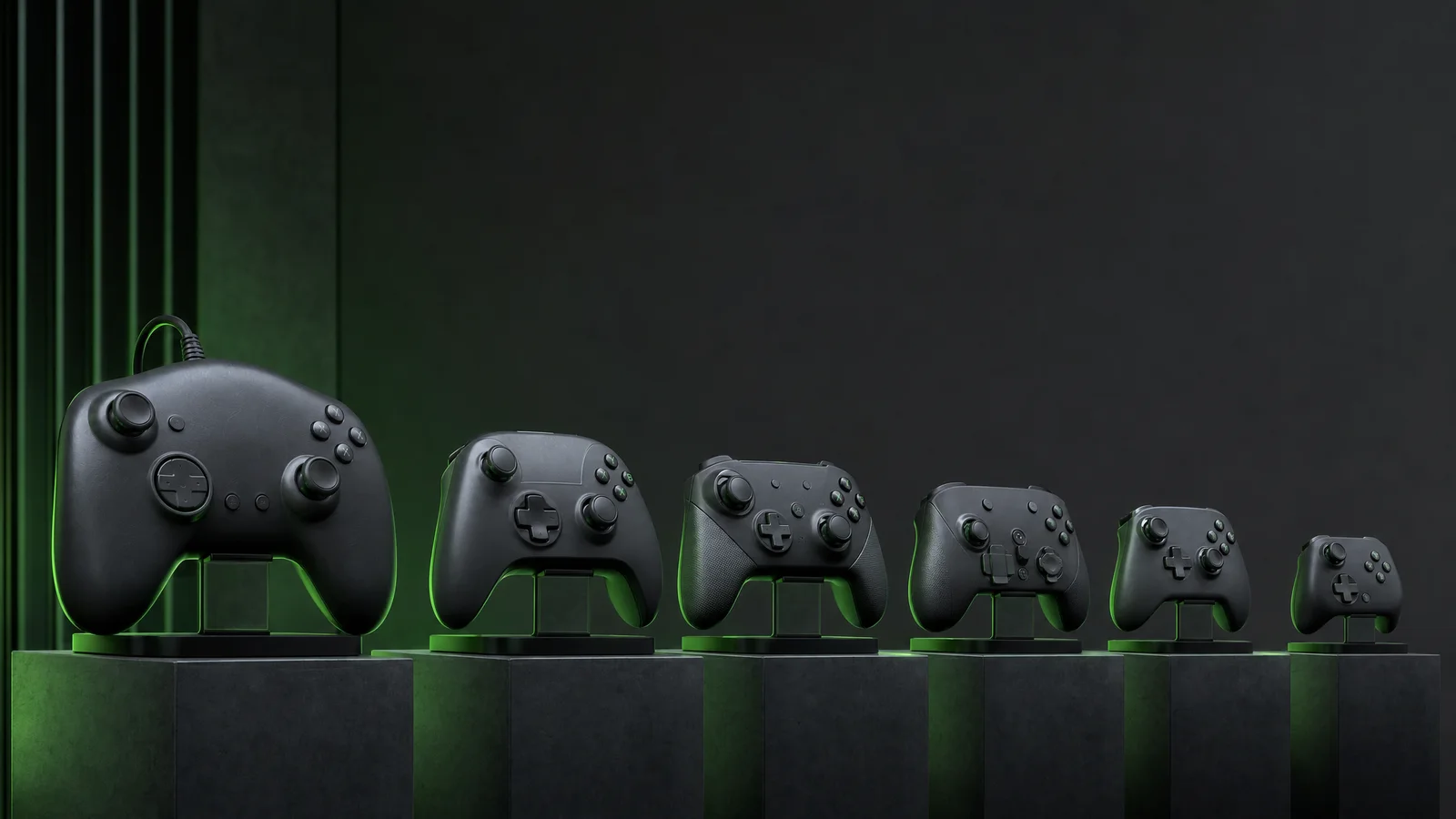
That brings the timeline to October 18, 2026, and Microsoft’s announcement of the Xbox Nano Controller on October 14. Available for preorder in select markets at a stated US$49.99, with November availability, the Nano is roughly five inches wide and weighs 3.5 ounces. Its compact design offers the 18 standard controller inputs plus a programmable Action Button, a rechargeable internal battery, Xbox Wireless and Bluetooth, and compatibility with Xbox Series X|S, Xbox One, Windows, Android and iOS. A USB-C cable is sold separately. Those facts describe its position, not a verdict: it is a smaller branch of the language, not proof that smaller is universally superior.
The Nano is therefore an interesting endpoint for this first chapter of Xbox’s controller history. The Duke began with excess—too much body for the role it needed to play—while the Nano emphasizes portability and reach. Between them sits a long negotiation over whose hands the standard assumes. Compactness can make a controller less imposing and easier to carry, but it can also alter leverage, spacing and fatigue depending on the player. Its programmable Action Button suggests another modern priority: convenience is no longer only about where controls are placed, but about letting software and personal routines decide what one of them means.
Seen from 2026, Xbox controller history is less a straight line than a loop around familiar ground. Microsoft has preserved a recognizable arrangement while adding wireless connections, PC fluency, feedback, customization, accessibility pathways and now a deliberately compact option. The enduring shape became a language because people repeated it until their hands could speak without translation. The most persuasive controller is consequently not the one with the longest feature list. It is the one whose physical assumptions, software support and learned habits meet the player with the least unnecessary friction—and that answer will never be identical for everyone.
2001: the Duke and a deliberate gamble
Big by design, not by accident
The first Xbox arrived in 2001 carrying a controller that looked less like a refined instrument than a piece of living-room hardware: the Duke. It was broad, deep and heavy beside the gamepads many players already knew. That scale was not a printing error or an unfinished draft left in the box. Microsoft was making a deliberate gamble that a new console, aimed in part at an audience comfortable with PC hardware and large televisions, could establish its own physical language.
The verified hardware story is straightforward. The Duke used two offset analog sticks, with the left stick set high and the right stick lower, rather than placing them symmetrically or copying the arrangement familiar from PlayStation controllers. It had a four-button face cluster marked A, B, X and Y, separate black and white buttons, Back and Start controls, a central Xbox button, and two analog triggers. Along its lower edge were two slots for Xbox memory units and other accessories.
That list matters because the Duke was not merely an oversized shell around a conventional layout. Its proportions created room for the hands to approach the controls at a different angle. The left thumb reached naturally toward the elevated stick while the right thumb dropped toward the lower stick and face buttons. The analog triggers gave acceleration, braking and graduated weapon control a dedicated place beneath the index fingers, at a time when pressure-sensitive triggers were not yet a universal expectation.
Its face buttons also expressed a slightly different priority from the compact pads of the previous generation. A, B, X and Y sat in a broad diamond, while the black and white buttons occupied their own positions closer to the center. In games that used every input, the arrangement could feel like a cockpit with controls distributed across a dashboard. In games that did not, it could feel as though the controller had made a simple task unnecessarily spacious.
The memory-unit slots were practical rather than glamorous. The Xbox could store saved games on its internal hard drive, one of the console’s signature conveniences, but removable memory units still offered a way to carry saves between consoles. Building their slots into the controller kept the accessory within reach and helped make the Duke feel like a complete Xbox-specific device. It also added to the sense that the pad was designed around a whole ecosystem rather than only around thumb placement.
Here the recollection needs separating from the specification. The Duke is widely remembered as enormous, and that memory is justified by comparison: it was visibly larger than the later Controller S and more imposing than the slim pads that had become common elsewhere. But “too big” was never a universal measurement of failure. Hand size, reach, grip style and the game being played all changed the verdict. A controller can be physically large yet comfortable if its contact points meet the hands well.
For larger hands, the Duke’s broad grips could reduce the cramped, fingertip-heavy feeling that smaller pads sometimes produced. There was more surface to hold, more distance between the shoulder controls and face buttons, and less pressure to curl the thumbs tightly inward. Its weight could make the device feel planted during a long session. Those are ergonomic possibilities, not a claim that every owner experienced them; the same dimensions that gave one player room gave another player extra distance to cross.
For smaller hands, the drawbacks were easier to understand. Reaching from a grip to the black and white buttons could require a noticeable thumb shift. The face cluster was not simply farther away in appearance; the surrounding shell made the entire journey feel longer. A smaller player might need to loosen the palm, rotate the wrist or use the edge of a thumb to reach an input. The analog triggers were forward-looking, but their usefulness did not erase the basic question of whether the index fingers could settle on them comfortably.
What the Duke taught Xbox
The asymmetrical sticks were another deliberate break from expectation. Their offset arrangement became a recognizable Xbox signature, especially because the left stick occupied the primary movement position while the right stick sat lower beneath the face buttons. For three-dimensional games, that separation could make simultaneous movement and camera control feel clearly organized. It also meant that someone switching from another platform had to learn a new thumb map, even when the underlying actions were familiar.
That learning curve was part of Microsoft’s larger gamble. The company was not entering the console market with decades of controller inheritance. It could choose a layout that suited its own instincts, then ask developers and players to adopt it. The Duke’s size amplified that message. It said Xbox was not trying to disappear into an existing category; it was arriving with a point of view, even if that point of view occupied more space than many laps and coffee tables wanted.
The response eventually supplied its own correction. The smaller Controller S followed and became the more familiar original-generation shape. That change is often treated as a simple admission that the Duke was too large, but the more useful reading is that Xbox learned which parts of its design language were worth preserving. The offset sticks, analog triggers, face-button logic and accessory support could survive in a body that asked less of the hands. A smaller shell did not require abandoning the identity Microsoft had established.
In that sense, the Duke was an important first draft rather than a dead end. It tested whether a controller could make room for more inputs and a different relationship between the thumbs. Some of its choices endured because they were functional; its proportions receded because comfort has to include more than the owner with the broadest grip. Later Xbox pads would keep refining that compromise: the Xbox 360 controller made wireless play and the central Guide button central to the experience, while later generations adjusted textures, triggers, sticks and button placement without discarding the basic Xbox grammar.
Calling it the “best” or “worst” controller settles too little. PlayStation and Nintendo developed different answers to the same physical questions, and even within the Xbox audience, hands vary more than nostalgic rankings admit. The Duke’s lasting value is not that every player should want one. It is that Microsoft’s first controller made ergonomics visible as design, exposed the costs of a bold layout, and gave Xbox a foundation the smaller, more polished pads could finally inhabit.
Controller S and the lasting silhouette
A smaller answer that became the standard
The first Xbox controller, the Duke, announced itself before a game did. It was broad, heavy-looking and unapologetically built around the hands Microsoft imagined would carry a new console into the living room. That scale had character, but it also made the original Xbox’s basic question impossible to ignore: what should an Xbox controller feel like when the player is not built like the hardware?
The Controller S was the answer, and its importance went beyond being a smaller accessory. It tightened the Duke’s footprint, brought the controls into a more approachable reach and revised the arrangement into something that read quickly in the hands. The change was not simply cosmetic. A controller’s size determines whether the thumbs arrive naturally at the sticks, whether the index fingers settle comfortably on the triggers and whether the face buttons feel like destinations or chores.
That made the S a practical correction to the Duke’s excess rather than a rejection of the Xbox idea. The two-stick, four-face-button language remained, as did the broad Xbox identity, but the S made that language easier to speak. A player no longer had to stretch across a particularly large shell to move between its central controls. Smaller hands gained reach; larger hands gained a less imposing object. Neither benefit made the design universally perfect, but both widened the conversation.
Eventually, the Controller S became the more familiar Xbox shape and displaced the Duke as the default reference point. That transition matters because default hardware teaches millions of people what a platform considers normal. The S was no longer an experiment for a particular market or a corrective option for particular hands. It became the controller many players associated with Xbox itself, turning a revision into a foundation.
Its lasting contribution was an ergonomic grammar: the spacing, angles and relationships that later Xbox controllers could refine without having to start over. The grammar was flexible enough to accommodate wireless hardware, new buttons and different materials, yet stable enough that an Xbox player could recognize the family at a glance. Good industrial design often works this way. It does not demand attention forever; it makes future changes feel legible.
The Xbox 360 controller in 2005 extended that sentence with a wireless-first design and a central Guide button. Wireless play changed the living-room relationship between player and console, but the underlying silhouette did not become a stranger. The 360’s additions felt like developments of the S-era arrangement: a familiar reach pattern carrying new system functions.
Xbox One continued the process in 2013 with revised ergonomics and impulse triggers. Those triggers gave developers another way to communicate through resistance and vibration, while the shell and control placement kept the family resemblance intact. The point was not that each generation felt identical. It was that players could move forward without relearning the physical logic of every important action.
Later variants made that grammar more adjustable. The 2015 Elite introduced remappable paddles, trigger stops and swappable components, treating the familiar Xbox layout as a base for customization rather than a fixed answer. Elite Series 2, launched in 2019, added adjustable-tension sticks, shorter hair-trigger locks and a rechargeable battery. The Elite Series 2 Core followed in 2022 with a reduced component package, not a wholly new generation. These were premium interpretations of the silhouette, not escapes from it.
Meanwhile, the Xbox One S-era controllers introduced Bluetooth, making the same basic design more useful beyond the console. That mattered because an ergonomic grammar is only influential when it travels. Xbox-style arrangements became recognizable on Windows and mobile devices as well as on the television, helped by Microsoft’s XInput API, which standardized much of the expected Xbox input behavior on Windows. DirectInput and newer GameInput still coexist, but XInput helped make this layout a software assumption as well as a physical one.
That reach should not be mistaken for a universal verdict. PlayStation and Nintendo developed their own equally recognizable solutions, and “best controller” remains an owner’s opinion rather than a measured fact that settles every hand, game or platform. Even within Xbox’s audience, thumb length, grip strength, mobility and preferred posture change the answer. A smaller shell can improve access for one player while feeling cramped to another; a conventional arrangement can be familiar without being sufficient.
Microsoft’s Xbox Adaptive Controller, released in 2018, makes that qualification especially important. It is a hub with 3.5mm ports and USB connections for accessible custom setups, allowing players to connect the switches and devices that suit their needs. It is not a substitute for every player’s preferred gamepad, nor is the standard controller a substitute for an adaptive setup. The lesson is broader than either product: ergonomic progress means offering routes, not declaring one shape final.
The Series X|S controller in 2020 refined the established form with textured surfaces, a hybrid D-pad and a dedicated Share button. Each change is easy to describe in isolation, but the larger achievement is continuity. The controller could add a new capture function and alter tactile details without discarding the reach pattern that Controller S made familiar. Its silhouette became a kind of platform shorthand, recognizable even when the internals and feature list moved on.
That is why the Controller S deserves more credit than a footnote in a hardware timeline. It transformed a large first draft into a durable design vocabulary—one that could support wireless play, PC compatibility, premium customization, accessibility conversations and, eventually, a compact Nano interpretation. Its legacy is not that smaller is always better. It is that a thoughtful reduction can make a platform more reachable, more recognizable and more capable of changing without losing its shape.
2005: Xbox 360 turns the pad into a home button
The Xbox 360 controller was not merely a smaller Duke with better manners. It was the moment Microsoft treated the gamepad as part of the console’s operating system: a piece of hardware for steering a car or aiming a rifle, certainly, but also for waking the machine, opening a dashboard and managing a player’s digital life. That shift sounds ordinary now. In 2005, it made the controller feel less like an accessory and more like the front door to the Xbox 360.
Wireless becomes the default
The headline change was wireless play. The original Xbox launched in 2001 with the famously oversized Duke, then quickly moved toward the smaller Controller S shape that became more familiar. Xbox 360 took that lesson further by making the wireless controller the expected companion from launch. No cable stretched across the room by default, no controller port dictated where a player could sit, and no living-room furniture had to be rearranged around a cord.
That freedom was especially meaningful for a console whose ambitions were becoming more social. A wireless pad made a second controller easier to place on a sofa, supported the relaxed distance of a living-room television and helped the Xbox 360 feel less like a computer stationed at a desk. It also introduced the unromantic responsibility of batteries. The standard arrangement used replaceable AA cells, while Microsoft offered a rechargeable Play & Charge solution. Wireless removed one nuisance and created another: the controller could be liberated from the console while still being tethered to the question of what was left in its battery compartment.
That tradeoff remains instructive. An internal battery is tidy, but eventually asks to be recharged rather than swapped. Replaceable batteries are less elegant, but a fresh pair can restore a controller immediately. The 360 generation did not settle that argument; it made the decision visible. Even today, controller design keeps circling the same compromise between convenience, repairability, weight and the simple panic of a low-battery warning during a multiplayer match.
The central Xbox Guide button gave the new pad its symbolic center. Pressing it brought up the Guide, a quick route to friends, messages, settings and the broader console interface. It also carried the controller’s identity: a glowing Xbox emblem that was visible in the room and legible in the hand. The button was not just branding placed between the sticks. It told players that the controller could leave the game without truly leaving the game.
Before this, the pad mostly translated physical actions into game actions. The Guide button introduced a layer between those worlds. A player could check who was online, respond to an invitation or adjust a system function without treating the console dashboard as a separate destination. Later controllers would refine that idea with dedicated Share buttons and more elaborate quick menus, but the 360’s central button established the pattern: the home interface belonged on the pad, not only on the television.
A familiar shape with sharper intentions
The basic control arrangement was conservative in the best sense. Two offset analog sticks, a left directional pad, four face buttons, twin shoulder bumpers and analog triggers gave the 360 controller a layout that felt immediately related to the Controller S while making modern 3D games its clear priority. The triggers were broad and comfortable for driving, aiming and gradual acceleration. The bumpers sat above them as separate digital inputs, creating a useful distinction between a squeeze and a quick press.
That shoulder-and-trigger arrangement also showed how the Xbox family was thinking about game vocabulary. The face buttons remained suited to jumping, attacking and selecting. The sticks handled movement and viewpoint. The triggers could represent pressure, throttle or a weapon’s graduated response, while the bumpers offered quick functions without asking the index finger to abandon the trigger. It was not a revolution in every individual gesture, but it was a mature arrangement: a pad increasingly designed around the demands of 3D action rather than inherited from older two-dimensional conventions.
The D-pad was the conspicuous weak spot. Its cross shape could feel imprecise or awkward for games that demanded clean directional taps, including fighting games, platformers and menu-heavy software. Some players tolerated it because the analog stick had become the main navigation tool; others found the limitation impossible to ignore. The 360 controller’s larger achievement was not that it eliminated compromise, but that it made the compromise easy to identify. A controller could be excellent for first-person shooters and still be frustrating for a precise four-way input.
Microsoft’s answer would arrive much later in the form of the Xbox One-era hybrid D-pad, whose faceted design made diagonal and cardinal presses feel more deliberate for many players. That later improvement should not be projected backward onto 2005. The original 360 pad earned its reputation through a strong overall layout, not through solving every genre equally well.
The wired headset connection was another small but important piece of the 360’s identity. A headset could plug into the controller, keeping voice chat physically close to the player instead of requiring a separate console-side arrangement. That fit the era’s growing emphasis on Xbox Live parties, matchmaking and persistent friends lists. The controller became a bridge between hands-on play and the social layer around it, although the headset connection also meant one more cable hanging from a device whose great selling point was freedom from cables.
For PC players, the 360 controller became unusually influential because Microsoft’s XInput API helped standardize Xbox-style input on Windows. The wired pad was the uncomplicated route: plug it in, and a growing number of games could understand its buttons and triggers in a consistent way. Wireless support was possible through a dedicated receiver rather than the console connection simply carrying over, so “wireless-first” did not mean effortless wireless PC use in every setup. Still, the 360 helped turn the familiar Xbox layout into a common PC language.
XInput did not erase the wider Windows input landscape. DirectInput remained relevant, and newer GameInput systems coexist with both. Nor did an Xbox-shaped prompt set become a universal answer for every player. PlayStation and Nintendo controllers preserve different arrangements and tactile priorities, while PC users may prefer keyboards, mice, arcade sticks or specialist devices. The 360’s contribution was standardization, not proof that one layout was objectively correct.
Seen from the present, the generation’s gains are easy to list: wireless play as the norm, a central home-and-social command, more confident triggers, integrated chat and a controller that could move between console and PC. Its flaws are just as useful to remember. Batteries remained a maintenance issue, the D-pad could disappoint, wireless PC use needed the right hardware, and the shape that felt comfortable to one person could feel bulky or tiring to another. “Best controller” is always an owner’s judgment, shaped by hands, games and habits rather than a universal measurement.
The later family would keep adding layers: Xbox One’s revised ergonomics and impulse triggers, Bluetooth in Xbox One S-era controllers, the Elite’s paddles and swappable parts, the Adaptive Controller’s accessible hub design, and the Series X|S pad’s Share button, textured surfaces and hybrid D-pad. The 360 sits at the hinge of that story. It did not perfect the controller. It made the controller central.
That is why its most lasting feature was not any single contour or button. It was the idea that pressing the Xbox emblem could connect the physical hand to the console’s entire social and digital life. More than two decades later, the announced Xbox Nano Controller carries that inheritance into a compact form, with Xbox Wireless, Bluetooth, an internal rechargeable battery and a programmable Action Button. The Nano is a different answer to the question of what a controller should be. The 360 was where Xbox first made the question impossible to ignore.
Windows and XInput: the other half of Xbox’s advantage
A controller became a promise developers could count on
On October 18, 2026, the Xbox controller story is no longer confined to the console under the television. It also belongs to the Windows PC, where a different sort of hardware advantage took shape: not merely a familiar shell, but a familiar conversation between controller and game. Microsoft’s XInput API helped turn the Xbox pad into a developer-facing contract. When a game asks for a face button, a trigger, or a thumbstick, XInput gives that request a consistent vocabulary.
That consistency sounds dry until a game tells you to “press A” and you can do so without translating the instruction from an unfamiliar diagram. XInput was built around the Xbox-style arrangement: four face buttons, two clickable sticks, bumpers, triggers, a directional pad, and the central system controls. It presents those controls in predictable ways, including analogue trigger and stick data, rather than leaving every game to interpret every manufacturer’s device from scratch.
The result is less glamorous than a new shell or a clever hinge, but just as important. A developer can support an Xbox-compatible controller through a known set of calls and expect the game to receive a broadly familiar layout. That reduces one layer of technical guesswork. It also makes controller support easier to fold into menus, tutorials, accessibility options, and local multiplayer without building a separate translation chart for every pad a Windows player might own.
XInput does not magically write a game’s prompts, nor does it force every title to display Xbox letters. The developer still chooses how input is detected and how button glyphs are presented. A game can show keyboard prompts while a controller is in hand, or display the wrong symbols because of an imperfect implementation. XInput’s advantage is more basic and more useful: it gives the game a stable foundation on which sensible prompts and mappings can be built.
That foundation helped establish a familiar PC rhythm. Plug in an Xbox controller, launch a game, and there is a reasonable chance the important parts simply line up: the face buttons correspond to the on-screen letters, the triggers behave as expected, and the sticks need no elaborate setup. “Reasonable chance” matters here. Windows is an enormous ecosystem, and no API can erase the quirks of individual games, drivers, firmware, storefronts, or controller revisions.
Not the only road through Windows
DirectInput did not vanish when XInput arrived. It remains part of Windows controller history and continues to matter because it supports a broader variety of input devices, including older gamepads, specialist hardware, wheels, flight sticks, arcade controls, and devices whose layouts do not resemble an Xbox pad. For a developer making a general-purpose input system, DirectInput can offer breadth where XInput offers a more focused, console-like standard.
That coexistence explains why “PC controller support” is not one single feature. A game may support XInput cleanly but handle a DirectInput device poorly, or support both while presenting different prompts and configuration screens. Some players use translation layers to make one type appear as another. Those tools can be helpful, particularly for unusual hardware, but they add another piece of software between a button press and the game’s interpretation of it.
Newer Microsoft development work, including GameInput, reflects a Windows world that has grown beyond the assumptions of a single controller family. GameInput is intended as a more modern, unified way to access a range of gaming input devices, bringing together scenarios that previously might have required separate approaches. Its existence does not make XInput irrelevant overnight. Older games, established engines, and familiar development habits continue to shape what players encounter today.
For players, that history is mostly felt as friction or its absence. A modern input API can help a game recognize more devices, but recognition is not the same as a well-designed control scheme. The best implementations still account for remapping, simultaneous keyboard and controller use, accessibility devices, menu navigation, and prompts that change when the active input changes. An API can provide the nouns; the game still has to write a comprehensible sentence.
Xbox controllers became the default recommendation on Windows partly because XInput made them a safe bet for developers and players at the same time. The advantage compounds. More games are built around the expected layout, so more players encounter that layout, so more developers can assume it without explanation. The controller becomes not just a device you can use, but the shape that many PC games quietly expect you to use.
“Default” still has an asterisk
That does not make an Xbox controller universally best. PlayStation controllers have their own long-established conventions and strong PC support, while Nintendo’s designs offer different priorities in shape, buttons, and motion features. A player with small hands may prefer a compact pad; another may need a larger grip, rear controls, a different stick arrangement, or an accessibility hub such as Microsoft’s Xbox Adaptive Controller. Comfort and access are not footnotes to compatibility.
The physical connection also complicates the simple plug-and-play story. USB is the most direct wired route and can be particularly convenient for a desktop setup, troubleshooting, charging, or a controller that does not offer Bluetooth. Bluetooth is more flexible for a laptop or living-room PC, but support depends on the controller model, operating system, firmware, and the game’s handling of connected devices. Pairing is not the same thing as guaranteeing identical features in every title.
Xbox One S-era controllers introduced Bluetooth to the family, while earlier wireless Xbox controllers may require a Microsoft Xbox Wireless Adapter or a wired connection for PC use. The adapter and Bluetooth are therefore not interchangeable labels for the same experience. They represent different paths through Windows, with differences that can involve pairing convenience, device support, and which controller features a particular game or setup recognizes.
That is why a USB cable can remain useful even in an age of wireless pads. It avoids the pairing menu, supplies a charging connection for models with internal batteries, and gives the PC a clear hardware route when Bluetooth behaves unpredictably. The cable does not turn every game into a perfectly mapped experience, however. Prompt bugs, stale firmware, or a game designed around another input system can still produce confusion.
That is the other half of Xbox’s advantage. The shell tells your hands where to go; XInput helped teach Windows games how to listen. DirectInput keeps the door open to stranger and older hardware, and GameInput points toward a broader future, but the familiar Xbox layout remains the path of least resistance for many PC players. It is not a universal victory, nor a guarantee of flawless support. It is a durable agreement between expectation and implementation—and on a platform famous for variables, that agreement is powerful.
2013 and the Xbox One: subtle changes under the fingers
A familiar shape, tuned rather than reinvented
The Xbox One controller arrived in 2013 with a difficult brief: improve a shape that had already become the default vocabulary of Xbox play without making the change feel like a redesign. The Duke had been comically large, and the later Controller S established the more approachable silhouette. Xbox 360 then refined that template with wireless play and its central Guide button. Xbox One’s pad continued the same broad arrangement, but its differences lived in the details: narrower shoulders, more carefully sculpted grips, a quieter face, and a sense that Microsoft was editing rather than starting over.
That restraint mattered. The Xbox One pad still looked immediately legible to anyone coming from a 360. The asymmetrical sticks remained, the menu controls stayed near the center, and the colored face buttons occupied familiar territory. Yet the shell was reshaped around the hands. The grips flowed more continuously into the body, while the upper edges and triggers were adjusted to make the controller feel less like a slab. None of this promised a new way to play. It aimed for a less distracting way to hold the old one.
The most interesting changes were not visible from across the room. The shoulder buttons were redesigned to produce a more consistent press across their length, addressing the 360 controller’s sometimes uneven feel. The battery compartment also sat more neatly within the rear shell, preserving the familiar removable-power approach while making the back less intrusive. These are modest victories, but a controller is a tool used for hours at a time. A few millimeters of contour can matter more than a dramatic new button.
Microsoft also paid attention to sound and motion. The Xbox One controller’s buttons and bumpers were tuned toward a quieter, more deliberate click than the famously assertive 360 hardware. “Quieter” is not automatically “better”: some players like a strong mechanical response, while others appreciate less chatter in a living room. The important point is that the redesign treated acoustics and fingertip feedback as part of ergonomics. Comfort is not only the absence of strain; it is also the character of every repeated input.
Impulse triggers and the business of feeling
The signature feature was the pair of impulse triggers. Small motors inside the left and right triggers could deliver localized vibration, allowing a racing game to distinguish engine rumble from a weapon’s kick or a loss of traction. Standard controller vibration had usually spoken through the whole shell. Impulse triggers made the index fingers part of the feedback system, turning the trigger from a simple analog lever into a surface that could answer back.
That distinction was especially persuasive in driving games. A throttle could pulse under one finger while the brake communicated a separate sensation under the other, giving the hands a clearer connection to acceleration and grip. Shooters could use the effect for recoil, though the result depended on how thoughtfully a game implemented it. Impulse triggers were not a universal upgrade to every genre, and some players preferred to reduce or disable vibration. They were best understood as another expressive channel, not as a replacement for good sound, animation, or physical controls.
The feature also exposed a practical tradeoff. More moving parts mean more design complexity, and the triggers became a little more mechanically substantial than those on earlier Xbox pads. That added character but could make them feel less featherweight. For players who wanted the shortest possible trigger movement, the standard launch controller was not trying to be a tournament instrument. Its priority was broad compatibility with everything from a cinematic adventure to a Sunday racing session.
The thumbsticks received a subtler treatment. Their tops were slightly smaller and more textured than the 360’s, with a revised rim intended to help the thumbs stay planted during long camera movements. The change was easy to overlook because the sticks remained in the same asymmetrical positions, but that continuity was itself the point. Microsoft was refining leverage and grip without asking players to relearn where their thumbs belonged. As always, hand size complicates the verdict: a contour that centers one player’s thumb can crowd another’s.
The D-pad was another quiet correction. The 360’s disc-like cross could be divisive, particularly for fighting games, menu navigation, and games that demand clean diagonals. Xbox One returned to a more traditional cross-shaped design with distinct directional sections. It was a clearer, more intentional input, though “better” still depended on the game and the player. A crisp D-pad can help with eight-way movement, while a louder click or firmer resistance may not suit everyone. The redesign acknowledged a long-standing complaint without pretending one shape could satisfy every preference.
Launch hardware, then the revisions
It is important not to blend every Xbox One controller into a single historical object. The 2013 launch pad did not include a built-in 3.5mm headset jack. Wired chat required the separate Xbox One Stereo Headset Adapter or an accessory designed for the controller’s earlier connection arrangement. Later standard controllers added a 3.5mm jack directly to the lower edge, a small convenience that changed the everyday setup more than its modest size suggested.
That later hardware also brought Bluetooth in the Xbox One S era. Bluetooth expanded the controller’s usefulness beyond the console, making compatible connections to Windows PCs and mobile devices more straightforward, while Xbox Wireless remained part of the Xbox ecosystem. The revised shell is identifiable by details including the textured rear grips and, on many versions, the seam and finish changes around the body. These were not all-new generations; they were refinements that gradually made the standard pad more flexible.
For buyers comparing listings, “Xbox One controller” therefore describes a family rather than one exact specification. A launch unit can be perfectly serviceable and still lack features found on a later revision. The 3.5mm jack, Bluetooth support, surface texture, colorway, and included accessories can vary by model and package. Checking the specific hardware is more useful than assuming that a familiar silhouette guarantees identical capabilities. This is one of the less glamorous lessons of controller history: revisions often hide in the connector panel.
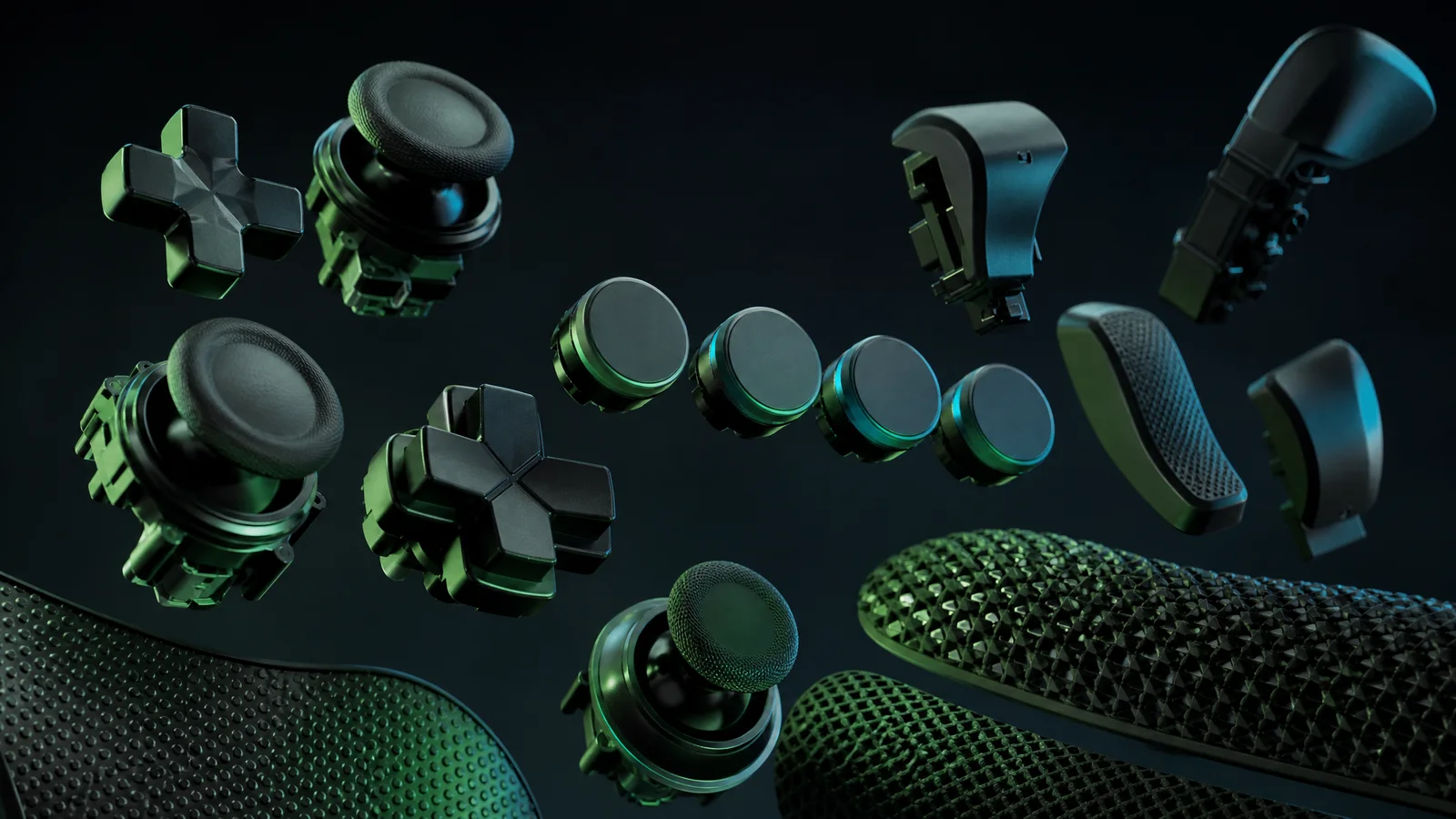
Microsoft pushed the design in a more ambitious direction with the Xbox Elite Controller in 2015. Its removable thumbsticks and D-pad, trigger stops, adjustable stick tension, and rear paddles treated the controller as a configurable instrument rather than a one-shape-fits-most accessory. The Elite did not replace the standard Xbox One pad; it offered a premium answer for players who wanted different physical controls for different games. The price and extra complexity made it a specialized choice, not a universal definition of “better.”
The same philosophy continued with Elite Series 2 in 2019, which added adjustable-tension sticks, shorter hair-trigger locks, and a rechargeable internal battery. Elite Series 2 Core arrived in 2022 with a reduced component package, not as a wholly new generation. That distinction matters because Xbox’s controller line is less a straight ladder than a branching family: the everyday pad, the configurable Elite models, and accessibility-focused hardware each solve different problems. The Xbox Adaptive Controller, launched in 2018, is a hub with 3.5mm ports and USB connections for custom setups, not a substitute for every player’s needs.
By the time the Series X|S controller appeared in 2020, its changes felt like the Xbox One approach carried forward: a slightly refined size, textured surfaces, a dedicated Share button, and a hybrid D-pad. The lineage was clear, but so was the lesson of the 2013 redesign. Xbox controllers increasingly became platforms, with XInput helping standardize Xbox-style input on Windows while DirectInput and newer GameInput systems continued to coexist. The familiar button map mattered far beyond one console.
That may be the most useful way to view the Xbox One controller’s place in the timeline. It was not a radical break like the Duke’s eventual retreat, nor a specialist tool like the Elite. It was a careful negotiation between familiarity and feedback: triggers that could speak, sticks that could hold, a D-pad that could articulate, and a shell that asked less of the wrists. Whether it is the best controller remains an owner’s judgment, shaped by hand size, favorite games, and comparisons with PlayStation, Nintendo, and countless alternatives. Its achievement was making change feel almost invisible.
2015–2022: Elite, Elite Series 2, and Core
The controller becomes a kit
Microsoft’s original Xbox One Elite Controller, released in 2015, treated the gamepad less like a fixed appliance and more like a small box of tools. Its significance was not a radically different silhouette. It was the invitation to change the controller’s behavior and physical feel around the player, whether that meant moving a jump button to a rear paddle, shortening a trigger pull, or swapping a thumbstick for a taller or differently shaped alternative.
The four removable paddles were the headline feature. They could be assigned to existing inputs through the Xbox Accessories app, allowing a player to keep both thumbs on the sticks while jumping, reloading, crouching, or changing equipment. That is especially useful in games where taking a thumb off the camera stick has a tactical cost. It is not automatically better, however. Paddles add decisions, and some hands find the rear controls crowded, easy to press accidentally, or simply less comfortable than the familiar face buttons.
Trigger stops gave the original Elite a second kind of flexibility. A switch could limit each trigger’s travel, making it feel suited to rapid-fire actions, while the full range remained available for racing, driving, or games that use graduated acceleration. The feature changed the physical gesture rather than adding a new input. That distinction matters: a trigger lock can make a controller feel quicker for one genre while making it less expressive for another.
Microsoft also made the original Elite modular in the player’s hands. Its thumbsticks and directional pad could be removed and replaced with supplied alternatives, including taller and differently contoured sticks and a faceted pad. A taller stick can offer finer leverage for camera movement, while a broader or more traditional pad may better suit menus and two-dimensional games. None of these choices is universally correct; hand size, thumb reach, genre, and even preference for a clicky or smooth directional pad all matter.
Profiles turned those physical options into a software layer. Through the Xbox Accessories app, players could remap inputs and save multiple configurations, then use the controller’s profile control to move among them. One setup might favor a shooter, another a racing game, and another a conventional layout. The appeal was less about novelty than avoiding repeated menu trips. The original Elite established the central promise of the line: premium hardware is valuable when it removes friction between a player and the games they actually play.
Series 2 refines the bargain
The Elite Series 2, launched in 2019, kept the original’s central ideas but made the package more cohesive. Its four paddles, trigger locks, replaceable components, remapping, and profile support continued the “controller as toolkit” philosophy. The changes were in the details: the rear paddles and adjustment controls were integrated into a newer design, and the trigger locks offered shorter travel than the first Elite’s setting. That made the quick-pull option feel more deliberate, while full travel remained available when a game needed it.
Its most distinctive upgrade was adjustable thumbstick tension. A small tool allowed the player to select among tension settings, changing how much resistance the sticks provided around center. Higher tension can appeal to someone who wants a more deliberate feel during careful aiming; lower tension may feel easier for broad movement or long sessions. This is a preference control, not a promise of improved accuracy for everyone. It also introduces another setting to understand, and a player may sensibly leave it alone.
The battery arrangement was a major practical difference. The original Elite relied on replaceable AA batteries, giving owners the familiar option of carrying spares or using rechargeable AAs. The Series 2 introduced a built-in rechargeable battery and a USB-C connection, along with a charging dock in the full package. That is tidier on a desk and more convenient for a controller that lives in one place, but it is less immediately replaceable than a removable battery. Battery aging is therefore a different ownership consideration, even without making assumptions about how long any individual unit will last.
Series 2 also made the complete accessory set easier to view as part of the product rather than an assortment of extras. The full version included multiple thumbsticks, interchangeable directional pads, paddles, a carrying case, the adjustment tool, and charging hardware. The case could store the pieces that were not currently attached, while the dock reduced cable clutter. These additions helped explain the premium price, but they also meant that buyers were paying for a range of possibilities they might never use.
The original Elite can therefore remain the rational choice for a player who prefers replaceable AAs, finds its ergonomics comfortable, or locates it at a worthwhile price. Series 2 is the more complete design for someone who wants adjustable stick tension and an internal rechargeable battery in the same package as the paddles and swappable parts. Neither distinction should be confused with a guarantee of greater reliability. More moving pieces, removable components, batteries, and adjustment hardware create more functions to maintain; premium construction can improve the experience without making wear or individual-unit problems impossible.
Core: less kit, same idea
Elite Series 2 Core arrived in 2022 as a lower-cost, reduced-package version of the Series 2, not as a wholly new controller generation. The important electronics and control concepts remained: adjustable stick tension, shorter trigger locks, remapping, saved profiles, the internal rechargeable battery, and the Series 2 shape. What changed was what came in the box. Core was aimed at buyers who wanted the foundation first and did not need every physical accessory immediately.
The full Series 2 supplied paddles, additional thumbsticks, interchangeable directional-pad options, a carrying case, an adjustment tool, and charging equipment. Core omitted the paddles and much of that expanded component kit, while retaining the essentials needed to use and tune the controller itself, including the adjustment tool and USB-C cable. The exact appeal is consequently straightforward: Core offers the Series 2 platform without asking every owner to finance a drawer full of alternate parts.
That omission is not trivial. A Core owner who later wants rear paddles or extra stick shapes must obtain them separately, increasing the eventual cost and requiring another purchase. The full Series 2, by contrast, is expensive at the outset but arrives ready for experimentation. A player who knows they want paddles may find the complete bundle more coherent; a player who only wants the shape, battery, trigger locks, and tension adjustment may see Core as the less wasteful entry point.
Cost also changes the reliability conversation. A cheaper package does not automatically mean a less dependable controller, just as a premium package does not guarantee trouble-free ownership. The original Elite, Series 2, and Core all combine ordinary button inputs with specialized mechanisms and removable parts. Those features can make a controller more adaptable, but they can also make an eventual repair, replacement, or accessory decision more consequential. Buyers should consider warranty terms, battery preferences, how much they will actually use the extras, and whether a conventional controller would meet their needs more simply.
Across these three models, “best controller” is therefore an owner’s judgment, not a universal measurement. The original Elite is the pioneering toolkit, Series 2 is the most fully equipped refinement, and Core is the deliberate subtraction of the bundle around that refinement. A player with small hands may dislike the added rear controls; another may find them essential. Some will prefer Xbox’s offset sticks and hybrid-style direction controls, while PlayStation and Nintendo layouts offer different strengths and habits. The right choice is ultimately the one whose inputs, weight, battery arrangement, and component burden fit the person holding it.
2018: the Adaptive Controller changes the question
Not a smaller gamepad, but a doorway
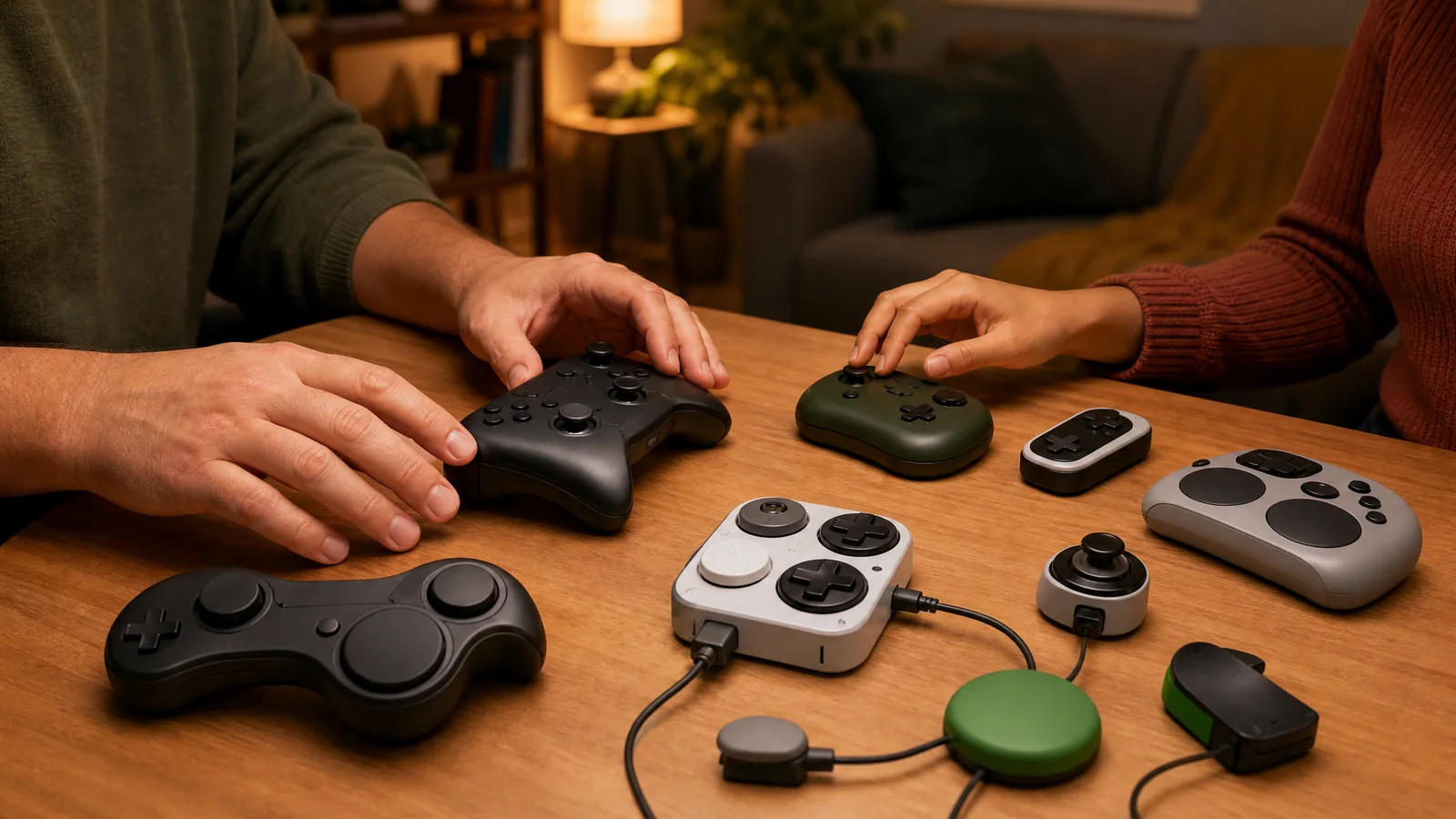
By 2018, the Xbox controller had spent nearly two decades becoming more familiar, more wireless and more adjustable. The Adaptive Controller changed the argument entirely. Instead of asking how one standard gamepad could fit more hands, Microsoft asked what a controller could become when the familiar plastic shell was only one possible part of the system. The result was not a replacement for the regular Xbox pad, and certainly not a universal answer. It was an accessibility hub: a central device that lets players build an individual control setup around their own movement, strength, range and preferences.
That distinction matters. The Adaptive Controller is a broad, flat rectangle with prominent built-in controls, but its most consequential features are around the edges and on the back. It offers nineteen 3.5mm ports and two USB connections for external switches, buttons, joysticks and other compatible accessories. Each port can correspond to a different gamepad input, allowing a player to place the action somewhere reachable rather than forcing every command into the two-thumb layout inherited from console history. The box is therefore less a finished instrument than a control panel for an instrument assembled elsewhere.
Its design makes the word “controller” feel usefully incomplete. A single large switch might stand in for A, a foot-operated input might handle a trigger, and an external joystick might provide movement without requiring the player to grip two analog sticks. The point is not that one arrangement is more advanced than another. The point is that the arrangement can follow the player. Mounting hardware, switch shape, activation pressure and placement can all become part of the conversation, alongside the console and the game itself.
Microsoft did not develop that conversation in isolation. Work with accessibility organizations and specialists, including AbleGamers, SpecialEffect and Warfighter Engaged, helped inform the product and its intended ecosystem. Those collaborations mattered because accessibility is rarely solved by a single industrial-design flourish. They brought attention to practical questions: how a device can be positioned beside a wheelchair, how inputs can be reached without sustained grip, how multiple accessories can be combined, and how a setup can be adjusted when a player’s needs change.
The ecosystem also extends beyond Microsoft’s own hardware. Compatible switches, adaptive buttons, alternative joysticks, mounting systems and specialty peripherals can be mixed according to the player’s goals. The Adaptive Controller’s two USB ports and nineteen 3.5mm connections provide the vocabulary, while outside makers supply many of the nouns. Microsoft’s collaboration with Logitech on the Adaptive Gaming Kit made that idea more approachable by packaging a collection of accessible inputs, though no kit can anticipate every body, room or play style. The value lies in the options, not in a promise of one complete box.
Configuration is part of the play
Personalization happens at several levels. On the hardware side, a player can choose which external controls are comfortable and where they should sit. On the software side, Xbox accessory settings can remap inputs and save configurations, while Xbox Copilot can combine two controllers so that they function as one input system. That can mean an Adaptive Controller and a conventional gamepad working together, or two people sharing control. It can also mean a player using whichever hand, limb or switch is most reliable for a particular command.
Those possibilities are especially important because “accessibility” does not describe one condition. A player may have limited finger movement but strong wrist control; another may prefer large, low-pressure buttons; another may need a setup that minimizes repeated reach rather than maximizing the number of available inputs. Some players may use the Adaptive Controller as their primary interface, while others may use it only for a few functions alongside a standard pad. The same ports support very different philosophies of play.
Games still determine how much of that flexibility becomes useful. Remapping can help when a title exposes sensible control options, but it cannot redesign every menu, timing demand or camera behavior. A game may technically accept the inputs while presenting an awkward sequence of simultaneous commands. Some genres also place unusual pressure on rapid analog movement, repeated triggers or context-sensitive actions. The hub expands the physical vocabulary, but it does not automatically make every software interface equally navigable.
That is why the Adaptive Controller should be understood as part of a setup rather than as a magic accessibility switch. A player may need to experiment with port assignments, mounting angles, button sizes and sensitivity. Caregivers, friends, therapists or gaming specialists may be involved in building and revising the arrangement. A successful configuration can reduce barriers dramatically, but finding it may take time, equipment and support. The less visible work behind the device is part of its story, not an inconvenience to edit out.
There are continuing limitations, too. The Adaptive Controller does not contain every possible input, and its connections do not guarantee that any accessory will suit a particular player. External hardware can add cost, clutter and compatibility questions. A desk, tray or wheelchair mount may be necessary, and a setup that works in one room may be difficult to transport. Even the generous port count has practical limits when a player needs many controls, specialized switches or a very specific arrangement of simultaneous inputs.
Physical comfort is another moving target. A configuration that feels effortless for a short session may create fatigue over a longer one, especially if a button requires repeated pressure or a joystick is positioned too far away. The device can relocate commands, but it cannot erase the underlying demands of a game. Nor does it address every accessibility need: visual, auditory, cognitive and communication considerations may require changes in the game, the console environment or the surrounding support. A hub is powerful precisely because it solves one layer of a larger problem.
Software standards help determine whether that layer connects smoothly. Microsoft’s XInput API helped standardize Xbox-style controller input on Windows, while DirectInput and newer systems such as GameInput also coexist. For players building an adaptive setup across Xbox and PC, that history can make compatibility uneven in practice. The Adaptive Controller is designed for Xbox and Windows use, but the surrounding accessories and applications may behave differently from one platform to another. “Works with a controller” is not always the same as “supports this individual configuration.”
That qualification should not obscure what Microsoft changed. Earlier milestones mostly refined a shared object: the Duke became the smaller Controller S, the Xbox 360 introduced a wireless-first pad and central Guide button, and later models pursued better grips, triggers and remapping. The Adaptive Controller challenged the assumption that the shared object had to be the center of the experience. It treated the player’s chosen arrangement as the center instead, with Xbox hardware providing a bridge between personal equipment and game software.
It also broadened the editorial meaning of “best controller.” The best arrangement for one player may be a conventional Xbox pad, a Switch-style device, a PlayStation controller, a mouse and keyboard, or an Adaptive Controller surrounded by specialized switches. Hand size, reach, fatigue, posture and familiarity all matter. A ranking that ignores those variables is not measuring quality so much as rewarding one body’s compatibility with one design. The Adaptive Controller makes that blind spot harder to defend.
2020: Series X|S and the refinement of reach
The Xbox Series X|S controller arrived in 2020 as an argument for refinement rather than reinvention. Microsoft did not redraw the familiar Xbox silhouette or replace the offset-stick layout that had become its signature. Instead, it concentrated on the small negotiations that happen between hand and machine: how far a thumb must travel, how confidently a finger finds a trigger, how quickly a controller can move from console to laptop to phone, and how much information its buttons communicate through texture and shape.
That makes the Series controller a useful midpoint in Xbox’s hardware history. The original 2001 Xbox arrived with the famously oversized Duke, a gamepad whose scale became part of the joke as well as its identity. The smaller Controller S followed and established the more familiar proportions. By 2020, Microsoft was no longer trying to prove that Xbox could make a controller at all. It was tuning a shape already understood by millions, reducing friction without pretending every pair of hands was the same.
A smaller familiar shape
The Series controller is subtly smaller and more compact than the standard Xbox One design, but “smaller” is not the same as “small.” That distinction matters. It remains a substantial, conventional gamepad, with the asymmetrical sticks, broad grips and trigger arrangement that define the Xbox school of ergonomics. For many players, the adjustment makes the controls feel more immediately reachable. For others, particularly people with smaller hands or limited grip strength, the remaining bulk can still be a meaningful barrier.
Its refinements are tactile as much as dimensional. Textured surfaces on the triggers and rear grips add a little more friction where fingers commonly rest, helping the controller feel anchored without requiring a hard squeeze. The finish is not a miracle material and does not erase fatigue, sweat or individual preference. It is a practical piece of industrial design: a surface that gives the hand more information about where it is, especially when attention is fixed on a dark corridor, a racing line or an opponent rather than on the controller.
The hybrid D-pad is an even more visible intervention. It combines the directional separation associated with a traditional plus-shaped pad and the continuous, dish-like feel of the faceted pad used on Xbox’s enthusiast-oriented controllers. The result is deliberately expressive: directional presses are easy to distinguish, while rolling a thumb across the diagonals feels less like crossing four isolated islands. It suits menu navigation and fighting-game inputs in different ways, though no D-pad can be ideal for every genre, thumb, or preferred level of clickiness.
Just above the controller’s center sits the Share button, a small addition with a large cultural explanation. Capturing a screenshot or recording a clip had already become part of ordinary console use, but the dedicated button makes that behavior legible. Players do not have to remember a particular chord or interrupt a game to search a menu. It also acknowledges that a modern controller is not only an instrument for playing; it is a launch point for documenting, sending and revisiting play.
That convenience comes with a tradeoff familiar from every new button. The center of an established layout is valuable real estate, and another control creates another opportunity for an accidental press or a moment of uncertainty. Microsoft’s solution was not to make the Share button elaborate. It made it simple, visually distinct and easy to understand. The design trusts that a modest shortcut can earn its space by lowering the mental cost of an increasingly common action.
One controller, several destinations
The Series generation also polished Xbox’s cross-device identity. The controller works with Xbox Series X|S and Xbox One, while Bluetooth support allows it to pair with compatible Windows computers and mobile devices. That does not make every game or operating system behave identically. Button prompts can differ, Bluetooth features may vary by device, and some players will still prefer a wired connection. But the underlying idea is important: the controller is no longer tied psychologically to the television beneath the console.
This flexibility rests on layers that players rarely see. Microsoft’s XInput API helped standardize Xbox-style controller input on Windows, giving developers a common language for the familiar buttons, triggers and sticks. DirectInput remains in the wider PC ecosystem, while newer GameInput technology coexists with both. A controller can therefore feel universal in the hand while software support remains a matter of operating-system conventions, game implementation and configuration menus.
Microsoft also presents Dynamic Latency Input, or DLI, as an engineering feature of the Series platform and controller relationship. In broad terms, it is intended to synchronize controller input more efficiently with the console’s processing and display pipeline, reducing unnecessary delay in the route from button press to on-screen response. That is a systems-design claim, not a promise that every game, television or connection will produce the same sensation. Display settings, wireless conditions, frame pacing and software all remain part of the experience, so there is no honest universal response figure to attach to the feature.
DLI is revealing because it shows where controller design had moved by 2020. The conversation was no longer limited to shell shape and button placement. Wireless protocols, firmware, console scheduling and display behavior had become part of the controller’s effective design. A good pad is still one that fits the hand, but it is also a coordinated participant in a chain of hardware and software. The visible object is only the part players can hold.
That broader ecosystem includes the Elite line, which had already explored a different answer to refinement. The 2015 Elite introduced remappable paddles, trigger stops and swappable components, while Elite Series 2 arrived in 2019 with adjustable-tension sticks, shorter hair-trigger locks and a rechargeable battery. Those controllers treat customization as the solution. The standard Series pad takes the opposite route: fewer variables, fewer parts to configure, and a set of tactile improvements intended to serve a broad audience.
Accessibility makes that contrast especially important. The Xbox Adaptive Controller, introduced in 2018, is a hub with 3.5mm ports and USB connections for custom control setups. It is not a substitute for every player’s needs, just as the standard Series controller is not a universal fit. A smaller shell, textured grip or Share button may help one person and do little for another. The honest achievement is not solving accessibility with one shape; it is expanding the range of ways Microsoft acknowledges that control can happen.
The reach keeps shrinking
Special designs, licensing and meaningful variants
A new coat is not a new generation
October 18, 2026 is a useful moment to separate Xbox controller history from Xbox controller marketing. The family tree is crowded with camouflage shells, anniversary colors, artist collaborations, licensed replicas, premium “pro” pads and unusual shapes. Some are genuinely important. Others are the same basic instrument wearing a different jacket. A changed finish can make a controller feel personal, but it does not automatically make it the successor to the previous generation.
The original Xbox makes the distinction easy to see. The large Duke gamepad gave way to the smaller Controller S, whose proportions became the more familiar Xbox shape. That was a meaningful change in how many hands reached the buttons and sticks. By contrast, a translucent shell or a themed faceplate may alter the object’s mood without altering its inputs, wireless behavior or operating assumptions. The question is not whether a controller looks new. It is whether it changes the relationship between player, platform and game.
That relationship can change in smaller but still worthwhile ways. The Xbox 360 controller’s wireless-first design and central Guide button established a particular rhythm for navigating the console. Xbox One revised the ergonomics and introduced impulse triggers; later Xbox One S-era controllers added Bluetooth. The Series X|S pad refined the shape, added a Share button, textured surfaces and a hybrid D-pad. These revisions may not feel like a clean break to every owner, yet they affect setup, comfort and features in ways that a paint job does not.
Licensed third-party pads live in the middle ground. A licensed controller has permission to carry the Xbox identity and may reproduce the familiar button map, but licensing is not a guarantee that it duplicates every Microsoft feature. A wired pad may omit wireless play. A compact pad may use a different D-pad or place a function behind a switch. A fighting pad, arcade stick or racing wheel may be excellent at one genre while being deliberately incomplete as a general gamepad. “Officially licensed” describes authorization, not universal equivalence.
Alternate shapes deserve the same careful reading. A smaller controller can be a relief for younger players or adults with smaller hands, while a broader shell can better suit someone who finds compact grips cramped. A split design, rear-button layout or asymmetric arrangement can reduce awkward reaches for one owner and introduce new ones for another. Even the original Duke, often remembered as a comic oversize relic, was not a design failure for every hand. The best controller is an owner’s judgment, not a measurement that applies to everyone.
What the label leaves out
Compatibility should be the first box to check, not the last sentence in a product listing. “Works with Xbox” may mean Xbox Series X|S and Xbox One, or it may refer mainly to Windows through XInput. Microsoft’s XInput API helped standardize Xbox-style input on Windows, but DirectInput and newer GameInput also coexist. A pad that behaves perfectly in one PC game may need a profile, an adapter or manual configuration in another. Console, computer and mobile support should be confirmed separately.
Bluetooth is another deceptively small word. Xbox One S-era controllers introduced Bluetooth, but a buyer still needs to know whether a particular third-party model supports Bluetooth, Xbox Wireless, USB, or some combination. Xbox Wireless can matter for a console connection without a cable, while Bluetooth may be the convenient path to a phone or tablet. A controller can support both and still behave differently across platforms. The product’s stated compatibility list is more useful than a familiar silhouette.
Remapping is not one feature but a range of possibilities. The 2015 Elite introduced a more serious form of customization with remappable paddles, trigger stops and swappable components. Elite Series 2 later added adjustable-tension sticks, shorter hair-trigger locks and a rechargeable battery. Elite Series 2 Core, released in 2022, reduced the component package rather than creating a wholly new generation. On another pad, “programmable” might mean only two rear buttons, an onboard toggle or a companion application that works on one platform but not another.
Buyers should ask where remapping is stored and when it works. Does a profile live in the controller, in console software or in a Windows application? Can it be changed from the sofa, or only while connected to a computer? Does it remap buttons equally in a game, the dashboard and a mobile device? The answers matter more than a badge saying “pro.” Extra controls are meaningful when they solve a real reach or accessibility problem; they are clutter when they merely turn a familiar pad into a cockpit.
Battery arrangements also divide variants that look nearly identical. A controller may use replaceable AA batteries, a rechargeable internal pack, a removable rechargeable pack or a cable-only design. Each choice trades convenience, longevity and repairability differently. A listing should make clear whether a battery is included, whether charging is possible while playing, and whether the USB-C cable is included. “Wireless” does not necessarily mean “rechargeable,” and “USB-C” does not necessarily mean that the cable comes in the box.
Meaningful where it matters
Accessibility makes the limits of “standard” especially visible. The Xbox Adaptive Controller, launched in 2018, is a hub with 3.5mm ports and USB connections for custom setups. It is not a substitute for every player’s needs, nor is it simply a decorated conventional controller. Its importance comes from opening a route to switches, external buttons and other devices. That is a different kind of innovation from shaving a few millimeters off a shell or adding a special colorway.
Warranty and support belong in the same checklist as buttons and Bluetooth. A licensed product can have its own manufacturer, return process and warranty terms. A premium Microsoft pad can have different coverage or service expectations from a budget model, while a limited edition may be harder to replace once stock disappears. Buyers should verify who handles a fault, how long coverage lasts, whether accessories are covered and what happens if the controller is used across console and PC. A lower price is not automatically a better value if the support path is unclear.
Finally, compare the feature that will be used rather than the feature that photographs well. A textured grip may matter during long sessions; a hybrid D-pad may matter to someone who plays fighters or platformers; a paddled Elite layout may matter to a player who wants to keep thumbs on the sticks. Another owner may prefer a light, simple pad, a PlayStation-style arrangement, a Nintendo controller’s distinct face buttons, or no vibration at all. Xbox’s timeline is richer when variants are judged by the hands and games they serve—not mistaken for generations merely because the packaging says special.
2026: the Nano makes small a first-class design choice
A different answer to the Duke
On October 14, Microsoft announced the Xbox Nano Controller, a deliberately compact alternative to the standard Xbox pad. That announcement gives the Xbox controller timeline a neat visual rhyme: the original Xbox arrived in 2001 with the famously oversized Duke, while the Nano arrives in 2026 by asking how little controller a modern player might actually need. The point is not to pretend every hand wants the same thing. It is that “smaller” is no longer being treated merely as a compromise for children or a budget accessory.
The Nano is roughly five inches wide and weighs about 3.5 ounces. Those numbers sound modest until they are translated into a living-room object: less plastic spanning the palms, less weight hanging from the wrists, and potentially less bulk in a backpack or desk drawer. It still offers the 18 standard controller inputs expected from an Xbox gamepad, alongside a programmable Action Button. In outline, then, this is not a stripped-down remote with a few buttons missing. It is a conventional Xbox control scheme compressed into a different physical proposition.
That distinction matters because Xbox history has usually moved toward refinement rather than radical miniaturization. The smaller Controller S followed the Duke and became the more familiar Xbox shape. Xbox 360 made wireless play central and placed its Guide button at the controller’s heart. Xbox One revised the ergonomics and added impulse triggers, while later models inherited Bluetooth. The Series X|S controller refined the established form with textured surfaces, a hybrid D-pad and a Share button. The Nano is less a new language than a new sentence written with fewer inches.
Its programmable Action Button is the most conspicuous attempt to make that compactness feel like added value rather than subtraction. A dedicated extra control can be useful for a frequently repeated command, a shortcut, or a function that otherwise requires moving a thumb across the face buttons. The important word is “programmable”: its usefulness will depend on how flexibly owners can assign it and how naturally it falls under a finger. One extra button cannot replace the Elite approach of remappable paddles and trigger stops, but it may offer a simpler way to personalize the controls without turning the controller into a cockpit.
The Nano also keeps the practical expectations of a current Xbox accessory intact. It uses Xbox Wireless with compatible consoles and Bluetooth for supported devices, and it works with Xbox Series X|S, Xbox One, Windows, Android and iOS. That spread makes its small size more relevant than it would be for a console-only pad. A controller that can move from a console shelf to a laptop bag, phone stand or tablet can benefit from being unobtrusive. On Windows, the familiar Xbox-style input model also sits within an ecosystem shaped by Microsoft’s XInput API, even as DirectInput and newer GameInput systems continue to coexist.
The rechargeable internal battery is another meaningful choice. A compact controller can be easier to carry when it does not require a pair of loose batteries, and a built-in rechargeable design removes one small recurring chore from everyday use. The qualification is equally important: the USB-C cable is sold separately. The Nano supports wired charging through that connection, but its purchase price does not automatically mean every part of the charging setup is in the box. That is a minor detail with major potential to irritate anyone who expects a controller to be ready immediately.
At a stated US price of $49.99, the Nano sits in a more approachable category than Microsoft’s Elite family, whose appeal comes from adjustable-tension sticks, hair-trigger locks, swappable components and, in the Elite Series 2, a rechargeable battery. The 2022 Elite Series 2 Core reduced the component package rather than creating a wholly new generation. The Nano makes a different bargain: fewer enthusiast mechanisms, less physical heft, and a lower entry point for someone whose priority is simply a smaller wireless Xbox controller.
Who benefits from less controller?
Young players are the obvious audience, but stopping there would undersell the design. Smaller hands may find a full-size controller harder to wrap around, particularly when reaching for shoulder buttons and face buttons at the same time. Players with limited grip strength may appreciate a lighter object, though weight alone cannot determine accessibility. The Xbox Adaptive Controller remains a hub for custom setups using 3.5mm ports and USB connections; the Nano is not a replacement for that broader approach, nor should it be presented as one.
Adults with smaller hands could benefit just as directly. So could travelers, second-controller buyers, and people who play primarily on phones or tablets. A controller that takes less room beside a keyboard or in a case may be more likely to travel, and a lower mass may make occasional handheld or couch sessions less cumbersome. Even a player who likes the standard Series controller might want a second pad that does not dominate a small coffee table. “Best controller” remains an owner’s judgment, not a universal measurement, and PlayStation and Nintendo players bring their own familiar shapes and preferences to the comparison.
There is also a psychological benefit to the Nano’s premise: it treats hand fit as a legitimate design axis rather than an afterthought. The history of gamepads often celebrates features that add capability—more paddles, more adjustment, more texture—while assuming that the basic shell should remain broadly fixed. A compact controller reverses that emphasis. It says the distance between buttons, the arc of a grip and the amount of material in the hands can be features in themselves.
But the announcement cannot settle whether the Nano’s proportions work over time. Long-session comfort is untested here. A lighter controller might reduce fatigue for one player while giving another less substance to brace against. Smaller grips could make face-button reaches easier yet leave larger hands feeling cramped. Thumbstick placement, trigger travel, the angle of the wrists and the pressure needed for the shoulder controls will matter more than a neat measurement on a specification sheet. No honest verdict about comfort can be issued before extended use across different hands and play styles.
Durability is similarly an open question. A 3.5-ounce controller may feel wonderfully uncomplicated, but compactness does not automatically tell us how well its shells, sticks, buttons or battery will age. The Nano’s announcement does not establish a response-time advantage, resistance to stick drift, long-term battery performance or a durability record. Those are exactly the areas where a product can acquire its reputation after launch, through months of ordinary ownership rather than a promising first impression.
Availability is still part of the story as well. As of October 18, the Nano is available for preorder in select markets at the stated US price of $49.99, with November availability planned. That timing describes the announced window, not guaranteed inventory everywhere, and regional pricing or access may differ. It is too early to turn preorder interest into a sales narrative or to assume that every Xbox owner will be able to try one at launch. The practical test begins when different kinds of hands can put one through real sessions.
The Nano therefore arrives as a focused experiment in restraint. It does not erase the Duke, replace the standard Series controller, or compete with the Elite Series 2 on customization. Instead, it expands the definition of an Xbox controller by making compactness a primary choice alongside wireless range, remapping and premium materials. That is a small physical change with a larger historical implication: after twenty-five years of learning how to make the Xbox pad more capable, Microsoft is now asking whether making it smaller can be capability too.
Why Xbox pads endure—and where rivals push back.
The Xbox controller’s staying power is less about a single stroke of genius than a long campaign of sensible revisions. The 2001 Xbox began with the famously enormous Duke, a pad that made “ergonomic” sound like a dare. Microsoft quickly followed with the smaller Controller S, which became the recognizable foundation: offset sticks, the familiar face-button diamond, generously spaced grips and a layout that treated long sessions as a design problem worth solving. The shape has changed, but the argument has remained steady. Xbox pads tend to feel like tools you can understand immediately, then keep using for years.
That continuity is the owner’s strongest pro-Xbox case. The Xbox 360 controller made wireless play feel ordinary rather than extravagant, with its central Guide button and familiar stick arrangement. Xbox One refined the ergonomics, added impulse triggers, and eventually brought Bluetooth to Xbox One S-era controllers. The Series X|S pad tightened the formula again with textured surfaces, a Share button and a hybrid D-pad. None of those changes demanded that players relearn the location of their thumbs. For people who move between generations, consoles and Windows PCs, that consistency can matter more than a dramatic new feature.
Microsoft’s software history reinforces the hardware’s appeal. XInput helped standardize Xbox-style controller input on Windows, while DirectInput and the newer GameInput coexist for broader compatibility. That does not make every game or every controller completely frictionless, but it explains why the Xbox arrangement is often the path of least resistance on a PC. A player buying for Game Pass, Steam, Xbox consoles and a phone can reasonably value a familiar button map and broad device support over a more exotic feature set. The best part of a controller is frequently the part that disappears while the game is loading.
Where the familiar shape stops being the whole story
PlayStation makes a persuasive counterargument by asking what a controller can communicate, not merely how comfortably it can hold inputs. The DualSense’s haptic feedback and adaptive triggers can give individual actions a distinct texture: resistance can change the character of a trigger pull, while more detailed vibration can suggest surfaces, impacts or machinery. These effects depend on game support and do not replace good ergonomics, but when developers use them thoughtfully, they add information to the hands. Xbox’s impulse triggers offer a related idea, yet PlayStation’s adaptive system has made the feature more central to its platform identity.
That advantage is not universal. Some players prefer a consistent trigger with no changing resistance, especially in competitive games or when a long session turns novelty into fatigue. Others have hand pain, limited grip strength or a need for low-effort actuation, making adjustable resistance a matter of access rather than immersion. A DualSense is also a poor answer for someone whose main target is an Xbox console, and an Xbox pad cannot reproduce PlayStation-specific features in games designed around them. Platform ownership should come before the temptation of a spec sheet.
Nintendo pushes from another direction. Its Joy-Con controllers, Pro Controller and motion-capable designs treat orientation and movement as possible inputs rather than optional flourishes. HD Rumble can make small events feel granular, and motion aiming can be more intuitive than a stick for particular games. Nintendo’s approach is especially persuasive for party play, fitness software, pointer-like control and games built around physical gestures. It can also be less appealing to someone who wants a conventional, substantial gamepad, or who finds detached controllers and motion gestures awkward. The right question is not whether motion is better, but whether the games being played make it meaningful.
Xbox’s answer has often been modularity and choice within a familiar grammar. The 2015 Elite introduced remappable paddles, trigger stops and swappable components; Elite Series 2, launched in 2019, added adjustable-tension sticks, shorter hair-trigger locks and a rechargeable battery. The Elite Series 2 Core arrived in 2022 with a reduced component package, not a wholly new generation. These controllers suit players who know exactly how they want to configure a pad, from a shooter player assigning a paddle to jump to a racing player changing trigger travel. They are not automatically sensible purchases for someone who will never use those adjustments.
Accessibility also complicates any simple ranking. The Xbox Adaptive Controller, launched in 2018, is a hub with 3.5mm ports and USB connections for custom setups using switches, buttons and other devices. It is not a substitute for every player’s needs, nor a conventional controller with a different shell. Its importance is that it makes a broader range of arrangements possible. A standard pad may be ideal for one person and unusable for another; hand size, mobility, fatigue, reach and the ability to press small buttons all deserve more weight than brand loyalty.
Choosing an Xbox pad without buying the wrong one
Hand size is the practical starting point. Larger hands may appreciate the fuller grip and spacing of a standard Xbox controller or Elite, particularly when playing games that keep both sticks busy. Smaller hands can find that bulk tiring or struggle with simultaneous reach to bumpers, triggers and face buttons. Microsoft’s announced Xbox Nano Controller is aimed directly at that gap: roughly five inches wide and 3.5 ounces, it is a compact alternative rather than a claim that every player needs a miniaturized pad. Its smaller body should be considered alongside reach, grip strength and preferred button spacing, not treated as a universal ergonomic upgrade.
As of October 18, 2026, the Nano is available for preorder in select markets at a stated US$49.99, with November availability. It includes the 18 standard controller inputs plus a programmable Action Button, a rechargeable internal battery, Xbox Wireless and Bluetooth, and compatibility with Xbox Series X|S, Xbox One, Windows, Android and iOS. A USB-C cable is sold separately. That combination makes it a potentially practical travel and multi-device option, especially for smaller hands or a player who wants a lower-cost rechargeable controller. Since availability is market-specific and the launch is upcoming, buyers should verify local terms rather than assume every retailer or region matches the headline.
For the broadest Xbox use, the current Series controller remains the sensible middle ground. It suits console play, PC gaming and mobile streaming, offers the familiar layout, and avoids paying for specialist adjustments that may go untouched. Check whether a particular model includes a rechargeable battery or expects disposable cells, and remember that Bluetooth is useful for phones and PCs but does not erase every platform-specific compatibility wrinkle. A wired connection can also be preferable for a desk setup, provided the cable and game support meet the player’s needs.
Competitive players should decide which advantage they can actually exploit. An Elite Series 2 or Elite Series 2 Core makes more sense when remapping, trigger locks, adjustable stick tension or paddles solve a repeated problem. The Core’s reduced component package can be appropriate for someone who wants the Elite controls without every accessory, while a standard pad is better value when those features would remain untouched. Do not confuse a more adjustable controller with an automatically more accurate one; configuration is useful only when it fits the player, the game and the player’s willingness to maintain that setup.
Budget and platform can narrow the decision quickly. At the Nano’s stated US$49.99 price, it occupies an interesting lower-cost position for a compact, rechargeable, cross-device Xbox-compatible pad, subject to local availability and final buying conditions. A standard Xbox controller is the safer all-round choice when full-size ergonomics and established familiarity matter more than minimum weight. PlayStation owners who want adaptive triggers and supported haptics should buy a compatible DualSense rather than expecting an Xbox pad to recreate those sensations. Nintendo players should likewise prioritize Joy-Con or Pro Controller features when motion and HD Rumble are central to the games they play.
There is no final victory lap here, only a useful distinction. Xbox pads endure because Microsoft has refined a comfortable, legible layout, preserved cross-generation habits and built a strong bridge to Windows and other devices; the Nano extends that philosophy toward smaller hands and lower weight. PlayStation pushes back with richer haptics and adaptive triggers, Nintendo with motion and HD Rumble, and accessibility needs push every brand toward more individual answers. For many Xbox-and-PC players the standard pad is the safest recommendation, while Nano, Elite, DualSense, Nintendo or adaptive setups may be better for particular hands and games. Xbox is not universally best; it is enduringly persuasive when continuity and versatility matter most.
Find the right Xbox controller, not just the newest one
These links lead to Amazon US search results rather than a verified individual listing. Check model, platform compatibility, seller, warranty, price and local availability before buying. The Nano is still a preorder announcement as of this feature’s date; a search result is not a stock guarantee.
- Standard Xbox Wireless Controller — search Amazon US
- Xbox Elite Wireless Controller Series 2 — search Amazon US
- Xbox Elite Series 2 Core — search Amazon US
- Xbox Adaptive Controller — search Amazon US
- Xbox Nano Controller (announced preorder) — search Amazon US
Affiliate disclosure: As an Amazon Associate, Joking Joystick earns from qualifying purchases. These are retailer searches, not claims that any specific controller is in stock or at a particular price.