
A social-media profile can outlast the person who created it. Unless Meta is informed that an account holder has died, a Facebook or Instagram account may continue to look much as it did before, including the possibility of automated Facebook birthday reminders that friends and relatives would plainly rather not receive.
Once Meta receives and accepts a death report, the account’s outcome can follow one of two broad paths: it can be memorialized, preserving the existing profile as a place of remembrance, or it can be permanently deleted. The result depends on the deceased person’s settings, whether a legacy contact was selected, and the type of request and documentation submitted after their death.
That distinction matters because a memorialized account is not an account handed over to the family. It remains locked down. A deletion request is not simply a button any relative can press, either. Meta’s policies are structured around preserving the account holder’s privacy while allowing limited profile management and, in some situations, removal.
Memorialization keeps a profile visible, but locks it down
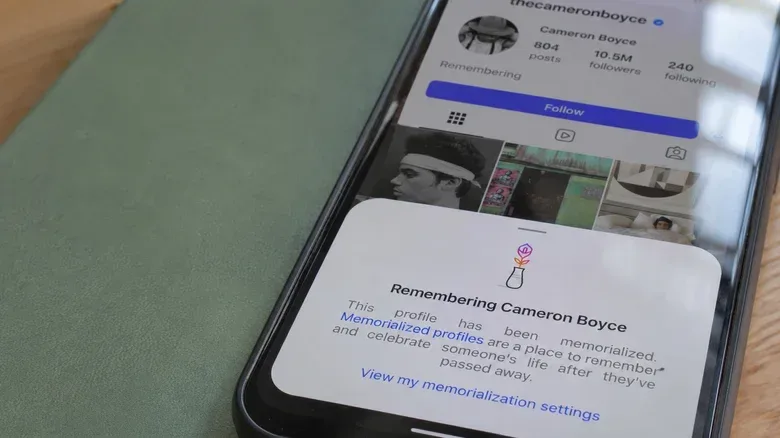
Memorialization is the option designed to retain a person’s profile, posts, photos and videos rather than erase them. On Facebook, a memorialized profile receives a “Remembering” label beside the person’s name. Material that was visible to particular people before memorialization remains visible to those same people afterward.
In practical terms, memorialization does not rewrite an account’s audience. If a person had posted something publicly, it can remain public; if they shared content with a narrower group, it does not become open to everyone merely because the profile has become a memorial. Instagram follows the same basic privacy principle. A private Instagram account remains private after memorialization rather than turning into a public archive.
Both platforms also take steps to make the account less likely to be surfaced as an active social profile. Facebook removes memorialized accounts from friend suggestions and birthday reminders. Instagram removes them from Explore. These measures help prevent the awkward impression that the deceased person is still participating in the network normally.
The most important limit is access. Nobody can log into a memorialized Facebook or Instagram account, including immediate family members. That means account memorialization is deliberately different from inheriting a device, knowing a password, or having a trusted relative take over a profile. The profile may remain viewable under its pre-existing privacy rules, but the account itself is no longer usable as a normal account.
Private messages stay private
A common expectation after a death is that close family may be able to retrieve photos, conversations or other personal material from the person’s accounts. Meta’s approach creates a hard boundary around private communications. Even next of kin do not receive direct access to the deceased person’s private messages.
Related coverage includes What Happens to Facebook and Instagram Accounts After Death?.
This applies to Facebook messages and Instagram direct messages. A legacy contact cannot open the inbox, read conversation history or send messages as the account holder. They cannot use the account to make new connections, either. On Facebook, they cannot remove friends or issue new friend requests; on Instagram, they cannot create posts or message other people from the memorialized profile.
The restriction can be difficult for families hoping to preserve a complete record, but it also prevents a memorialized account from becoming a vehicle for someone else’s speech. A posthumous profile should not suddenly begin making posts, accepting relationships or sending private notes that appear to originate from the person who died.
For people making their own plans now, the implication is straightforward: if there are photos or shared materials that a trusted person may need later, the relevant download permission has to be enabled before death. A relative cannot assume that being named as a contact will unlock all content or correspondence later.
What a Facebook legacy contact can and cannot do
Facebook allows adult users to choose a legacy contact from their friends list. The appointment only becomes relevant after the profile is memorialized. It gives the nominated person a narrow caretaker role, not account ownership and not the password.
A Facebook legacy contact can perform several useful, public-facing tasks:
- Pin a post to the deceased person’s profile, such as memorial-service information.
- Update the profile picture and cover photo.
- Accept incoming friend requests.
- Request that the account be removed.
- Download a copy of shared content, but only if the account owner enabled that option in advance.
Those powers can help a family make a memorialized profile accurate and useful without allowing it to be actively operated. The contact might pin practical information for friends, for example, while retaining the account holder’s existing profile and posts.
But the limits are equally important. The legacy contact cannot log in as the account holder, cannot inspect private messages, cannot delete friends, and cannot send friend requests. They are not a replacement user. Calling the role a caretaker is more accurate than thinking of it as digital inheritance.
Facebook also notes a potential administrative consequence for Pages and Groups. If the deceased person was the sole administrator of a Page, the Page can be removed after the profile is memorialized following a valid request. A Group with no other administrator can be paused. Anyone who runs a community, hobby group or public-facing Page alone should understand that their profile’s memorialization may affect that space, not just their personal timeline.
Facebook’s deletion setting covers more than the main profile
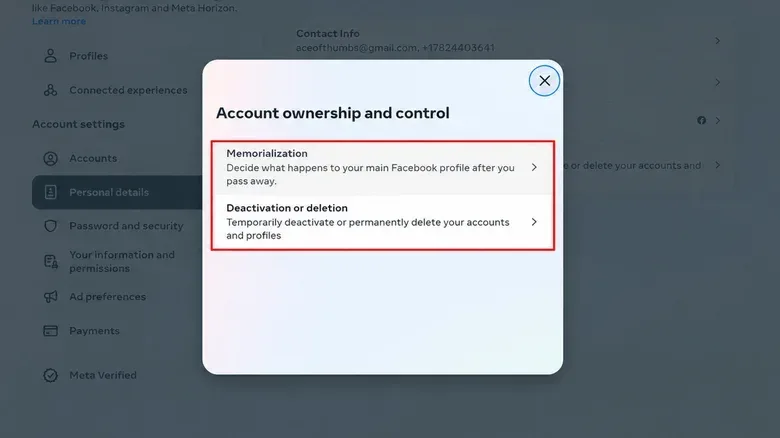
Facebook offers an alternative for people who do not want their account to remain online after death: Delete after death. If this setting is selected, Meta will remove the account after receiving proof of death.
The setting is found in Facebook’s Accounts Center through Profiles and personal details, then Account ownership and control, then Memorialization. That is also where a user can appoint a legacy contact. The location is worth noting because social account controls, like the phone settings covered in this guide to customizing app icons, menus and gestures on a Samsung Galaxy phone, are only useful when people know where the relevant menu actually lives.
There is a meaningful difference between the two Facebook choices. A legacy contact is able to manage only the main profile after it is memorialized. The deletion option, by contrast, also applies to additional Facebook profiles. Choosing removal therefore offers a more comprehensive approach for someone with more than one profile attached to their Facebook presence.
If no legacy contact was set up, friends or family can still seek memorialization by providing appropriate supporting documentation. However, without a previously chosen contact, nobody can later edit the memorialized profile. That makes pre-planning especially relevant for people who would want a relative or friend to be able to update a photo or pin a notice.
Instagram offers similar choices, with its own request requirements
Instagram also provides a legacy-contact option and a Delete after death setting. The core privacy model is similar to Facebook’s: memorialization preserves the profile under its existing privacy settings, prevents login, and blocks the use of private messages or new posts as though the deceased person were still active.
An Instagram legacy contact can update the profile picture, manage tags and download shared content when the deceased person had already allowed that download option. Those are limited tools, but they can be meaningful for a memorial profile. Managing tags may help address how the account appears in material shared by others, while a profile-picture update can help signal clearly that the account has become a memorial.
It does not authorize the contact to publish new content or read direct messages. The line remains consistent across the two services: profile stewardship may be allowed, but private communications and ordinary account activity remain off-limits.
Reporting a death versus requesting deletion
For Instagram memorialization, someone must first report the death and provide supporting evidence, such as an obituary. A permanent-deletion request may require more substantial documentation, including a death certificate. The person seeking deletion must also show that they are an immediate family member or that they have legal authority to make the request.
These are separate processes with different outcomes. Memorialization is about retaining an account in a protected, inactive form. Deletion is an irreversible request to remove it, and Meta may ask for more evidence because of that finality. Meta does not specify a time frame for either type of request, so families should not presume that a profile will change immediately after paperwork is submitted.
A practical plan for account holders and families
The available choices are limited, but planning reduces uncertainty. Account holders who prefer a lasting memorial profile can select a legacy contact and consider whether the shared-content download permission should be enabled. People who prefer not to leave a profile online can choose Delete after death instead.
It is also wise to set expectations with the person selected as a legacy contact. They should know that they will not receive a password, inbox access or authority to post as the deceased person. Their job is limited to the tools Meta permits after memorialization.
- Decide whether the preferred outcome is memorialization or deletion.
- Use Accounts Center to review the memorialization controls and, if wanted, select a legacy contact.
- Enable shared-content downloading beforehand only if preserving that material is part of the plan.
- Make sure the chosen contact understands the limits of the role.
- For families making a request after a death, prepare the supporting documentation relevant to memorialization or deletion.
Ultimately, a memorialized Facebook or Instagram account can preserve a portion of a person’s online life, but it is not a complete digital estate file. Posts and photos may remain available to their original audience; private messages remain protected; and limited profile tools are available only when the account holder set them up in advance. The best time to make that choice is while the account owner can make it themselves.