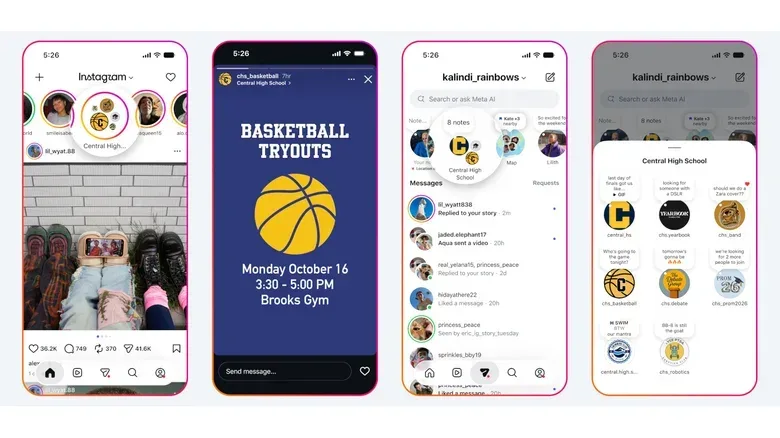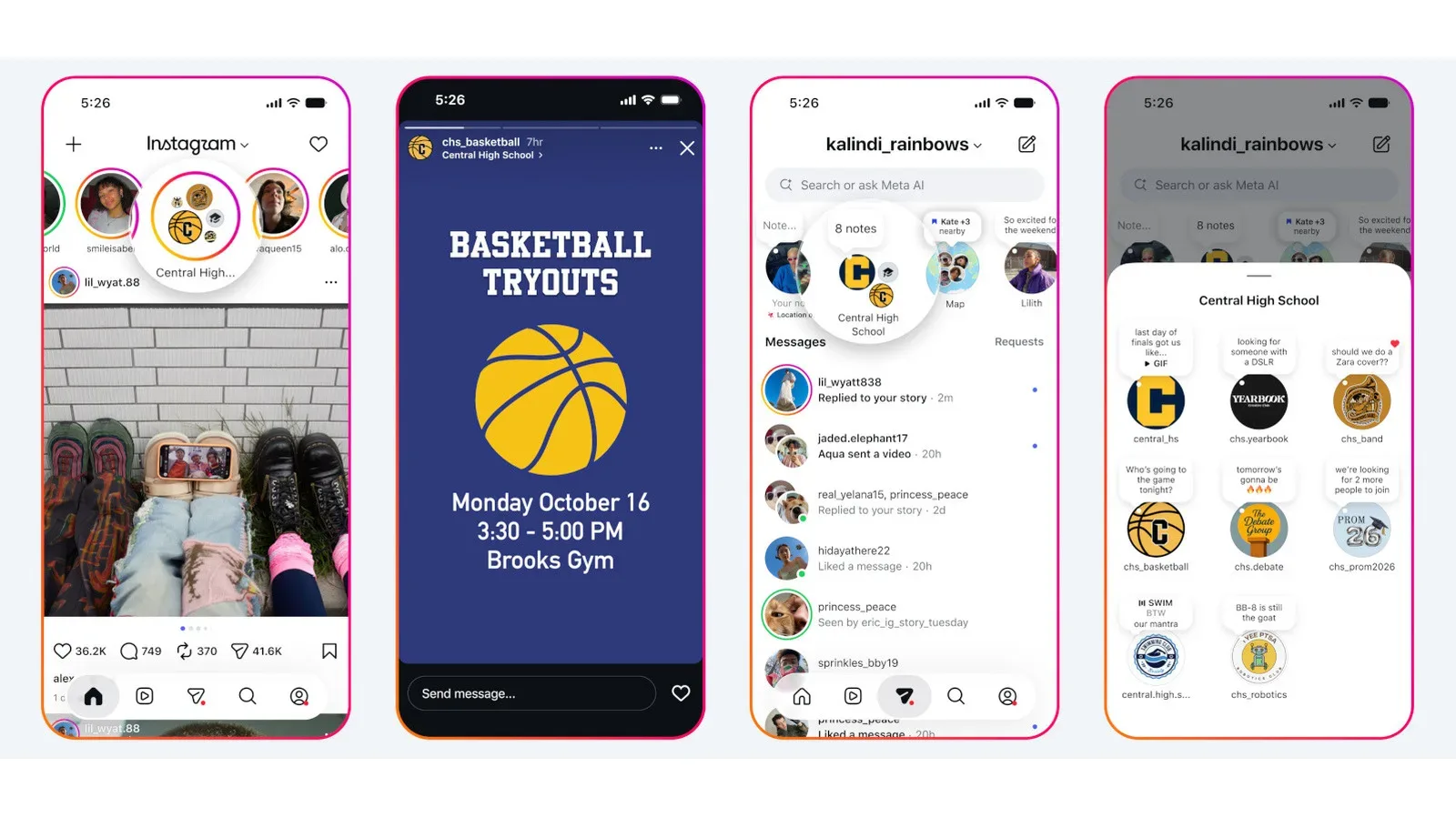
Instagram is expanding its School Partnership Program with a set of school-community tools designed to put announcements, club activity and student connections inside the app students already use. The newly available features include school clubs and teams, posts limited to verified students, school-run Channels, student directories and profile banners that are visible only in narrowly defined school-related contexts.
The update builds on the program’s existing moderation commitment. Participating schools can submit reports involving bullying or harassment experienced by their students, with those reports moved higher in the moderation queue. Meta has said it will respond to reports from partner schools within 48 hours.
That does not turn Instagram into a school intranet, a student-information system or a hall-pass replacement—thankfully, nobody needs an algorithmically sorted excuse for being late to chemistry. But it does make the platform a more deliberate communications space for schools that are already part of the program.
What is changing for partner schools
Partner schools can now create clubs and teams that function as centralized places for sharing information and upcoming events. Administrators for a club or team can post Stories and Notes, while the person administering a school’s overall partnership program has the same posting ability.
In practical terms, a sports team could use a Story to publicize tryouts. A school club could use Notes for short reminders or event nudges. These are familiar Instagram formats rather than entirely new school-specific content types, which may lower the learning curve for students and organizers.
The significant boundary is audience access: only verified students at the relevant school can see those Stories and Notes. Verification is handled through UNiDAYS, a third-party service working with Meta to confirm a student’s identity before that student joins their school community.
Schools can also create Channels for important community updates. Unlike the verified-student Stories and Notes, these Channels can serve a wider group that includes students, parents and teachers. That gives schools a place for broadly relevant announcements while reserving student-only posts for material intended for enrolled, verified members of the school community.
Stories, Notes and Channels: the useful distinction
These tools may sound interchangeable at a glance, but they have different roles in Instagram’s design.
- Stories are a visual, temporary posting format and can suit notices that benefit from an image, graphic or a quick callout, such as a tryout reminder.
- Notes are brief updates, better suited to concise prompts and reminders than detailed announcements.
- Channels provide an administrator-led way to publish important information to a community that can include parents and teachers as well as students.
The feature mix suggests schools can choose an audience and format based on the message rather than forcing every announcement into one feed. A club’s student-facing reminder and a school-wide update for families are not necessarily the same communication problem, even when they concern the same event.
Verification is the key privacy mechanism
The new student-only functionality rests on verification. Rather than simply letting an account select a school name, Instagram is using UNiDAYS to verify identity before a student can join the school community. That distinction matters because a school label on a profile is not, by itself, a meaningful access control.
Verified students can access a school directory listing their verified peers. They can also add a school banner to their profile. That banner is not presented as a universal profile marker: it is visible only to other students and to teens they follow back. The limited visibility is an important part of the design, because it narrows who can see the school affiliation in the social graph described by Instagram.
It is also worth being precise about what verification does and does not mean. It is intended to determine whether someone can enter a school community and view certain school-limited content. It is not the same as a guarantee that every interaction within that community will be welcome, accurate or free from misuse. Verification can make an audience more specific; it cannot independently solve every social problem that can occur in a social space.
Why the moderation commitment remains central
The School Partnership Program began with a safety-oriented promise: reports from participating schools about bullying and harassment affecting their students receive priority handling, with a stated response window of up to 48 hours. The new communications tools add utility, but the reporting pathway remains the program’s most consequential safeguard.
A moderation queue is the ordered system used to determine which reports are reviewed first. Moving a school’s report higher in that queue is meant to reduce the time it waits for attention. A response within 48 hours is a service commitment to the partner school; it should not be read as a claim that every case is resolved, or that a particular moderation outcome is guaranteed, in that period.
That distinction is especially relevant now that the program adds directories and more school-focused places to post. Giving verified students an easier route to discover peers and school activity may make organization simpler. It also makes clear reporting routes, responsible administration and informed participation more important—not less.
What schools, students and families should take from the rollout
For school administrators, the new capabilities create choices about where information belongs. Channels can address a broader school community. Student-only Stories and Notes can handle messages that are appropriate for verified students but not intended for parents and teachers. Clubs and teams can centralize activity that might otherwise be scattered across individual accounts and informal group conversations.
For students, the directory and school banner may make it easier to identify verified peers and signal participation in a school community. The boundaries are still worth understanding: a school banner’s visibility is limited to other students and teens followed back, while access to school Stories and Notes depends on verification.
For parents and teachers, Channels are the portion of the expansion most directly relevant to receiving school communications. They are described as a community tool that can include them, rather than a verified-student-only feature. Whether a particular school uses Channels, clubs, teams or all of the above will depend on that school’s participation and administrative decisions.
There is a broader app-literacy angle here, too. As services gain more specialized spaces, users need to know which identity checks control entry, who can see a post, and what reporting path applies when something goes wrong. That is a different question from whether an app itself is functioning correctly; for an example of how technical disruptions can have causes outside an operating-system update, see this report on iPhone app crashes linked to a Google Analytics for Firebase issue.
A school layer inside a public-facing social app
Instagram’s approach here is to add a more bounded school layer within a platform better known for broad social sharing. The combination of UNiDAYS verification, student-only Stories and Notes, school directories, limited-visibility banners and administrator-run Channels creates multiple levels of access rather than one catch-all school feed.
The features are now going live for partner schools and their verified students. Their value will depend on clear administration and on users understanding the visibility rules attached to each tool. Still, the expansion is a notable shift: Instagram is giving participating schools not just a faster lane for serious reports, but a set of structured ways to communicate with the communities already gathered on the app.