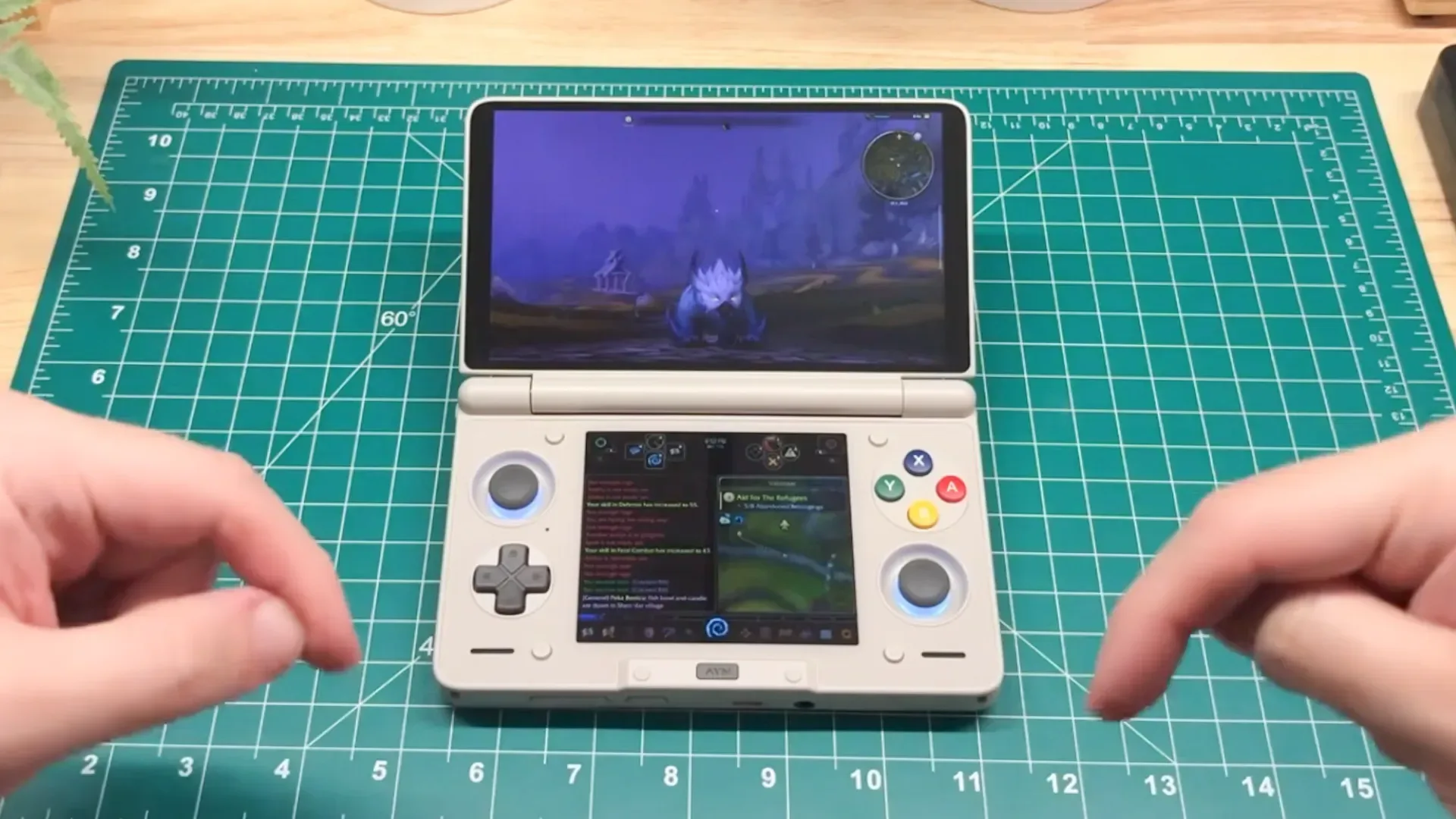
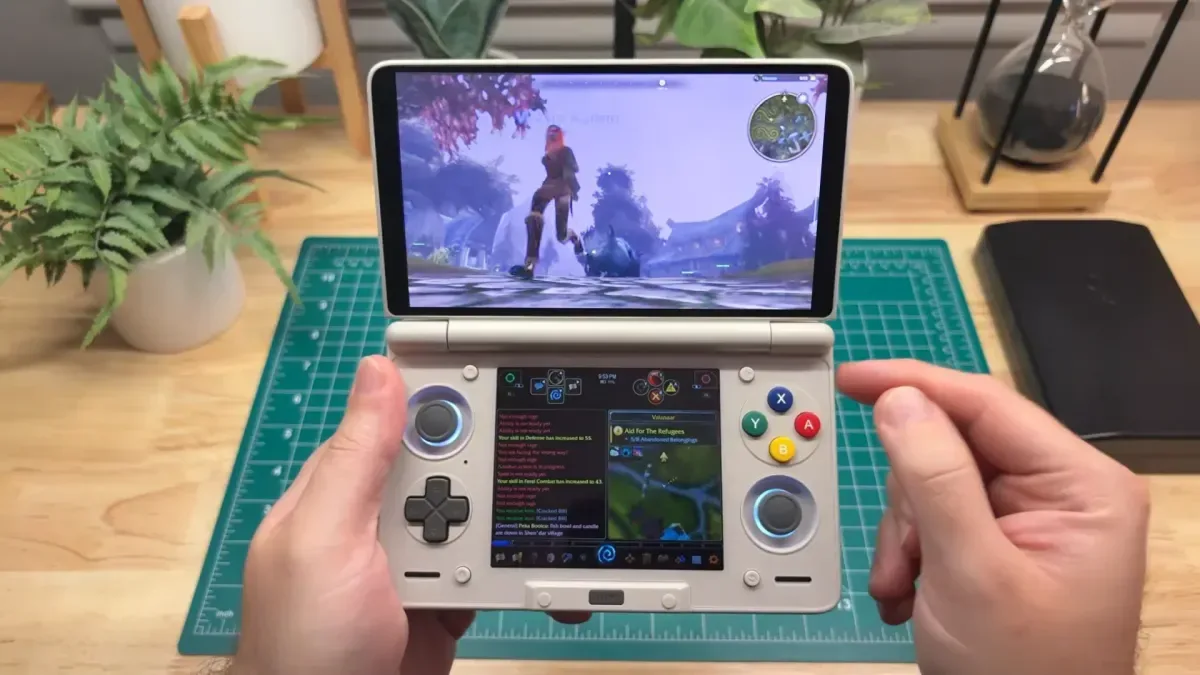
WoW Forever can now be configured for play on AYN’s dual-screen Thor handheld through DS Forever, an unofficial launcher and companion application built around the device’s two displays. The result is not a simple Android port or a one-button installation: it is a technically involved setup that runs the PC game through a compatibility stack, requires a player’s own account and game files, and leaves a substantial amount of control mapping to the user.
For players willing to do that work, the appeal is unusually clear. The Thor’s second screen is intended to act as a persistent companion panel rather than dead space, with options for a map, previously encountered NPC information, and quest information drawn from the Questie add-on database. That division could be especially useful for an MMORPG, where navigating quests and checking locations routinely compete with the main game view.
The setup has been demonstrated by CD’s Retro Corner, while DS Forever is credited to developer Jreese702. It is currently specific to the AYN Thor. It has not been tested on non-dual-screen hardware, including the Retroid Pocket Duo, so prospective users should not assume that an APK installation will produce the same result on another Android handheld.
What DS Forever is doing
DS Forever combines work from WoW Forever Android Launch and GameNative. Its purpose is to make the PC version of WoW Forever workable on the Thor’s Snapdragon-based Android hardware and to organize information across two displays.
That distinction matters. This is not described as a native Android release of the game. Instead, the application uses a compatibility layer: software that helps programs made for one computing environment operate on another. The named components are Wine/Proton, DXVK, and a custom Turnip graphics driver.
- Wine/Proton is part of the compatibility approach used to run PC software outside its usual environment.
- DXVK is included in the graphics portion of that approach.
- Turnip is the custom graphics driver named for this configuration.
For the person setting it up, the practical meaning is simpler than the terminology: DS Forever is doing a great deal of translation and preparation behind the scenes before the game can launch. That complexity explains why storage, file placement, permissions, checks and updates are all part of the process.
It also means expectations should be grounded. A PC MMORPG has far more possible commands than the face buttons and sticks of a compact handheld naturally expose. The software may make the game possible on the device, but it does not eliminate the need to decide how abilities, menus and other actions should be mapped. Players should expect configuration rather than console-like plug-and-play convenience.
The second screen is the point, not a novelty
Dual screens only become worthwhile when the extra display has a job. In this case, DS Forever assigns it practical information that a player might otherwise open and close over the main game screen.
Related coverage includes WoW Forever Gains Dual-Screen Support on the AYN Thor.
The available companion-view material includes:
- Maps, including indoor layouts with exits and floors differentiated by colour.
- Information on NPCs the player has already seen.
- Quest data based on the Questie add-on database.
That is a sensible arrangement for a quest-heavy game. The top display can remain focused on the character and world, while the lower panel can be checked for orientation and task context. Indoor maps are a particularly helpful use case because multi-floor layouts can be awkward to interpret when a player must repeatedly obscure the play screen to inspect them.
There is an important limitation in the wording, though: the second screen provides supporting data; it does not turn WoW Forever into a game designed around touch-first mobile controls. The core experience is still a PC game being adapted to compact hardware. The best case is a more organized portable interface, not an entirely frictionless reinvention.
What users need before installing anything
DS Forever does not include WoW Forever itself. Users need an active subscription or game time, their own account, and their own game installation files. The game folder must include the .build.info file and the Data folder.
Storage is a major consideration. The configuration calls for roughly 60GB of free capacity. The tested location was Documents/WoW Forever on the Thor’s internal storage, although the key requirement is selecting the correct game folder when DS Forever is first launched. Anyone considering this approach should account for that requirement before moving files or beginning setup: free space must accommodate the copied installation as well as normal device use.
The app itself is distributed as an APK through its GitHub releases page. Installing an APK requires Android to permit installation from unknown sources, a setting that should be treated carefully. Downloading from a project release page is not the same as installing from a managed storefront, and users should independently verify that they are using the intended project and the latest available release.
That caution is not an accusation about the project. It is basic device hygiene whenever an app requests elevated installation permission and access to a substantial game directory. A user should understand what is being installed, what files it can access, and what account credentials will later be entered.
Setup sequence: what the process involves
Because DS Forever changes regularly, its current project instructions should take priority over any abbreviated guide. At a high level, the reported process works as follows:
- Confirm that the account has active access to WoW Forever and that the user has the necessary game files.
- Copy the game installation to the Thor, retaining the .build.info file and Data folder, while ensuring there is around 60GB of free storage.
- Download and install the newest DS Forever APK, after making an informed decision about Android’s unknown-sources permission.
- Grant the requested file access and point DS Forever to the copied game folder.
- Run the dual-screen setup process. It performs seven required checks, prepares map artwork from the local game files, and downloads the quest database.
- If one of those checks fails, use the app’s retry option rather than assuming the final Play button will become available.
- Use Configure Login to sign in. An account protected by an authenticator still requires manual approval.
- Launch through Play. DS Forever includes update functions for both the app and the game client.
The seven checks are an especially useful signal that this is a prepared environment rather than a standard game install. They exist to make sure the pieces required for the two-screen arrangement and client launch are in place. Map art is built from the user’s own game files, while quest information is downloaded during setup.
After the game is launching, button mapping remains an individual task. Users will need to make choices about what is most important to have immediately reachable on the Thor. There is no universal ideal layout because the right mapping depends on how a person plays and which commands they rely on most often.
Hardware expectations and compatibility limits
DS Forever is currently framed as an AYN Thor solution. That is more specific than simply saying it supports Android devices, and it should be taken literally. The software’s presentation, supporting information and checks are designed around a handheld with two screens.
Memory capacity may also affect the experience. Higher-RAM Thor variants are recommended over Lite or Base models, with the warning that lower-memory hardware may disappoint. No benchmark figures, performance targets or model-by-model results have been provided here, so it would be premature to promise a particular frame rate or reliability level. The grounded takeaway is that prospective users should favor the more capable Thor configuration if this project is their main reason for pursuing the setup.
Similarly, the fact that the project has not been tested on devices such as the Retroid Pocket Duo is not proof that it cannot work there. It means there is no established support claim to rely on. For a project that depends so heavily on the arrangement and purpose of two screens, that difference is more than a minor footnote.
Account and policy questions deserve separate research
The project has been described as not violating Blizzard’s terms of service, but that point should not be treated as a blanket guarantee. Players who are concerned about account standing should review the applicable rules themselves before using third-party launcher or compatibility software. A working technical method and a user’s comfort with the relevant account terms are separate questions.
It is also stated that AI tools assisted in the project’s development. That fact does not by itself establish how the application works, how safe it is, or whether it is appropriate for every user. The relevant practical checks remain familiar ones: use the current project documentation, inspect permissions, keep credentials protected, and decide independently whether an unofficial launcher is acceptable for the account and device involved.
For the right Thor owner, DS Forever’s strongest idea is not merely getting a large PC MMO onto a small Android handheld. It is assigning the second display to the information that constantly interrupts MMO play: maps, NPC references and quest details. The installation is demanding, the storage commitment is large, and control setup is unavoidable—but the project points to a more purpose-built handheld layout than simply squeezing a PC interface onto one screen.
Players shopping around the portable retro and handheld space can also browse our handheld, console and controller deals roundup, while keeping DS Forever’s Thor-specific requirements in mind.