PC gaming hardware is having a wonderfully excessive 2026. At one end, Valve’s new Steam Controller arrives as a $99 pad with drift-resistant sticks, trackpads and a magnetic charging puck. At the other, ASUS has built a $4,500-starting gaming laptop with two 3K OLED displays and support for an RTX 5090. Between them sits a more familiar question for players: what part of the setup actually changes the way games feel, and what part is expensive spectacle?
A newly compiled set of top-rated technology picks gives the Steam Controller the gaming-accessory crown, names the ASUS ROG Zephyrus Duo the leading gaming laptop, and points to Alienware’s 39 5K as the standout gaming display. The selections do not suggest one universal “best” PC-gaming purchase. They instead outline three sharply different priorities: adaptable input, maximum mobile horsepower and display versatility.
That distinction matters because PC gaming purchases often cascade. A controller has to work with a player’s library. A laptop affects where and how games can be played. A monitor can determine whether someone prioritizes visual detail, competitive responsiveness or the practical business of keeping several windows visible at once. In 2026, even standout products come with constraints worth understanding before anyone sends a wallet into a boss arena.
Valve’s controller is built for Steam first
The second-generation Steam Controller arrives nearly 13 years after the original model. Its basic proposition is unusually focused: it is not presented as a general-purpose controller for every PC launcher. It is designed specifically for Steam, meaning games outside Valve’s client need to be added to Steam before they can be played with it.
That limitation is neither a small footnote nor automatically a deal-breaker. For a player whose library, social circle and routine already revolve around Steam, keeping games inside one client may be effortless. For someone who jumps regularly between separate PC storefronts, it adds a setup step and makes the controller’s value proposition less clean. The right question is not simply whether $99 is a fair price for its feature list. It is whether Steam is genuinely the center of the buyer’s PC gaming life.
On hardware, though, Valve is aiming well above a basic gamepad. The controller includes tunnel magnetoresistance joysticks, high-end rumble, four programmable rear buttons and two trackpads. Tunnel magnetoresistance is a sensing approach used here to address joystick drift—the unwanted movement registered by a stick even when it is not being touched. Drift is one of the most frustrating long-term controller failures, especially in games where a tiny false input can move a camera, character or aiming reticle. A claim that the sticks will not drift is therefore a durability promise as much as a bullet point.
The four programmable rear buttons broaden the number of commands a player can reach without moving their thumbs off the sticks, while dual trackpads preserve an input idea closely associated with Valve’s earlier controller ambitions. That can be particularly relevant for games designed around a mouse-like interface, although the supplied details do not establish how every genre or game will feel on the new pad. What is clear is that Valve has made a controller with more ways to interact than a conventional two-stick layout.
The charging arrangement is also more thoughtful than the usual cable-and-dock afterthought. A USB-connected puck serves both as a 2.4GHz wireless transmitter and charger. Magnets let the controller latch onto it when its connection point is held over the puck. It is a small convenience, but a useful one: it reduces desktop clutter by combining a wireless receiver and charging point, while making the act of putting the controller away part of keeping it charged.
There is even an oddball bit of personality: the controller may scream when dropped. Whether that becomes a beloved joke or a noise users immediately disable is a matter of taste, but it fits an input device attempting to be memorable rather than invisible.
For players weighing a premium pad, the Steam Controller’s most compelling case is polish at $99 alongside features associated with pricier controllers. Its clearest caveat is compatibility philosophy. This is a Steam controller in the literal sense, not merely a controller that happens to connect to a PC.
The ROG Zephyrus Duo treats portability as a secondary stat
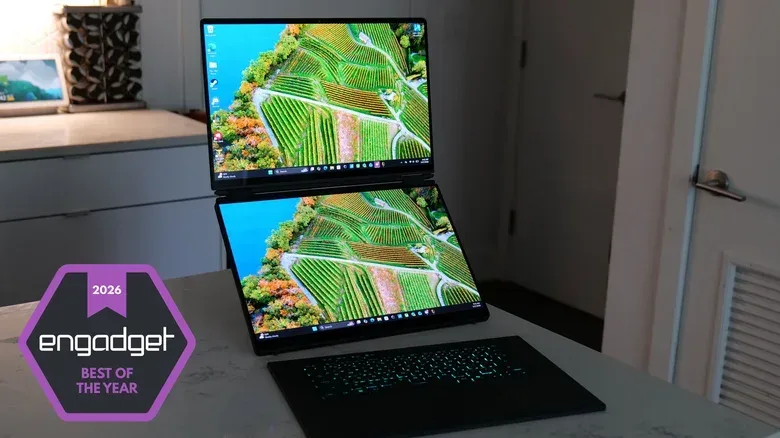
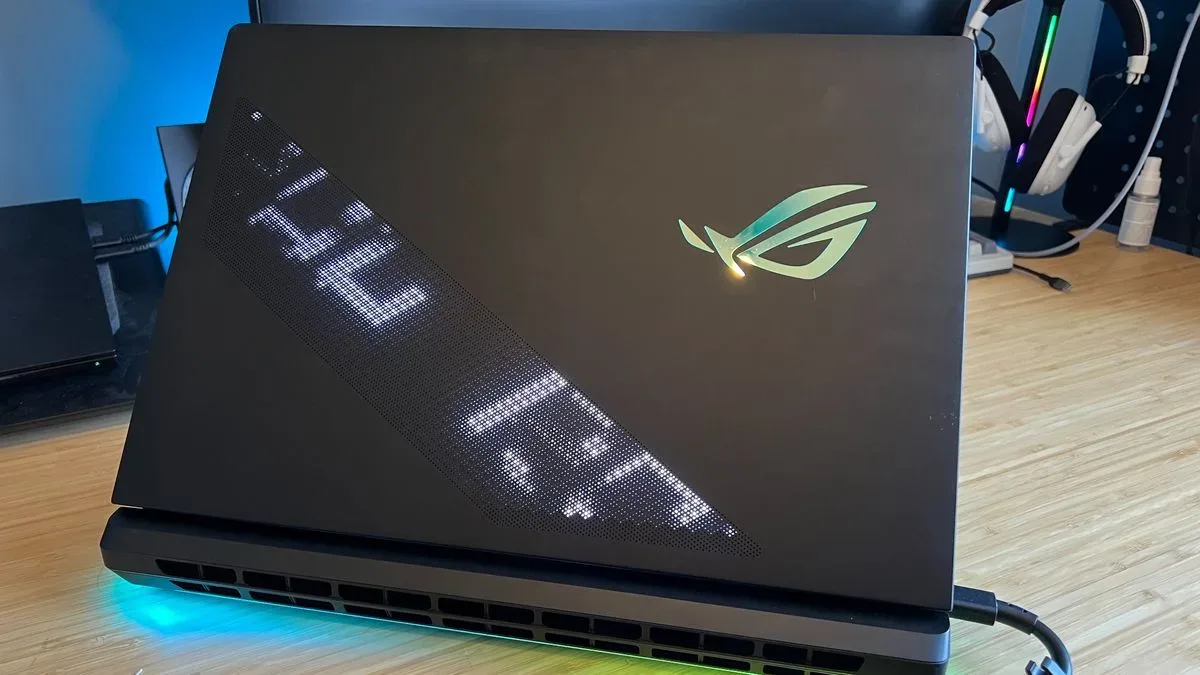
ASUS takes the opposite route with the ROG Zephyrus Duo. This is less a laptop that happens to game and more a portable battle station that happens to fold shut. It is large, heavy and deliberately flamboyant, with a starting price of $4,500. That price alone puts it outside a mainstream buying conversation, but the hardware explains the intention.
The Zephyrus Duo has two 3K OLED displays, a fully detachable keyboard, up to 64GB of RAM and support for up to an NVIDIA RTX 5090 GPU. It also supplies four USB ports, full-size HDMI and an SD card reader, plus unexpectedly punchy speakers and respectable battery life for hardware of this class.
Those details make the device more understandable as a workstation-grade gaming machine than as an everyday notebook. Two displays can let a user keep a game, chat, stream controls, guides or creative tools visible at the same time. A detachable keyboard gives the physical layout more flexibility than a conventional laptop chassis. And the full-size HDMI port and SD card reader acknowledge that this machine may be asked to connect to larger displays or work with captured media, not merely run games.
OLED, or organic light-emitting diode display technology, is central to the visual appeal here. Unlike conventional LCD panels that rely on a backlight, OLED pixels emit their own light. The provided hardware list does not make a universal image-quality claim for every OLED screen, but the inclusion of two 3K OLED panels makes the Zephyrus Duo’s display setup a major part of its identity rather than a spec-sheet garnish.
Its biggest trade-off is simple: the same ambition that makes it distinctive also makes it exceptionally costly and physically substantial. This is not evidence that every player needs an RTX 5090-capable dual-screen laptop. It is evidence that buyers who specifically want that kind of no-compromise configuration have an option unlike a basic gaming notebook.
Alienware 15 shows how quickly the value calculation can move
The year’s laptop story is not only about the luxury ceiling. The Alienware 15 was also highlighted because it initially started at $1,000, or $1,200 with an RTX 5050. That pricing made it notable in a period when systems containing RAM have become more expensive. But its starting price has since increased to $1,450.
The shift is a reminder to treat a launch price as a moment in time, not an eternal property of a product. A gaming laptop that once represented a route to budget-friendly PC play can look materially different after a several-hundred-dollar increase. It also reveals why prospective buyers should separate a product’s design from its present-day deal status. A configuration may still be useful, but its appeal depends on the price actually available when someone is ready to buy.
Memory pricing is one pressure point in the wider PC market described here, and the same context affects devices beyond gaming notebooks. The Apple MacBook Neo reportedly moved from $600 to $700 amid an AI-driven RAM crunch; the Mac mini M6 is priced at $899, far above the $599 of earlier versions. None of that establishes a precise formula for every component or brand, but it does make the practical advice clear: recheck current pricing rather than relying on an early review or launch announcement.
For more on the PC hardware scene beyond laptops and peripherals, see our coverage of Intel’s Micro-LED CPU patent, a reminder that performance hardware still has room for theatrical presentation.
A 39-inch OLED that switches roles
The Alienware 39 5K attacks a different bottleneck: the monitor. Its 39-inch ultrawide format is described as essentially a 32-inch screen extended at the sides, creating extra room for games and multiple full-size windows. That makes its appeal easy to divide into two use cases. For immersive games, the wider image can pull more of the scene into view. For desktop use, the width can hold several applications without shrinking each one into a narrow column.
Its most consequential feature is mode switching. The display can run at 5K and 165Hz for high-resolution gaming, or 1080p+ and 330Hz for faster esports-oriented games. Resolution describes how much image information is shown; refresh rate, measured in hertz (Hz), describes how frequently the display updates each second. The 5K/165Hz mode prioritizes image detail while retaining a high refresh rate. The 1080p+/330Hz option cuts resolution to pursue substantially more frequent screen updates, which is more relevant to players chasing speed in competitive titles.
This is the monitor’s strongest practical argument. Instead of forcing a buyer to select one permanent identity—high-resolution screen or high-refresh esports display—it offers two specialized modes. That does not eliminate the need for a powerful PC capable of driving demanding games, and it will not make a $1,100 display a sensible purchase for everyone. But it does make the 39 5K unusually flexible for someone whose library includes both cinematic single-player games and competitive games.
Alienware also uses a four-stack tandem OLED panel and a three-subpixel RGB stripe. The former refers to a panel construction intended to provide more brightness than earlier OLED approaches. The latter concerns the red, green and blue subpixels used to form a pixel, with the stated benefit of sharper text and fine detail. That second point is especially important on a monitor that is meant to do double duty as a multitasking desktop screen; crisp text makes the non-gaming hours more comfortable.
Build around your actual play habits
The through-line across these picks is not that bigger numbers always win. It is that specialized hardware is more persuasive when its specialty aligns with real habits.
- Steam-first players should look hardest at Valve’s controller. Its trackpads, rear buttons, anti-drift joystick design and combined wireless-charging puck are unusually rich for $99, provided working through Steam is acceptable.
- Players seeking a desktop replacement are the natural Zephyrus Duo audience. Its dual displays, high-end GPU support, ports and detachable keyboard serve a specific all-in-one ambition, but its size, weight and $4,500 starting price demand a correspondingly specific need.
- Buyers watching laptop value should take the Alienware 15’s price move seriously. Starting price changes can reshape a budget recommendation quickly, particularly while RAM costs are putting pressure on the PC market.
- Players who split time between spectacle and competition have the strongest reason to consider the Alienware 39 5K. Its high-resolution and high-refresh operating modes directly acknowledge that different games benefit from different display priorities.
The larger lesson is pleasingly unglamorous: buy for the friction you encounter most. If controller drift has ruined too many matches, resilient sticks matter. If desk space is limited but a large, versatile display would change both work and play, an ultrawide could be a better investment than a laptop upgrade. If the goal is maximum hardware in a machine that travels, then the ROG Zephyrus Duo makes its extravagant case. The best hardware in 2026 is not one item—it is the equipment whose compromises you will notice the least after the novelty wears off.